
15 min read
How to Automate Customer Feedback Surveys

Hardik Makadia

Let’s build your chatbot today!
Launch a no-code WotNot agent and reclaim your hours.
*Takes you to quick 2-step signup.
You can ask customers exactly what you want to know and still get no answer.
Most companies are sending more surveys than ever, bombarding customers on every channel. Yet CX scores are not moving. Forrester's 2025 US CX Index found that a quarter of US brands' rankings dropped, for the second year in a row.
This implies that either the customer feedback surveys were not being answered or the received data was not being put to use.
It did not add up.
You can write the perfect question and still hear nothing back.
The problem is rarely the question. It's usually the channel, the timing, or what happens after someone replies.
I researched customer feedback surveys, the three core metrics, and what actually drives response rates in 2026. Here's what I found, and how to build an automated flow that gets real answers.
What a Customer Feedback Survey Actually Measures
A customer feedback survey is a short questionnaire that captures how someone feels about an interaction, a product, or the relationship as a whole. Simple enough.
These surveys give businesses a better understanding of what customers think and experience. The goal is to collect this feedback directly from customers and use it to identify what’s working, what isn’t, and what could be improved.
Any survey is mostly done to quantify the success rate of interactions and the customer experience. So I broke down the meaning behind the important metrics for measuring CX by the job each one does.
This’ll give you an idea of what businesses are looking for behind those “How many stars would you give our service” questions.
CSAT measures the moment
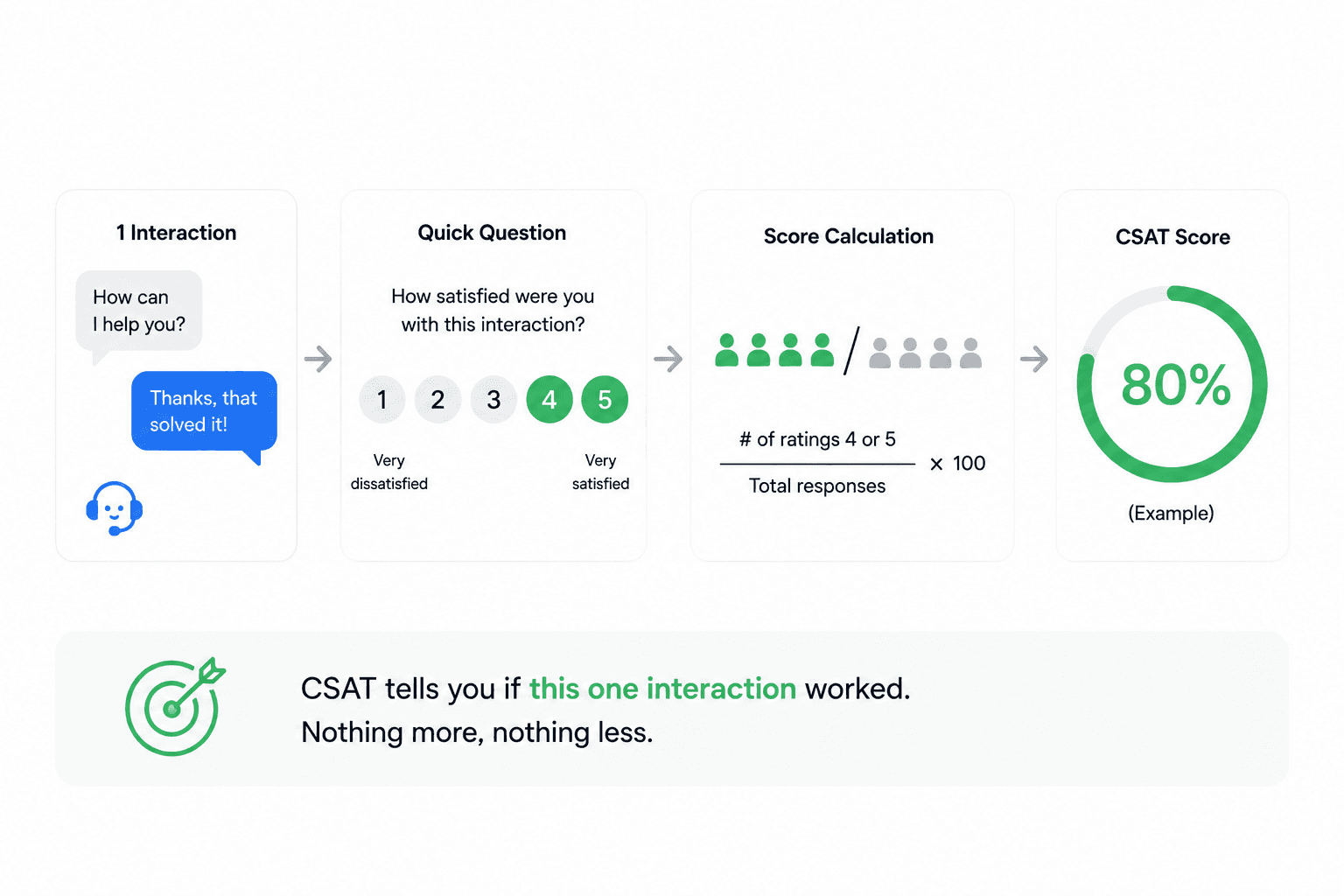
CSAT (Customer Satisfaction Score) asks how satisfied someone was, right after one specific interaction. It usually runs on a 1 to 5 scale.
The math is simple: count the people who rated 4 or 5, divide by total responses. If 80 out of 100 people rate 4 or 5, your CSAT is 80%.
A CSAT of 75 to 85% is considered a great score. SaaS and e-commerce companies aim for 90%+.
CSAT tells you if this one interaction worked. Nothing more, nothing less.
NPS measures if they'll stick around
NPS (Net Promoter Score) asks: "How likely are you to recommend us to a friend?" on a 0 to 10 scale. Fred Reichheld at Bain created it back in 2003.
Respondents fall into three buckets:
Promoters (9 to 10)
Passives (7 to 8)
Detractors (0 to 6)
NPS = % Promoters minus % Detractors. The score can range from -100 to +100.
The global average NPS sits around 32, based on Retently's 2025 benchmark of over 150,000 organizations. Bain's own research found something worth noting: "Loyalty leaders... grow revenues more than twice as fast as their industry peers."
This is not a vanity number. It tracks whether people will stay and talk about you.
CES measures friction
CES (Customer Effort Score) asks how easy it was to get something done. Usually on a 1 to 7 scale, agreeing or disagreeing with a line like "they made it easy to handle my issue."
CEB (now part of Gartner) introduced this idea in 2010, backed by an HBR study. Their finding was clear: reducing effort predicts loyalty better than trying to delight people.
I found this useful because it changes how you think about churn. People don't leave because you failed to impress them. They leave because things got hard.
Which one goes where
Here's a simple rule I use to decide:
Metric | Measures | Scale | Best time to send |
CES | Effort at one step | 1–7 | Right after support or a task |
CSAT | Satisfaction at one stage | 1–5 | Right after purchase, delivery, or a ticket closes |
NPS | Loyalty to the relationship | 0–10 | Quarterly, or around renewal |
Let’s build your chatbot today!
Launch a no-code WotNot agent and reclaim your hours.
Let’s build your chatbot today!
Launch a no-code WotNot agent and reclaim your hours.
Types of Customer Feedback Surveys
Sending customer feedback surveys is the easy part. Getting useful answers is the hard part. That comes down to asking the right questions with a clear goal in mind.
Here are four effective survey types to help you understand your customers and gather useful insights.
1. Product/Service Survey
This survey helps you assess customer needs and measure satisfaction with your product or service, which supports retention efforts.
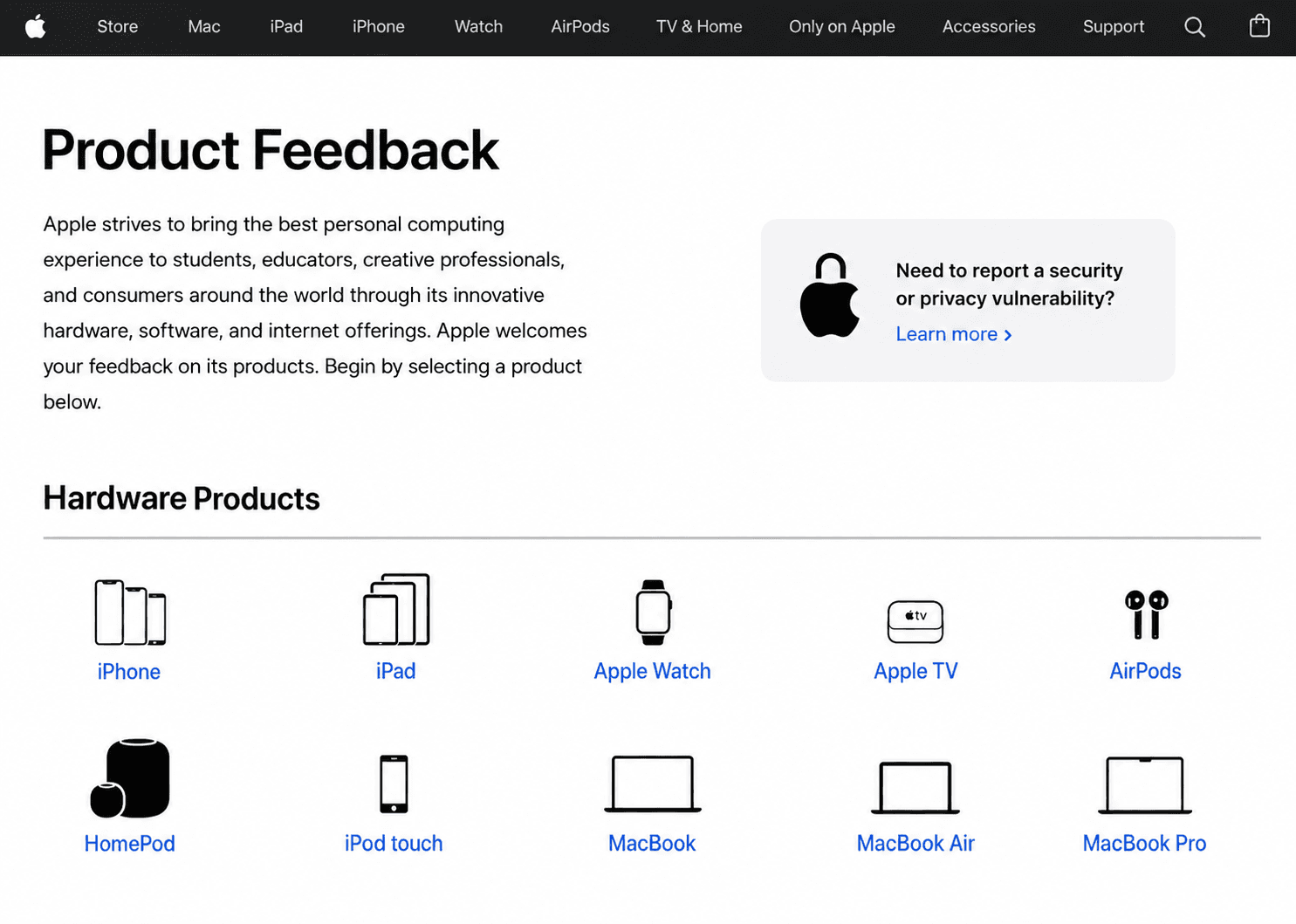
(Source)
Questions to ask:
How long have you been using this product?
Does this product help you achieve your goals?
What product features do you like the most?
What improvements would you make if given the chance?
Is there a new feature you'd like to suggest?
2. Customer Satisfaction Survey
This survey measures satisfaction using a simple, binary response format (true/false, happy/sad, good/bad, yes/no).
Questions to ask:
Did our product do what you wanted it to do?
Rate your satisfaction with our team in providing prompt service.
How likely are you to return to our website?
3. Customer Effort Score (CES) Survey
This survey measures the effort required for customers to use the product or resolve an issue with customer support.

(Source)
A common CES question: How convenient do you find our product? on a 5-point scale:
Very convenient
Convenient
Neither convenient nor inconvenient
Inconvenient
Very inconvenient
4. Customer Churn Feedback Survey
This survey helps you understand why customers cancel or leave, so you can address the underlying issues and reduce future churn.

Questions to ask:
Why have you decided to cancel your subscription?
What are the main reasons for your cancellation?
How likely are you to return in the future?
While conducting customer feedback surveys could be tricky, the right questions and clear survey goals can highlight valuable insights. You can use a ready-made template to build the survey form faster and tailor it to the type of survey you need.
Why Most Surveys Go Unanswered
I wanted to know why response rates stay low even when the questions are good. Turns out, channel, length, and timing do most of the damage. Not wording.
The channel is not right
A survey that requires customers to open an email, click a link, and fill out a form creates more effort than one that appears directly after an interaction.
Random website pop-ups have very low completion rates, close to 8 to 15%. Compared to this figure, any survey on WhatsApp has an average rate of 30 to 50%, which is one of the highest.
If your response rate is stuck in single digits, switch channels before anything else.
Too many questions, too little patience
Survicate studied over 267,000 responses and found a sharp drop-off:
2 to 3 questions: 86.8% completion
4 to 6 questions: 77.4% completion
15+ questions: down to the low 40%
Customers are more likely to complete a survey when they know it won't take much of their time. Keeping transactional surveys short and using follow-up questions only when necessary can make the experience feel less like a form and more like a conversation.
Timing works like a multiplier
Ask for feedback too early, and the customer may not have experienced enough to give a meaningful answer. Ask too late, and they may no longer remember the interaction.
Here are some time brackets that seem to have worked for getting maximum responses:
Post-purchase surveys: on the confirmation page, then again 7 to 10 days after delivery
Post-support conversation survey: within 24 hours of a ticket closing
NPS (relational): quarterly, or every 6 months at minimum
Churn/exit: the moment cancellation starts
Note: Sending SMS within 2 hours of an event gets roughly 32% more completions, based on compiled industry data.
But one question still remains the same - should you automate customer survey feedback? If yes, why?
Why Automation Is the Best Way to Go
Let's start with what's actually broken before going to the automation.
What's Quietly Going Wrong
Some facts about CX health really stood out in Medallia's 2026 State of Customer Experience Report:
Response rates are sinking: Median survey response fell to 8.6% by Q3 2025, down 11% from the year before.
Feedback fatigue: 51% of consumers feel requests have increased. 36% say too many companies are asking.
Follow-through barely happens: "1 in 3 departments that receive CX insights take zero action on them," per the same report.
That last point explains a lot. Feedback isn't disappearing because people stopped caring. It just sits in someone's inbox, leaving customers to wait for a follow-up that never comes.
And that gap shows up in how people actually feel. 66% of CX practitioners think experiences are improving. Only 17% of consumers agree with them.
Someone's out of touch here, and it's not the customer.
What Changes When You Automate It Right
The real advantage of automating customer feedback isn't that you no longer have to send surveys manually. It's that you can make feedback contextual, immediate, and actionable.
That starts with timing. Automation lets you connect the survey to the customer journey itself. A support ticket gets resolved, a survey appears. An order gets delivered, feedback is requested. A customer gives a low score, the next question can ask what went wrong. A cancellation starts, the customer can be asked why before they leave.
And when feedback is tied to the right moment, acting on it becomes just as important. Automation sorts out the timing problem completely.
CustomerGauge's research found that "closing the loop within 48 hours increases retention by 12% and boosts NPS by an average of 6 points." Triggering a survey in a timely fashion every single time—and following up just as quickly—is only practical with automation.
This also changes how often you need to ask. Event-triggered custom surveys replace all-encompassing generic batches. Fewer asks, sent at the right moment, beat more asks sent at the wrong one.
And as your customer base grows, this becomes even more important. Manual follow-up scales with headcount. Automated follow-up scales with your customer base instead, so growth doesn't quietly break your CX process.
It also pays off beyond retention. Automated feedback surfaces churn risk early, low scores flag which customers need attention before they leave, and even satisfied customers often point out gaps that turn into upsell opportunities. That matters because repeat customers spend 67% more than new ones, so keeping them engaged pays for itself.
How to Build an Automated Customer Feedback Survey Flow
Before building your survey in any tool, you need to decide what you want to learn, when you want to ask, and what you’ll do with the responses.
An automated feedback flow is essentially a conversation that starts at the right moment, asks a few relevant questions, and changes what it asks based on the customer's responses.
Planning before an Automated Customer Feedback Survey:
You don't need to build anything yet. First, map out what this conversation should look like.
Set a Goal: Don't begin by writing questions. Start by deciding why you're collecting feedback. Are you trying to: measure CSAT, collect product feedback, evaluate support team’s performance, etc.
Decide on a trigger: Automated flows require a specific event or action to start them. So it’s up to you to zero in on the cause (trigger) of the survey.
Example: A support conversation closing, a cart being abandoned, a completed appointment, etc.Plan the questions: A good feedback survey usually doesn't need to be long. Start with the one question that directly measures your goal, then use follow-up questions to understand the answer.
Map the conversation based on answers: This is where a survey becomes a flow rather than just a questionnaire. Think about what should happen after each response.
Decide what happens after the survey: Collecting feedback is only half the job. Decide where the response should go and what should happen afterward.
The types of tools you actually need:
When automation is the goal, you have to curate a tech stack to accommodate and execute your vision. Whatever you have planned needs a tool or platform at almost every step.
In this case too, here are the basic tools you need to have at hand:
A survey/feedback collection tool: This is the thing that asks the question and captures the answer.
A trigger source: This is where the "event" lives that kicks off the survey. It can be your CRM, Helpdesk, e-commerce, or your website as well.
A delivery channel/API: The actual pipe the message travels through based on the channel you want to use. This could include WhatsApp Business API, SMS gateway (Twilio is the most common), or an email service.
A destination for results: Where responses land so someone actually sees them: Slack (for detractor alerts), Google Sheets or a BI dashboard (for raw data/trends), or back into the CRM/helpdesk ticket (for closed-loop follow-up).
If you're building this on one platform like WotNot, most of the above-mentioned tools will collapse into one system. WotNot is a conversational AI chatbot platform where you can build multiple workflows, from lead generation to customer support and feedback collection.
So to keep things simple, I’ll take you through an overview of the process of creating a feedback survey on WotNot.
How to Build an Automated Customer Feedback Survey (with WotNot)
If you want to see how this works live, you can talk to our sales team to see it all in action.
Now let’s get building.
Step 1: Pick your trigger type
Once you log into the platform, start by going to the bot builder. Then click on the Build a Bot button and select Outbound Bot.

WotNot's outbound bots run on one of two setups:
One-off campaign: upload a CSV of contacts, send the survey once. Good for a single feedback push.
Ongoing campaign: connect a webhook, so contacts get enrolled automatically whenever something happens, like an order shipping or a ticket closing.

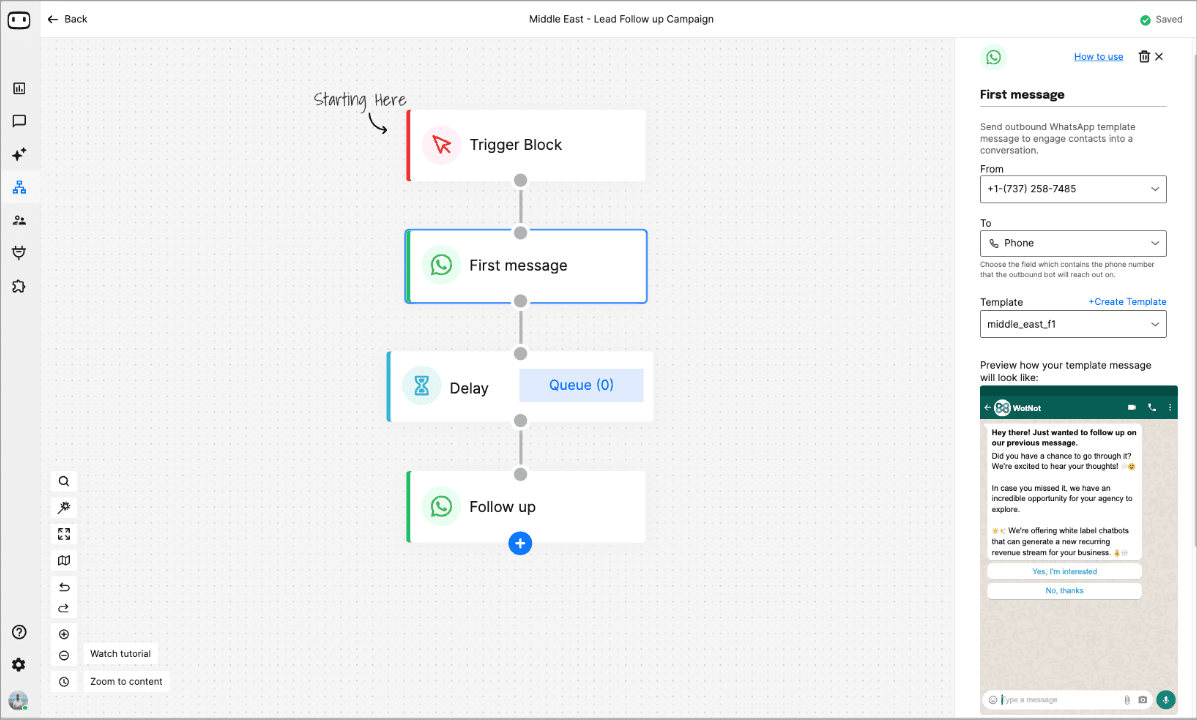
If you want the trigger-based setup, ongoing is the one you want. When the builder canvas opens, there will be a Trigger block. Clicking on it will show you the configuration options.
You can upload a list of contacts from whom you want to collect feedback in the form of a CSV, or you can go with the list of contacts saved in the platform.
When you select CSV, you’ll have to designate fields that the platform will use to customize your messages.
Something like "Hey {name}, how was your order?" instead of one flat, generic spam.

Step 2: Add your message block
Drop in a Send WhatsApp or Send SMS block. Both are outbound-only, and both list feedback surveys as a named use case.
WhatsApp is the channel that has the highest response rate for customer feedback surveys, so we’ll go with WhatsApp here.
Configure:
The number you're sending from
The variable holding the contact's number
Your survey question or template
When you click on the WhatsApp block, the side drawer will show you the Create Template.
Step 3: Create WhatsApp Template
You'll pick:
A template type: Text/Media (standard) or Carousel (for showing multiple options)
A category: Marketing, Utility, or Authentication
A template has four parts: Header (optional), Body, Footer (optional), and Buttons.
For a feedback survey, the body is where your question goes. You can personalize it with variables, just type # to pull one in, like "Hey #name, how was your order #order_id?"
For the response mechanism, use quick reply buttons. You get up to 3. That's enough for a Yes/No/Maybe or a simple 1–3 scale, but not enough for any scoring with more options.

Click on Create Template, which will send it to Meta for approval.
Proofread everything, since you can't edit a template once it's submitted. Approval typically takes anywhere from 1 minute to 24 hours.
Once the template is approved, you can add it to your flow.
If your survey has multiple questions, you can add multiple Whatsapp blocks like shown in the flow in the following screenshot.
Step 6: Deploy and check results
Hit Deploy. A one-off campaign can't be paused mid-send, so this is the last checkpoint. Then track responses in Analytics > Outbound.
Note: When you are running an Ongoing campaign, you can stop it from the visual editor at any time.

This is just one of the routes you can take to create an automated customer feedback survey. You can also take the multi-tool setup to do the same.
Start building, not just reading
Build AI chatbots and agents with WotNot and see how easily they work in real conversations.

Start building, not just reading
Build AI chatbots and agents with WotNot and see how easily they work in real conversations.
Start building, not just reading
Build AI chatbots and agents with WotNot and see how easily they work in real conversations.

Choosing a Customer Feedback Survey Tool
I looked at this without picking favorites. Tools fall into three categories, and the right one depends on your setup, not the hype around any one platform.
Traditional survey builders
Good for broad research and deep analytics.
SurveyMonkey: strongest all-around, big template library
Typeform: one-question-at-a-time format, higher completion for short surveys
Qualtrics: most powerful analytics, priced around $420/month for 1,000 responses at the Research Core tier
Jotform: best if you need payments or e-signatures baked in
Conversational and chatbot platforms
Best for proactive outreach, especially on WhatsApp or SMS.
Landbot: visual, no-code builder for web and WhatsApp
Botpress: developer-friendly, most customizable
WotNot: no-code AI agent platform with WhatsApp outbound bots that sync responses to your CRM
I'd use this rule of thumb to decide: if you need statistical expertise, then go traditional. Want proactive, high-response outreach? Look at a conversational/chatbot platform.
How to Turn Responses Into Results
Collecting answers is easy. Turning scores and yes/nos into something you can act on is the real work. It's mostly simple math and sorting.
Roll the answers into one number:
CSAT: ratings of 4 or 5, divided by total. 80 of 100 = 80%.
NPS: % promoters minus % detractors. Range: -100 to +100.
Yes/No: share who said yes. 70 of 100 = 70% positive.
That number is your headline. Track it week to week.
Check enough people replied:
A score from 10 people will swing wildly next week. Early on, treat it as a rough signal and lean on what people wrote.
Watch who stays quiet:
Unhappy-but-not-furious customers often don't reply. So a rising score with falling responses isn't a win, it usually means only the happy ones are left answering.
Group the comments:
The score tells you what. The comments tell you why. Sort open text into buckets (billing, onboarding, speed), then count them. The biggest, most damaging bucket is where you start.
One catch: frequency isn't importance. "Slow delivery" said 30 times beats "nice" said 200 times.
Track the trend:
One score says little. A steady 32 reads differently from a 32 that used to be 45. Watch the line, not the dot.
The Question Bank
Once you know what you want to learn, the next step is choosing the right questions. These ready-to-use examples cover some of the most common feedback scenarios.
For finding CSAT and CES scores
"How would you rate your overall satisfaction with [product/service]?" (1–5)
"How satisfied were you with the support you received today?" (1–5)
"[Company] made it easy for me to handle my issue." (Strongly disagree to Strongly agree, 1–7)
Low-score follow-up: "What went wrong, and how could we do better?"
For NPS (with branching)
"On a scale of 0 to 10, how likely are you to recommend us to a friend or colleague?"
If 9–10: "What do you love most about us?"
If 0–6: "What's the most important thing we could improve?"
Post-purchase Survey
"How satisfied are you with your purchase today?" (1–5)
"How did you first hear about us?" (attribution)
After delivery: "How satisfied are you with the product you received?"
"How was the delivery experience?" (0–10)
Churn/exit-triggered survey
Keep this one short. 1 to 2 questions max, since people are already leaving.
"What's the primary reason you're canceling?" (price, missing features, switched, no longer needed, poor support, other)
"What could we have done to keep you?" (open text)
Post-onboarding survey
The first week decides a lot. I'd send this right after setup, not weeks later.
"How easy was it to get started with [product]?" (1–5)
"What almost stopped you from signing up?" (open text)
"Is anything confusing about your first few days here?" (open text)
Feature/product feedback
Good for in-app surveys right after someone uses a specific feature.
"How useful is this feature for you?" (1–5)
"What's one thing that would make this better?" (open text)
"Would you miss this feature if we removed it?" (Yes / No / Not sure)
Renewal (B2B / subscription)
Send this a month or two before renewal, not the week of.
"How likely are you to renew your subscription?" (0–10)
"What's the biggest reason you'd renew, or not?" (open text)
"Is anything blocking you from getting full value out of [product]?" (open text)
Live chat/chatbot conversation feedback
This is the quick, in-the-moment one. One tap, nothing more.
"Did this answer help?" Yes / No
If “No”: "What were you looking for instead?" (open text)
Website / on-site feedback
Usually triggered on exit-intent or after time-on-page.
"Did you find what you were looking for today?" (Yes / No)
If No: "What were you trying to find?" (open text)
Post-event / webinar
"How useful was today's session?" (1–5)
"What topic should we cover next?" (open text)
Once you’ve picked your questions, map out the conversation from start to finish.
Decide when the survey starts, how it branches based on responses, and what happens with the feedback afterward.
One Example of This Working End-to-End
I wanted to close with one real example, not a features list, of the whole flow working together.
Most healthcare and service businesses still collect feedback by phone or paper. It's slow, and a lot of it never gets recorded at all.
Saba Clinics changed this with a WhatsApp outbound bot. It messages patients a few hours after discharge, personalizes questions using CRM data, and writes replies straight back.
The numbers: 347,000 patients engaged, 227,000 feedback responses collected, a 69% open rate, and a 27% reply rate.
I think the lesson here goes beyond WotNot itself. The pattern- right channel, right timing, synced to a CRM, automated end-to-end- is what's worth copying. The tool is secondary.
From Feedback to Follow-Through
A few things worth remembering:
Match the metric to the job: CES at the step, CSAT at the stage, NPS at the relationship
Response rate is mostly a channel and timing problem, not a wording one
Closing the loop within 48 hours is the single highest-leverage move you can make
Feedback collection is moving away from the passive email link, toward proactive channels like WhatsApp and in-app. The gap between brands who close the loop fast and brands who let feedback sit will only get wider.
If proactive, WhatsApp-based feedback is missing from your setup, WotNot's outbound bots can trigger and personalize that survey automatically, and sync responses straight to your CRM. Worth a look if you're tired of chasing responses manually.
FAQs
FAQs
FAQs
What's the difference between a customer feedback survey and a customer satisfaction survey?
How many questions should a customer feedback survey have?
What's a good response rate for a customer feedback survey?
Is a chatbot survey more effective than a web form?
ABOUT AUTHOR
Hardik Makadia
Co-founder & CEO, WotNot
Hardik leads the company with a focus on sales, innovation, and customer-centric solutions. Passionate about problem-solving, he drives business growth by delivering impactful and scalable solutions for clients.

Start building your chatbots today!
Curious to know how WotNot can help you? Let’s talk.
Start building your chatbots today!
Curious to know how WotNot can help you? Let’s talk.


