Let’s build your chatbot today!
Launch a no-code WotNot agent and reclaim your hours.
*Takes you to quick 2-step signup.
It’s just an AI agent. What can go wrong??
Well… a lot.
You’ve probably seen those wild AI agent workflows floating around on LinkedIn.
Honestly? Half of them don’t even work properly.
And when you try building one yourself, things fall apart fast.
It’s confusing. It’s time-consuming. And nothing connects the way you expect it to.
That’s where AI agent builders come in. But before choosing a builder, it’s important to understand what AI agents actually are and how they work. Some make agent-building stupidly simple. Others give you power but need technical knowledge.
After testing these tools hands-on, I’ve shortlisted the ones actually worth using.
I hope this helps.
AI Agent Builders – TOC
TL;DR – Quick Overview of Best AI Agent Builders in the Market
In-Depth Review of Top 7 AI Agent Builders (I’ve Tried Them All)
And if you’re still wondering about the difference between AI agents and chatbots, here’s a detailed breakdown.
TL;DR – Quick Overview of Best AI Agent Builders in the Market
If you just want the quick answer, this table is for you.
You will get to know what each AI agent builder is really good at.
AI Agent Builder | Type | Best Used For |
No-code / Enterprise-friendly | Customer-facing AI agents (support, sales, lead qualification) | |
Open-source / Workflow-based | Backend AI agents, complex automations, and tool orchestration | |
Enterprise / Developer-heavy | Scalable, production-grade AI agents with strict governance | |
API-first / Developer-focused | Custom LLM agents with full control over logic & tools | |
No-code / Conversational | Chat and voice-based AI agents with strong UX | |
Enterprise / Microsoft-native | Internal business agents inside Microsoft 365 | |
No-code / Productivity-focused | Personal AI agents and task automation |
Most of these list tiered or custom pricing - get your own estimate first by running your requirements through the ai agent cost calculator here.
In-Depth Review of Top 7 AI Agent Builders (I’ve Tried Them All)
This took time. I actually used these tools.
Built stuff. Broke stuff. Learned what works and what doesn’t.
That’s why I’ve listed them here (with screenshots). So… you will be able to get a real vibe of how they work and when they make sense to use.
1. WotNot
WotNot is a no-code AI agent builder with a user base varying from SMBs to enterprises.
Most teams use it for support, lead qualification, onboarding, and sales. These are some of the most common AI agent use cases across industries.
If you want to avoid giving your tech team a headache, then WotNot is a solid place to start.
Best for: Teams that want to launch AI agents fast, without writing code or stitching together multiple tools.
User Reviews: 4.6/5 (from 95+ reviews) on G2
How WotNot Helps in Building AI Agents
WotNot helps you design, test, and deploy AI agents quickly.
Seems simple, right?
What makes it stand out is how little friction there is between an idea and a working agent. That’s why I’ve kept WotNot at #1 on this list.
WotNot comes with a canvas-style visual builder where you design conversation logic step by step.
It allows you to map conversations and logic without code. This makes it easy to understand what your agent is doing.
You can also customize LLMs with guardrails. With detailed prompts, you can control how the AI speaks, when it hands off, and how it behaves.
The best part?
Once built, the same agent can be deployed across WhatsApp, your website, Instagram, and other channels.
Pricing
WotNot offers a 14-day free trial, with paid plans based on usage and features.
The base plan starts at $29 per month (which is pretty budget-friendly for small teams).
For heavier usage, there are custom plans. But it is reasonably priced for teams using it for revenue-generating or support-heavy use cases.
Start building, not just reading
Build AI chatbots and agents with WotNot and see how easily they work in real conversations.

Start building, not just reading
Build AI chatbots and agents with WotNot and see how easily they work in real conversations.
Start building, not just reading
Build AI chatbots and agents with WotNot and see how easily they work in real conversations.

2. n8n
n8n is a workflow automation tool that many teams use to build AI agents behind the scenes.
If WotNot feels like drag-and-drop, n8n feels like assembling Lego (with more pieces, of course).
Best for: Developers and technical teams building backend-heavy AI agents or complex automations.
User Reviews: 4.8/5 (from 200+ reviews) on G2
How n8n Helps in Building AI Agents
n8n works when your AI agent needs to talk to multiple tools, APIs, and databases before taking action.
Here you will find yourself designing event-driven workflows. Kinda like this AI agent for news, which is created in n8n.
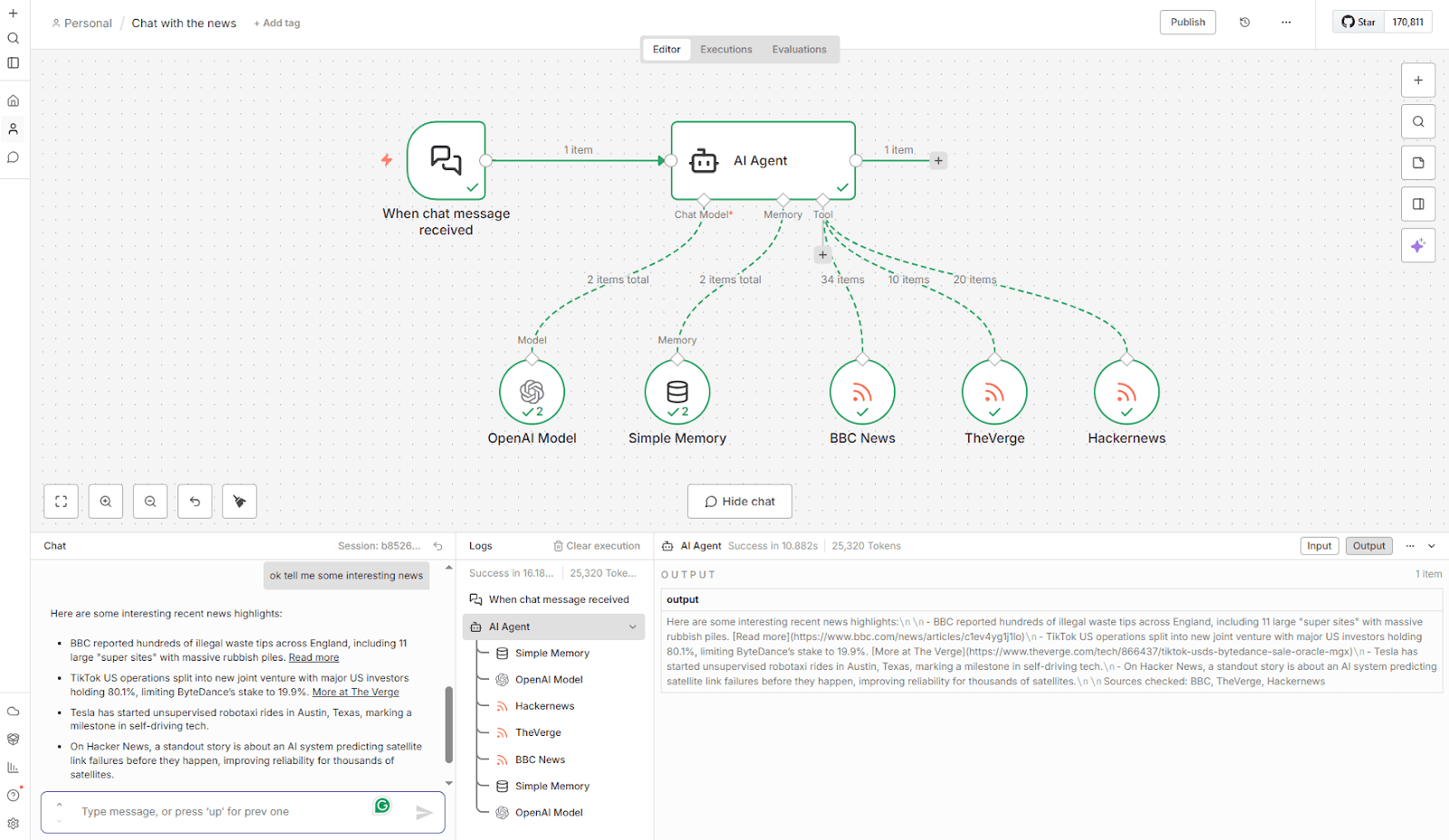
Everything in n8n starts with a trigger (API calls, webhooks, schedules, or user actions).
From there, you chain together steps like:
Calling an LLM
Fetching data from tools
Transforming responses
Taking action based on conditions
This makes it perfect for building AI agents that work in the background, not necessarily in a chat UI.
Also, n8n connects with hundreds of tools out of the box. And when that’s not enough, you can write custom JavaScript logic.
This is where n8n pulls ahead of no-code tools.
But there’s one small issue: n8n is powerful, but it’s not instant.
There’s a learning curve, especially if you’re new to workflows or APIs.
Debugging can take time, and small changes sometimes require rethinking the entire flow.
We worked with a real estate client who had built their lead qualification bot using n8n. But the workflow became fragile when they tried to scale.
Interestingly, this isn’t just something we experienced.
I came across a Reddit discussion where builders were asking if AI agents are actually useful (or just overhyped). And the responses were surprisingly consistent.
“They work well for structured, repeatable tasks… but break with edge cases and messy workflows.”
In short, n8n gives you flexibility, but making those workflows reliable at scale isn’t easy without technical experience.
But once things click, it’s incredibly flexible.
Pricing
n8n is free if you self-host.
Its paid plans start from 24€ per month (if billed monthly). But you can take a 14-day free trial to get a feel for the platform and its capabilities.
3. Google’s Vertex AI
Vertex AI isn’t built for quick experiments or weekend projects.
It’s Google’s enterprise ML platform, designed for teams that care about scale, reliability, and governance.
Basically, it gives you infrastructure-level power.
Best for: Large teams building production-grade AI agents with strict security, scale, and compliance needs.
User Reviews: 4.3/5 (from 625+ reviews) on G2
How Vertex AI Helps in Building AI Agents
Vertex AI works when your AI agent needs to operate at scale.
You won’t find a drag-and-drop type interface. (Aka. Hard skip if you ain’t a dev.)
Here, everything in Vertex AI starts with infrastructure.
You define how models are deployed, how data flows between steps, and how agents run inside managed pipelines.
From there, an AI agent can:
Call LLMs or custom models
Fetch and process data from cloud services
Pass context across multiple steps
Take actions based on structured logic
It also has many helpful pre-built blueprints. It comes along with source code and configuration files so that you can customize it as per the need.
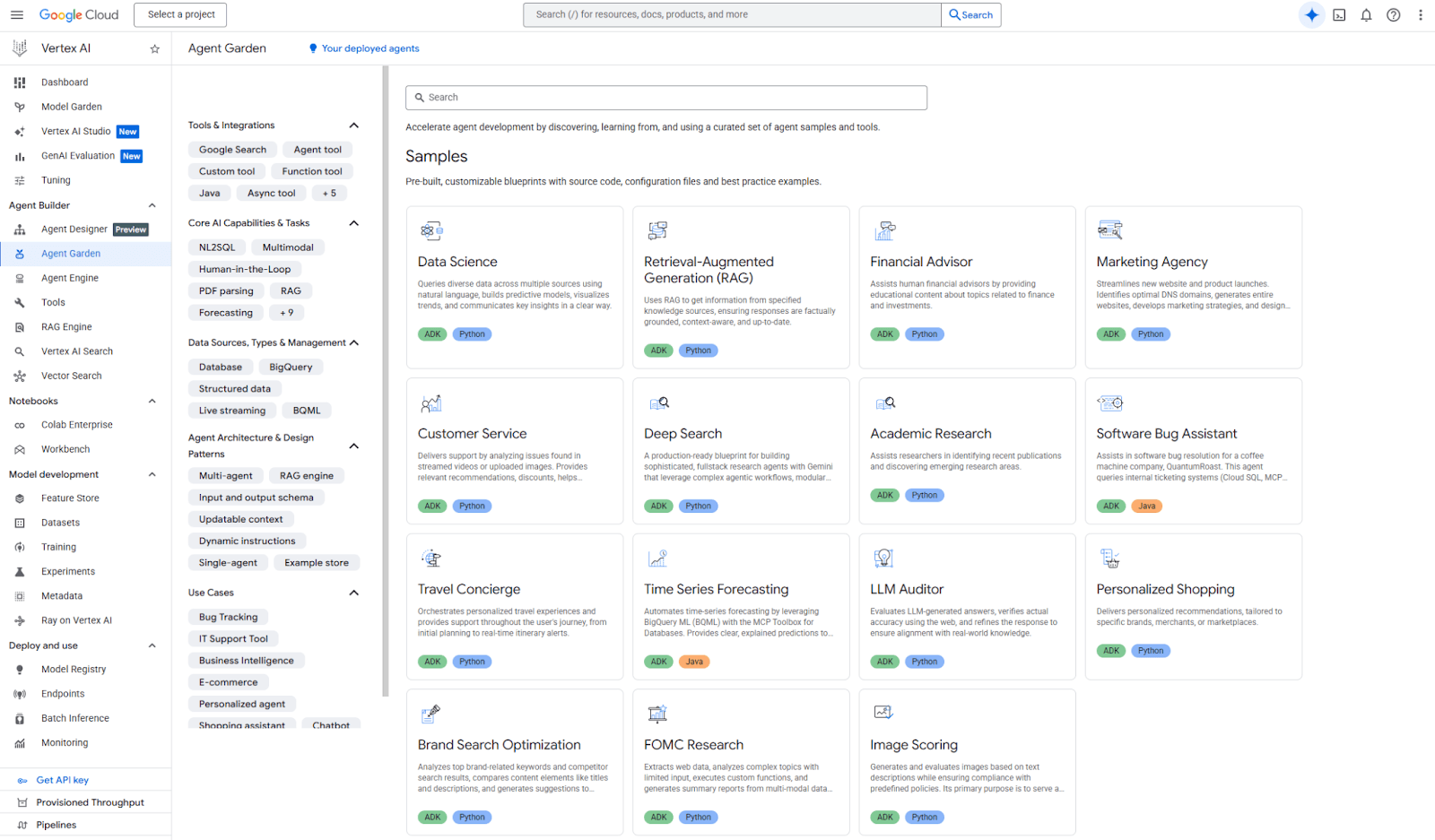
Vertex AI is ideal for you if you want to build a multi-step, backend-heavy AI agent.
It is also used for monitoring and control. You get logging, versioning, access control, and guardrails by default.
But here’s the tradeoff.
Vertex AI is powerful, but it’s not fast to start with.
There’s a learning curve + cloud setup takes time. And if you want to make small changes, then you might have to redeploy stuff.
This isn’t a tool you casually experiment with.
But here’s the best part: Once everything is set up, it’s extremely stable, and you can scale anytime.
Pricing
Vertex AI follows a usage-based pricing model across compute, model usage, and pipelines. Check out this page for more details: Vertex AI pricing.
Costs can add up quickly if you’re not careful. But that’s the tradeoff for scale and reliability.
If you’re building AI agents that must run reliably for thousands (or millions) of users, Vertex AI is hard to beat.
4. OpenAI’s Agent Builder
OpenAI’s Agent Builder is for people who want full control over how their AI agents think, act, and use tools.
There’s no visual canvas. No opinions baked in. Just APIs, models, and building blocks.
Best for: Developers who want to build custom AI agents without platform constraints.
User Reviews: No reviews on G2
How OpenAI Helps in Building AI Agents
OpenAI’s Agent Builder is the best fit for you when you want to define your own agent logic, instead of adapting to a platform’s workflow.
Here you can decide what tools the agent can use, how memory is stored and passed, when the agent should reason vs act, and how edge cases are handled.
You can do it all with absolute freedom.
OpenAI’s agent builder has a canvas-type builder, but here, everything starts with an API call.
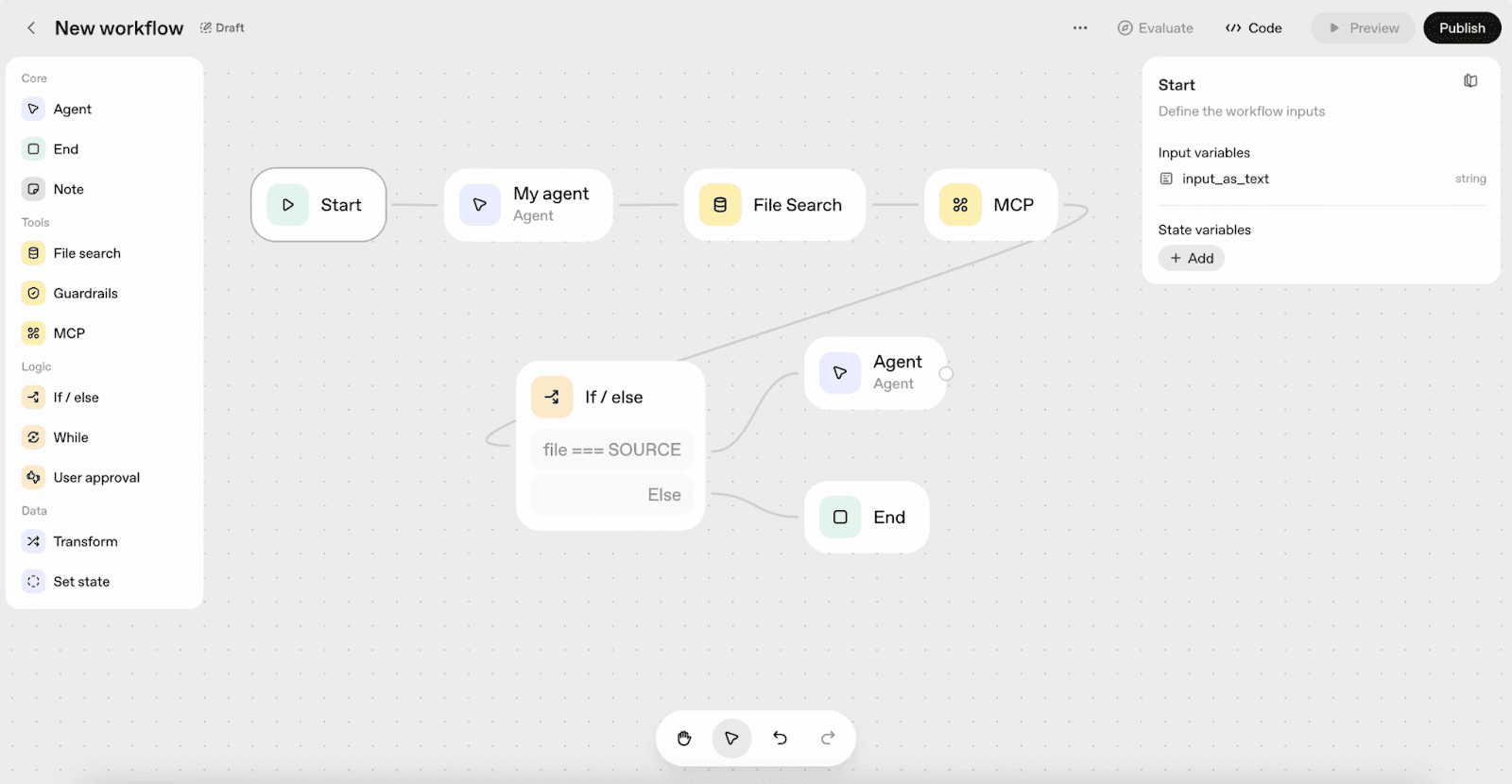
With this, you can:
Send context and instructions to the model
Allow the tool to call for specific actions
Parse outputs and feed them back into the loop
Repeat until the task is complete
This makes OpenAI’s Agent Builder perfect for highly custom, LLM-driven agents. Especially if you understand the difference between agentic AI and generative AI.
But there’s a catch.
There are no guardrails unless you build them. No UI unless you design one.
If there are bugs, then you need to read logs and tweak prompts..
Psst: Here’s a unique trait of OpenAI’s agent builder. It is relatively easy to start, but hard to master.
You can prototype an agent in hours. But to make it scalable, you need to pitch in a decent deal of engineering effort. Many teams rely on structured AI agent frameworks to make that process easier.
This tool rewards teams that enjoy building systems (not those looking for shortcuts).
Pricing
Pricing is usage-based, driven by model choice and token consumption.
Costs are predictable, but they add up as agents get more complex.
Note: You will have to add a payment mode first in order to use it (which is a red flag).
5. Voiceflow
Voiceflow is built for one thing: designing conversational AI agents. No backend logic. No heavy workflows. Just clean, intentional conversations.
Best for: Teams designing chat or voice-based AI agents with a strong focus on UX.
User Reviews: 4.6/5 (from 105+ reviews) on G2
How Voiceflow Helps in Building AI Agents
Voiceflow works when your AI agent needs to think and talk well.
Here, you’re designing conversations the same way you’d design a user journey.
For example, you can build a lead qualification agent that can ask smart questions and filter out leads that your sales reps should focus on.
Kind of like what I built here with Voiceflow below.
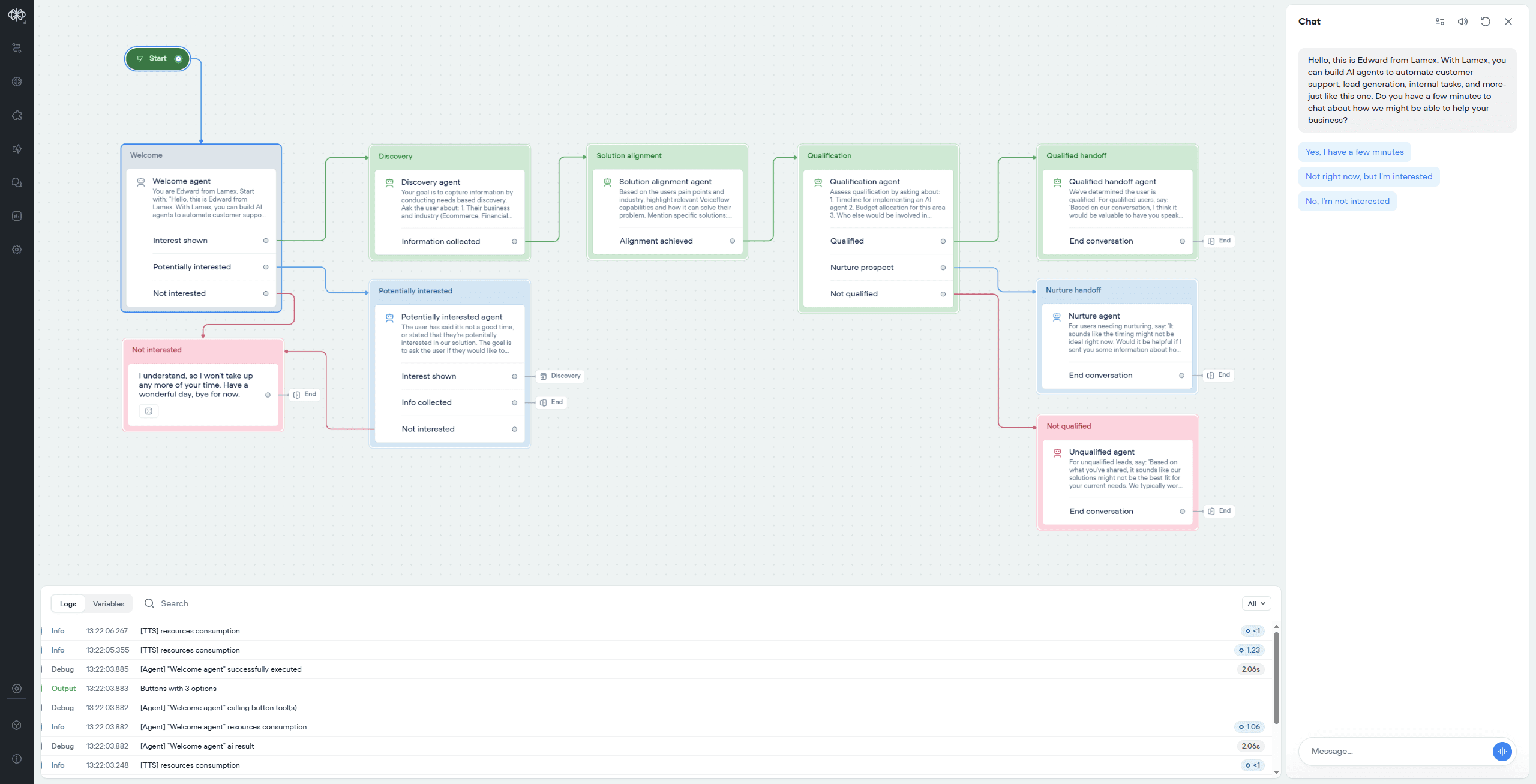
Voiceflow also plays nicely with LLMs.
You can easily define prompts and response behavior. Also, you can customize it to control tone and structure as per your brand style.
But Voiceflow isn’t trying to be everything.
You won’t find deep backend automation or complex tool orchestration here.
For heavy logic, you’ll still need to connect external systems.
But the best part is, Voiceflow is intuitive. Most people can start building something useful within minutes.
But the tradeoff is flexibility. Because as conversations get more complex, managing large flows can get messy.
Pricing
Voiceflow has a free tier where you can tinker around with limitations.
For advanced features, the paid plans start at $60 per month. Which is quite a lot compared to other AI agent builders on this list.
If the pricing seems high, you can also check out some good Voiceflow Alternatives.
6. Microsoft Copilot Studio
Microsoft Copilot Studio is designed for teams that already live inside the Microsoft ecosystem.
If your workflows revolve around Microsoft 365, Power Platform, Teams, or Dynamics, this tool will feel familiar (almost too familiar).
Best for: Enterprises building internal AI agents tightly integrated with Microsoft tools.
User Reviews: 4.4/5 (from 135+ reviews) on G2
How Microsoft Copilot Studio Helps in Building AI Agents
Alright, now here’s an AI agent builder that’s a little exclusive and dedicated for Microsoft ecosystem folks.
You can create agents like Think of internal agents like HR or IT helpdesk assistants, or even workflow-triggering agents inside Teams.
Everything starts with a guided, low-code builder.
Here’s what you need to do to build an AI agent in Copilot Studio:
Define conversation topics and triggers
Specify knowledge sources (SharePoint, files, websites)
Set actions using Power Automate
Ensure handoffs and fallbacks
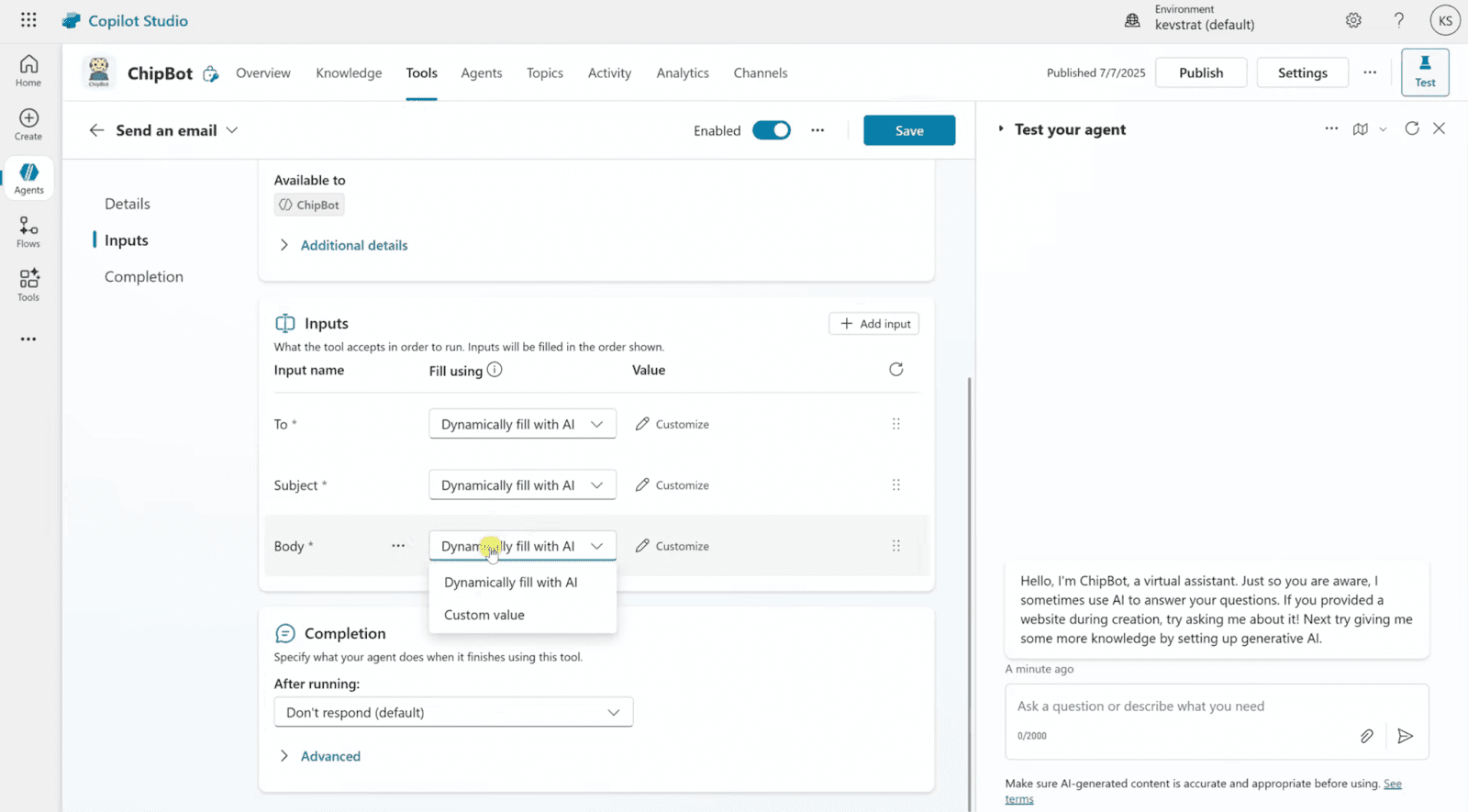
Note: Microsoft Copilot Studio is not exactly a drag-and-drop builder, but it is quite easy to build an AI agent with it.
One big advantage is deep native integration. You can directly connect with:
Microsoft Teams
SharePoint and OneDrive
Power Automate workflows
Microsoft security and identity
This makes it easy to build agents that can actually do things, like fetch internal docs or trigger approvals.
But this is also a con. Because if your stack comes from outside Microsoft, Copilot Studio will be a bit restrictive.
Pricing
Copilot Studio pricing is tied to Microsoft licensing and usage. It makes sense for enterprises, but it can feel expensive for smaller teams.
Also, for basic usage, its pricing starts with $30 per month.
7. Lindy
Now… Lindy positions itself as an AI employee, but it’s basically an AI workflow automation platform.
If most tools on this list feel like “systems,” Lindy feels more like a helper.
Best for: Individuals and small teams automating day-to-day tasks with minimal setup.
User Reviews: 4.9/5 (from 170+ reviews) on G2
How Lindy Helps in Building AI Agents
Lindy works when you want an AI agent to just do the job, without asking you to design logic or flows.
Instead of setting up triggers, nodes, or pipelines, you tell Lindy:
What task should the agent handle
When should it act
And what tools can it access
That’s it.
All you need to do is give a prompt, and it will create a flow. Kinda like this (screenshot below)
What’s even crazier is that if you want to edit something, you don’t have to do it yourself. You can give a prompt again, and it will take care of the flow.
You simply have to configure the steps, like connecting your accounts or something.
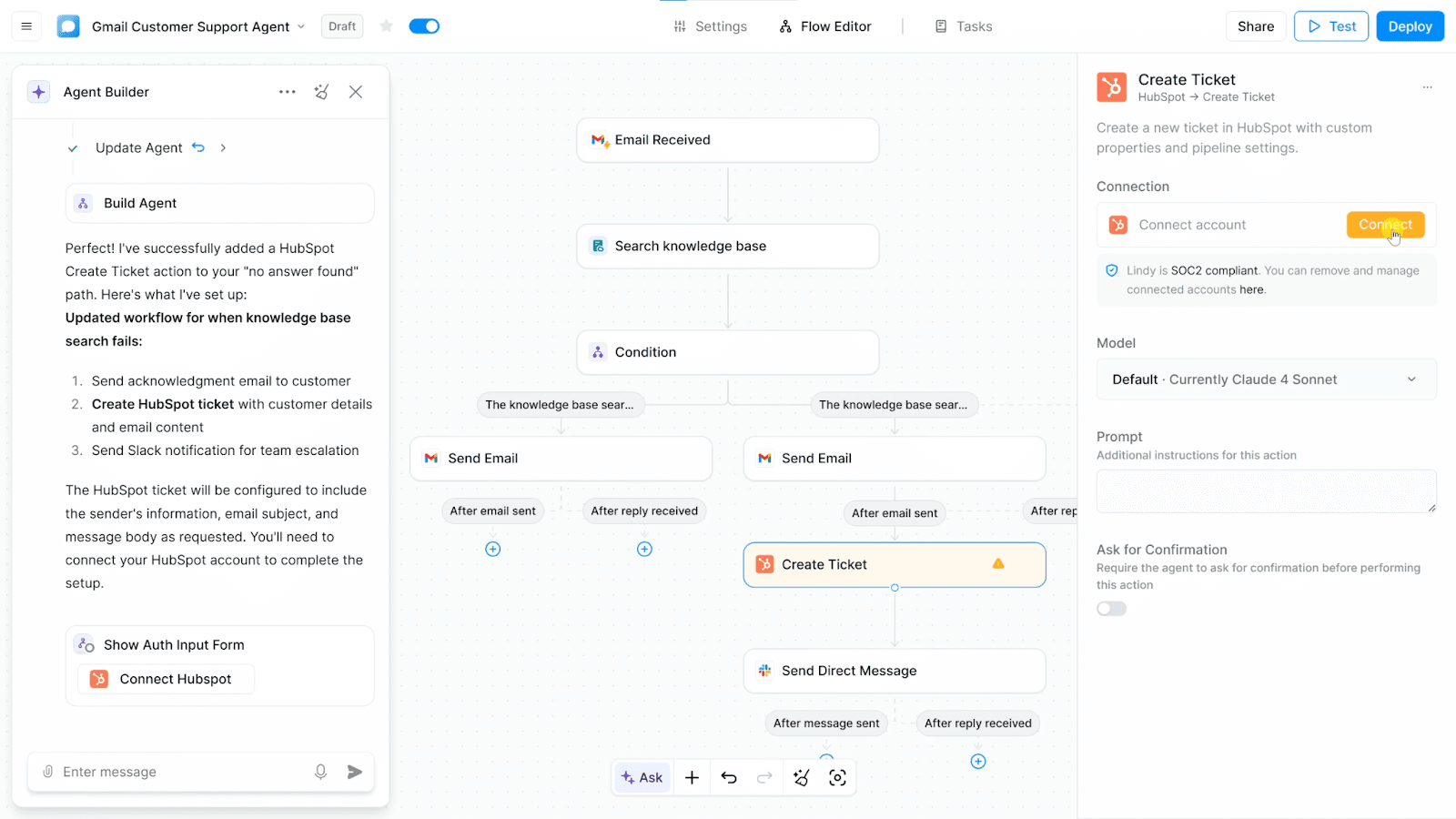
For example, you can create an agent that:
Monitors your inbox & replies to specific types of emails
Schedules meetings
Find leads for you
Resolves basic user queries on your behalf
There are many practical AI agent examples emerging across industries, from sales assistants to autonomous support agents. All without touching code.
For professionals looking to become VA, AI agent builders like Lindy can automate repetitive administrative tasks such as email management, meeting scheduling, and lead research, allowing them to spend more time on high-value client work.
Lindy relies heavily on natural language instructions. You don’t have to even create a flow.
Which makes it really fast to start. But it also has some limitations.
First, you have very limited control. You don’t get visibility into how decisions are made. And you can’t fine-tune logic or build complex, multi-step agents.
The worst part: If something breaks, debugging options are limited.
But it is great if you want results without setup overhead.
Pricing
It says it has a free plan, but you need to give your credit card details (which will autocharge after 7 days).
If you want to use its AI agent builder properly, then you’ll have to opt for its Pro plan, which costs around $49 per month.
Want to Build an AI Agent? Then Build It!!
If there’s one takeaway from this list, it’s this:
There is no “best” AI agent builder. But if you’re evaluating the broader ecosystem, it’s worth exploring some of the best agentic AI companies in the market. There’s only the one that fits how your team works today.
If you want speed and minimal setup, tools like WotNot or Voiceflow make sense.
If your agent needs to orchestrate tools and data behind the scenes, n8n is hard to beat.
If you’re building for scale, compliance, and reliability, Vertex AI or Microsoft Copilot Studio will feel more at home.
And if you want full freedom (and full responsibility), OpenAI’s Agent Builder gives you exactly that.
Here’s what I will suggest to you: Start small and pick one use case. Ship a working agent. Then improve it.
That’s how real AI agents are built.
And if you want to launch AI agents without code, then start with a no-code platform like WotNot.
It has a 14-day free trial, so you can tinker around without any prior investment.
FAQs
FAQs
FAQs
What is an AI agent?
Are AI agents the same as chatbots?
Do I need to know coding to build an AI agent?
Which AI agent builder is best for beginners?
ABOUT AUTHOR

Hardik Makadia
Co-founder & CEO, WotNot
Hardik leads the company with a focus on sales, innovation, and customer-centric solutions. Passionate about problem-solving, he drives business growth by delivering impactful and scalable solutions for clients.

Start building your chatbots today!
Curious to know how WotNot can help you? Let’s talk.
Start building your chatbots today!
Curious to know how WotNot can help you? Let’s talk.