15 min read
10 Best Zendesk Alternatives in 2026

Hardik Makadia

Let’s build your chatbot today!
Launch a no-code WotNot agent and reclaim your hours.
*Takes you to quick 2-step signup.
Zendesk is considered to be a titan in the field of support automation, and it is a sophisticated solution for large businesses and enterprises.
Being a very well-known platform across industries, when people need a support management tool, they go for Zendesk, no questions asked.
However, the heavyweight platform is feature-rich and highly configurable, which sometimes makes it a bit too much to handle for new users.
Additionally, the price jump for going from the base plan to the advanced plans is more than double. Also, AI add-ons inflate the monthly bill, which is not sustainable in the long run.
I have talked to enough support leaders in this exact position to know the pattern. The reasons to look beyond Zendesk vary for every user.
Hence, I have come up with support platforms that would solve your problems while avoiding the complexities brought by Zendesk.
These Zendesk alternatives solve these specific problems, evaluated by someone who builds conversational AI tools and has seen what actually works in production support environments.
How We Evaluated These Alternatives
Before we get to the list, here's the bar every tool had to clear. We looked for tools that solve the same core customer service problems while offering a clear advantage in cost, deployment, or AI. The best ones do at least two of the three.
After seeing teams evaluate and switch customer service platforms across hundreds of deployments, we narrowed our evaluation down to five questions:
1. Does it cover the channels you need?
If your customers use email, chat, WhatsApp, and social media, your replacement must handle all four natively, not through marketplace add-ons that break during updates.
2. Does the AI reduce your workload, or just bump up the ticket count?
Some platforms deflect tickets to a knowledge base and call it AI. Real AI resolves conversations on its own, then hands off cleanly to a human when needed. If you're weighing this one seriously, our guide to deploying an AI agent for customer service covers where these rollouts go wrong.
3. How quickly can your team set it up?
If the migration plan needs a consultant and a 90-day timeline, you're trading one complexity problem for another.
4. Does pricing scale predictably as you grow?
Per-agent pricing with AI resolution fees on top is the model Zendesk uses. Look for platforms with flat-rate or conversation-based pricing that doesn't punish growth.
5. Does it integrate with your existing CRM and tools?
A Zendesk replacement that can't talk to your Salesforce, HubSpot, or Shopify instance is a non-starter.
Every tool below was judged on these five points: channel coverage, AI quality, deployment speed, pricing transparency, and integration depth. Before you pick one, decide whether you need a full-suite replacement or a specialist tool that does one thing better.
Let’s build your chatbot today!
Launch a no-code WotNot agent and reclaim your hours.
Let’s build your chatbot today!
Launch a no-code WotNot agent and reclaim your hours.
TL;DR: Best Alternatives to Zendesk Compared
If you are scanning for the best alternatives to Zendesk, this table gives you the shortlist before the deep dives.
Platform | Type | Best For | G2 Rating | Starting Price (Billed yearly) |
WotNot | AI Agent Platform | AI-first support automation across channels | 4.6/5 | $23/month |
Freshdesk | Full-Suite Help Desk | SMBs wanting a simpler, cheaper Zendesk | 4.4/5 | $19/agent/month |
Zoho Desk | Full-Suite Help Desk | Budget-conscious teams in the Zoho ecosystem | 4.4/5 | $7/agent/month |
Intercom | Messaging-First Platform | Conversational AI and in-app messaging | 4.5/5 | $29/seat/month |
Help Scout | Email-First Help Desk | Teams that want simplicity over features | 4.4/5 | $25/user/month |
Hiver | Agentic customer service platform | AI-powered customer support across channels | 4.6/5 | $25/user/month |
HubSpot Service Hub | CRM-Integrated Suite | Teams already on HubSpot CRM | 4.4/5 | $7/seat/month |
Front | Collaborative Inbox | B2B teams needing shared inbox collaboration | 4.7/5 | $25/seat/month |
Gorgias | E-Commerce Help Desk | Shopify and e-commerce merchants | 4.6/5 | $10/month (50 tickets) |
Salesforce Service Cloud | Enterprise CRM-integrated service suite | Enterprises already running on Salesforce | 4.4/5 | $25/user/month |
Starting prices are the lowest paid tier, billed annually where the vendor offers an annual discount. All pricing and G2 ratings were checked on each tool's own pricing page and G2 profile in October 2026. Prices change often, so confirm the live page before you buy.
Why Would You Consider Zendesk Alternatives?
The Pricing Problem
Zendesk starts at $19, which is the most basic Support team plan, followed by the Suite Team plan, which costs $55. This tier has more features, but larger teams often find it limited.
Most teams end up on Suite Professional at $115 a seat. That's $1,150 a month for just 10 agents, before any AI is counted. And the AI is where it stings. Each agent includes only 10 automated resolutions a month on Professional, and 5 on the lower plans. Every resolution past that is billed, $1.50 each on a committed plan or $2.00 pay-as-you-go. Quality Assurance and parts of Copilot are paid add-ons on top.
What catches teams off guard isn't the starting price. It's where they land six months in. If cost is the main reason you're shopping around, our breakdown on how to reduce customer service costs is worth a read.
The Complexity
Zendesk was built through acquisitions, separate products stitched together under one platform. That makes it feature-rich and complicated from day one.
New users routinely flag how long setup takes. A Reddit thread put it plainly: complex configuration and steep learning curves slow down implementation, especially for smaller teams without dedicated IT. Multiple users report full rollouts stretching past three months, including weeks of workflow configuration and agent training.
For teams without technical resources, that operational overhead never really goes away. It's not just setup, either. Over in another thread, one user vented about being unable to reduce seats at renewal and getting ignored by their account rep for weeks. Another noted the platform's new focus: "all they do now is push AI."
The AI Add-On
The pattern I keep seeing is that Zendesk's AI pricing creates an unusual dynamic where better automation costs more. As the AI resolves more conversations, your resolution bill climbs right along with it.
Teams that adopt AI to save money sometimes find themselves paying more as the AI improves. That is not a pricing model designed for the customer's benefit.
It's worth knowing where that AI came from.
Zendesk didn't build most of it in-house. It announced its acquisition of Ultimate in March 2024, then completed its acquisition of Forethought in March 2026, its biggest deal in two decades. A lot of the "Zendesk AI" story is really a stack of bolted-on startups, which is part of why the pricing feels layered.
Top Zendesk Alternatives
These are the Zendesk competitors worth evaluating, with honest trade-offs for each one.
1. WotNot

Rating: 4.6/5 (G2)
WotNot is a no-code AI agent platform that automates customer support conversations across web, WhatsApp, Facebook Messenger, Instagram, and SMS.
It addresses the specific problem that drives most teams away from Zendesk's AI pricing. WotNot offers multi-LLM AI agents with flat, predictable pricing instead of per-resolution charges.
Capabilities:
No-code bot builder with drag-and-drop workflows
AI Studio with multi-LLM support (OpenAI, Anthropic, Gemini, Mistral)
RAG-based AI training on your own knowledge base
Deploy across web, WhatsApp, Messenger, Instagram, SMS
Live Chat with full context preserved on human handoff
GenAI Voicebot for inbound and outbound phone support, which Zendesk leans on marketplace apps to match
Outbound bots and proactive campaigns
Integrations with Salesforce, HubSpot, Zoho CRM, Zendesk, Freshdesk
How it compares to Zendesk:
Zendesk's AI is built around the ticketing system. WotNot's AI is built to have the full conversation before a ticket even needs to exist. Customer talks to the AI, AI handles it, done. No ticket, no queue. We dig into this head-to-head on our WotNot vs Zendesk comparison page.
Zendesk needs marketplace add-ons to cover social media channels. WotNot natively covers web, WhatsApp, Messenger, Instagram, and SMS from the same bot builder.
Human handoff in WotNot preserves full conversation context, including intent and collected data.
Zendesk charges $1.50 and up per AI resolution on top of $55 to $115 per agent per month. WotNot bundles AI credits into the plan price.
But here’s a hack that puts WotNot on the top of this list: you don't have to switch to use it. You can keep Zendesk and run WotNot's AI in front of it. Through the native Zendesk integration, WotNot can create tickets, check ticket status, and run live chat straight from your Zendesk account. The AI handles the front line, and anything it can't close lands in the help desk you already use.
Proof it works at scale: Tamkeen, a Yemeni fintech, ran an Arabic WhatsApp bot on WotNot that resolved 66.5% of queries without a human agent and avoided over $113K in support costs. The full numbers are in the Tamkeen case study.
The honest trade-off: WotNot is not a help desk. It does not include native ticketing, SLA management, or help desk reporting. It is the AI automation front-end that works alongside or replaces Zendesk's chatbot and AI agent.
And the "predictable pricing" line has one caveat worth stating plainly: credits aren't infinite. If you burn through your AI credits mid-month, extra credits cost $5 per 1,000. Still a flat rate, still cheaper than per-resolution metering, but it's not unlimited.
Best for: Teams spending heavily on Zendesk's AI agent fees who want predictable AI automation costs across multiple channels, with human handoff when conversations require it.
Pricing (as of 8th October 2026):
Lite: $29/month (1,000 chats, 1,000 AI credits)
Starter: $99/month (5,000 chats, 5,000 AI credits, AI Studio, all LLM models)
Premium: $299/month (10,000 chats, 10,000 AI credits, Live Chat)
Enterprise: Custom pricing (unlimited chats, unlimited credits, SSO)
Extra AI credits: $5 per 1,000 if you exceed your plan's allowance
Start building, not just reading
Build AI chatbots and agents with WotNot and see how easily they work in real conversations.

Start building, not just reading
Build AI chatbots and agents with WotNot and see how easily they work in real conversations.
Start building, not just reading
Build AI chatbots and agents with WotNot and see how easily they work in real conversations.

2. Freshdesk

Rating: 4.4/5 (G2)
Freshdesk is a cloud-based help desk platform by Freshworks that covers ticketing, automation, knowledge base, and multichannel support at a significantly lower price point than Zendesk.
Freshdesk is the tool most teams land on when they search for Zendesk alternatives, and for good reason. It covers the same core use cases, the interface is cleaner, and the pricing starts at free for up to 2 agents.
For teams under 50 agents that don't need Zendesk's enterprise-grade routing and multi-brand complexity, Freshdesk handles the job at roughly half the cost.
Capabilities:
Omnichannel ticketing (email, chat, phone, social media)
Freddy AI for ticket classification, suggested responses, and AI agents
Knowledge base with multilingual support
Automation workflows with event and time-based triggers
Collision detection and shared ticket ownership
SLA management with escalation rules
Proactive outreach via email, WhatsApp, and SMS campaigns
How it compares to Zendesk:
Freshdesk's Pro plan at $55/agent/month delivers much of what Zendesk's Suite Professional offers at $115/agent/month. The agent experience is cleaner and faster to learn.
Freshdesk's AI isn't simply "free." You get a starter allowance of 500 Freddy AI Agent sessions to try it, then pay $49 per 100 sessions after that. The agent-assist Freddy Copilot is a $29/agent/month add-on on Pro and Enterprise (as of October 2026). It's cheaper per unit than Zendesk's per-resolution meter, but it's still metered, not bundled.
The gap narrows at enterprise scale, where Zendesk's deeper customization, multi-brand support, and 1,500+ marketplace integrations pull ahead.
Freshdesk still wins on onboarding speed, agent experience, and built-in multichannel campaign messaging, which Zendesk lacks natively.
The honest trade-off: Freshdesk's omnichannel experience is not as unified as Zendesk's. It's basically separate tools for chat, phone, and ticketing stitched together, and multi-channel conversations can feel disjointed as a result.
Best for: SMB and mid-market teams under 50 agents that want Zendesk's core functionality at a lower price with faster deployment.
Pricing (as of 8th October 2026, billed annually):
Growth: $19/agent/month
Pro: $55/agent/month
Enterprise: $89/agent/month
Freddy AI Agent: first 500 sessions included, then $49 per 100 sessions
Freddy Copilot: $29/agent/month add-on (Pro and Enterprise)
3. Zoho Desk

Rating: 4.4/5 (G2)
Zoho Desk is a help desk platform that offers ticketing, automation, AI (Zia), and multichannel support as part of the broader Zoho ecosystem.
For teams already in the Zoho ecosystem (Zoho CRM, Zoho Analytics, Zoho Projects), the integration is native and frictionless. It leverages automation, SLAs, and intelligent workflows to streamline operations, reduce response times, and ensure consistent service delivery.
Capabilities:
Multichannel ticketing (email, chat, phone, social media, web forms)
Zia AI for sentiment analysis, auto-tagging, and response suggestions
Knowledge base and community forums
SLA management with multi-level escalations
Custom workflows and automation
Integration with the broader Zoho suite (CRM, Analytics, Projects)
How it compares to Zendesk:
Zoho Desk offers Zia, its AI assistant, for sentiment analysis, ticket tagging, and auto-suggest at a fraction of Zendesk AI's cost. The self-service portal and community forums are included in mid-tier plans.
Light Agent seats in Zoho Desk allow non-support staff to view tickets without consuming a full license.
Where Zendesk wins is in the breadth of its integration marketplace (1,500+ apps vs. Zoho's more limited third-party ecosystem) and the depth of enterprise-grade analytics through Zendesk Explore.
If budget is the primary switching reason, Zoho Desk is where to look. Plans start at $7/agent/month, and even the Enterprise tier at $40/agent/month is less than Zendesk's entry-level Suite.
The honest trade-off: Zoho Desk's interface feels dated compared to other support suite platforms. The learning curve for configuring advanced workflows is steeper than it should be for a budget tool.
Best for: Budget-conscious teams, especially those already using Zoho CRM, that want full help desk functionality at a price point well below Zendesk and Freshdesk.
Pricing (as of 8th October 2026, billed annually):
Free: Up to 3 agents
Express: $7/agent/month
Standard: $14/agent/month
Professional: $23/agent/month
Enterprise: $40/agent/month
4. Intercom

Rating: 4.5/5 (G2)
Intercom is a messaging-first customer service platform built around Fin, its AI agent, and a modern messenger widget.
Salesforce completed its acquisition of Intercom (which rebranded as Fin) in September 2026. The help desk is still called Intercom, but it and Salesforce Service Cloud (entry #9) are now under one owner. Decide whether to note this in-line or leave the entries as independent picks. Source: Salesforce press release.
Intercom approaches customer service from the opposite direction of Zendesk. Where Zendesk starts with a ticket and adds AI on top, Intercom starts with a conversation and builds resolution around it.
Fin AI resolves conversations with impressive accuracy, and the in-app messenger creates a support experience that feels native to the product rather than an extra.
Capabilities:
Fin AI agent with conversational resolution
Modern messenger widget with rich media support
Workflow automation with conditional logic
Shared inbox for team collaboration
Help center and knowledge base
Proactive messaging, product tours, and surveys (add-on)
300+ integrations
How it compares to Zendesk:
Intercom's Fin AI is more conversational and context-aware than Zendesk's AI agents. The messenger UX is significantly better.
Intercom charges $0.99 per resolved outcome vs. Zendesk's $ 1.50 and up per resolution. Intercom's seat pricing starts lower, but total cost at scale can be comparable once Fin fees accumulate.
Zendesk's Agent Workspace is powerful but ticket-centric. Intercom's workspace is conversation-centric: interactions flow like messaging, with AI suggesting responses and resolving issues in-line. If this is the model you want but the price tag stings, see how we stack up as an Intercom alternative.
The honest trade-off: Per-outcome pricing cuts both ways. To Intercom's credit, you only pay when Fin actually resolves something, not for escalations or conversations it punts to a human, which is fairer than per-conversation billing. The flip side: the better Fin gets, the more outcomes you pay for. A team handling 2,000 Fin outcomes a month adds about $1,980 to the bill, on top of seats. You can cap it with a monthly outcome limit, so at least the ceiling is yours to set.
The other thing to watch is add-ons, because the seat price isn't the whole bill. Pro (99/month), Proactive Support Plus (99/month), unlimited Copilot ($35/user/month), and usage-based SMS, WhatsApp, and phone all stack on top. The Early Stage program is a steal in year one (93% off, roughly $33/month for qualifying startups), but the discount tapers fast: 50% off in year two, 25% in year three.
Best for: SaaS companies and mid-market teams that prioritize conversational support, in-app messaging, and best-in-class AI resolution. Not ideal for budget-conscious teams or those with unpredictable ticket volumes.
Pricing (as of 8th October 2026, billed annually):
Essential: $29/seat/month
Advanced: $85/seat/month
Expert: $132/seat/month
Fin AI: $0.99 per resolved outcome, on top of seat costs
5. Help Scout

Rating: 4.4/5 (G2)
Help Scout is an email-first customer service platform. It is built around shared inboxes, designed for teams that find Zendesk's ticket-centric approach unnecessarily complex.
Help Scout deliberately does less than Zendesk. Conversations don't get assigned ticket numbers. The interface looks and feels like a shared email inbox, not an enterprise help desk.
For teams under 25 agents handling primarily email-based support, that simplicity translates into faster onboarding and lower operational overhead.
Capabilities:
Shared inboxes for collaborative email support
Docs knowledge base for self-service
Beacon widget for embedded help on your site
Saved replies and automation workflows
Customer satisfaction surveys
50+ integrations including Shopify, Slack, HubSpot
AI features for reply drafting and conversation summarization
How it compares to Zendesk:
Help Scout is what Zendesk would be if you stripped away the complexity and kept only the features small to mid-size teams actually use daily.
Deployment for Help Scout takes hours, not months. Pricing at $25/user/month is predictable and does not escalate with add-ons.
Where Zendesk wins: phone support, advanced routing, multi-brand management, and enterprise-grade analytics.
The honest trade-off: Help Scout lacks native phone support, advanced skills-based routing, and the deep analytics enterprises need. The integration ecosystem is smaller than Zendesk's 1,500+.
For teams with complex, multi-channel support requirements, Help Scout will feel limiting. If it's close but not quite right, we've rounded up other options in our Help Scout alternatives guide.
Best for: SMBs and growing teams that handle support primarily through email and want a clean, simple alternative to Zendesk's complexity. Especially strong for SaaS and e-commerce companies with under 25 agents.
Pricing (as of October 2026, billed annually):
Free: Up to 5 users (1 inbox, 1 Docs site)
Standard: $25/user/month (billed annually)
Plus: $45/user/month (billed annually)
Pro: $75/user/month (billed annually, 10-user minimum)
AI Answers: $0.75/resolution
6. Hiver

Hiver is an agentic customer service platform that helps teams manage customer support across email, chat, Slack, voice, WhatsApp, and social channels. It comes in two versions: Hiver in Gmail, which turns Gmail into a full-fledged helpdesk, and Hiver Omni, a standalone omnichannel platform that works across email providers.
Hiver is particularly useful for teams that have outgrown shared inboxes but don't want the complexity of traditional helpdesk software. It combines shared inboxes, ticketing, automation, SLAs, analytics, collaboration, and AI in one workspace, while keeping conversations connected to the tools teams already use.
Capabilities:
Shared inboxes and ticketing with clear ownership and conversation history
AI Agents that can resolve complex requests and take actions across connected systems
AI Copilot for drafting replies, surfacing information, and suggesting next steps
Omnichannel support across email, chat, Slack, voice, WhatsApp, and social channels
Rule-based automation for routing, tagging, assigning, and escalating conversations
Help Center for customer self-service and internal knowledge
SLAs, CSAT surveys, advanced analytics, and custom reports
AI QA, AI Insights, and Customer Intelligence on the Elite plan
Integrations with 1,000+ apps and business systems
How it compares to Zendesk and Freshdesk:
Hiver's biggest advantage is its combination of AI and ease of adoption. Hiver in Gmail works directly inside an existing Gmail or Google Workspace setup, while Hiver Omni provides a dedicated platform for teams that need broader omnichannel support. That makes the transition easier for teams that don't want to migrate their entire workflow into a traditional helpdesk.
The AI is also built into Hiver's paid plans rather than being treated as a separate add-on. The Growth plan starts at $25/user/month when billed annually and includes AI Agents, AI Copilot, Skills, and AI Knowledge Builder. Pro adds features such as SLAs, CSAT, advanced analytics, and premium integrations, while Elite adds AI QA, AI Insights, Customer Intelligence, and skill-based routing.
The honest trade-off: Hiver is particularly strong for teams already working heavily through email and Google Workspace, but teams with highly complex enterprise requirements may need to look closely at the higher-tier features and integrations they require. Hiver Omni is the better fit for organizations that need support across multiple channels rather than primarily managing email from Gmail.
Best for: Customer support and operations teams that want shared inboxes, automation, and agentic AI without the complexity of a traditional enterprise helpdesk.
Pricing:
Growth: $25/user/month (billed annually)
Pro: $55/user/month (billed annually)
Elite: $85/user/month (billed annually)
Monthly billing: $35, $65, and $95/user/month respectively
6. HubSpot Service Hub
Rating: 4.4/5 (G2)
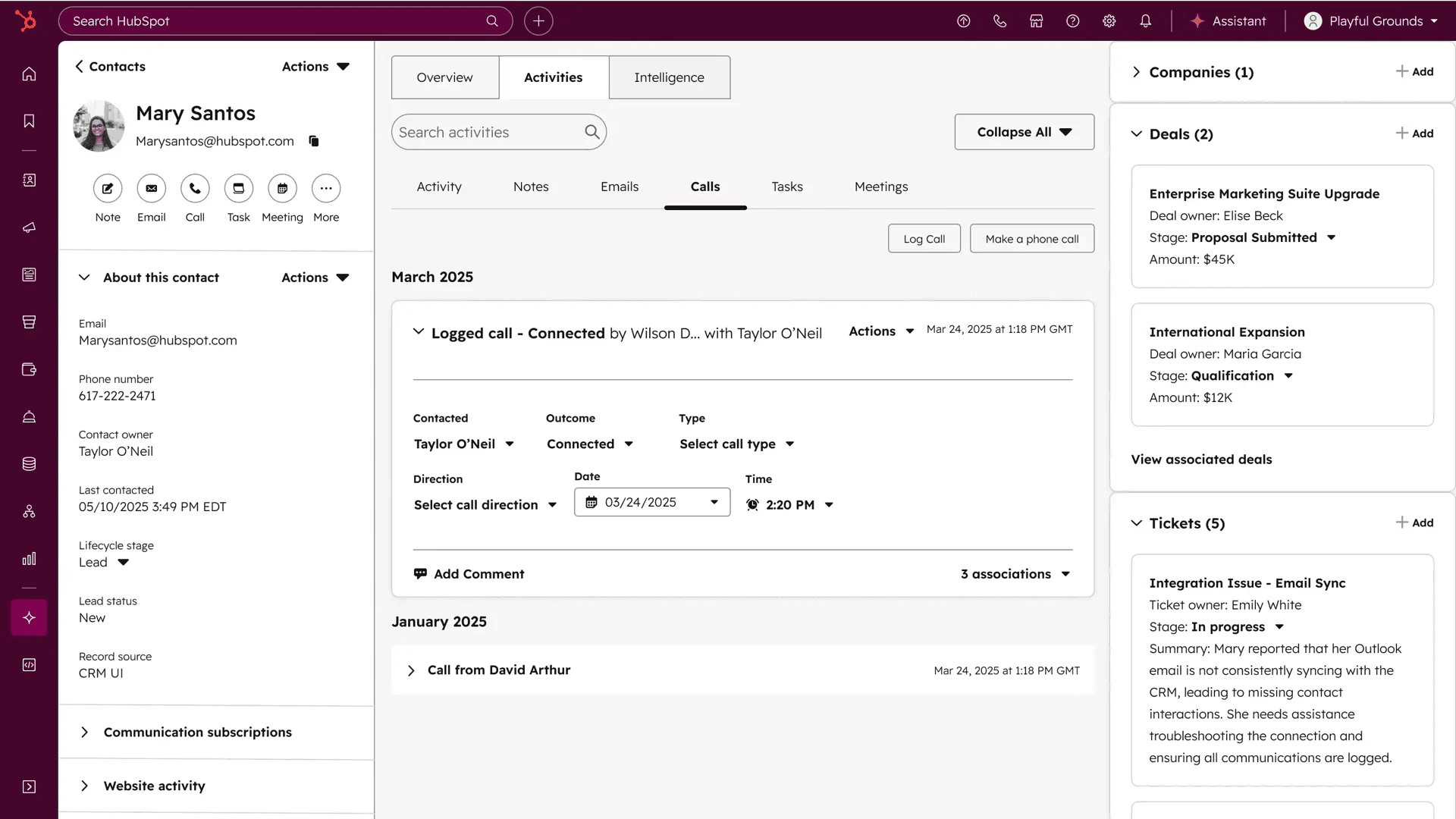
HubSpot Service Hub is the customer service arm of HubSpot’s CRM platform. It is designed for teams that want support, sales, and marketing data unified in a single system.
If your team already uses HubSpot for CRM, marketing, or sales, adding Service Hub is the lowest-friction path to a Zendesk replacement.
Every support conversation links to the contact’s full history across marketing touchpoints, deal stages, and previous interactions. That CRM context during support is HubSpot’s core advantage.
Capabilities:
Ticketing system with pipeline management
Live chat and Breeze Customer Agent (generative AI)
Knowledge base for self-service
Customer feedback surveys (NPS, CSAT, CES)
Shared inbox and conversation routing
Native integration with HubSpot CRM, Sales Hub, and Marketing Hub
1,500+ marketplace integrations
How it compares to Zendesk:
HubSpot’s free tier includes live chat, basic ticketing, and a knowledge base, which is more than Zendesk offers.
The CRM integration is native, and context handling is smoother during support conversations. That said, HubSpot’s ticketing, routing, and SLA management are less mature than Zendesk’s.
On AI, the old “it’s just rule-based chatflows” critique no longer holds. HubSpot’s Breeze Customer Agent is a generative AI agent, billed per outcome at $0.50 per resolved conversation (as of October 2026, down from $1.00), and it needs a Professional or Enterprise plan to run. Worth knowing if you’re comparing AI on the chatbot front specifically, where we line up as a HubSpot chatbot alternative.
A single platform for marketing, sales, and service eliminates data silos, unlike many segmented tools.
The honest trade-off: HubSpot Service Hub is primarily a CRM tool, not a help desk. Ticketing depth, SLA management, and agent productivity features lag behind Zendesk, Freshdesk, and Intercom.
Professional and Enterprise tiers are expensive ($90 to $150/seat/month) and come with mandatory onboarding fees.
Best for: B2B teams already using HubSpot CRM that want unified customer data across marketing, sales, and support. Not recommended as a standalone help desk for teams outside the HubSpot ecosystem.
Pricing (as of October 2026):
Free: Up to 2 users (basic ticketing, live chat, knowledge base, HubSpot branding)
Starter: $7/seat/month promotional, over a $20/seat/month list price
Professional: $90/seat/month (billed annually; $100 month-to-month; required onboarding fee of roughly $1,500)
Enterprise: $150/seat/month (required onboarding fee of roughly $3,500)
Breeze Customer Agent: $0.50 per resolved conversation, billed via HubSpot Credits (Professional and Enterprise)
7. Front

Rating: 4.7/5 (G2)
Front is a customer operations platform that combines shared inboxes, ticketing, and AI into one workspace. It is designed for B2B teams where internal collaboration on customer issues matters as much as the customer-facing response.
It treats support conversations like collaborative work, not tickets in a queue. Teammates can comment, mention, and loop in external stakeholders without leaving the conversation thread. Smart CSAT scoring predicts satisfaction without relying on survey responses.
For B2B companies where resolving a customer issue needs input from engineering, product, or finance, that collaboration model saves real time.
Capabilities:
Unified workspace for email, chat, social, and SMS
AI-powered triage, reply suggestions, and smart QA
Internal comments and @mentions for team collaboration
Ticketing with SLA tracking and custom workflows
Knowledge base and self-service
Zendesk importer (see the note under Pricing)
100+ integrations including Salesforce, HubSpot, and Slack
How it compares to Zendesk:
Front feels like email. Zendesk feels like a ticketing system. For B2B teams juggling complex, multi-touch customer issues, Front's collaborative model is faster.
Zendesk's strength is high-volume B2C support with structured routing and SLA enforcement, which Front handles but doesn't prioritize.
The honest trade-off: Front works well up to about 50 agents. Beyond that, managing routing and workflows gets harder. AI is a paid add-on below Enterprise, not included in the base plans. Copilot runs $20/seat/month on Starter and Professional, and the customer-facing Autopilot agent is metered from $0.05 per conversation.
The Starter plan is limited to a single channel and 10 seats. Per-seat pricing climbs to $105/seat on Enterprise.
Best for: Mid-market B2B teams (10 to 50 agents) that handle complex, multi-stakeholder customer issues and need collaborative resolution, not just ticket management.
Pricing (as of 8th October 2026, billed annually):
Starter: $25/seat/month (1 channel, max 10 seats)
Professional: $65/seat/month (max 50 seats)
Enterprise: $105/seat/month (annual only; AI Copilot, QA, and CSAT included)
AI add-ons on lower tiers: Copilot $20/seat/month; Autopilot from $0.05/conversation
8. Gorgias

Rating: 4.6/5 (G2)
Gorgias is a customer support help desk built specifically for e-commerce, with native Shopify, BigCommerce, and Magento integrations. This platform lets agents view order details, process refunds, and modify orders directly from the ticket.
If you sell online, particularly on Shopify, Gorgias replaces Zendesk with a platform designed around the workflow your agents actually need. That means seeing order status, issuing refunds, and answering "Where is my order?" without leaving the help desk.
Capabilities:
Native Shopify, BigCommerce, and Magento integrations
View/edit orders, process refunds, and cancel orders from the ticket
Automated responses for common e-commerce queries (order status, returns)
Revenue tracking tied to support interactions
Multichannel: email, chat, social media, SMS, phone
How it compares to Zendesk:
Gorgias uses ticket-based pricing instead of per-agent pricing. For e-commerce teams with many agents handling variable ticket volumes, this model can be significantly cheaper.
Zendesk's Shopify integration exists but is surface-level compared to Gorgias's deep order management. Where Zendesk wins: anything outside e-commerce support.
The honest trade-off: Gorgias is built for e-commerce and limited outside of it. If your business is SaaS, professional services, or B2B, Gorgias won't fit. Pricing scales with ticket volume, which can get expensive during peak seasons. For a wider look at this category, see our roundup of the best ecommerce help desk tools.
Best for: E-commerce businesses on Shopify, BigCommerce, or Magento that need a support platform wired directly into their store's order management.
Pricing (as of October 2026, billed annually):
Starter: $10/month (50 tickets, 3 seats)
Basic: $50/month (300 tickets, unlimited seats)
Pro: $300/month (2,000 tickets)
Advanced: $750/month (5,000 tickets)
Enterprise: Custom pricing
9. Salesforce Service Cloud

Rating: 4.4/5 (G2)
Salesforce Service Cloud is the customer service arm of Salesforce's CRM, built so support runs on the same customer data as sales and marketing. Agentforce is its AI agent layer.
This is the enterprise play for organizations that already live inside Salesforce. If your sales and marketing teams are on Salesforce, Service Cloud means support sees the exact same customer record, no syncing, no silos.
Capabilities:
Case management with skills-based routing and Omni-Channel routing
Agentforce AI agents grounded in Salesforce CRM data (Customer 360)
Self-service Help Center and Service Catalog
Voice and field service modules
AppExchange and AgentExchange integrations
Enterprise governance, compliance, and security
How it compares to Zendesk:
For enterprises that need CRM unification, Service Cloud is stronger, because the AI works from the same data as sales and marketing rather than a separate ticketing database. Zendesk is faster to stand up and far cheaper to run.
Where it stands out:
Deepest CRM unification on this list (service, sales, and marketing on one data model)
Agentforce AI agents that act on live CRM data
Enterprise-grade compliance and governance
The widest integration ecosystem through AppExchange
The honest trade-off: Cost and complexity dwarf Zendesk's, and it needs admin and developer resources to run well. Agentforce is metered, not bundled: Salesforce lists Help Agent resolutions at $2 each, or roughly $0.10 per action under its Flex Credits model. Grounded agents can also draw on Data 360 credits, billed separately. This is not a tool a small team spins up in an afternoon.
WotNot already has a Salesforce integration that creates leads by mapping WotNot variables to Salesforce fields, so teams on Service Cloud can run WotNot as the conversational layer in front of it.
Best for: Large enterprises already running on Salesforce that want service, sales, and marketing on one data model. Not a fit for teams outside the Salesforce ecosystem.
Pricing (as of October 2026, per salesforce.com/service/pricing):
Starter Suite: $25/user/month (billed monthly or annually)
Pro Suite: $100/user/month (billed annually)
Core: $195/user/month (billed annually)
Advanced: $395/user/month (billed annually)
Max: $550/user/month (billed annually)
Agentforce: Help Agent resolutions at $2 each, or Flex Credits (about $0.10 per action)
How to Switch From Zendesk
The biggest risk in leaving Zendesk isn't picking the wrong tool. It's spending another three months deploying the replacement. Here's how the teams I've watched make the smoothest moves actually do it.
1. Audit your triggers and automations first
Zendesk accounts collect dead workflows. Retire the ones you don't use before you migrate anything, so you're not porting clutter. Before migrating, figure out what you actually need to carry over.
Review: Triggers, automations, macros, ticket views, and escalation rules.
Remove: Outdated workflows, duplicate rules, and unused integrations.
Document: The processes your team relies on daily, such as ticket routing and automatic replies.
The goal is to create a clean list of what needs to be rebuilt in the new platform.
2. Export your data
Export your Zendesk data before making any changes.
Make sure you account for:
Ticket history and customer records
Help center articles and attachments
Internal notes, custom fields, and ticket statuses
Before moving everything, import a small sample and check that the records, attachments, and conversation history come through correctly.
3. Map the marketplace apps you actually use
List the apps connected to Zendesk, including your CRM, e-commerce platform, reporting tools, and internal communication apps.
For each integration, confirm whether it's natively supported, needs a third-party connector, or requires custom setup.
Test the workflows, too. If closing a ticket updates a CRM record today, make sure that still happens after the switch.
4. Pick by job, not by feature count
Shortlist two or three alternatives that fit your team's needs, rather than comparing every feature on every platform.
Test each one against the same scenarios:
Assign and escalate a ticket
Retrieve a customer's history
Automate a repetitive query
Hand a conversation over to a human agent
Compare pricing, implementation effort, and must-have features before committing.
5. Run both tools in parallel for at least a week:
Start with a small group of agents and a controlled batch of real tickets.
Check whether:
Tickets reach the right agents.
Automations and integrations work as expected.
Agents can find the information they need.
Reports and performance metrics remain reliable.
A week is a reasonable starting point for a simple setup. More complex workflows may need longer.
6. Cut over before your Zendesk renewal
Once the pilot works, decide when the new platform becomes your team's primary workspace.
Before switching over, test your key workflows, plan how to handle open Zendesk tickets, train agents on the new platform, assign someone to troubleshoot migration issues, and set a clear date to stop creating new tickets in Zendesk.
Pick the ideal option. Test it with your real ticket volume. Expand when the data confirms it works.
The Best Zendesk Alternative Is the One You Can Deploy This Week
So which one? It depends on the headache you're trying to fix.
If AI automation is the priority, start with WotNot or Intercom. If cost and simplicity matter most, start with Freshdesk or Help Scout. If email and shared-inbox collaboration is the real pain, look at Help Scout or Front. And if you already run on Salesforce, start with Service Cloud.
The best alternative is the one your team actually adopts, not the one with the most boxes ticked. For a wider view of the category, our guide on how to pick customer service tools walks through the trade-offs.
Ready to see the AI-first approach in action? Build your WotNot agent for free and test it against your real ticket volume this week.
FAQs
FAQs
FAQs
What is the best Zendesk alternative for small businesses?
Freshdesk is the most common choice for small businesses switching from Zendesk. It's free plan supports up to 2 agents, and the Growth plan at $15/agent/month covers most SMB needs. WotNot is a strong fit if AI-powered customer support automation is the priority, with plans starting at $23/month.
Can I switch from Zendesk without losing my data?
Are there free alternatives to Zendesk?
What is the best open-source alternative to Zendesk?
Can I add an AI agent to Zendesk without switching platforms?
ABOUT AUTHOR
Hardik Makadia
Co-founder & CEO, WotNot
Hardik leads the company with a focus on sales, innovation, and customer-centric solutions. Passionate about problem-solving, he drives business growth by delivering impactful and scalable solutions for clients.
You may also like…
You may also like…

Start building your chatbots today!
Curious to know how WotNot can help you? Let’s talk.
Start building your chatbots today!
Curious to know how WotNot can help you? Let’s talk.