24 min read
8 Best Help Scout Alternatives in 2026

Hardik Makadia

Let’s build your chatbot today!
Launch a no-code WotNot agent and reclaim your hours.
*Takes you to quick 2-step signup.
No sane person would just wake up one day and decide to migrate their entire support setup from the current platform to a different help desk for no apparent reason.
They switch because their business requirements no longer match the software. In this case, Help Scout.
It gives small teams a familiar, email-like workspace that feels nothing like the clunky ticketing systems most people dread. That's exactly why thousands of businesses start there. But when you outgrow that basic setup, what you might need are omnichannel presence, substantial reporting, and advanced AI to resolve queries automatically.
Help Scout does not have enough functionalities to face these requirements.
And you know it's time to start looking for alternatives to Help Scout.
That's exactly why we’re here, to find the right alternative for your business. Instead of ranking products by popularity, we've matched each alternative to the reason teams actually leave Help Scout in the first place.
TOC
Quick Comparison: 8 Best Help Scout Alternatives
Whether you are looking for a full Help Scout alternative or a complementary tool to reduce ticket volume, this table gives you the shortlist at a glance.
Tool | Starting Price (billed annually) | G2 Rating | Best For |
$23/mo (1,000 chats) | 4.6 / 5 | Deflecting tickets before they reach agents | |
$19/agent/mo (Support Team) | 4.3 / 5 | Enterprise omnichannel at scale | |
$19/agent/mo (Growth) | 4.4 / 5 | Budget-friendly multichannel | |
$25/user/mo (Growth) | 4.6 / 5 | Teams that live in Gmail | |
$14/user/mo (Starter) | 4.7 / 5 | Real-time collaboration on shared inboxes | |
$45/workspace/mo (Mini) | 4.5 / 5 | Chat-first, flat-rate pricing | |
$25/seat/mo (Starter) | 4.6 / 5 | Shared and personal email collaboration | |
$14/agent/mo (Standard) | 4.4 / 5 | Teams in the Zoho ecosystem |
Let’s build your chatbot today!
Launch a no-code WotNot agent and reclaim your hours.
Let’s build your chatbot today!
Launch a no-code WotNot agent and reclaim your hours.
What are the Reasons Teams Ditch Help Scout for?
Before you compare features, name the reason. That one honest sentence narrows an 8-tool shortlist to 2 or 3 faster than any comparison table can. Here are the five we hear most.
To scale to enterprise
Help Scout tops out at around 100 integrations, doesn't offer native voice or SMS, and its reporting is built for shared-inbox teams, not enterprise operations.
If you need voice, SMS, custom SLAs across regions, and an integration marketplace that goes into the thousands, you've outgrown the platform.
To get Help Scout-level ease at a lower price
Help Scout's Standard plan runs $25/user/month, and the new AI resolution charges $0.75 each, $10 add-on inboxes, and $20 add-on Docs sites.
All of these add-ons make the bill harder to predict every quarter.
It's possible that your business hasn’t changed, but Help Scout’s pricing has become too much. So now you need a more affordable help desk.
To get AI that resolves tickets, not just drafts replies
Help Scout's AI answers can pull from your knowledge base and respond to simple questions, but it can't take an action. It can't create a ticket, update a CRM record, route by intent, or hand off with context.
If you're paying for AI, it should do more than draft.
To reach customers on channels Help Scout doesn't cover
There's no native voice and SMS integration, and social coverage is limited. If a chunk of your customer conversations happens outside email and web chat, every workaround adds friction and cost.
To go deeper on reporting, workflows, and customization
Help Scout ships pre-built reports on volume and response times. But real-time custom dashboards, granular routing rules, and complex workflow builders for larger teams aren't there.
If you've hit the ceiling on what you can actually measure and automate, you're right on schedule.
Don't see your reason on this list? Then Help Scout might still be the right tool for you. Not every itch is a switching signal.
The 8 Best Help Scout Alternatives in 2026
Each entry follows a consistent structure so you can quickly understand what the platform is, where it stands out, where it falls short in comparison to Help Scout, who it is best for, and what it costs.
This is not a generic ranking. It is about where each tool actually fits best, so you know where to look first.
1. WotNot
G2: 4.6/5
If you're leaving Help Scout because you want AI that resolves conversations instead of just drafting replies, this is the perfect tool.
Most tools on this list help you close tickets faster. WotNot, on the other hand, is just trying to make sure half those tickets never show up.
It is a no-code AI agent platform that deploys conversational AI across web, WhatsApp, Facebook Messenger, Instagram, and SMS.
If a big portion of your Help Scout volume is things like order status checks, appointment scheduling, FAQs, and lead qualification, you can use WotNot’s AI agent to auto-resolve queries before they become tickets.
This platform is not support-only but a versatile environment where you can automate many sides of your operations (support, inbound lead qualification, etc) via multiple channels.
WotNot has a drag-and-drop type bot builder, and it’s not just for namesake. Actually drag-and-drop. You can literally set up the bot wireframe in minutes.
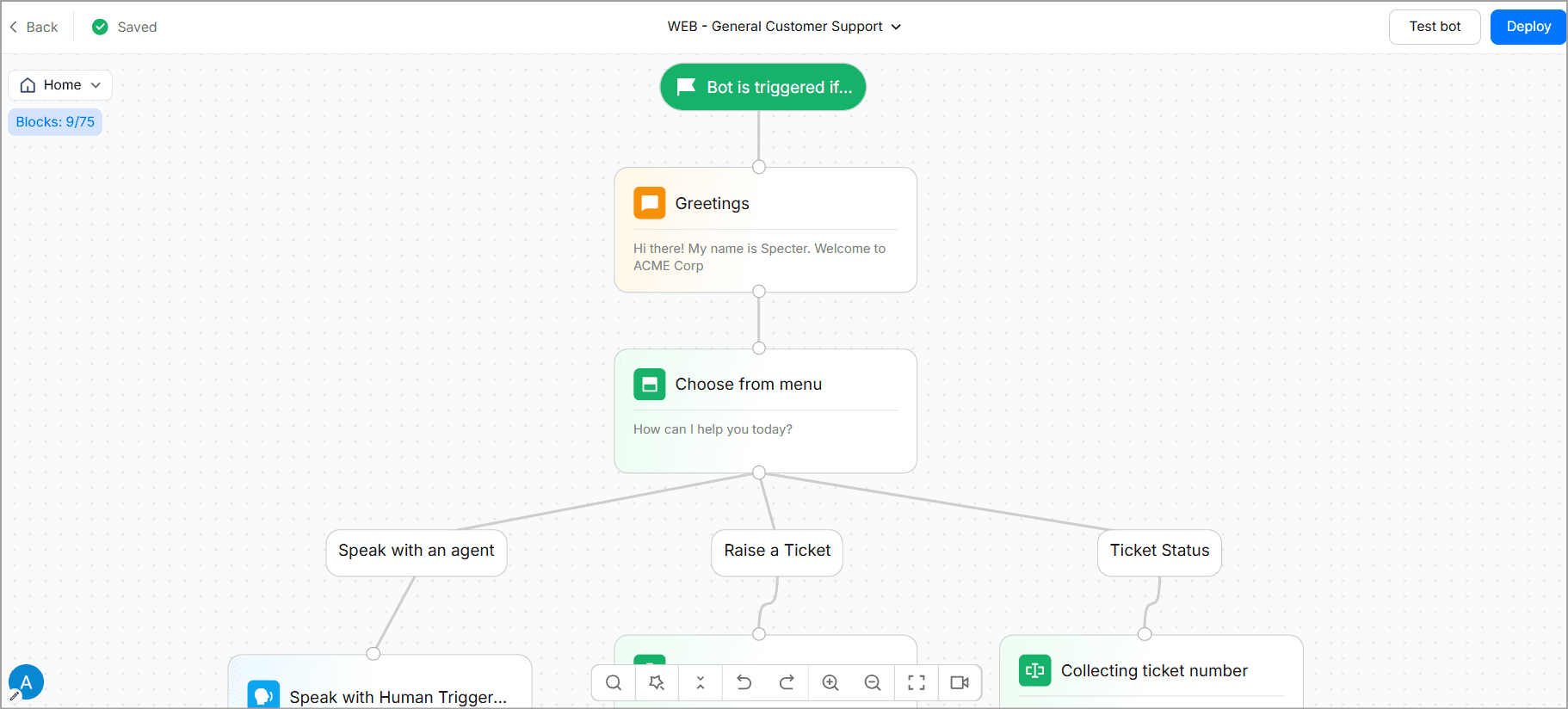
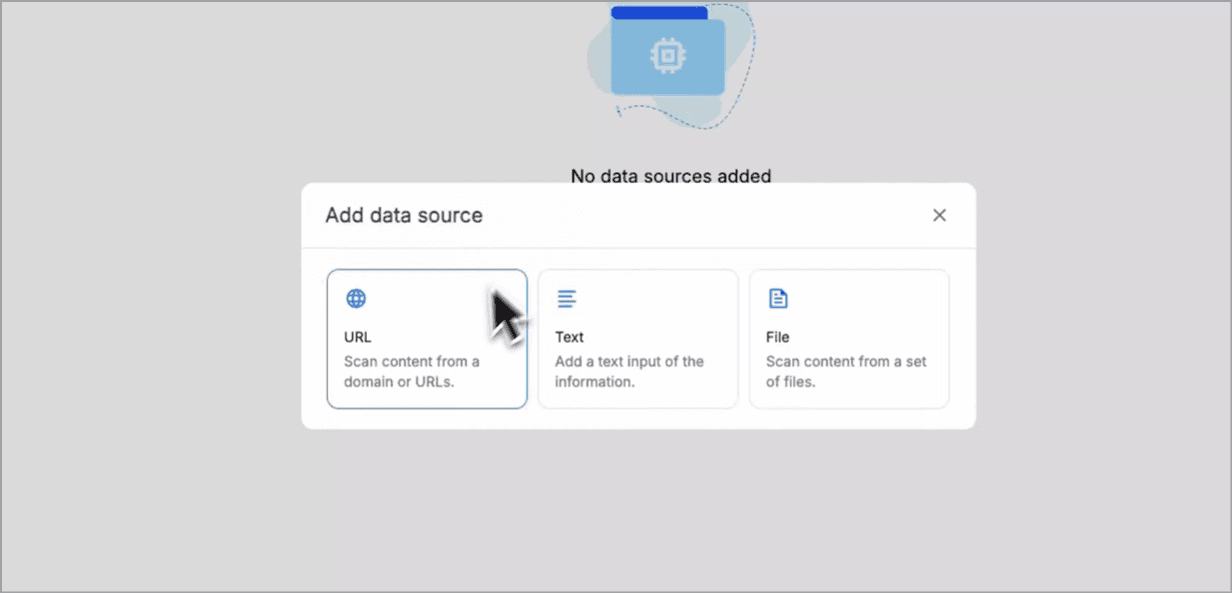
The knowledge base thing is what got me, though. You just have to paste in URLs or upload your help articles, connect the KB to the agent, and it uses RAG to pull answers from your actual docs.
So the answers are true to your brand and business and not random guesses.
In fact, even on the base plan, you get 1,000 sources for your knowledge base. You can literally fold all your business info into one knowledge base, creating one source of truth.
The AI Studio supports OpenAI, Anthropic, Gemini, and Mistral. You can switch models without retraining the whole bot.
But it’s not all about AI with no human assistance.
When a bot fails, it’ll transfer to Live Chat with all the collected data and detected intent already there. Your agent isn't starting from scratch.
Core functionalities
No-code bot builder with a visual flow designer and drag-and-drop canvas.
Multi-LLM AI Studio with RAG-based knowledge base training and model switching without retraining.
Live Chat with context-preserved human handoff (full bot transcript passed forward).
Multichannel deployment across web, WhatsApp, Messenger, Instagram, and SMS from one bot.
Outbound bot campaigns for proactive outreach, not just inbound support.
Native integrations with Salesforce, HubSpot, Zoho CRM, Zendesk, Freshdesk, Slack, and Zapier.
WotNot wins over Help Scout because:
It handles conversations before they become tickets, instead of managing them after.
It uses flat AI credits ($99/month for 5,000 chats + 5,000 AI credits, as of July 2026) instead of Help Scout's $0.75 per AI resolution, so the bill doesn't go out of hand.
It gives you multi-LLM choice where Help Scout AI Answers is single-model.
It deploys natively across WhatsApp, Messenger, Instagram, and SMS and phone calls. Help Scout does not integrate SMS and phone calls natively.
It runs outbound bot campaigns, which Help Scout doesn't do at all.
The honest trade-off
WotNot is not a full help desk. There's no shared email inbox with SLA queues, no collision detection, no built-in Docs that customers could access. If your support workflow depends on those, you'll want to run WotNot alongside a help desk, not instead of one.
Live Chat is also gated to the Premium plan at $299/month, so smaller teams that want human agents in the same tool have to pay up to reach it.
WotNot Pricing:
Do It Yourself (Annually billed)
Lite: Starts at $23/month (1,000 chats, 1,000 AI credits)
Starter: Starts at $79/month (5,000 chats, AI Studio, access to all LLM models, integrations)
Premium: Starts at $239/month (10,000 chats, Live Chat, custom widget)
Enterprise: Custom pricing (unlimited chats, unlimited AI credits, SSO, priority support)
Done For You (Annual cost)
Subscription + Managed Setup: Starts at $12,000/year (20,000 chats, 20,000 AI credits, dedicated account manager, 60 hours of managed services)
Free Trial: 14-day free trial available on all Do It Yourself plans. No credit card required.
Verdict
From using these products thoroughly, I can tell you that if your tickets are dominated by repetitive queries, WotNot solves that in a way none of the other seven tools on this list does.
Pair it with a lighter help desk (or keep Help Scout for human email support) and you've solved a completely different problem than a like-for-like Help Scout swap.
Start building, not just reading
Build AI chatbots and agents with WotNot and see how easily they work in real conversations.

Start building, not just reading
Build AI chatbots and agents with WotNot and see how easily they work in real conversations.
Start building, not just reading
Build AI chatbots and agents with WotNot and see how easily they work in real conversations.

2. Zendesk

G2: 4.3/5
If you're leaving Help Scout because you're scaling to enterprise and price isn't the blocker, this is the tool that will work perfectly.
Zendesk is an obvious contender in a Help Scout alternatives list and for good reason.
It combines ticketing, live chat, voice support, messaging, and a help center in one suite with a marketplace of 1,800+ integrations.
Zendesk is the best option for you if you need an omnichannel presence, more integrations, and workflow options than Help Scout can offer.
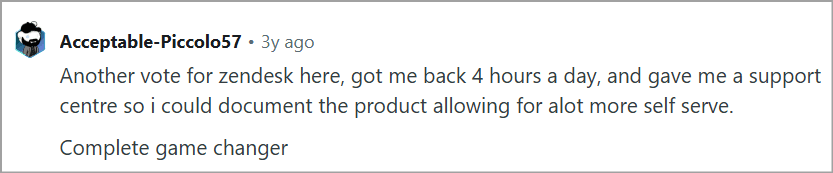
A user in a Reddit thread r/CustomerSuccess said that using Zendesk had saved them around 4 hours per day, which is almost half of a workday for human agents.
Advanced AI Agents can check order status in Shopify, process returns, update Salesforce, and create Jira tickets without a human. That's a real leap over Help Scout's answer-only AI. It's also priced accordingly.
But I’ll point one thing out to all of you wanting to upgrade to an enterprise tool: Zendesk is a powerful, versatile, and highly customizable platform. However, that entails a lot of complexity in its usage and setup.
If you want to explore more options like this one, have a look at our detailed list of Zendesk alternatives.
Core functionalities
Omnichannel workspace covering email, chat, voice, SMS, and social in one agent view.
Advanced AI Agents for autonomous multi-step resolution (order status, refunds, ticket creation).
Zendesk Explore for real-time custom dashboards and cross-channel reporting.
Skills-based routing with SLA management and multi-brand support.
1,800+ marketplace apps and deep API/webhook access.
Enterprise security including HIPAA compliance, SSO, and audit logs from Suite Professional.
Zendesk wins over Help Scout because:
Native voice and SMS (Help Scout offers neither).
1,000+ integrations vs Help Scout's ~100, per Zendesk's marketplace.
AI that takes actions, not just drafts responses.
Real-time custom dashboards beyond Help Scout's pre-built reports.
Enterprise-grade routing, SLAs, and multi-brand support.
The honest trade-off
Pricing is the trade-off, and it comes in two forms. One Gartner Peer Insights reviewer said that they couldn't reduce license counts during a two-year contract, even when their team grew smaller.
The other is that Advanced AI is billed per agent and per resolution, so a mid-market team modeling AI cost has to plan for both.
Zendesk Pricing
There are three categories of pricing plans in Zendesk. Here we are going to list the ones under customer service. (Monthly billing)
Support Team: $19/agent/mo
Suite Team: $55/agent/mo
Suite Professional: $115 /agent/mo
Advanced AI add-on ~$50/agent/mo
Automated resolutions billed per resolution at $2.00
No free plan trial available
Verdict
Zendesk earns its price if you're running 20+ agents across multiple channels and need deep reporting, enterprise security, and AI that takes real action. If you're a mid-market business with a small support team, this is the tool that gets expensive the fastest on this list because you just don't see the add-ons coming till you’ve racked up a huge bill.
3. Freshdesk
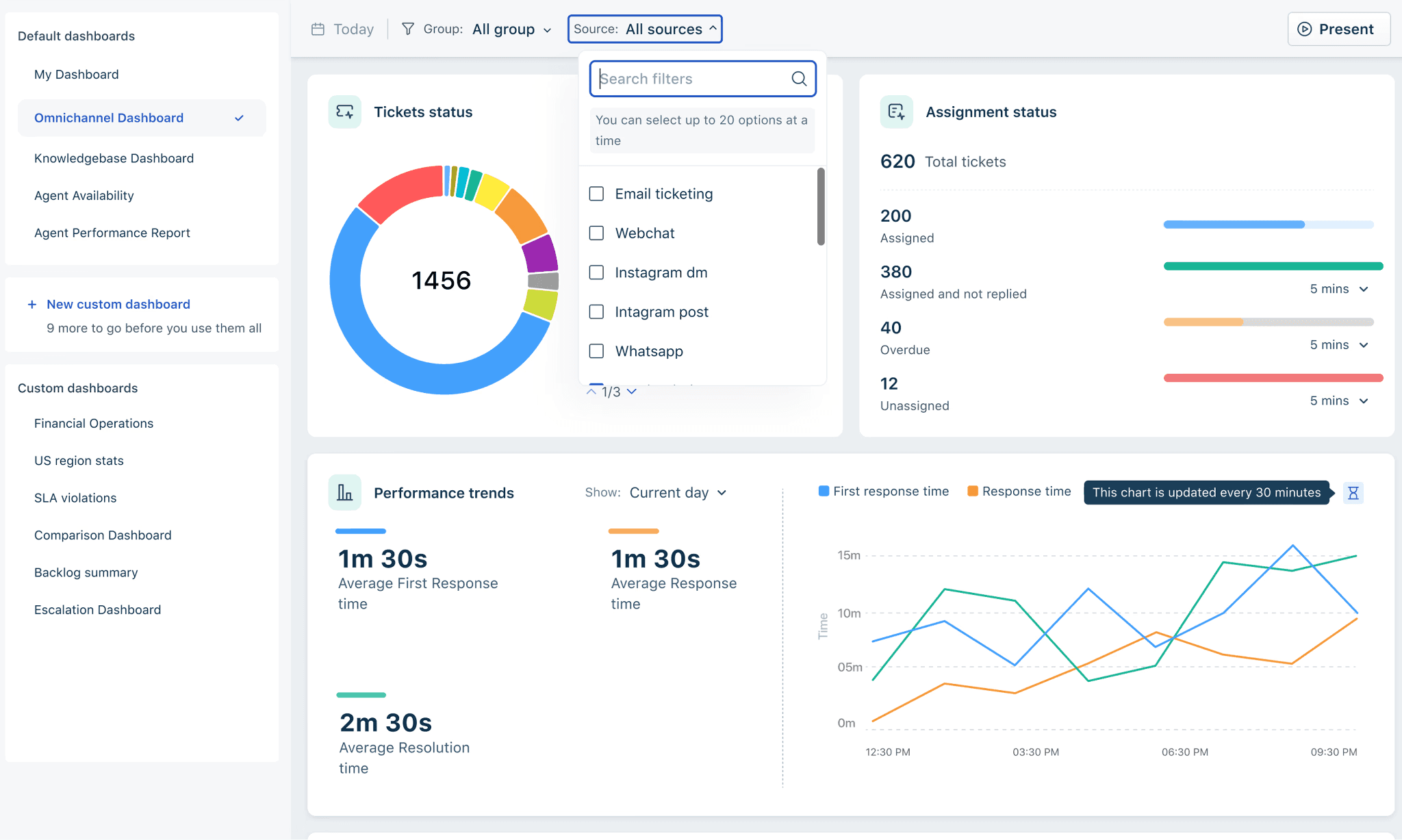
G2: 4.4/5
If you're leaving Help Scout because you want the same shared-inbox ease at a lower per-agent price, this is the tool that solves that.
Freshdesk is the answer if you want more than Help Scout but less than Zendesk— the perfect middle ground.
It is a ticketing platform front and center, offering email ticketing, live chat, phone, and social.
Where Help Scout keeps support succinct, just like an email thread with your team CC'd in, Freshdesk hands you an actual ticket management apparatus with statuses, SLAs, routing rules, parent-child tickets, the whole shebang.
One Lead Support rep on G2 said, "The UI is interactive and easy to get started." And I agree with that. And well-versed agents pick it up even quicker.
Conversations from all channels land in one workspace. Customer history comes attached to the conversation, so agents aren't asking the same questions over and over again. Instead of manually sorting requests all day, Freshdesk handles routing, prioritization, and repetitive tasks in the background.
One feature I mentioned earlier genuinely stood out to me: parent-child ticketing.
You can keep the full scope of the ticket under the parent card, while allocating relevant child tickets to teams responsible. It's surprisingly practical.
Freddy AI comes in two parts now. Copilot is a per-agent add-on, and AI Agent is session-based with the first 500 sessions included.
Then $49 per additional 100 sessions, and sessions expire monthly with no rollover. So a real AI-enabled Freshdesk seat sits at Pro ($49) + Copilot ($29) = ~$84/agent/month minimum.
Core functionalities
Shared inbox with collision detection, canned responses, and threaded ticket views.
Freshdesk Omni (priced separately) unifies email, chat, phone, and messaging.
Freddy AI Copilot for agent-side drafting, summarization, and translation.
Freddy AI Agent for autonomous ticket resolution (session-metered).
SLA management, round-robin routing, and workflow automation from the Pro plan.
1,000+ marketplace integrations including Salesforce, Slack, and Shopify.
Freshdesk wins over Help Scout because:
Native phone (Freshcaller) and SMS monitoring that Help Scout doesn't offer at all.
The reporting, once you're on Pro, is way more thorough than Help Scout's built-in dashboards.
1,000+ marketplace apps vs Help Scout's ~100.
It actually has SLA tracking and ticket routing, not just a shared inbox with folders.
It allows teams to turn resolved tickets into help articles and proactively surface relevant content to both agents and customers, a feature Help Scout can’t compete with.
You can eventually get access to Freshworks’ other platforms, which is a complete suite unlike Help Scout, which is strictly a support and ticketing platform.
The honest trade-off
The pricing structure is where Freshdesk quietly stops feeling cheaper. A verified Capterra reviewer flagged that "essential features that are surprisingly considered add-ons" push the real cost well above the sticker price.
There are also four separately priced Freshworks products (Freshdesk, Omni, Freshchat, Freshcaller) that teams often need together. And AI sessions expire monthly, so if you burn through them mid-cycle, your automation stops until you buy more.
Freshdesk Pricing (as of July 2026):
Free: $0, up to 2 agents for 6 months
Growth: $15/agent/mo; Pro $49/agent/mo
Enterprise: $79/agent/mo.
Freshdesk Omni: from $29/agent/mo.
Freddy AI Copilot: add-on ~$29/agent/mo
AI Agent sessions $49 per 100 after the first 500. Annual billing
14-day trial, no card.
Verdict
Freshdesk is the strongest fit if you want multichannel coverage at a predictable per-agent cost and can manage without heavy AI automation (or add it incrementally). Just don't confuse the starting price with the real price.
4. Hiver
G2: 4.6/5
If you're leaving Help Scout because you want Help Scout-level ease without dragging your team out of Gmail, this is the tool that solves that.
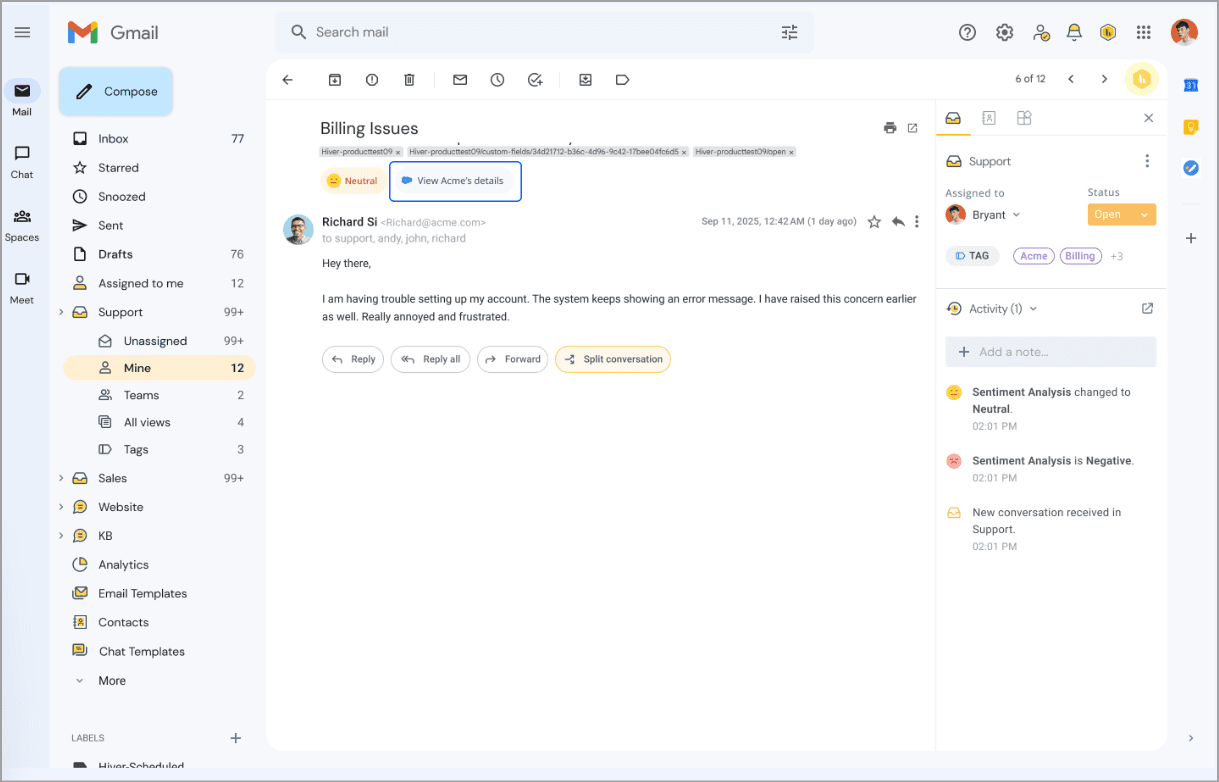
Hiver, instead of asking your team to log into a help desk, turns your existing Gmail (or Outlook) inbox into one.
There's almost no learning curve because support happens directly from the inbox instead of another application.
Your shared inboxes simply become organized workspaces where you can assign conversations, track them, add tags, discuss and monitor them without messy CC chains or wondering who's replying next. It simply gives teams much better visibility into ongoing customer conversations.
Another thing that stood out is how practical Hiver's automation feels.
Instead of overloading teams with a bunch of workflow building, Hiver takes over all the repetitive work like assigning conversations, categorizing requests, enforcing SLAs, and routing emails to the right person.
One Operations Manager on G2 said even the free plan "offers amazing features" for tagging and internal notes.
The platform’s AI makes things simple and streamlined rather than complicating things. It summarized long threads for me, suggested replies, and helped agents work faster without taking over the conversation.
Just because Hiver is based within the Gmail inbox doesn’t mean it won’t give you a larger business overview.
Integrations bring customer information into the inbox, while analytics help managers track response times, workloads, SLA performance, and team productivity without constantly exporting reports.
Core functionalities
Shared inboxes inside Gmail — assignment, internal notes, collision alerts, and status tracking (open/pending/closed), all without leaving your inbox.
Native SLA policies and CSAT surveys — bundled from the Pro plan, no separate SLA tool needed.
AI Copilot, AI Agents, and AI Summarizer — draft replies, triage tickets, and turn a messy thread into a clean summary with issues, actions, and next steps.
Round-robin and rule-based automation — auto-assign, auto-tag, and escalate based on conditions, capped by tier (10 rules per inbox on Growth, 20 on Pro, unlimited on Elite).
Customer portal and knowledge base — self-service option, though it's the thinner part of the product.
WhatsApp, voice, and Slack-as-channel — via Hiver Omni, for teams that need more than email.
Hiver wins over Help Scout because:
Lives inside Gmail/Outlook while Help Scout is a standalone product you switch into.
Native voice channel and WhatsApp coverage while Help Scout offers neither.
Free plan with unlimited users, whereas Help Scout free is capped at 5.
No per-resolution AI charges.
The honest trade-off
One area where Hiver doesn't quite keep up is knowledge management. Its knowledge base gets the job done, but it feels secondary. If self-service is a big part of your support strategy, Help Scout's Docs and Beacon experience is still more polished and proactive.
Hiver's biggest strength, that is, living inside Gmail, is also its biggest limitation. It works brilliantly for Google Workspace teams, but the experience isn't as smooth elsewhere. If your organization relies on Outlook or a mixed email environment, you'll likely run into compromises that simply don't exist in its Gmail version.
Pricing
(as of July 2026, hiverhq.com/pricing):
All the plans listed are annually billed.
Free: $0/user/mo. 1 inbox, unlimited users
Growth: $25/user/mo. 2 inboxes, capped at 10 users, basic automation
Pro: $55/user/mo. 5 inboxes, unlimited users, adds native SLA + CSAT + AI Agents/Copilot.
Elite: $85/user/mo. Unlimited inboxes, adds SSO, HIPAA, skill-based routing.
Verdict
Hiver is the right answer only if your team already lives in Gmail (or Outlook) and would rather add capabilities to their inbox than switch to a new app. If you're in that camp, it's the smoothest transition on this list. If you're not, skip it.
5. Missive
G2: 4.7/5
If you're leaving Help Scout because you want a lightweight collaborative inbox at a lower price, not a full help desk, this is the tool that solves that.
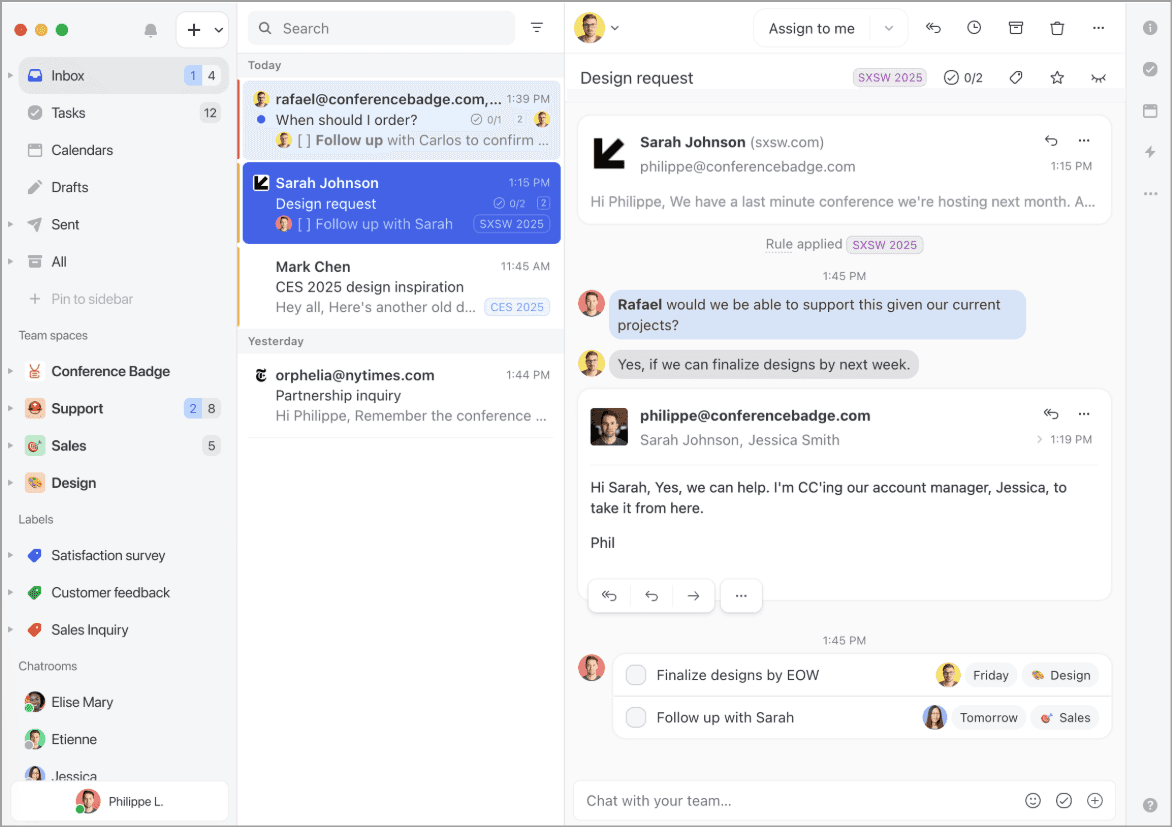
Missive is a shared inbox with a Slack-style internal chat in every thread.
The biggest difference is collaboration. Instead of forwarding emails, copying teammates, or jumping into Slack, everyone works inside the same conversation.
Internal discussions, @mentions, shared drafts, and task assignments all happen alongside the customer email, so decisions stay attached to the conversation instead of disappearing across different tools.
As per Missive's own G2 profile, it's used by over 4,500 businesses across accounting firms, logistics companies, travel agencies, and early-stage tech teams.
That mix tells you its ideal customer: teams of 5-50 where multiple people deal with the same customer conversations.
One reviewer described using it to keep track of key topics and deadlines across four separate teams, including external collaborators, all without leaving the thread.
A few things came up during my digging, like how the Search can struggle once mailboxes become large and the sidebar workflow took a bit of getting used to.
Another concern which was echoed by others was that the mobile app doesn't feel nearly as polished as the desktop experience.
For AI, you need to plug in an OpenAI or Anthropic key and pay the provider directly. That keeps the base price predictable and the AI bill honest.
Core functionalities
Shared inbox with team assignments, drafts, and real-time collaborative editing.
Internal chat threads inside every email conversation (no context-switching to Slack).
Channel coverage across email, WhatsApp, SMS, Instagram, and social.
Rules and automation, up to 1,000 rules with drag-and-drop editing, including AI-powered rules that read message content.
Native apps across web, macOS, Windows, iOS, and Android.
AI assistant includes drafting, translation, summarizing, and AI-driven labeling, running on your own connected AI provider key.
SAML SSO and personalized onboarding on the Business plan.
Missive wins over Help Scout because:
Brings email, live chat, SMS, WhatsApp, Messenger, Instagram, and more into one inbox, instead of focusing mainly on email support.
Lets multiple teammates write and edit the same reply together in real time.
Keeps internal discussions inside the conversation with @mentions, so teams don't have to switch to Slack.
Offers more flexible ownership by assigning conversations to individuals, teams, or multiple collaborators.
Uses smarter automation rules that can understand message content and work across multiple channels.
Lets you manage multiple email aliases and domains from a single workspace.
Delivers a consistent experience across web, desktop, and mobile apps, making it easier to work from anywhere.
The honest trade-off
Missive doesn't have a customer-facing knowledge base. If your Help Scout Docs page is doing real work deflecting tickets before they're even opened, you don't get an equivalent here. Search is also the most consistently flagged weak spot, especially on older messages and IMAP accounts.
Pricing
Billed annually (as of July 2026)
Starter: $14/user/mo
Productive: $24/user/mo
Business: $36/user/mo.
AI billed separately via BYO-key. 30-day risk-free trial + 30-day money-back.
Verdict
Missive is the right answer for small collaborative teams that want a shared inbox with chat embedded, at a price that respects a small team's budget. It's not the right answer if you need a knowledge base, voice, or a zero-setup experience.
6. Crisp
G2: 4.5/5
If you're leaving Help Scout because you want AI, multichannel messaging, and a live chat widget under one predictable flat price, this is the tool that solves that.
Help Scout assumes your customer relationship begins with an email. Crisp assumes it begins with someone typing into a chat widget on your website while they're still deciding whether to buy.
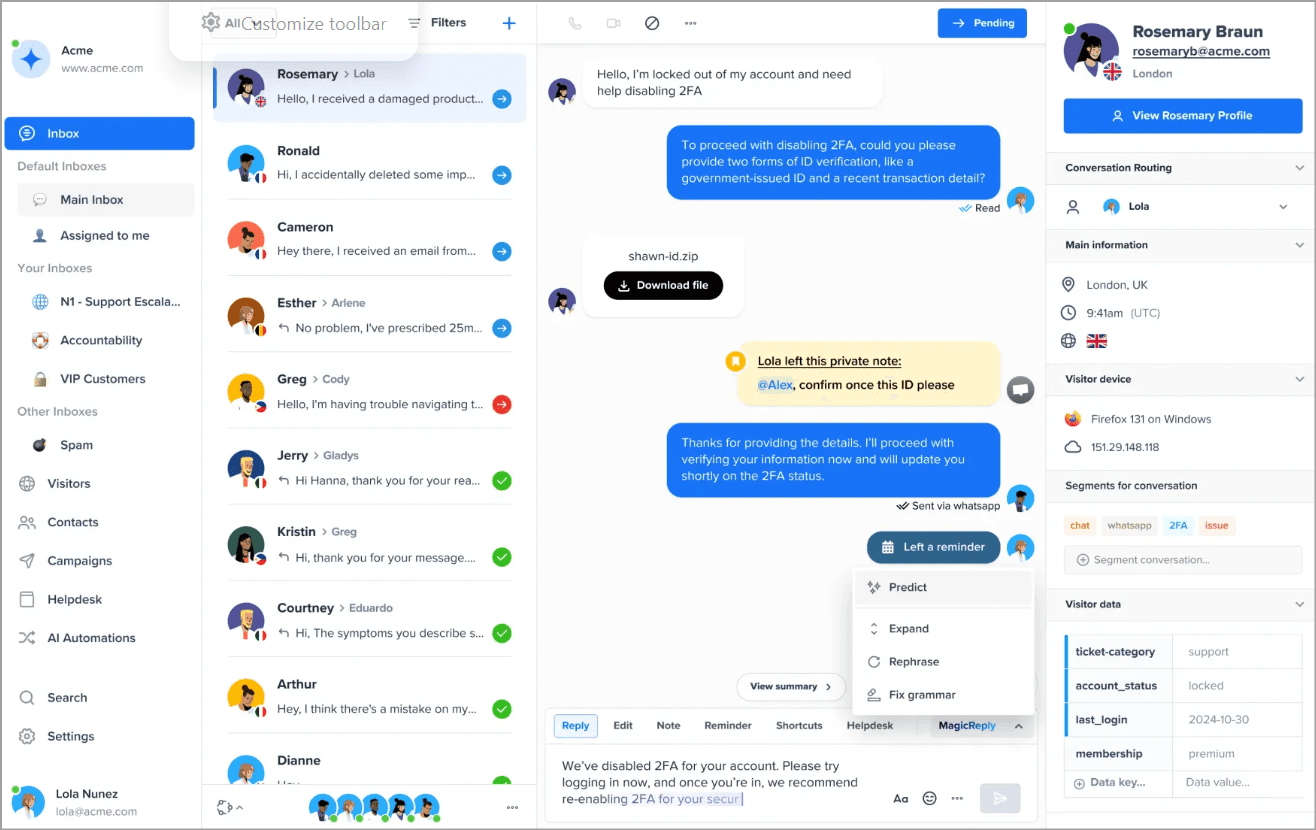
Crisp is an all-in-one customer messaging platform with chat, shared inbox, help center, AI chatbot (Hugo), and workflow builder, all priced per workspace instead of per agent.
That last part is the differentiator that matters. Your bill doesn't scale with team size the way Help Scout's, Zendesk's, or Freshdesk's does.
One feature that really bowled me over was co-browsing. Instead of asking customers to explain what they're seeing, agents can view their screen and guide them through the issue in real time.
It's not something every team needs, but for SaaS support or onboarding, it can save a lot of back-and-forth.
Shopify and e-commerce teams really gravitate here. One verified reviewer in a leisure/travel company reported that Crisp's AI is "bringing us a 40% reduction in queries due to their AI handling mundane queries."
That said, Crisp isn't trying to be a traditional help desk. Reporting is lighter, ticket workflows aren't as structured, and some reviewers mention that conversations can start feeling cluttered as volume grows.
Core functionalities
Hugo AI chatbot with visual workflow builder, branching logic, and API calls.
Multichannel messaging covering web chat, WhatsApp, Messenger, Instagram, Telegram, and email.
Co-browsing (MagicBrowse) so agents can see the customer's screen live.
Help center and knowledge base built into the platform.
CRM contact profiles with unified conversation history across channels.
Crisp wins over Help Scout because:
Flat per-workspace pricing, whereas Help Scout is per-user, with add-on inbox and Docs fees stacking on top.
Native multichannel including Instagram, WhatsApp, Messenger, Telegram without gating WhatsApp.
Built-in chatbot and workflow builder, while Help Scout AI Answers doesn't route, branch, or call APIs.
Co-browsing capability where Help Scout doesn't offer it.
Unlimited conversations on paid plans and no per-resolution surprise.
The honest trade-off
Here's the part that isn't about features at all: Crisp's account-management reputation is genuinely shaky. Multiple Trustpilot reviewers describe abrupt suspensions, vague "internal system error" explanations, and real difficulty canceling.
Essentials at $95/workspace/month has AI heavily limited (roughly 50 uses/month per verified reviewers), and unlocking unlimited AI resolutions means going to Plus at $295.
Pricing:
Free: $0, 2 seats
Mini: $45/workspace/mo
Essentials: $95/workspace/mo
Plus: $295/workspace/mo
Enterprise custom. 14-day trial on paid plans.
Verdict
Crisp is the right call if live chat and chatbot are genuinely your primary support surface, especially if you're running a Shopify or WooCommerce store and want fast setup at a low price. It's the wrong call if predictable account management matters as much to you as the product itself, because the suspension and cancellation complaints here are too consistent to wave away.
7. Front
G2: 4.6/5
If you're leaving Help Scout because you need deeper team collaboration and workflow customization without losing the email-first feel, this is the tool that solves that.
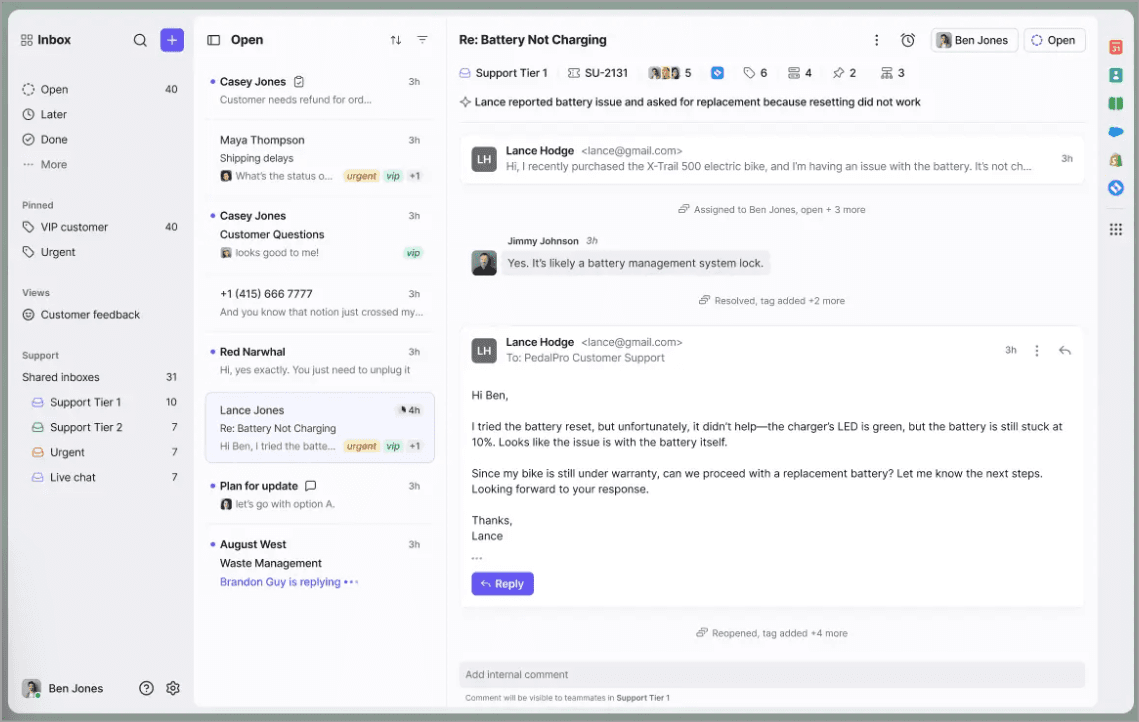
Front sits in a specific space: not quite a help desk, not just an email client. It’s a collaborative inbox where support, ops, and account management can all work on the same conversations without forwarding chains.
While Help Scout is built around efficient customer support, Front is designed for organizations where multiple teams work together on customer conversations.
In addition to email and live chat, Front centralizes SMS, WhatsApp, social media, shared inboxes, and even personal work inboxes into a single interface.
Internal comments and mentions are inside every thread. Shared drafts let two people write a reply together in real time, which is not something Help Scout has.
Front extends AI across the support workflow with reply drafting, conversation summaries, smart categorization, response suggestions, and task automation.
One G2 reviewer said the internal comment feature alone justified the cost because it stopped their team from forwarding emails back and forth, cutting response time in half in the first month.
Core functionalities
Unified inbox for shared and personal email accounts, plus chat, SMS, and social.
Internal comments and mentions inside every conversation thread.
Shared drafts with real-time collaborative editing.
Automation rules and macros (20 rules on Professional, unlimited on Enterprise).
Analytics and SLA tracking from the Professional plan.
Front AI, Copilot, Smart QA, and Smart CSAT as add-ons on lower tiers ($10-20/seat).
Front wins over Help Scout because:
Best-in-class real-time collaboration, whereas Help Scout supports notes, not live co-drafting.
Broader native channels including SMS and social.
More flexible automation rules and workflow customization.
Richer analytics with team-performance dashboards from Professional.
Familiar email-like UI that non-support teams adopt faster than a ticketing system.
The honest trade-off
In January 2026, Front removed true two-way Outlook sync. So actions in Front (read, archive, delete, tag) no longer sync back to Outlook, which creates duplication and mailbox overload. If your team runs on Outlook and depends on that sync, this is disqualifying until Front reverses it.
There's also the pricing curve. Starter at $25 is single-channel only. Real multichannel starts at Professional at $65, and AI add-ons can double your bill.
Pricing
Annual billing prices (as of July 2026):
Starter: $25/seat/mo (max 10 seats, single channel type)
Professional: $65/seat/mo (up to 50 seats)
Enterprise: $105/seat/mo.
Copilot: +$20/seat, Smart: QA +$20/seat, Smart CSAT +$10/seat.
14-day trial, no card.
Verdict
Front is the right call if you're a mid-market team with real omnichannel volume, a budget to match, and everyone's on Gmail. It's the wrong call for small, budget-conscious teams, and it's a hard pass if your team runs on Outlook until Front reverses the one-way sync change.
8. Zoho Desk
G2: 4.4/5
If you're leaving Help Scout because you need deeper customization and your team already runs on Zoho, this is the tool for you.
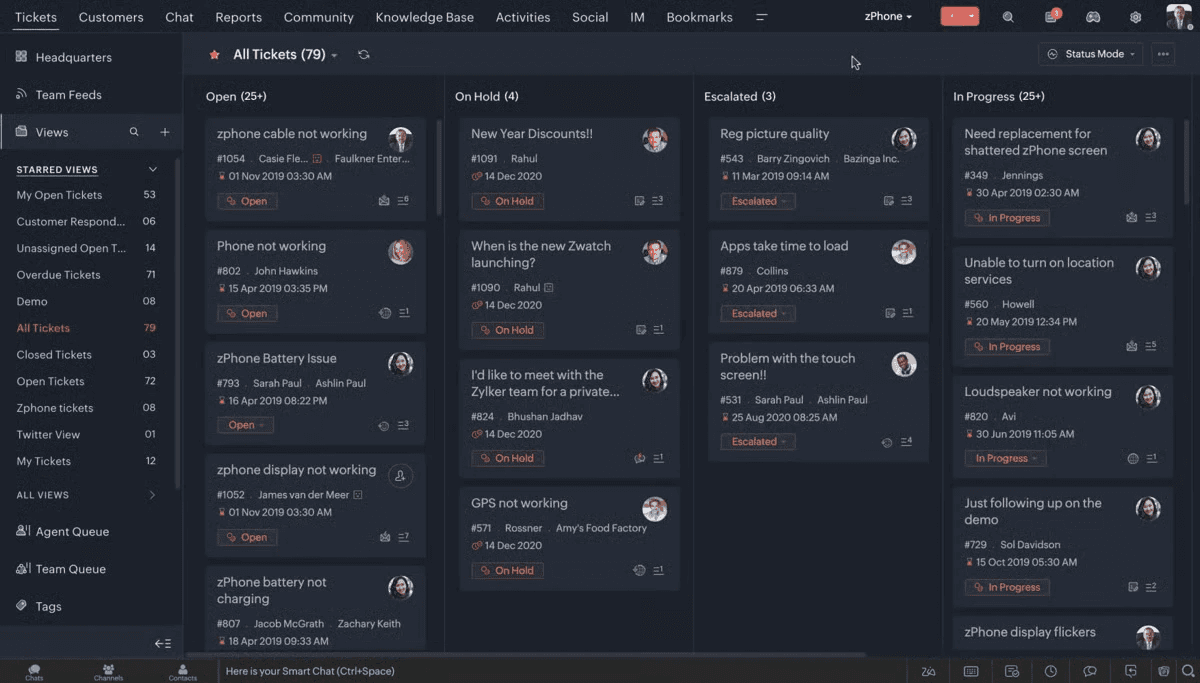
Zoho Desk is a full-featured help desk that plugs natively into Zoho CRM, Zoho Analytics, Zoho Books, and the other 50+ Zoho apps without middleware. If your sales, finance, and support teams are all inside the Zoho ecosystem already, go for it.
Zoho Desk is built for businesses that need more structure and control over their customer support operations.
Unlike Help Scout's email-first approach, Zoho Desk delivers a traditional help desk with advanced ticket automation, customizable workflows, SLA management, and deep reporting capabilities.
Blueprint (Zoho's process-management engine) also handles workflow customization at a depth Help Scout doesn't reach all achievable without code.
Combined with Zia AI for ticket summarization, sentiment analysis, reply suggestions, and knowledge recommendations, Zoho Desk seems too good to be true, almost.
It has refined its UI over the year, cutting onboarding time in half. However it’s still a work in progress.
It's not that Zoho Desk lacks features, it's that it has too many of them crammed into a screen that doesn't always know how to prioritize. One G2 reviewer described it plainly: "Some UI areas feel cluttered, the mobile app can be slow at times
Core functionalities
Multi-channel ticketing across email, live chat, social, and phone (via Zoho Voice).
Native integration with Zoho CRM, Analytics, Books, and 50+ Zoho apps.
Blueprint automation for guided processes, approvals, and SLA escalations.
Custom dashboards and reports from the Professional plan.
Multi-department and multi-brand support on Enterprise.
Zia AI assistant for sentiment analysis and response suggestions (Enterprise only).
Zoho Desk wins over Help Scout because:
Native phone/IVR via Zoho Voice while Help Scout has no native voice.
Multi-brand and multi-department support.
Deeper workflow customization via Blueprint, whereas Help Scout ships pre-built flows.
Cheaper entry at $7 Express vs Help Scout's $25 Standard.
Tight integration with Zoho CRM if you're already in the ecosystem.
The honest trade-off
The UI is the most-cited complaint. Users flag it as dated, cluttered, and text-heavy compared to modern tools. Zia AI is also locked to the Enterprise tier at $40/agent/month, so if AI is why you're switching, you either pay up or Zoho isn't your tool. And the value isn’t worth it if you're not in the Zoho ecosystem.
Pricing:
Free: $0, up to 3 agents
Express: $7/agent/mo
Standard: $14/agent/mo
Professional: $23/agent/mo
Enterprise: $40/agent/mo.
Zoho Voice: from $34/user/mo separately. 15-day trial.
Verdict
Zoho Desk is the right call if you want a real ticketing help desk at the lowest price on this list, and especially if your team already lives inside Zoho CRM or Zoho Books. It's the wrong call if a clean, minimal interface is non-negotiable for your team, or if you need AI without upgrading every single seat to Enterprise.
Which Help Scout Alternative is for you?
Eight tools is still a lot. Three questions will narrow it down fast.
If your problem is volume, not the platform
If repetitive questions are eating your team's day, you don't need a new help desk. You need an AI layer in front of the one you have.
WotNot: Flat-rate AI agent that deflects volume before it becomes a ticket
Crisp: Chat-first AI (Hugo) built into the conversation, not bolted on
If the help desk itself is the problem — limited channels, weak reporting, climbing costs — you need a full replacement.
Zendesk: for enterprise scale and deep reporting
Freshdesk: for more power at a lower price than Zendesk
Front: for teams with heavy omnichannel and automation needs
Zoho Desk: for real ticketing on the tightest budget
If your team's home base decides it for you
Where your team already works matters more than any feature list. The tool that fits your existing habits wins over the one with the longest spec sheet.
Gmail-first teams: Hiver, which lives inside the inbox you already use
Zoho ecosystem teams: Zoho Desk, for native CRM/Books/Analytics sync
Cross-functional collaboration teams: ops, account management, support sharing threads- Front or Missive
No strong home base, want the fewest surprises: Freshdesk
If your bill six months from now is the real question
This is the one most teams skip, and it's the one that bites hardest. The pricing model that looks cheapest today can flip on you as you grow.
Per-resolution pricing: (Help Scout, Zendesk) rewards small teams, punishes growth
Per-agent pricing: rewards efficiency, punishes hiring at scale
Flat per-workspace pricing: Crisp, WotNot's flat allocations rewards volume, can feel pricey small
None of these is universally cheaper. Model your bill at your projected volume, not today's.
Which tool actually replaces Help Scout?
Honestly? None of them, if you're looking for a Help Scout copy. It occupies a specific niche: a simple, human, email-first help desk with a clean UI and modest AI.
Every tool on this list is either bigger, cheaper-but-different, more AI-heavy, or more collaborative than that.
The teams that succeed at this switch don't pick the tool with the longest feature list. They pick the one that matches their actual reason for leaving. Match your reason from the five above to the tool that solves it, and the choice usually makes itself.
If your reason is "we're drowning in repetitive tickets," you can try WotNot free for 14 days without a credit card. If your reason is something else, one of the other seven is the right pick.
FAQs
FAQs
FAQs
Which Help Scout alternative has the best AI?
Can I use a chatbot instead of a full help desk?
Can I migrate my Help Scout data to another platform?
ABOUT AUTHOR
Hardik Makadia
Co-founder & CEO, WotNot
Hardik leads the company with a focus on sales, innovation, and customer-centric solutions. Passionate about problem-solving, he drives business growth by delivering impactful and scalable solutions for clients.

Start building your chatbots today!
Curious to know how WotNot can help you? Let’s talk.
Start building your chatbots today!
Curious to know how WotNot can help you? Let’s talk.