18 min read
Best AI Agents for Customer Service in 2026 (Full Comparison)

Hardik Makadia

Let’s build your chatbot today!
Launch a no-code WotNot agent and reclaim your hours.
*Takes you to quick 2-step signup.
Every platform on this list claims its AI resolves most of your tickets. Most are quoting a demo number, not the one you will see in month three.
I have watched enough of these rollouts to know the gap is real. The tool that looks brilliant in a sales call often deflects a handful of FAQs in production, then quietly gets scaled back.
So this is a working comparison of the best AI customer service agents in 2026, built to help you pick the one that fits your channels, your budget, and your tolerance for a bill that grows every time the bot does its job.
Ten platforms. Real pricing, real ratings, and the honest trade-off each one carries.
What Is an AI Agent for Customer Service?
Before we rank anything, it helps to agree on what the term actually means.
An AI customer service agent (you will also see it called an AI customer support agent or a customer service AI agent) is software that reads a customer's request in plain language, pulls the answer from your knowledge base or connected systems, and resolves the issue on its own, looping in a human only when it hits its limit. The good ones do not just answer. They take action, like checking an order, processing a refund, or updating an account.
That action part is what separates an AI support agent from a plain chatbot. A chatbot follows a script and hands you a dead end when your question falls outside it. An agent reasons, retrieves, and acts. We cover the full distinction in AI agent vs chatbot, but the short version is simple: a chatbot deflects, an agent resolves.
One more distinction to keep in your back pocket, because it decides how you read the pricing later: deflection versus resolution. Deflection means the customer went away. Resolution means the problem got solved. The AI agents space has filled up fast, and a lot of vendors blur those two, because a deflected chat is cheaper to claim than a resolved one.
How We Evaluated These Platforms
No single platform wins for everyone. A Shopify store and a 500-seat enterprise are shopping for different things. So instead of crowning one champion, we scored each tool against the criteria that actually decide the fit:
Resolution depth, not just deflection: Whether it can solve the problem, or does it only make the customer go away?
Integration depth: If it can plug into your CRM, helpdesk, and order systems, or bolt on from the outside.
Pricing transparency: Is the real bill knowable up front? (If you want to model it, our AI agent cost calculator helps.)
Deployment speed: If it takes days to go live, or a multi-month project.
Security and compliance: SOC 2, GDPR, and HIPAA where it counts.
Channel coverage: Web, WhatsApp, email, voice, and social, or web-only.
Model flexibility: One locked LLM, or your choice of provider?
The market for customer support agents has gone from a handful of players to dozens in two years, so every entry below is rated on live pricing and current G2 and Capterra scores, checked as of this writing.
At a Glance: The 10 Best AI Agents for Customer Service
Here is the whole field in one view. Jump to any entry below the table.
Platform | Best for | Key feature |
AI plus handoff without per-resolution billing | Multi-LLM AI Studio and flat pricing | |
Fin (Intercom) | Product-led teams already in Intercom | Highest resolution rates, works with any helpdesk |
Zendesk AI | Teams already living in Zendesk | AI layered onto deep ticketing |
Salesforce Agentforce | Salesforce-native enterprises | Agents that act on CRM data |
Botpress | Developer-led teams | Code-level control over agent logic |
Chatbase | Small teams wanting a fast FAQ bot | Fastest no-code setup |
Ada | High-volume enterprises | Autonomous CX across channels |
Decagon | Large consumer brands with voice needs | Chat, email, and voice from one agent |
Tidio (Lyro) | Shopify and small support teams | Claude-powered Lyro and a generous free plan |
Gorgias | Shopify brands with order-action tickets | Native Shopify actions inside the ticket |
Note: Ratings and prices checked September 2026 against vendor pricing pages, G2, and Capterra. Counts drift weekly, so treat them as a snapshot.
The 10 Best AI Agents for Customer Service
The build quality matters less than the fit. Here are the best AI agents for customer support and service in 2026, ranked with WotNot first, then nine more that each win for a specific kind of team. Every entry carries an honest trade-off, because they all have one.
1. WotNot
Ratings on G2: 4.6/5
Best for: SMB and mid-market teams that want one no-code agent across channels for autonomous resolution and human handoff in one platform, without per-resolution charges.
WotNot is a no-code AI agent platform that runs across web, WhatsApp, Facebook Messenger, Instagram, and SMS, along with voice, from a single build. What earns it the top slot here is not one feature. It is the combination of flat pricing and a real multi-LLM engine at a time when most of the category bills you per resolution.
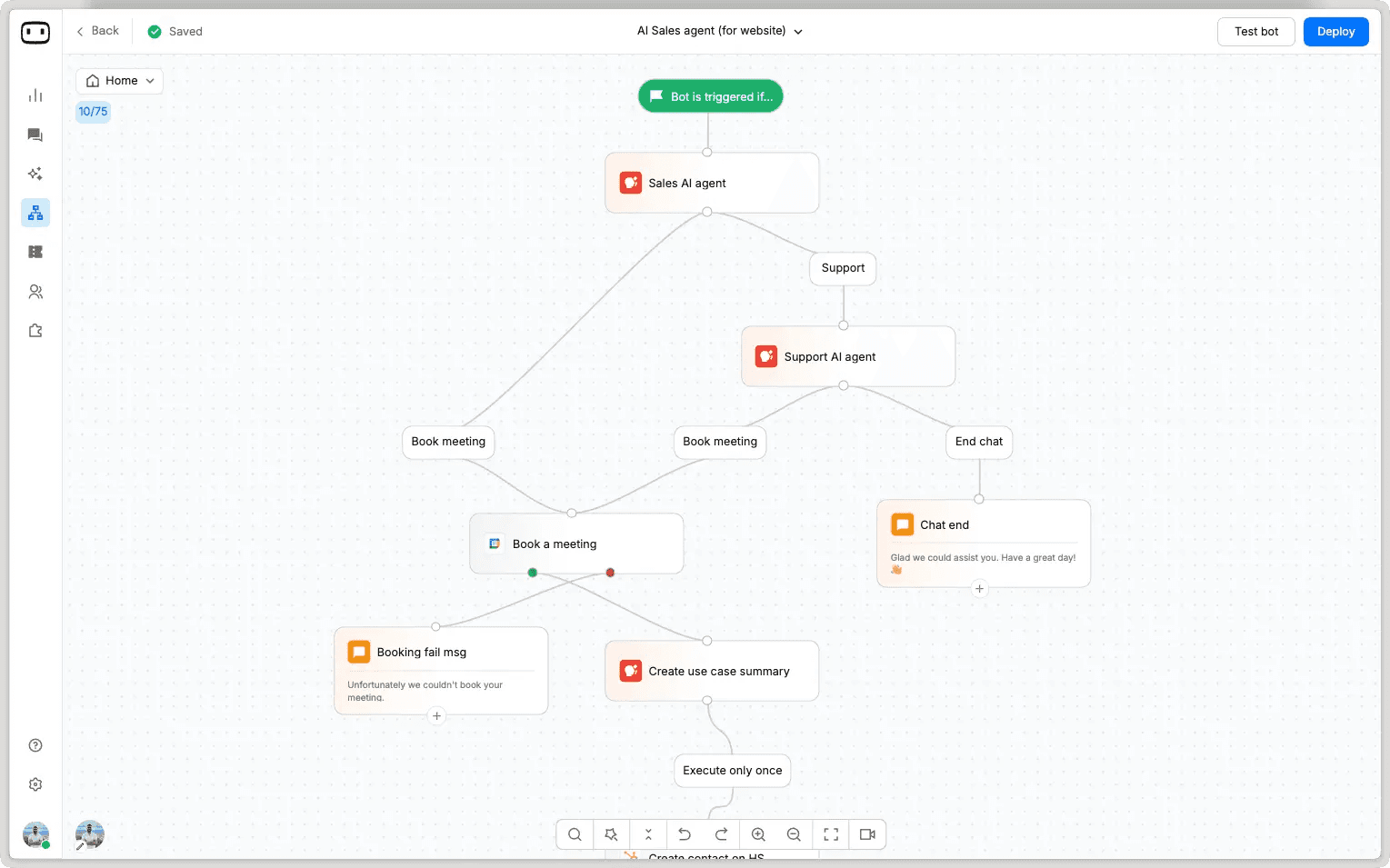
The build itself runs through a visual canvas. The platform pairs autonomous resolution with a customer support layer where the AI handles what it can and a human picks up the rest. When a chat escalates, the agent inherits the full history, the customer's intent, and every data point already collected, so nobody has to repeat themselves. That handoff runs through WotNot's live chat tool with complete context delivery.
The build itself runs through a visual studio. You feed the agent your content, pick which model runs behind it, and define what it's allowed to do: book a meeting, qualify a lead, push data to your CRM, resolve a ticket.
On the AI side, AI Studio lets you choose your model (OpenAI, Anthropic, Gemini, or Mistral), train the agent on your own knowledge base with RAG, and switch providers without rebuilding. WotNot also offers a done-for-you build service if you'd rather hand off the setup.
Fintech firm Tamkeen ran support on WhatsApp with WotNot and saved $113K in the process.
On the money side, the one thing worth knowing: WotNot charges a flat monthly fee with a chat and AI-credit allowance. No charge that grows every time the agent succeeds. For teams nervous about outcome-based bills, that predictability is the pitch.
Key features:
No-code bot builder across web, WhatsApp, Messenger, Instagram, and SMS
AI Studio with multi-LLM support and RAG training on your knowledge base
Live Chat with zero-restart context handoff to human agents
Outbound bots, voicebot, and analytics
Integrations with Salesforce, HubSpot, Zoho, Zendesk, Freshdesk, Slack, and Zapier
Pros:
Flat, predictable pricing with no per-resolution surcharge
Real model choice instead of one locked LLM
Context-preserving handoff that does not restart the conversation
WhatsApp and the full channel set without an enterprise contract
Cons:
Live Chat sits on the Premium tier and up, not the entry plans
Pricing:
All prices listed below are based on monthly billing rates.
Lite: $29/month (1,000 chats, 1,000 AI credits, no-code builder)
Starter: $99/month (5,000 chats, AI Studio, all LLMs, integrations)
Premium: $299/month (10,000 chats, Live Chat, custom widget)
Enterprise: custom (unlimited chats, SSO, professional services)
Do-it-Yourself: $12000/year onwards (20,000 AI credits and chats, dedicated account manager)
14-day free trial, 20% off annual billing
Start building, not just reading
Build AI chatbots and agents with WotNot and see how easily they work in real conversations.

Start building, not just reading
Build AI chatbots and agents with WotNot and see how easily they work in real conversations.
Start building, not just reading
Build AI chatbots and agents with WotNot and see how easily they work in real conversations.

2. Fin (Intercom)

Best for: Product-led and SaaS teams with solid docs, already on or willing to adopt Intercom.
Fin is Intercom's AI agent, and it holds the deepest track record in the category. It works on top of your existing helpdesk (Zendesk, Salesforce, or HubSpot) or inside Intercom's own suite, and it carries the largest review base of any tool here by a wide margin.
The setup is genuinely fast, which is the loudest thing users say about it. Fin is actually efficient when your documentation is. Powered by Claude, Fin resolves 51% of queries out of the box before any tuning, with well-documented teams pushing far higher.
The catch is the meter. Fin bills $0.99 per resolution, and a "resolution" includes an assumed resolution when a customer simply stops replying for up to 24 hours or if they expressly confirm resolution, so you can pay for a chat that did not actually help anyone.
In Intercom's own community, one admin ran the numbers and described conversations where a human stepped in still being counted as Fin-resolved, which nudges teams to let customers sit with a wrong answer first.
The one pricing fact to hold: Fin bills per outcome, so cost scales with adoption, not with team size. Great when volume is steady. Nervy when it spikes.
Weighing Fin against the field? We break it down in our Intercom alternative guide.
Key features:
Works with any helpdesk or inside Intercom
Fin AI Engine with no-code configuration
Answers in 45+ languages
Analyze, train, test, and deploy in one workspace
Procedures for multi-step, rule-guided actions
Pros:
Category-leading resolution rates with a strong knowledge base
Largest, most established review base in the space
Layers onto your current stack without a migration
Cons:
Per-resolution pricing gets hard to forecast and expensive as volume climbs
The assumed-resolution trigger can bill you for chats that resolved nothing
AI fees stack on top of Intercom seats, and lead qualifications cost $9.99 each
Pricing:
Fin AI Agent: $0.99 per resolution
Standalone (Fin with your helpdesk): $49/month base including 50 resolutions minimum
Intercom seats: from $29/seat/month (Essential, annual) up to $132 (Expert)
Essential: $39/seat/mo billed monthly (Messenger, shared inbox and ticketing; public help center)
Advanced: $99/seat/mo for workflow automation builder and multiple team inboxes
Expert: $139/seat/mo billed monthly (SSO, HIPAA support, SLAs, multibrand)
Copilot: $35/seat/month
14-day free trial
G2 Ratings: 4.5/5
3. Zendesk AI

Best for: established support orgs already living in Zendesk that want AI on top of mature ticketing.
Zendesk runs the deepest ticketing and workflow engine in customer service. Its AI agents now come baked into every Suite plan rather than sitting behind a separate add-on. If your team already works in Zendesk, the AI layers on without adding another tool to the stack.
You train the agent on your help center and past tickets, then let it triage, tag, suggest replies, and resolve the routine stuff. The agent copilot side, which drafts and summarizes for human agents, tends to get warmer reviews than the customer-facing bot.
One pricing note worth your attention: the AI agent bills per automated resolution on top of your seat costs, and an abandoned chat can still count. Two meters, one bill. If you're weighing whether to stay, our Zendesk alternatives list covers the exits.
One Reddit user said Zendesk AI fits enterprise workflows natively, but building good generative responses is less intuitive than Fin.
Key features:
AI agents included across Suite plans
Knowledge base, action builder, and omnichannel routing
Messaging, live chat, and telephony
Intelligent triage and generative AI for voice (Enterprise)
Large integration marketplace
Pros:
The most mature ticketing and workflow engine on the list
AI now included in Suite plans instead of a flat add-on
Deep ecosystem and reporting
Cons:
Per-resolution overage stacks on already per-seat pricing
The per-resolution rate is not published, so budgeting takes homework
A resolution defined by an inactivity window can inflate the count
Pricing:
The following plans are monthly billed rates and for Customer Service.
Support Team: $25/agent/month (email and ticketing only)
Suite Team: $69/agent/month (AI agents start here)
Suite Professional: $149/agent/month (Admin Copilot, App Builder, AI writing tools, Quick Reports; skills-based routing, IVR; 10 ARs per agent/mo)
Suite Enterprise: custom (Intelligent Triage, Auto Assist, sandbox, custom roles)
Copilot add-on: $50/agent/month
G2 Ratings: 4.3/5
4. Salesforce Agentforce

Best for: enterprises already standardized on Salesforce that want agents acting on CRM data.
Agentforce is Salesforce's agentic layer, and its whole value rests on proximity to your Salesforce data. If your customer records, cases, and workflows already live in Salesforce, an Agentforce agent can read and act on them with very little plumbing. If they do not, most of the appeal evaporates.
Building an agent means defining topics and actions, then guardrailing them so the thing doesn't improvise. Users note that getting actions to fire reliably without hallucinating takes tight configuration, and can't be rushed.
The pricing is a three-piece puzzle. You can pay $2 per conversation, buy Flex Credits at $500 per 100,000 (roughly $0.10 per action), or license per user from $125 up to $550. Whichever you pick, the real cost is usually driven by Data Cloud and implementation, not the agent meter itself.
Key features:
Low-code Agent Builder inside Salesforce
Actions across CRM records, cases, and workflows
Agents that act natively on Salesforce CRM data
Data Cloud grounding for context
Voice actions
Enterprise governance and security
Pros:
Unmatched if your business already runs on Salesforce
Agents that take real action on CRM data, not just answer
Enterprise-grade governance
Cons:
Three pricing models make the real bill hard to pin down
Data Cloud and implementation costs often dwarf the agent fees
Overkill and expensive unless you are Salesforce-native
Setup is a project, not a weekend
Pricing:
Conversations: $2 per conversation
Flex Credits: $500 per 100,000 credits (~$0.10 per action, $0.15 per Voice action)
Free tier: 200000 Flex Credits per org
Data Cloud costs additional
G2 Rating: 4.4/5
5. Botpress

Best for: Developer-led teams that want code-level control over conversation logic.
Botpress is the builder's platform. Every node in its visual studio accepts custom JavaScript, so you can design an agent visually and then drop into code for the tricky parts. For a team with engineering muscle, that is the appeal. For a team without one, it is the catch.
It supports multiple LLMs, WhatsApp, knowledge bases, and an autonomous engine that reasons through multi-step tasks. The two recurring gripes from reviewers are a learning curve that rewards a JavaScript-comfortable team and documentation that lags the pace of new features.
As one Reddit user put it, if you need API calls, custom logic, and webhook integration, Botpress beats packaged SaaS bots by a mile. G2's own review tallies show "ease of use" as the top praise and "steep learning curve" as the top complaint. It sounds contradictory until you realize both are true: simple bots are easy, anything with real logic is difficult to crack for non-tech teams.
If it is not the right fit, our Botpress alternatives guide covers the field.
Key features:
Visual Studio with custom code at every node
Autonomous Engine for multi-step reasoning
Multi-LLM support and knowledge bases
WhatsApp and white-label webchat
RBAC and team collaboration (Team plan)
Pros:
Deep customization for developers
Multi-LLM flexibility
Visual and code hybrid handles complex logic
Cons:
Steep learning curve for non-technical teams
Documentation trails the product
Conversation-based billing plus AI usage can be unpredictable
Voice comes through integration, not a native channel
Pricing:
These pricing plans are billed annually.
Free: $0 (25 conversations/month)
Plus: $189/month (250 conversations, $25 AI usage included)
Team: $939/month (1,500 conversations, $150 AI usage included)
Enterprise: Custom
Extra conversations sold in packs; 20% off annual
G2 Ratings: 4.5/5
6. Chatbase
Best for: Small teams that want a polished FAQ and support bot live fast, on a budget.
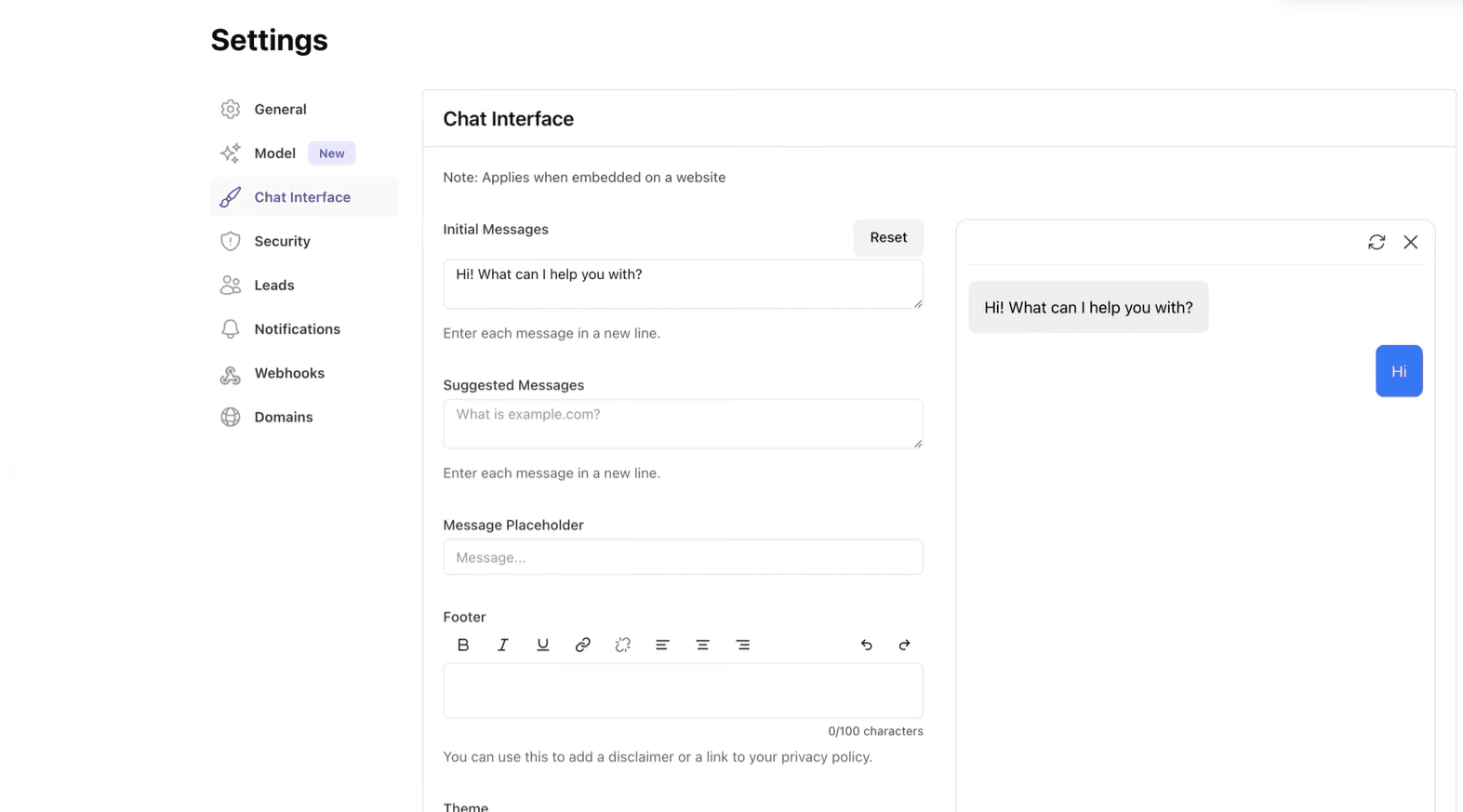
Chatbase is the quickest way on this list to get an agent trained on your own content and embedded on your site. Upload your docs, and you can have a working bot in about 15 minutes. For a lean team with mostly repetitive questions, that speed is the whole pitch.
The build is deliberately simple with no flows to wire, no logic to map. Upload your sources, tweak the tone, embed the widget. A Reddit user summed it up as cheap, quick to spin up on a document, but light on ticketing and escalation.
The ceiling shows up fast, though. Every self-serve plan includes exactly one AI agent, even the $400 tier, and answer quality completely depends on your documentation, with reviewers reporting a few fabricated answers. The fact is that if your source content isn't structured cleanly, Chatbase tends to make things up rather than admit it.
The one cost note: Chatbase runs on message credits, and a single reply can eat several credits depending on the model, so the effective ceiling comes faster than the headline plan suggests.
Key features:
RAG training on your docs, PDFs, and site
AI Actions to connect your APIs
Multi-LLM (GPT and Claude)
WhatsApp, Facebook, and Instagram channels (Hobby and up)
Voice and telephony (Standard and up)
Pros:
Fastest setup in its class
Model flexibility and clean source citations
Cheap entry point
Cons:
One AI agent per self-serve plan, even at the top tier
Answer quality depends entirely on your docs, with occasional hallucinations
Support is the weakest-rated category, and Trustpilot skews low
Pricing:
The pricing given below is for annually billed rates.
Free: $0 (50 message credits and 1 member only)
Hobby: $40/month (700 message credits/mo, 2 members, integrations, basic analytics)
Standard: $150/month (4,000 message credits/month)
Pro: $500/month (15,000 message credits/mo, 5 members, advanced analytics)
Enterprise: custom
G2 Ratings: 4.8/5
7. Ada

Best for: high-volume enterprises that want autonomous CX across channels and have the budget for it.
Ada is an enterprise-grade AI agent built to automate support at serious scale, across web, mobile, social, and SMS. Its customer-success reputation is strong, and it is built for brands fielding huge contact volume. The friction is procurement. There is no public rate card and no self-serve trial, so evaluating Ada means a sales cycle before you see a number.
You train Ada on your knowledge and connect it to backend systems so it can resolve multi-intent tickets, not just answer one question and stop. Users describe it as having a generative engine that handles layered requests well.
Ada also leans heavily on Zendesk or Salesforce for its full feature set.
But Ada’s performance comes with an enterprise commitment. The recurring theme is scale-versus-access: it is built for massive volume and complex routing, but the price tag keeps it out of reach for smaller teams. Onboarding is not self-serve either. Users note that mapping workflows and getting the most out of the reasoning engine takes dedicated account managers.
Key features:
Autonomous agents across web, mobile, social, and SMS
60+ language coverage
Deep Zendesk and Salesforce integration
Reasoning engine with testing and coaching tools
Enterprise security and analytics
Pros:
Deepest public review base among agentic-first vendors
Strong customer-success and onboarding support
Built for high-volume, multi-channel automation
Cons:
No public pricing and no self-serve trial
Full feature set leans on Zendesk or Salesforce
Costs scale hard with volume and are difficult to forecast
Pricing:
No public pricing, sales-gated.
Ratings: G2 4.6/5
8. Decagon

Best for: large consumer brands with high volume and voice needs, plus the engineering to run it.
Decagon sits at the enterprise edge of this list. Its agents resolve and act across chat, email, voice, and SMS using natural-language workflows it calls Agent Operating Procedures. The customer roster tells the story: Chime, Duolingo, Rippling, and Notion all run on it.
Users describe it as the next generation of support bots because it performs actions across backend systems rather than just serving up knowledge-base links.
The build model is its signature. You write agent procedures in plain language, and the platform turns them into logic the agent executes. It's aimed squarely at complex, multi-step tasks, not FAQ deflection.
Teams that have swapped in Decagon for legacy tools call the multi-step handling impressive, while placing it firmly in mid-market-to-enterprise territory on price.
If Decagon is on your shortlist but the commitment feels heavy, our Decagon alternatives guide sorts the options by why people switch.
Key features:
Agent Operating Procedures (plain-language workflows compiled to logic)
Chat, email, voice, and SMS from one agent
Actions across Salesforce, Zendesk, and Stripe
Sub-second voice latency
Enterprise compliance credentials
Pros:
Strong autonomous resolution and action-taking
A true voice channel, not a bolt-on
Trusted by major consumer brands
Cons:
No public pricing, no trial, no self-serve
Multi-week to multi-month implementation, and it needs a technical owner
Pricing:
No public pricing; sales-only
G2 Ratings: 4.9/5
9. Tidio (Lyro)

Best for: Shopify and DTC stores and small support teams under 10 seats.
Tidio is the SMB and ecommerce pick, and its Lyro AI agent is one of the few in this roundup powered by Anthropic's Claude. Lyro learns from your help center and answers only from that verified content, handing off cleanly when it does not know. Setup is fast, and the free plan is unusually generous, with 10 seats at zero cost.
Reddit's SMB verdict is that Lyro is easy to set up on Shopify and doesn't charge the per-resolution rates people associate with Intercom.
But one thing you need to keep an eagle eye on is the fact that Tidio meters three things separately: your base plan, Lyro conversations, and Flows. Users put the real-world bill at 2 to 3x the headline once you add the AI and automation. And every self-serve plan caps at 10 seats before a jump to $749.
The one cost note: Lyro is metered by AI conversations as a separate line from your base live-chat plan, so a busy site outgrows the small packs faster than expected. For the wider field, see our Tidio alternatives comparison.
Key features:
Lyro AI agent (Claude-powered, 47 languages, Smart Actions)
Flows no-code chatbot builder
Shared inbox across web, email, Messenger, Instagram, and WhatsApp
Live chat and help desk
Deep Shopify integration
Pros:
Claude-powered AI with clean human handoff
Genuinely generous free plan with 10 seats
Fast setup and a strong ecommerce fit
Cons:
Three separate billing meters make the real cost hard to predict
Hard 10-seat cap, then a steep jump to the $749 tier
Lyro and Flows cannot share context in the same conversation
Pricing:
Monthly billed rates.
Free: $0 (50 conversations, 10 seats, 50 lifetime Lyro chats)
Starter: $29/month (100 billable conversations; 10 seats, 50 one-off Lyro conversations)
Growth: $59/month (from 250 and up to 2,000 billable conversations, 10 seats, advanced analytics, and native Shopify actions)
Plus: from $300/month (custom seats and limits)
Premium: Custom
Lyro add-on: from $39/month for 50 AI conversations
Ratings: G2 4.6/5
10. Gorgias

Best for: Shopify and DTC brands where order-action tickets dominate the queue.
Gorgias is built for one job and does it better than anyone: ecommerce support tied directly to Shopify. Its AI Agent can check orders, process refunds, and handle returns inside the ticket, and its ticket-based pricing gives you near-unlimited seats.
You can set it up on top of the Gorgias helpdesk, connect your store, and let the agent auto-respond to the high-volume order questions that clog a DTC queue. Users say it ties into Shopify order data cleanly and beats generic LLM bots for store owners.
The wrinkle is the billing. The AI Agent costs $0.90 to $1.00 per resolved conversation, and per Gorgias's own documentation, each AI resolution also counts as a ticket, so one automated chat can carry two charges. It shines with its outstanding features where Shopify is concerned but is not on par with competitors for other channels.
Automation being billed per resolved interaction on top of ticket costs is felt by busy stores the fastest. If that's you, our customer support tools roundup covers leaner setups.
Key features:
Native Shopify actions (orders, refunds, returns, subscriptions) inside the ticket
Omnichannel inbox with near-unlimited seats
Ticket-based pricing rather than per-seat
AI Agent for order status, refunds, and order edits
Auto-response to high-volume order questions
Macros and rules tied to store data
Pros:
Best-in-class Shopify integration and in-ticket actions
Unlimited seats on most plans
Strong fit for order-action-heavy ecommerce
Cons:
The good features require a connected Shopify store
Per-resolution AI billing stacks on top of ticket fees (double-charged)
Automation caps around 60%, below the marketing
Pricing:
Monthly billed prices listed below.
Starter: $10/month (50 tickets, over that, it is charged $0.40/ticket)
Basic: $60/month (300 tickets)
Pro: $360/month (2,000 tickets)
Advanced: $900/month (5,000 tickets)
Enterprise: custom
AI Agent: $0.90 (annual) to $1.00 (monthly) per resolution
Ratings: G2 4.6/5, Shopify App Store 4.3/5
Let’s build your chatbot today!
Launch a no-code WotNot agent and reclaim your hours.
Let’s build your chatbot today!
Launch a no-code WotNot agent and reclaim your hours.
Which One Should You Use?
There is no single best AI agent for customer service. There is only the best one for your stack, your volume, and your budget. The short version:
Want AI resolution and human handoff without a per-resolution meter? Start with WotNot.
Already on Intercom with strong docs? Fin resolves the most, if you can forecast the bill.
Living in Zendesk or Salesforce? Zendesk AI and Agentforce keep everything in one place, for a price.
Have a developer to drive it? Botpress gives you the most control.
Need a cheap FAQ bot live today? Chatbase.
Enterprise scale with a real budget and voice needs? Ada or Decagon.
Running Shopify? Tidio for small teams, Gorgias when order actions dominate.
The pattern I keep seeing is that teams overspend on capability they will not use, then underinvest in the documentation that actually drives resolution. Before you sign anything, model your real numbers with an ROI calculator, then trial the two that fit.
Start with the problem you have today, not the scale you hope for. The right agent is the one you will still be happy paying for in month three.
FAQs
FAQs
FAQs
What is the difference between an AI chatbot and an AI customer service agent?
How much does an AI customer service agent cost in 2026?
What resolution rate can I realistically expect?
What is per-resolution pricing, and why does it matter?
Which AI customer service agent is best for a small business?
ABOUT AUTHOR
Hardik Makadia
Co-founder & CEO, WotNot
Hardik leads the company with a focus on sales, innovation, and customer-centric solutions. Passionate about problem-solving, he drives business growth by delivering impactful and scalable solutions for clients.

Start building your chatbots today!
Curious to know how WotNot can help you? Let’s talk.
Start building your chatbots today!
Curious to know how WotNot can help you? Let’s talk.