
15 min read
Chatbase Review 2026: Honest Take After Testing It

Hardik Makadia

Let’s build your chatbot today!
Launch a no-code WotNot agent and reclaim your hours.
*Takes you to quick 2-step signup.
Chatbase promises you a working AI chatbot in under ten minutes. So I tested that claim.
I uploaded a knowledge base, pasted a few URLs, and had a bot answering questions before my coffee got cold. The speed is real. For a certain kind of business, that alone makes it worth the price.
But "fast to set up" and "right for your business" are two different things.
A tool can be brilliant at what it does and still be the wrong choice for what you actually need. So I kept going. I pushed it past the demo, asked the questions it wasn't ready for, and watched where it started to strain.
I should be upfront about one thing: I run WotNot, which competes with Chatbase in some areas. So I have a perspective here.
But I've also got no interest in telling you a tool is bad when it isn't. Chatbase is very good at a specific job. The real question is whether that job is the one you're hiring it for.
Here's what I found.
Quick Verdict: Is Chatbase Worth It?
Short answer: yes, if you know what you're buying.
See, Chatbase is one of the fastest ways to get a working support bot live. You upload your docs, it trains a bot on them, and you embed it on your site. For FAQ deflection and doc-based support, it's genuinely excellent, and the setup speed is not marketing fluff.
But here's the thing you need to get straight before you pay: Chatbase is a knowledge-retrieval tool, not a full support platform.
It answers questions from your content beautifully. It does not run multi-step workflows, it has no native live chat handoff, and it won't automate your Instagram DMs. The moment your support turns into a process instead of a question, you'll feel the ceiling.
So who is it actually for?
Chatbase is a strong fit if you're:
A solopreneur, course creator, or small business that needs FAQ automation fast
A small SaaS or e-commerce team with solid documentation and mostly repeat questions
Anyone whose support is genuinely about answering, not completing tasks
You'll want to look elsewhere if you're:
A support team that needs live chat with human handoff and ticketing
A team that needs the bot to take actions (book appointments, update records, route cases)
A marketing team that needs social or WhatsApp broadcast automation
If you saw yourself in that first list, Chatbase will probably make you happy. If you saw yourself in the second, keep reading, because I'll show you exactly where it stops being enough.
One disclosure before we go further: I've done my best to keep this fair, and I'll tell you plainly where Chatbase beats us and where it doesn't.
Let’s build your chatbot today!
Launch a no-code WotNot agent and reclaim your hours.
Let’s build your chatbot today!
Launch a no-code WotNot agent and reclaim your hours.
What Is Chatbase?
Chatbase is a no-code platform for building AI chatbots trained on your own content. You feed it your website URLs, PDFs, help docs, or plain text, and it turns that into a bot that answers questions in natural language. No coding, no flow design, no conversation architecture to map out.
The way it works is simple enough that anyone can do it. You point it at your content, it processes and indexes everything, and within minutes you have a chat widget you can embed on your site. When a customer asks a question, the bot searches your content, finds the relevant piece, and generates an answer grounded in your actual documentation.
Here's the mental model that helps: Chatbase is a conversational layer on top of your content. It's not trying to be your CRM, your ticketing system, or your marketing automation tool. It does one thing: turning your documentation into instant answers, and it stays focused on that. Whether that focus is a strength or a limitation depends entirely on what you need, which is what the rest of this review is about.
What Chatbase Does Well
Let me start with what genuinely impressed me, because there's a lot here. When Chatbase stays in its lane, it's one of the best tools in the category.
1. Setup Speed Is Genuinely That Fast
You've probably read "get a chatbot live in minutes" on every platform's homepage. With Chatbase, it's actually true.
You paste your website URL or upload a PDF, Chatbase crawls and processes it, and you have a working bot within minutes. No flow builder to learn, no nodes to connect, no conversation paths to design. If you've got clean documentation, you can go from signup to a live, embeddable widget faster than almost anything else out there.
This is the single biggest reason people love it. For a small team that just needs to stop answering the same five questions over email, that speed is the whole value proposition.
Quick tip: Before you upload anything, spend twenty minutes cleaning up your source docs. Remove outdated pages, duplicate content, and anything contradictory. Chatbase is only as good as what you feed it, and a clean knowledge base is the difference between a bot that impresses and one that frustrates.
2. The Answers Stay Grounded in Your Content
This is the part that matters most for accuracy. Chatbase pulls answers from your documents rather than making things up from general knowledge. So when a customer asks about your refund policy, it quotes your actual refund policy, not some generic version it invented.
When your docs clearly cover a question, the responses are sharp and on-brand. You'll notice this immediately when you test it. Ask it something straight out of your FAQ and it nails the answer, often better phrased than the original doc.
3. The "Improve Answer" Feature Is My Personal Favorite
This is the feature I'd point to first if you asked me what sets Chatbase apart from a basic RAG wrapper.
Here's how it works. You review your chat logs, find a spot where the bot gave a weak or wrong answer, and click "improve answer." You then show it how it should have responded. Prompt engineering or coding knowledge is not required at this point. The bot learns from that correction going forward.
For a non-technical team, this is huge. It means you can actually improve your bot over time based on real conversations, without needing a developer every time something's off. I genuinely wish more platforms did this as cleanly.
4. Clean, Useful Analytics
Chatbase shows you what people are actually asking. You get conversation logs, the most common questions, and clear signals about where your bot is struggling or where your docs have gaps.
This matters more than it sounds. If you check it weekly, you'll spot the same question about billing or setup coming up again and again, which tells you exactly what to fix in your docs or your product. It turns your chatbot into a feedback loop, not just a deflection tool.
Where Chatbase Falls Short
Now the other side. None of these are dealbreakers on their own, but you need to know them before you commit, because a few of them are the kind of thing you only discover after you've built everything.
1. It Breaks Down the Moment Support Becomes a Process
This is the big one. Chatbase is built to answer questions. It is not built to complete tasks.
Here's what I mean. If a customer asks "what's your return policy," Chatbase is great. If a customer says "I want to return my order, it arrived damaged, and I need a refund to a different card," you're now in a multi-step process. Collect the order number, verify the purchase, check the return window, confirm the refund method, trigger the refund.
That's a workflow, and Chatbase isn't built for it.
You get an answer, but not a complete outcome. Now for FAQs, that's perfectly fine, but for actual case handling, you'll feel boxed in fast. This is the ceiling most support teams hit, and it's worth being honest with yourself about how much of your support is questions versus processes.
2. No Native Live Chat or Human Handoff
Chatbase has no built-in live chat inbox and no native way to hand a conversation off to a human agent.
If the bot can't solve something and a customer needs a real person, you can't seamlessly escalate within Chatbase. You have to integrate a separate third-party tool like Zendesk, and that integration can add meaningful cost on top of what you're already paying. For a support team, this is often the single biggest limitation, because human handoff isn't a nice-to-have; it's the whole safety net.
If live chat with human handoff is core to your support, this is the point where you'll want to look at platforms that build it natively.
3. Accuracy Lives and Dies by Your Documentation
I touched on this in the strengths, but it cuts both ways, so it belongs here too.
When your docs are clear, the bot is sharp. When your docs are thin, outdated, or unstructured, the bot gets vague or, worse, confidently wrong. Ask it something your documentation only half-covers and you'll often get an answer that sounds authoritative but isn't quite right. On niche or messy data, it can hallucinate.
You need to verify this one yourself before you rely on it. Take your ten hardest customer questions, the edge cases, the ones your docs barely address, and run them through the bot during your trial. That's where you'll find out whether Chatbase actually fits your content or just looks good on the easy questions.
4. Customization Is Limited
You can change the bot's tone, set some instructions, and adjust basic branding on the widget. But if you want deep control over the UI, custom layouts, and different conversation experiences for different user types, you'll feel the walls.
For most small businesses, the defaults are fine. But if brand experience is a priority and you want the chat widget to feel like a bespoke part of your product, Chatbase will feel restrictive.
Chatbase Pricing: What It Actually Costs
The sticker price on Chatbase is simple. The credit system underneath it is where you need to pay attention, because that's what actually determines your monthly bill.
The Plans
Here's how the tiers break down:
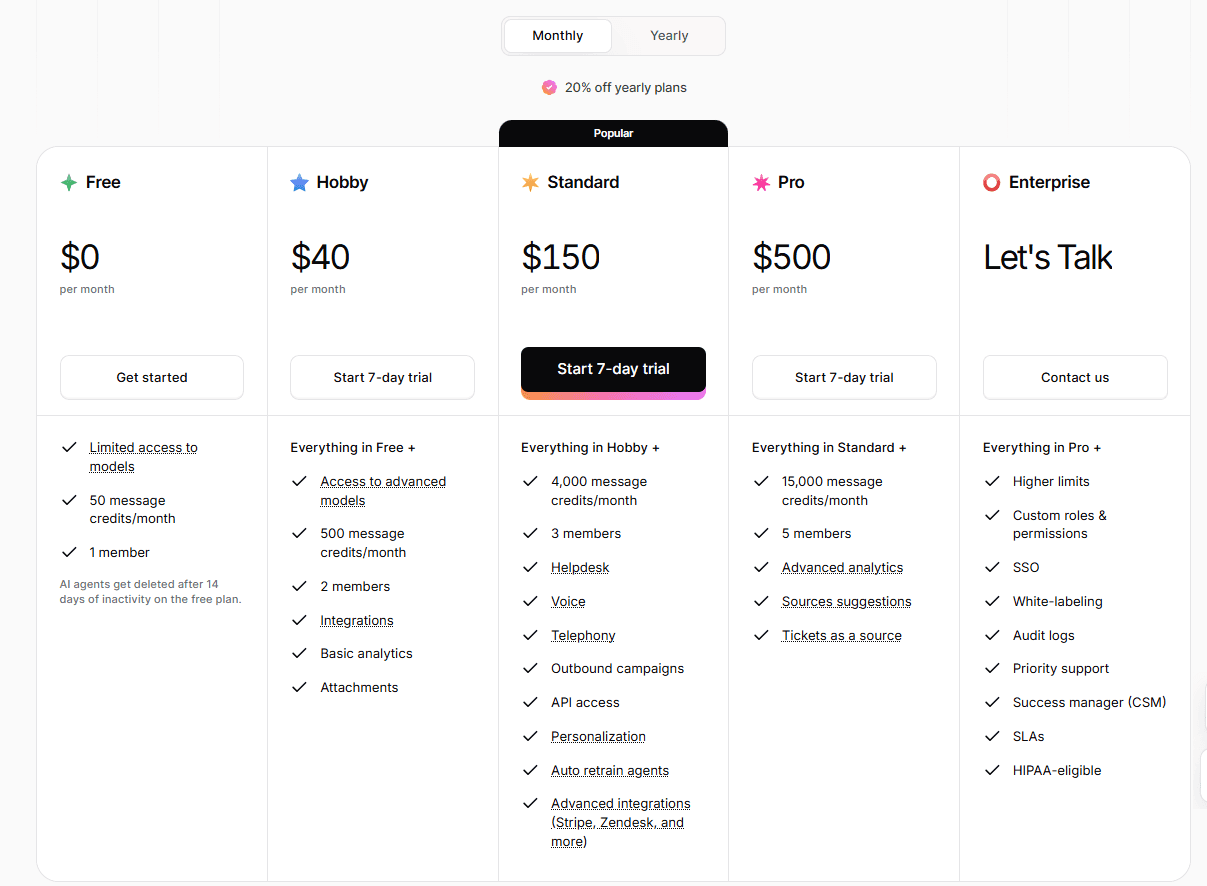
Free ($0/month): 50 message credits, 1 team member, limited model access. Good for testing. Note that agents get deleted after 14 days of inactivity, so it's built for active evaluation, not a slow trial.
Hobby ($40/month): 500 credits, advanced AI models, integrations, basic analytics, up to 2 members. This is where most small businesses start.
Standard ($150/month): 4,000 credits, API access, helpdesk, voice, telephony, auto-retraining, advanced integrations like Zendesk and Stripe. Built for support teams going multi-channel.
Pro ($500/month): 15,000 credits, advanced analytics, up to 5 members, tickets as a knowledge source.
Enterprise (custom): SSO, white-labeling, audit logs, HIPAA-eligible deployment, dedicated CSM.
Disclaimer: Chatbase offers a 7-day free trial, but to claim it, you need to enter card details.
Start building, not just reading
Build AI chatbots and agents with WotNot and see how easily they work in real conversations.

Start building, not just reading
Build AI chatbots and agents with WotNot and see how easily they work in real conversations.
Start building, not just reading
Build AI chatbots and agents with WotNot and see how easily they work in real conversations.

The Credit Math Nobody Explains Upfront
Here's the part you need to understand before you pick a plan.
Chatbase bills by message credits, but not every message costs the same. The number of credits a single response consumes depends on which AI model you choose. A basic model costs less per message. A more advanced model like GPT-4o costs significantly more for the exact same response.
So when you see "500 credits" on the Hobby plan, that does not mean 500 conversations. Depending on your model choice, it could be far fewer. Same plan, very different runway.
And here's the detail that catches people off guard: if your bot uses actions, a single user message can consume multiple credits. Chatbase confirms this in their own docs. Say a customer asks to book a meeting and your bot has a calendar action. The bot makes one request to check available slots, then a second request to generate the reply. That's two requests and two times the credits for what looks like one message. Stack a few actions together, and a single conversation can quietly burn through your allowance.
The tip that saves you money here: Match the model to the job. You don't need your most powerful model answering "What are your hours?" Use a cheaper model for simple FAQ deflection and save the premium model for genuinely complex questions. If you're running action-heavy flows, watch your credit consumption closely in the first few weeks, because it adds up faster than the headline number suggests.
One more thing worth knowing: Subscription credits do not roll over. They reset at the start of each calendar month regardless of when you signed up. If you want credits that don't expire, that's the auto-recharge add-on ($40 per 1,000 credits), which tops you up automatically when you dip below a threshold you set.
Watch the Add-On Costs
The headline plan price isn't always the full picture. A few common needs sit outside the base tiers as paid add-ons:
Remove "Powered by Chatbase" branding: $99/month. Worth noting, since white-label branding is something many businesses assume is included and it isn't until Enterprise.
Extra agents: $25 per agent per month beyond your plan's limit.
Auto-recharge credits: $40 per 1,000 non-expiring credits.
None of these are dealbreakers, but they're the kind of things that turn a $40 plan into an $80 plan once you account for what you actually need. Factor them in before you compare Chatbase's price to anything else.
The Plan Jumps Are Steep
One thing worth flagging: the gaps between tiers are large.
Going from $40 to $150 to $500 is a big jump each time. If your usage lands between two plans, you'll likely feel like you're either constantly hitting your cap or paying for far more than you use.
This is where the auto-recharge add-on can help. If you're only a little over your plan's credits, topping up is often cheaper than jumping to the next tier just to get more headroom.
But zoom out for a second, because there's a bigger point here. Credit-based pricing rewards low volume and punishes success. Your bill climbs exactly when your bot gets popular, which is the opposite of what you want. Some platforms, WotNot included, price on conversations rather than model-weighted credits, which makes your monthly number far easier to forecast. If predictable costs matter more to you than a low entry price, it's worth comparing the two models against your expected volume before you commit.
What Real Users Say
I've woven observations throughout this review, but it's worth stepping back to look at the overall sentiment, because there's an interesting split depending on where you look.
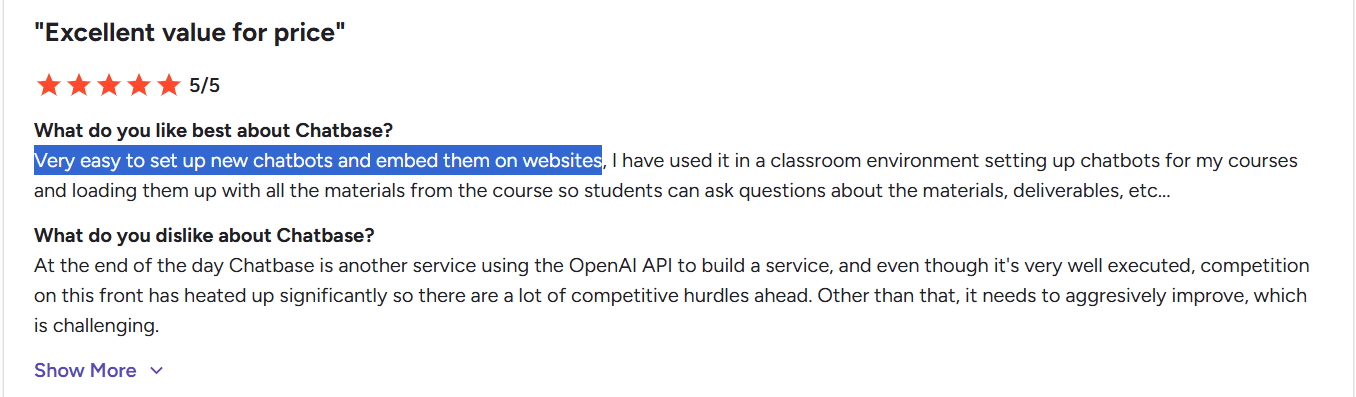
On G2, the sentiment skews positive. The recurring themes are exactly what you'd expect: fast setup, ease of use, and no coding required. Reviewers consistently praise how quickly they get value.

On Reddit, the tone is more skeptical:

One widely discussed thread frames Chatbase as "basic RAG" that's making millions, with the underlying question being whether you're paying a premium for something you could build yourself. The honest answer, for most non-technical teams, is that the convenience is worth it. But if you have a developer and specific needs, that skepticism is fair.
The recurring complaint across both is pricing and credit consumption. When a bot gets popular, credits drain faster than expected, and the monthly cost climbs. This comes up again and again, so budget with headroom.

The pattern is clear enough: people love the speed and simplicity, and they get frustrated when they either outgrow the Q&A model or get surprised by usage costs. Both are predictable if you go in with your eyes open.
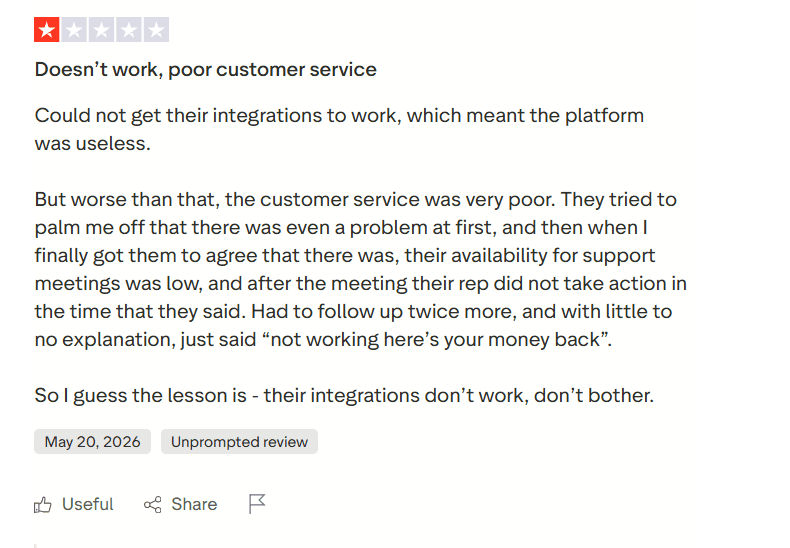
On Trustpilot, the recent picture is rougher, and the complaints cluster around three themes that are worth taking seriously.
The first is support. Multiple reviewers describe reaching out with a real problem and getting either silence or a runaround. One Standard plan customer described eight days of silence after their bot hit a training limit on less than 1MB of data, and then being refused a refund. Another described support that first denied there was a problem at all, then eventually just refunded them with a curt "not working, here's your money back." The recurring word in these reviews is a lack of empathy, a sense of talking to automated sequences rather than people.

Source: Trustpilot
The second theme is integrations that don't deliver. More than one reviewer signed up specifically for integrations and couldn't get them working, which for them made the whole platform unusable. If integrations or webhooks are central to your plan, and note that webhooks are limited by integration count, with the $150 tier reportedly capping at 8; this is something you need to verify during your trial rather than after you've paid.
Source: Trustpilot
The third, and the one I'd weigh most heavily, is aggressive monetization over time. A customer of more than three years wrote something that stuck with me: as Chatbase built up its client base, usage costs tripled and plan features disappeared. They described being pushed off their existing plan toward new ones that cost three times more and offered less. Another review flagged frequent price changes outright.
How Chatbase Compares to Alternatives
If Chatbase doesn't fit, the right alternative depends on what specifically it's missing for you. Here are the three most common gaps and where to look for each.
1. Need live chat and human handoff, not just answers
This is the most common reason people move on from Chatbase. You want the FAQ deflection, but you also need live chat, human handoff, and a way to actually manage conversations when the bot can't cope.
That's where a platform with native live chat comes in. WotNot was built with this in mind: the bot handles what it can, and hands off cleanly to a human when it can't, inside the same system.
We definitely are a competitor, but this specific gap, the missing human safety net, is one we designed around from the start.
2. Need the bot to take actions, not just answer
Booking, updating records, routing cases, triggering workflows. If your support is a process and not just a Q&A, you need a platform built for structured flows. Chatbase can technically do some actions on higher tiers, but it's not the core of what it does. This is worth testing carefully against your actual use case before committing.
3. Need social and marketing automation.
If your real need is Instagram DMs, WhatsApp broadcasts, and social lead gen, Chatbase isn't the category. A tool like Manychat is purpose-built for that, and you'd be fighting Chatbase to make it do a job it was never designed for.
If you want to see exactly how WotNot and Chatbase stack up feature by feature, we've put together a detailed WotNot vs Chatbase comparison.
So, Should You Buy Chatbase?
Chatbase does one thing exceptionally well: turning your docs into fast, accurate answers. If your support is mostly repeat questions and your documentation is solid, it's a strong, affordable pick you can launch today.
Just go in with clear eyes on the recent support and pricing complaints, and test the integrations you need before you pay. The goal is to pick a tool that still fits twelve months from now, not just today.
And if the gaps in this review- live chat, predictable pricing, actions beyond Q&A- are the things you actually need, that's the space WotNot has spent years building around. You can try it free and judge it against everything you've read here.
FAQs
FAQs
FAQs
Is Chatbase worth it?
For simple, doc-based support, yes. If your goal is to deflect repeat FAQ questions and your documentation is clear, Chatbase gets you there fast and affordably. It becomes less worth it if you need workflows, live chat handoff, or the bot to take real actions, at which point you'll likely outgrow it.
Does Chatbase have a free plan?
Can Chatbase replace a customer support help desk?
What happens when you hit Chatbase's credit limit?
Can Chatbase do more than answer FAQs?
ABOUT AUTHOR
Hardik Makadia
Co-founder & CEO, WotNot
Hardik leads the company with a focus on sales, innovation, and customer-centric solutions. Passionate about problem-solving, he drives business growth by delivering impactful and scalable solutions for clients.
You may also like…
You may also like…



Start building your chatbots today!
Curious to know how WotNot can help you? Let’s talk.
Start building your chatbots today!
Curious to know how WotNot can help you? Let’s talk.