>
>
Intercom Review (2026): Features, Pricing, Fin AI, Pros and Cons, and Who It's Best For

18 min read
Intercom Review (2026): Features, Pricing, Fin AI, Pros and Cons, and Who It's Best For

Hardik Makadia

Let’s build your chatbot today!
Launch a no-code WotNot agent and reclaim your hours.
*Takes you to quick 2-step signup.
Intercom charges you $0.99 every time its AI agent successfully answers a customer's question.
Let me reiterate: you pay more when the AI works better.
That single pricing decision tells you everything about where Intercom sits in 2026: category-leading product, category-leading price tag, and a billing model that has generated more Reddit threads than most SaaS companies generate in a lifetime.
And now Salesforce is buying the whole thing for $3.6 billion.
So is Intercom (now rebranded as Fin) still worth it? This review breaks down every feature, every plan, every catch, and the Salesforce acquisition's implications, so you can decide before you sign up.
What Is Intercom (Now Fin) and Why Do People Use It?
Intercom review in one line: it is an AI-first customer service platform that combines a messenger widget, a helpdesk, and an AI agent (Fin) that resolves support queries end-to-end across channels.
Origin:
The company was founded in 2011 and started as a messaging tool for internet businesses to talk to their customers. Over the years, it narrowed its focus to customer support. Then AI happened.
Current Trajectory:
For the last three years, the entire company has been rebuilt around Fin, its AI agent. In May 2026, Intercom rebranded its corporate entity to "Fin." A month later, Salesforce acquired Fin for approximately $3.6 billion, with the deal expected to close in Salesforce's fiscal Q4 2027.
Who uses it?
Mid-market and enterprise support teams, especially B2B SaaS companies with high inbound volume. The platform serves over 30,000 companies and resolves over 2 million conversations weekly through Fin alone.
User Opinions:
On G2, Intercom holds 4.5/5 across 3,890 reviews. On Capterra, it holds 4.5/5 across 1,134 reviews. On Trustpilot, it sits at 2.9/5 across 522 reviews, a gap that skews heavily toward billing complaints.
The pattern is consistent everywhere: users love the product, but hate the bill, finding it too expensive compared to the ROI. Both camps describe it accurately.
Note: The Salesforce acquisition is signed but not closed as of July 2026. Pricing and product are unchanged for now, but anyone signing a multi-year contract should factor in ownership uncertainty.
Let’s build your chatbot today!
Launch a no-code WotNot agent and reclaim your hours.
Let’s build your chatbot today!
Launch a no-code WotNot agent and reclaim your hours.
How to Get Started with Intercom?
It’s not much. All you need is an email address and about 15 minutes for the basics. But "the basics" and "getting real value" have a significant gap between them.
Creating an Account
Intercom offers a 14-day free trial with no credit card required. You can sign up with email or Google, answer a few questions about your team size and main requirement for the platform, and you land in a clean, modern dashboard.
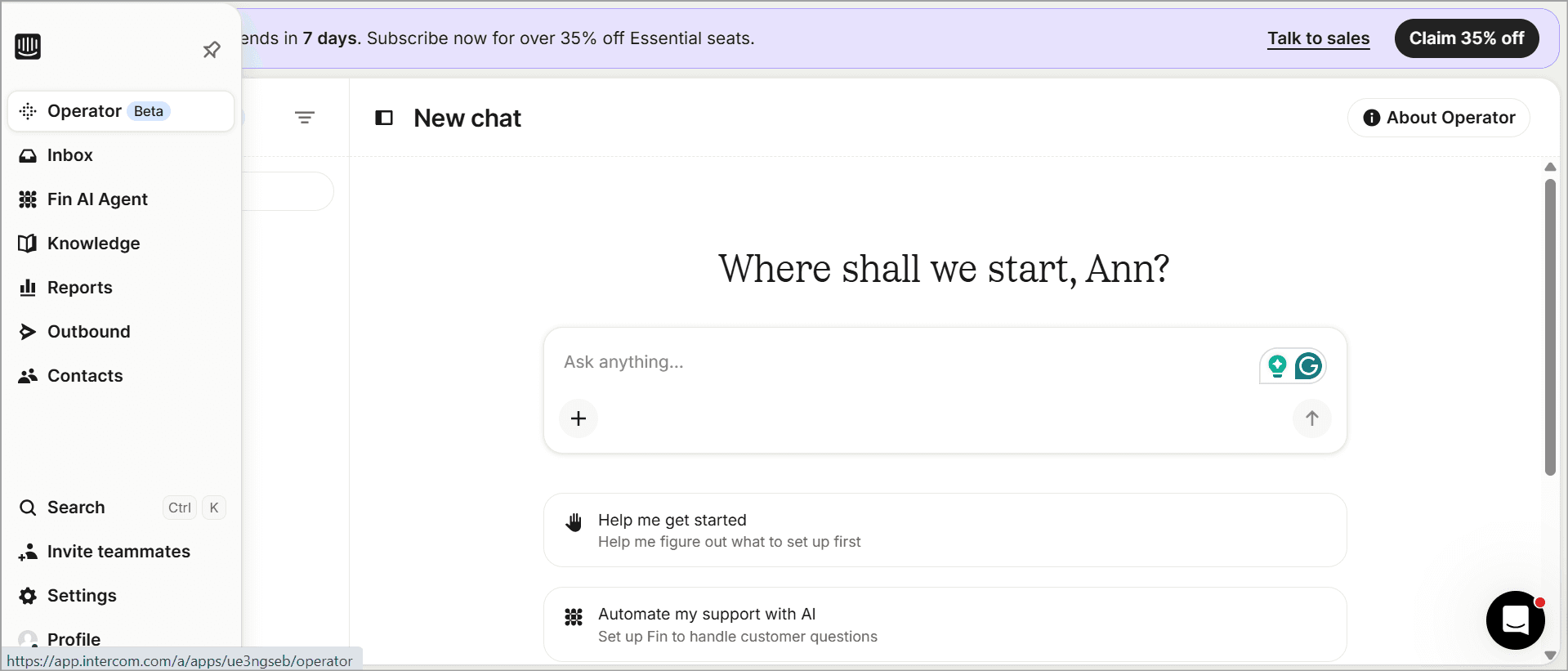
First impressions? The interface is polished when you first reach the main dashboard. The onboarding so far is also pretty straightforward.
Setting Up Fin AI Agent
Once you enter the Fin dashboard, you’ll see the Operator, which is the onboarding agent within Intercom that handholds new users to facilitate their start with the platform.
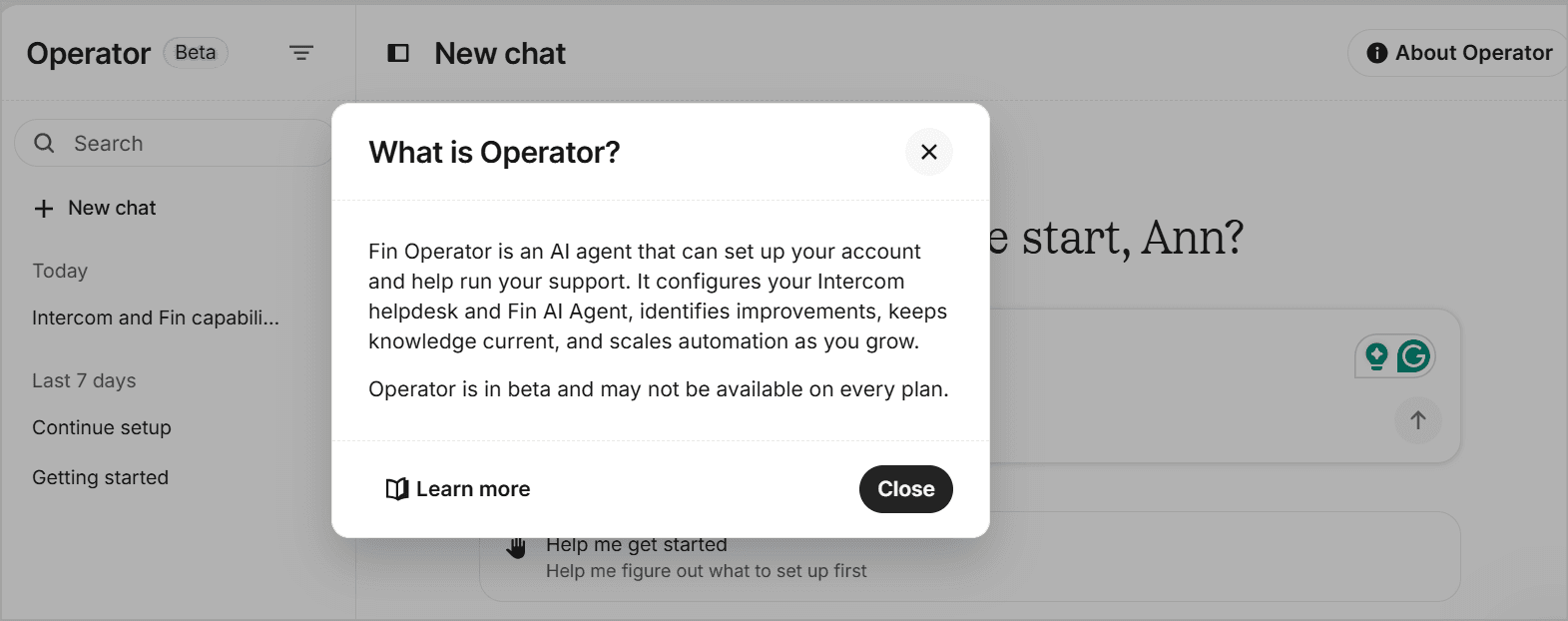
You can switch to the Fin AI Agent to start setting up your agent. Once you do, there are a couple of options Intercom offers you that define what is the genre of your agent is going to be. You’ll have to pick one of them to get started.
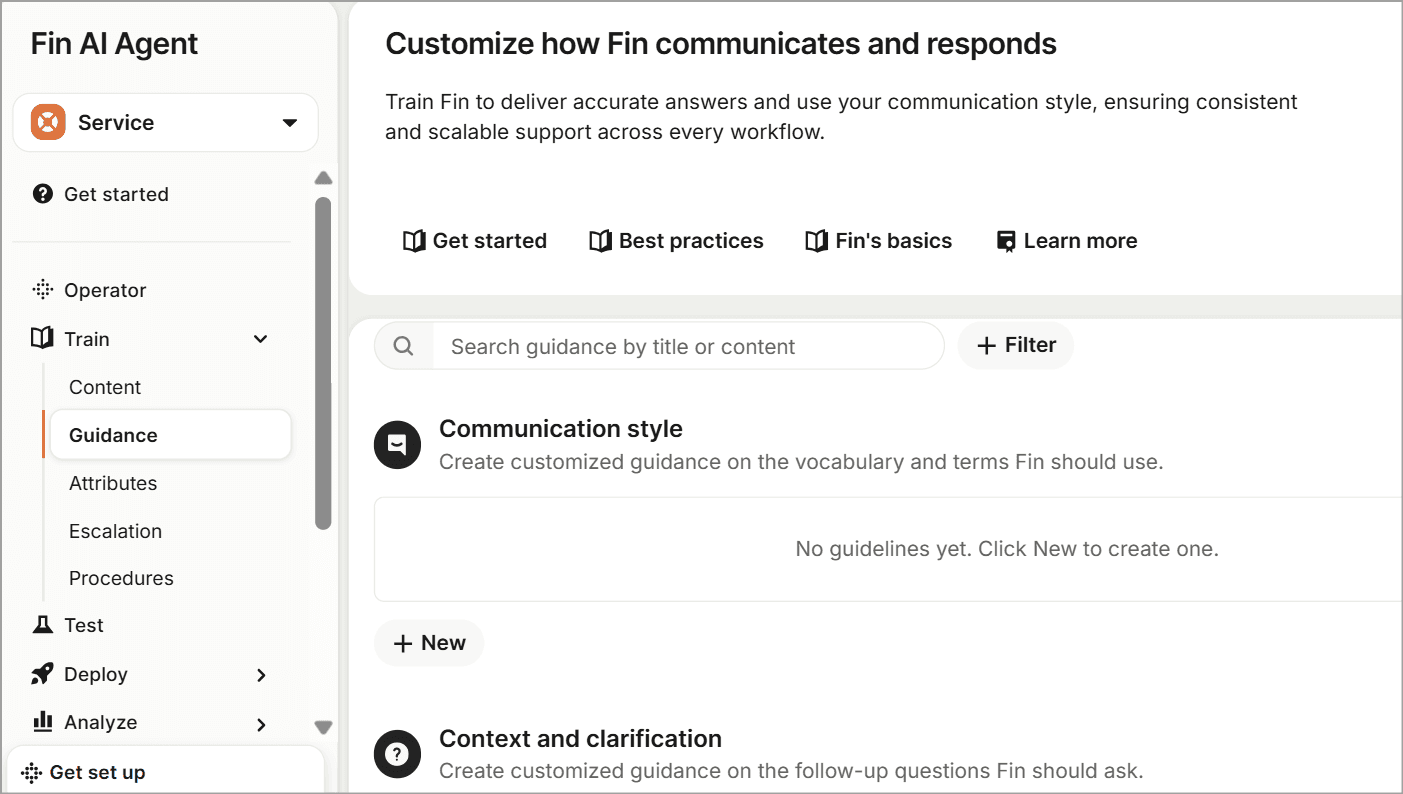
Fin runs on a four-step framework: Train, Test, Deploy, Analyze. This loop drives continuous optimization without needing code or technical know-how.
Under Train, Content is where you add the content Fin uses: help center articles, internal resources, FAQs, PDFs. You also configure Guidance (tone of voice, terminology, escalation rules) and Procedure (step-by-step instructions for complex actions like processing refunds or updating accounts). Attributes are factors you can set Fin to detect and act accordingly.
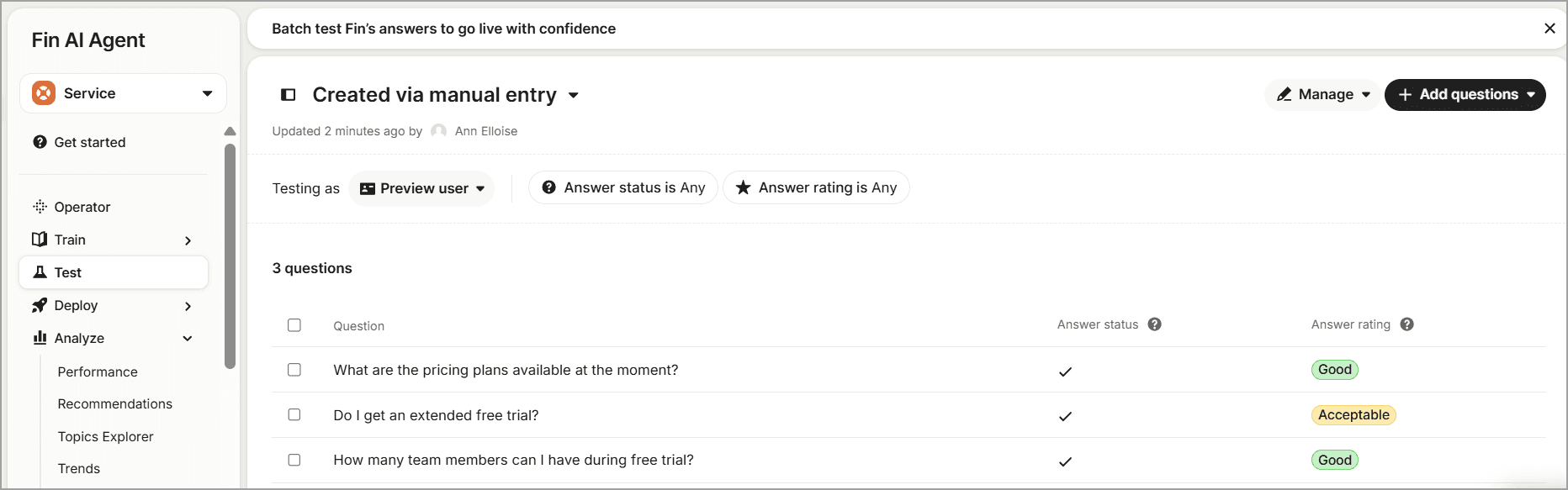
Test lets you generate batch questions from your conversation history or upload your own. Fin answers them, and you rate each response as Good, Acceptable, or Poor. If Fin can't answer something, it flags a content gap.
You can also test from the perspective of different customer types, regions, and segments. You’ll at least have to have three conversations to generate batch questions for testing.
Deploy pushes Fin live across your chosen channels: live chat, email, phone, SMS, social, Slack, and many more. Audience targeting on each channel gives you full control over the rollout pace.
Analyze surfaces AI-powered insights to keep driving performance. The aspects under Analyze are where the AI prowess in Fin actually becomes visible. It vets conversations to come up with Recommendations to improve resolution rates, suggests new topics (Topic Explorer) and Trends. This can prove to be very useful for fixing what's not working quickly.
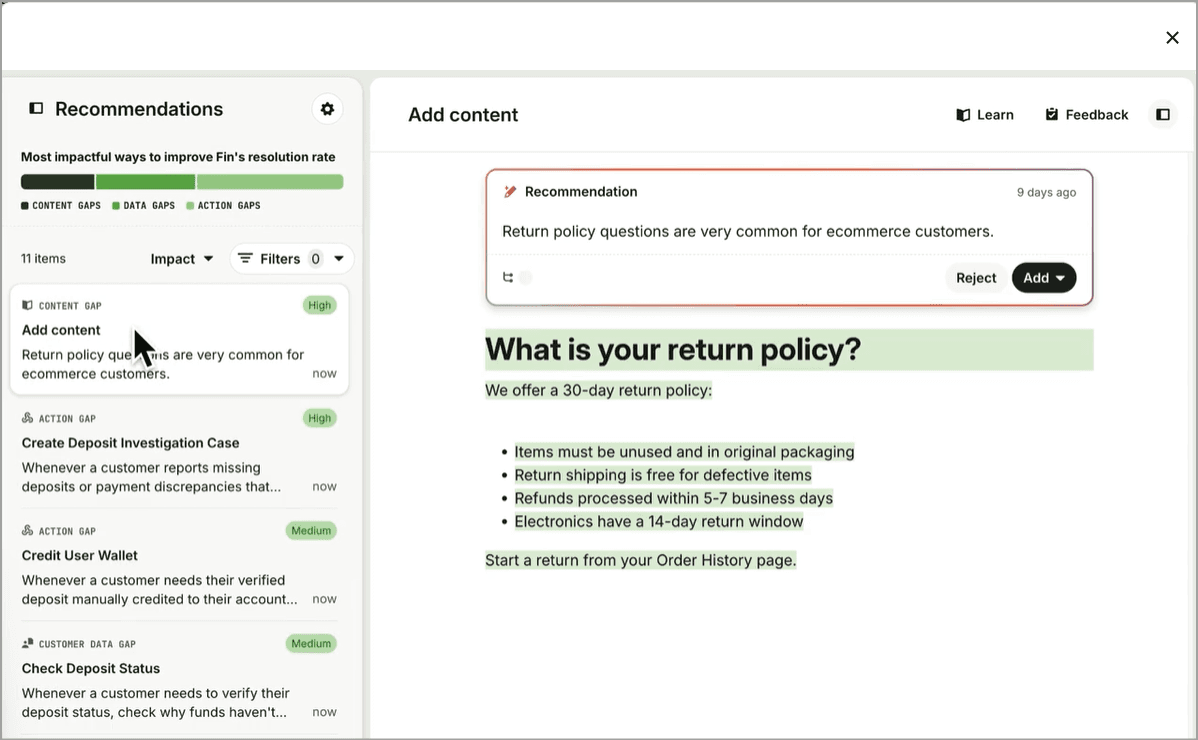
Monitor is another aspect of Analyze where you can set Fin to watch very specific conversations or performance metrics.
Can Fin be live in under an hour?
On a well-maintained knowledge base, yes. But here's the thing. Des Traynor, Intercom's co-founder, openly admits that the biggest barrier to higher resolution rates is not model intelligence. It's the configuration.
Businesses have to manually codify complex back-office policies: refund rules, approval chains, edge cases. Many customers just say "we'll let humans handle it" rather than writing everything out.
Setting Up the Helpdesk and Inbox
The inbox sits on the left panel. It is the communication hub where your team handles conversations in real time. Channels show up here: Messenger, email, phone, WhatsApp, Instagram, Facebook, Slack, SMS. You pick what you need during setup.
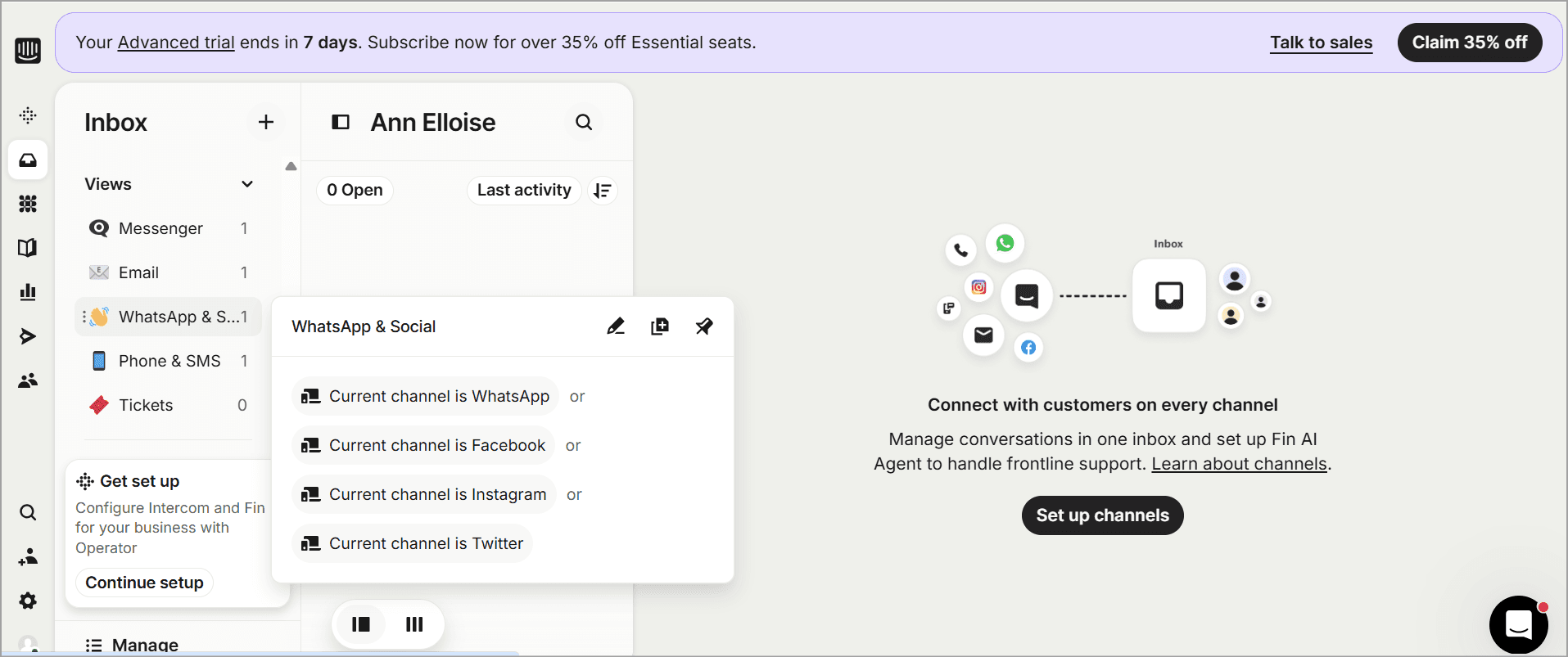
The setup here doesn’t take much, as the bare minimum is connecting the channels you will be using to converse with your audience. There are multiple filters to categorize chats, and you can even create separate inboxes for teams.
You get canned responses, macros, Fin AI suggestions, internal notes, and mentions for collaboration. When your team grows, auto-assignment rules route conversations to available agents. You can even create a ticket out of a conversation when the problem can’t be solved immediately and needs to be escalated.
For a team under 10 people, the inbox setup is self-explanatory. Larger teams spend more time defining routing rules, team inboxes, and department structures.
But the platform does not overwhelm you with enterprise-level configuration during onboarding.
Team Setup
Seats are tied to your plan tier. Essential, Advanced, and Expert determine feature access. Advanced includes 20 free Lite seats (limited collaborator access), and Expert includes 50.
One thing to watch: Lite seats are not agent seats. They are limited-access collaborator seats for non-support teammates who need occasional visibility. Do not plan your headcount around the free Lite allocation.
Time and difficulty: Basic setup (Messenger, live chat, knowledge base) is not complicated, much. Getting Fin optimized with Guidance, Tasks, and complex workflows takes significantly longer.
Reviewers report weeks of ramp-up for advanced deployments. The platform's breadth, including Messenger, Inbox, Outbound, Series, Tours, Help Center, Workflows, Fin, takes time to master.
Detailed Overview and Review of Intercom's Core Features
Now that setup is covered, let's get into what the platform actually does. And there is a lot of it.
Fin AI Agent
Fin does not simply run on GPT. Fin is a purpose‑built, multi‑phase AI engine built for one job: resolving customer support queries end-to-end.
The architecture uses Intercom's proprietary Apex 1.0 model for chat and email, and Apex Flash for low-latency voice. Under the hood, Fin uses Claude Sonnet for direct answer generation, in-house post-trained LLMs built on Qwen for specialized tasks, and selective OpenAI and Anthropic models for other components.
Per VentureBeat, Apex 1.0 achieved a 73.1% resolution rate in benchmarks, outperforming GPT-5.4 and Claude Opus 4.5.
When Fin hits its limit, it hands off to a human agent with full conversation context. No blank screens. No repeating the problem.
So what are the real resolution numbers?
Intercom's marketing claims 76% average across 12,000+ customers. Founder Des Traynor's honest framing in interviews: the average customer hits about a 65% resolution rate, but complex B2B SaaS caps lower.
Real limitations worth knowing:
Performance is directly tied to knowledge base quality. If your help center is thin or outdated, Fin underperforms.
Complex back-office rules require manual policy coding setup.
The "assumed resolution" billing loophole inflates reported resolution rates for some customers.
Messenger
The customer-facing chat widget. Widely called the cleanest UX in the category, and it is hard to argue.
The Messenger embeds directly in-app or on-site. It surfaces help articles, bot flows, and human chat in a single surface. Customizable branding, multilingual support, and a mobile experience that actually works. This is the product that built Intercom's reputation before Fin existed.
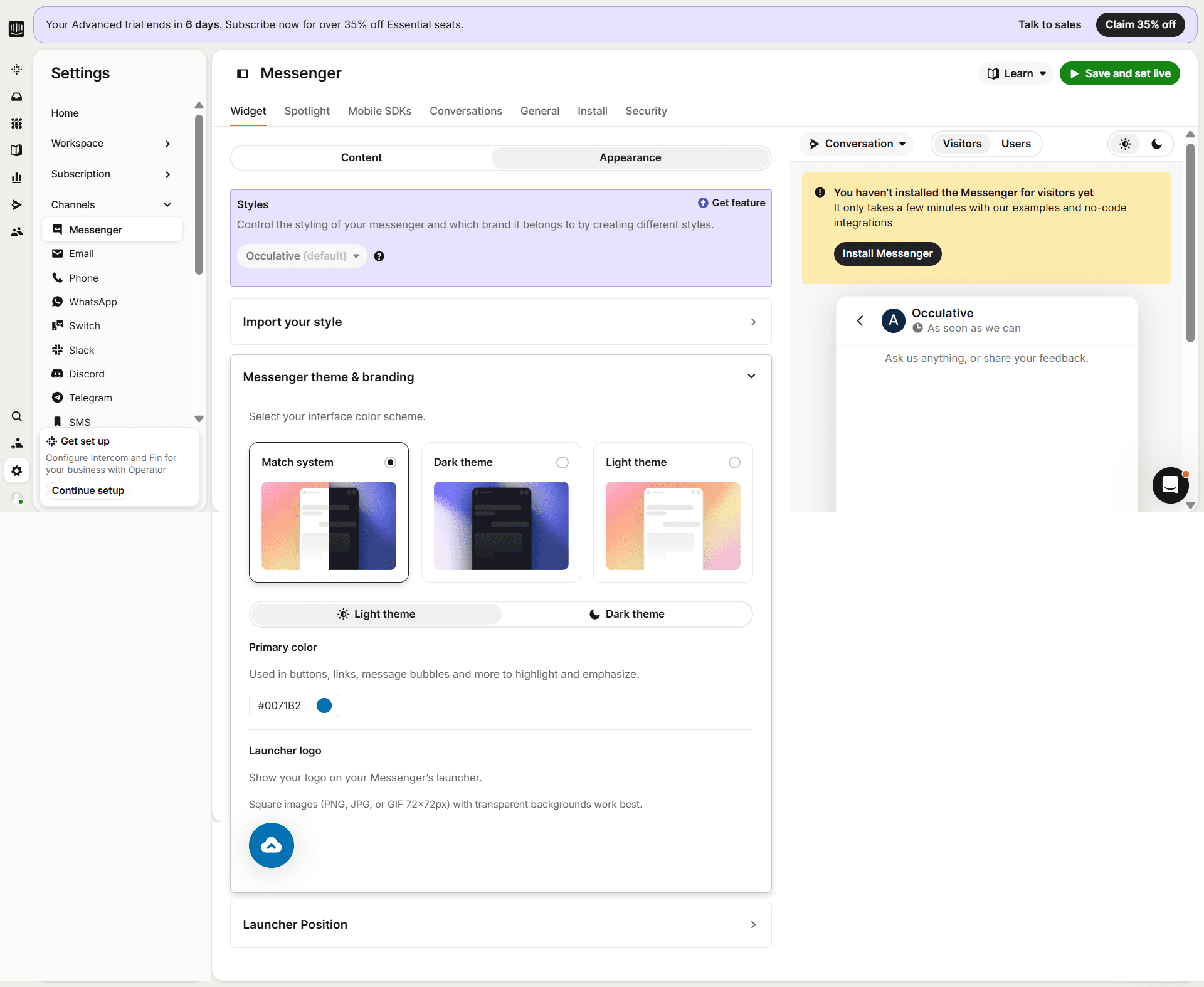
If you are evaluating customer service tools and Messenger UX is your top priority, Intercom wins. No one else comes close on the widget itself.
Inbox, the Messaging Hub
To recap what we’ve already discussed about the Inbox in the set-up section, the integrated communication dashboard pulls conversations from all channels into one view. You get assignment rules, team inboxes, SLAs (Expert plan only), macros, canned responses, internal notes, and mentions.
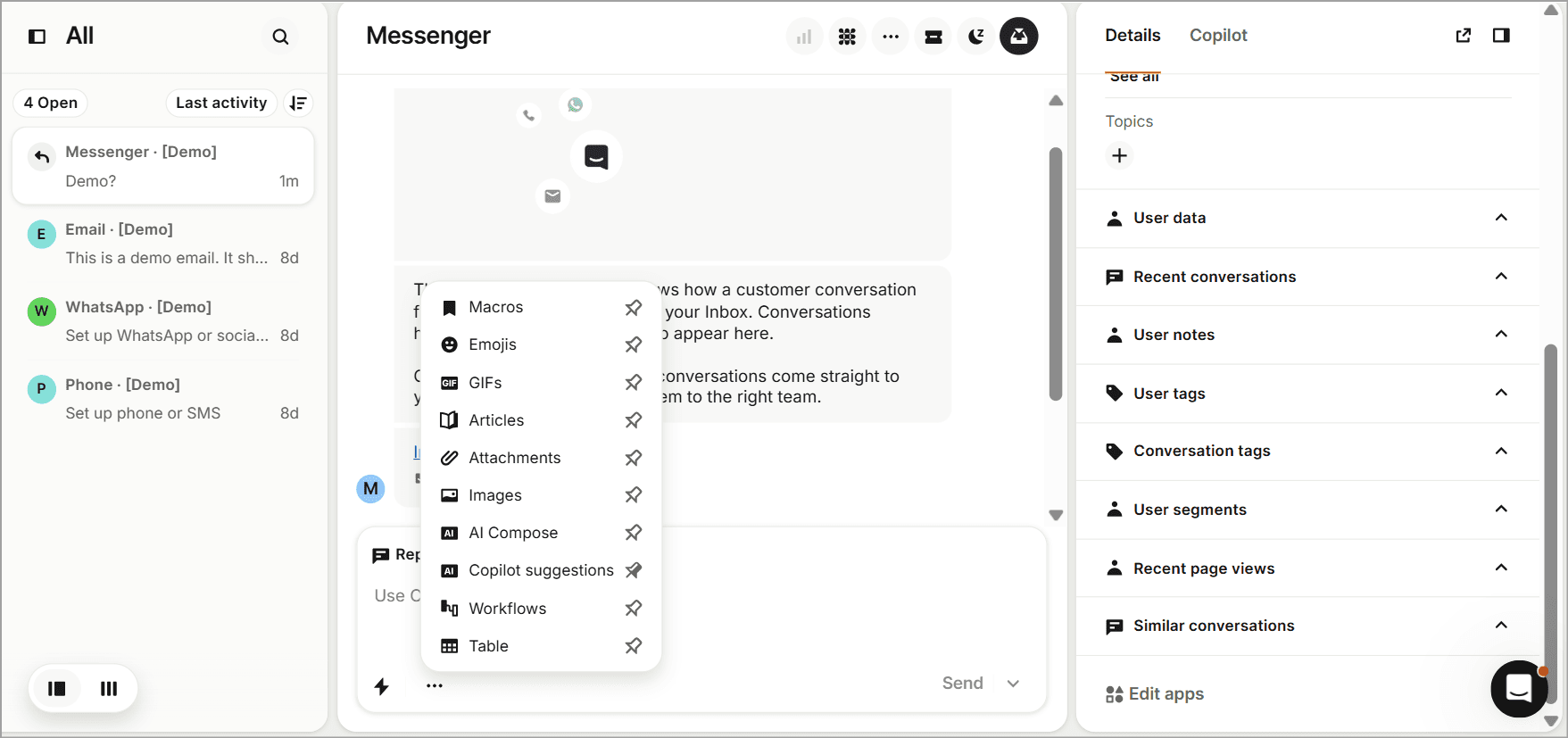
There is a built-in AI Compose that can rewrite, elaborate, or shorten whatever you've drafted. For email threads, it summarizes the full conversation history.
Agents can collaborate internally while handling a specific conversation, sharing notes in real time within the chat without the customer seeing them.
Ticketing
Intercom’s ticketing system keeps support organized across three types:
Customer tickets: Two-way, customer-facing support.
Back-office tickets: Internal requests for teams like finance or engineering.
Tracker tickets: Link multiple conversations around bugs, outages, or other widespread issues.
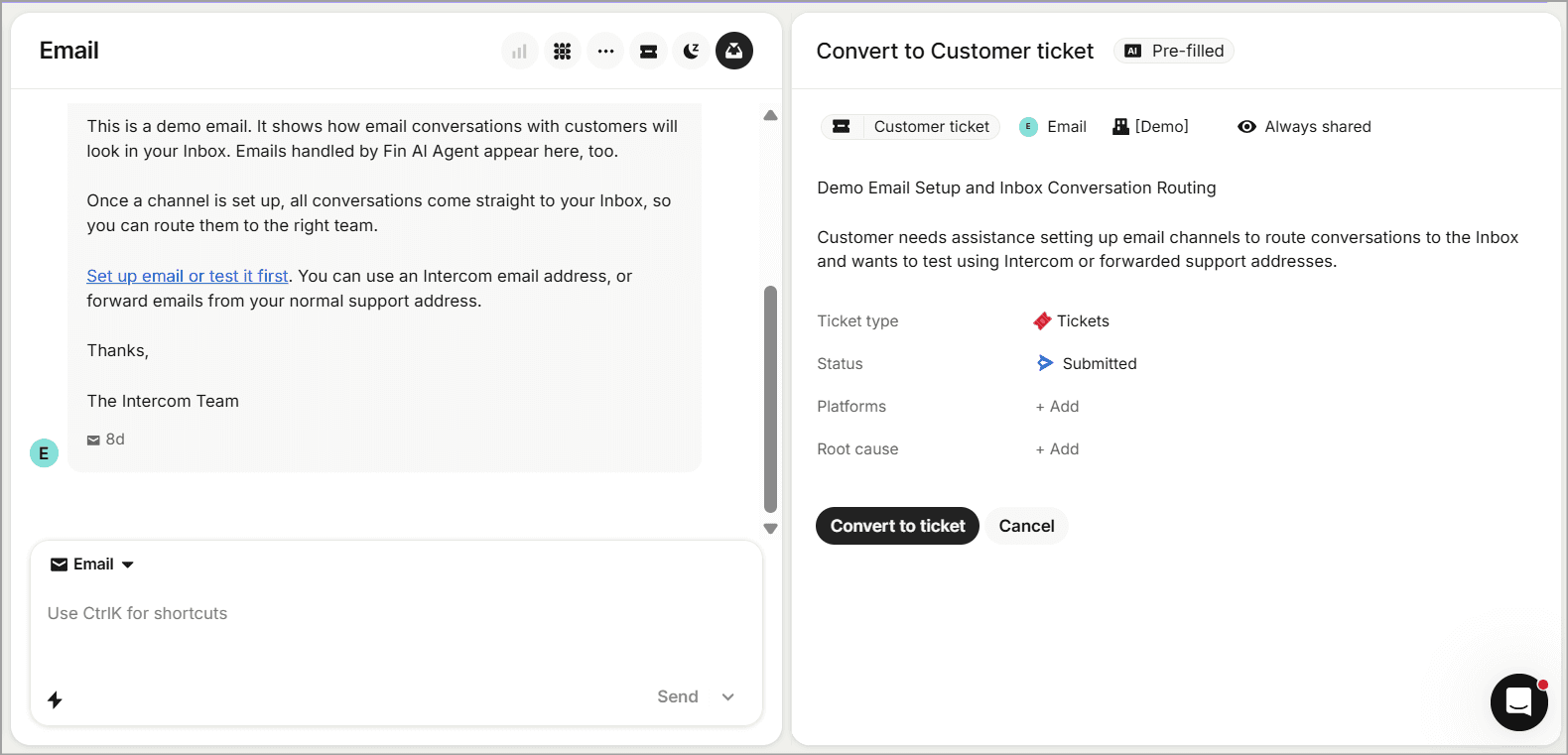
You can convert conversations into tickets, create custom ticket types, configure fields, automate routing, and customize ticket statuses. It’s a solid blend of conversational support and structured ticketing.
The honest trade-off: It doesn’t offer the queue depth and SLA controls of dedicated platforms like Zendesk.
Copilot (AI Agent-Assist)
Copilot is the AI assistant that sits inside the inbox for your human agents. It suggests replies, summarizes conversations, auto-translates, and pulls relevant context, making it easy for Agents to handle conversations and solve queries in real time. You can enable content access (uploaded by you for training Fin) for it to draw relevant info and assist you with on-brand responses.
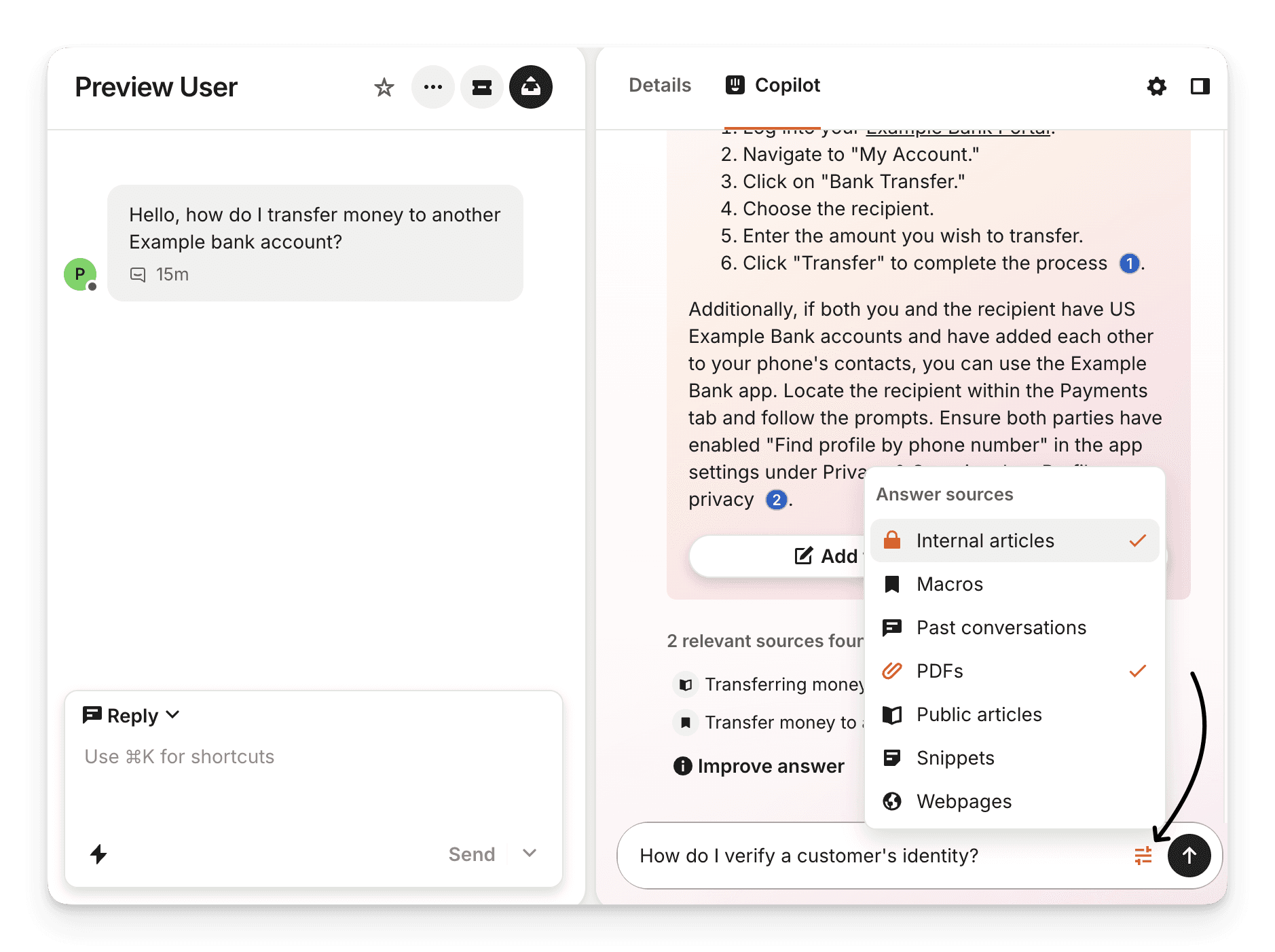
Every plan includes free "included usage" of 10 Copilot conversations and 10 AI auto-translation conversations per agent per month. Unlimited usage is a separate add-on ($29-35/seat/month).
Which brings us to a subtle but important point: Copilot (agent-side AI) and Fin (customer-side AI) are billed separately. If you want both, you are paying two AI charges on top of your seat costs. That stacking is part of why Intercom's real bill surprises people.
Workflows and Automation
Intercom’s Workflows is a no-code, drag-and-drop visual automation builder with triggers, conditions, and actions, which is similar to a lot of chatbot builders you might’ve seen. Available on Advanced and above, which means not on Essential.
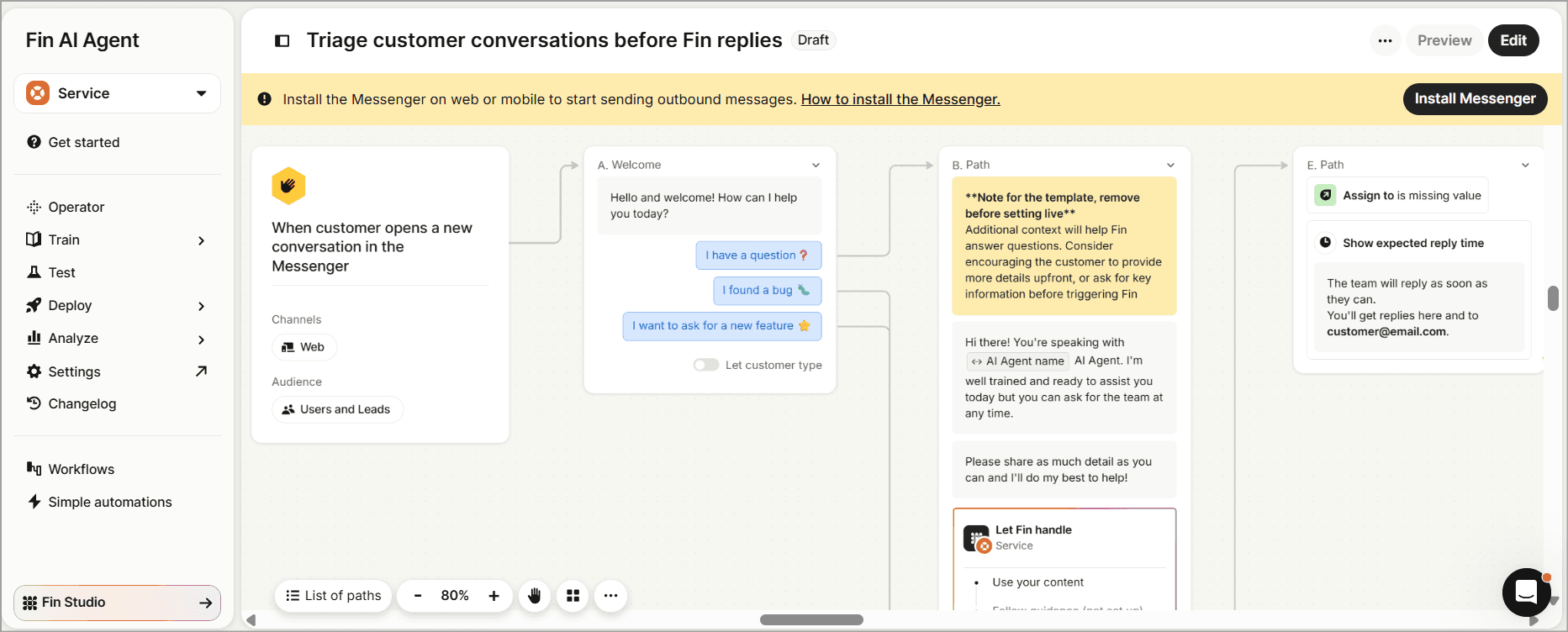
You can route conversations, assign to teams, send automated messages, update data, and build multi-step sequences. The builder is flexible.
Workflows can run across chat, email, WhatsApp, SMS, Instagram, Facebook, Slack, and phone. The workflow lets you automate in two ways:
Customer-facing workflows: Interact directly with customers through messages, buttons, and forms.
Background workflows: Run silently behind the scenes to handle tasks like auto-tagging conversations, routing conversations, assigning SLAs, snoozing inactive threads, and updating ticket statuses.
The trigger system gives Workflows much of its flexibility. They can also trigger when a teammate updates an assignment, adds a note, or changes a ticket state.
From there, you can build conditional paths, for example, routing high-value customers to a priority inbox or assigning conversations based on language or plan tier.
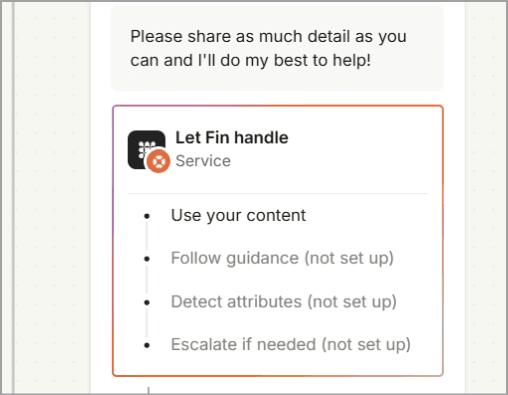
You can even add “Let Fin handle” at any point, allowing Fin to handle the conversation and escalate to a human when needed. Reusable workflows and templates make common processes easier to set up.
But the learning curve is real. Debugging complex workflows can get confusing, and several G2 reviewers flag that the builder is easier to start than to maintain. Once your automation logic grows beyond a dozen branches, you will spend time untangling it.
Start building, not just reading
Build AI chatbots and agents with WotNot and see how easily they work in real conversations.

Start building, not just reading
Build AI chatbots and agents with WotNot and see how easily they work in real conversations.
Start building, not just reading
Build AI chatbots and agents with WotNot and see how easily they work in real conversations.

Outbound and Proactive Support
This is where Intercom's product-led bias comes through. It offers posts, product tours, surveys, banners, tooltips, checklists, series campaigns, and mobile carousels. The proactive engagement toolkit is one of the most complete in the category.
Basic proactive features (Banners, Tooltips) are included under all paid plans. The full suite (Product Tours, Surveys, Series, A/B testing) requires the Proactive Support Plus add-on at $99/month plus per-message overage pricing.
For SaaS companies doing in-app onboarding and activation, this is a genuine differentiator. Des Traynor predicts proactive support will become "the future battleground" once reactive resolution rates peak out.
Analytics and Reporting
The performance dashboard tracks conversation volume, resolution rates, response times, CSAT, agent performance, and Fin-specific KPIs. There is a CX Score that grades support quality across every conversation without requiring surveys.
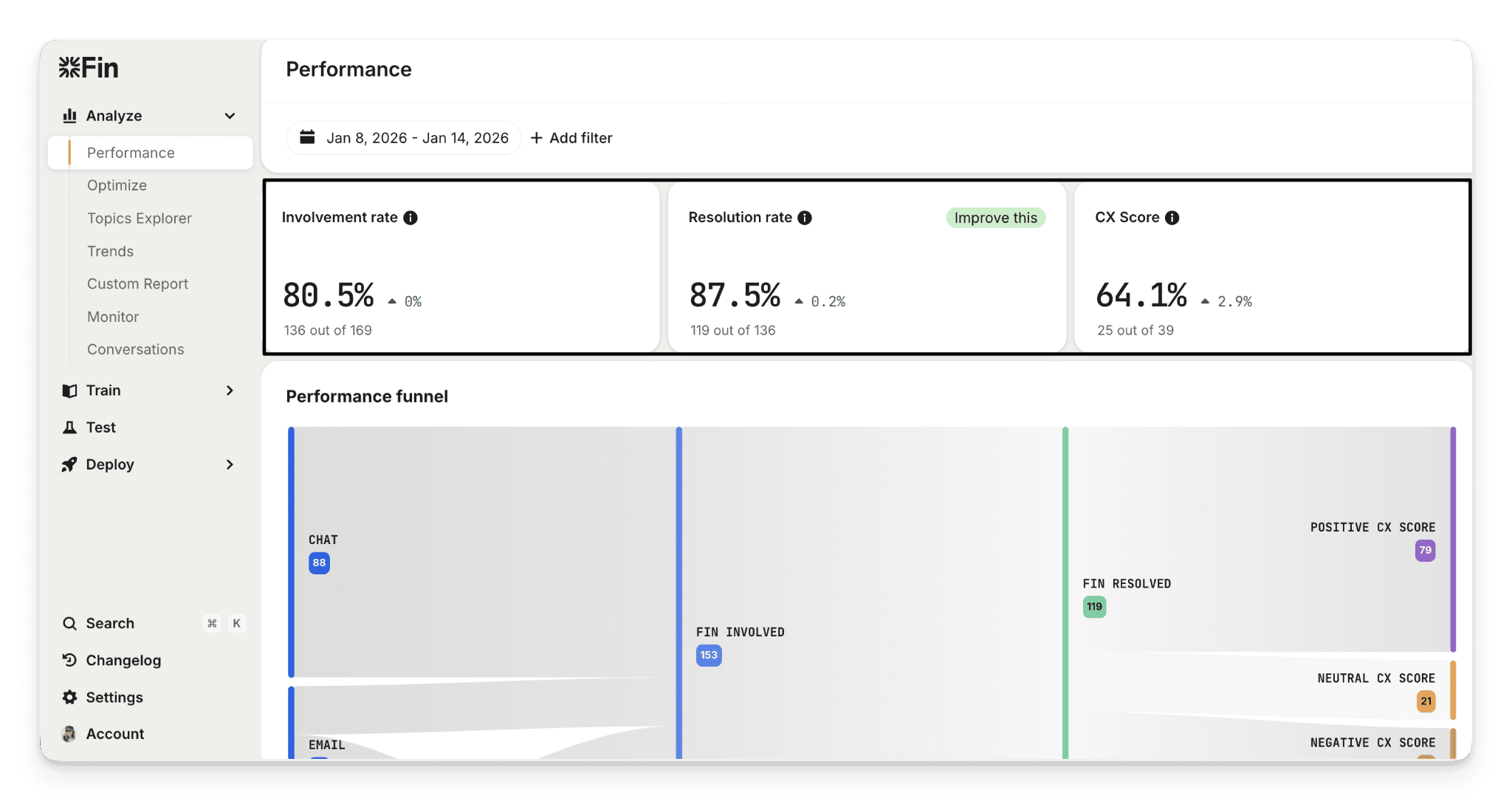
Topics Explorer helps you spot patterns, track trends, and catch emerging issues before they hit your customer experience. The Optimize tab surfaces AI-powered suggestions to improve Fin's performance.
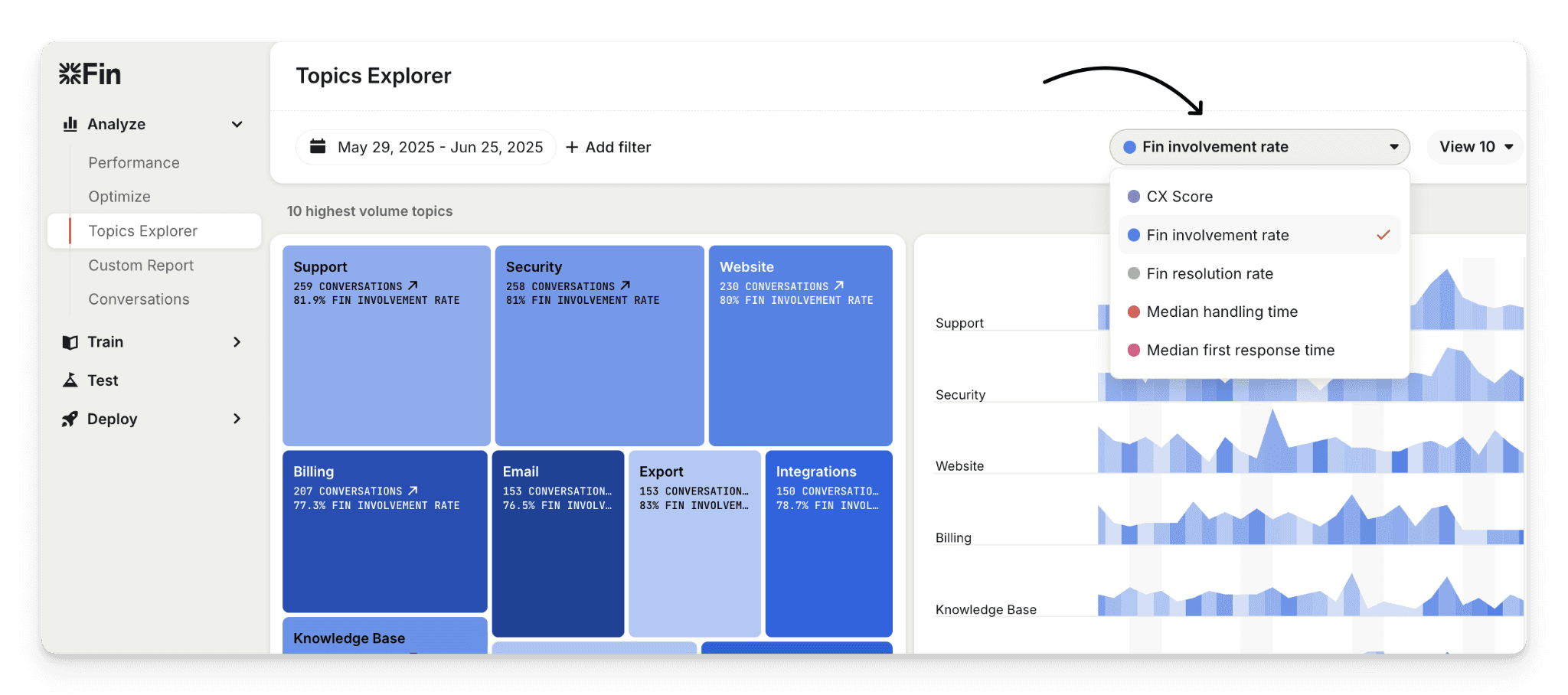
Here's the catch. The deeper analytics (Custom Report Builder, Reporting Dataset API, real-time dashboard) are gated to Advanced and Expert. The Pro add-on ($99/month) unlocks CX Score, Topics Explorer, Trends, Recommendations, Monitors, and Custom Scorecards. This became a paid add-on in March 2026. Features that were previously free.
Reviewers consistently call reporting the weakest pillar relative to what you pay. For a platform at this price point, you'd expect more depth.
The problems start when you need to decipher the results you see. Users on Intercom's own community forum describe the same frustration. No topic-level breakdown, or a way to separate confirmed resolutions (customer clicked "Yes, that helped") from assumed resolutions (customer just went quiet).
Multi-channel Support
Live chat, email, WhatsApp, SMS, phone (Fin Voice), Slack, Instagram, Facebook Messenger. Broad coverage.
Some channels (email campaigns, SMS, WhatsApp, Phone) are usage-billed on all plans. Live chat, support email, in-app chats, banners, and tooltips are free and unlimited.
The Messenger is the strongest channel by a wide margin. Some users report fragmented cross-channel visibility for conversations that bounce between channels. Not a dealbreaker, but worth knowing.
Integrations
Shopify, Slack, Salesforce, Jira, HubSpot, Stripe, Zapier, and more. Fin can sit directly on top of Zendesk without migrating anything. API access on all plans. Fin also works over API for custom deployments.
G2 feature ratings land around 86% for integrations and 89% for app connectivity. The ecosystem is strong and broad.
Security, Compliance, and Data Handling
Enterprise-grade. SOC 2 Type II, ISO 27001:2022, ISO 27018, ISO 27701, ISO/IEC 42001:2023 (that last one is a responsible-AI standard, audited by Schellman). HIPAA support on the Expert plan. GDPR, CCPA, and HDS compliant.
Data encrypted in transit (TLS 1.2+, 256-bit) and at rest (AES-256). Fin's AI Engine applies multi-stage safety checks (query validation, grounded retrieval, reranking, final validation) before responses reach customers. Regular external audits, pentests, and a bug bounty program.
Alongside Zendesk, this is the strongest compliance posture in the customer service category.
Skills You Need to Use Intercom
Intercom markets itself as easy to set up. That is true for the basics. But the full platform has a lot of functions, and encompassing them all requires more than just dragging and dropping.
Task | Skill level |
Live chat (answering, canned responses) | Beginner |
Widget customization | Beginner |
Knowledge base setup | Beginner |
Fin AI agent (training, Guidance configuration) | Intermediate |
Fin Tasks (refunds, order actions) | Intermediate |
Workflows/automation builder | Intermediate to Advanced |
Multi-brand / advanced configuration | Advanced |
API / custom integrations | Advanced |
The single most important skill for Fin's performance is knowledge base curation. If your help content is thin, outdated, or poorly organized, Fin will underperform regardless of how well you configure everything else. This is not a set-it-and-forget-it investment.
Intercom Pricing Explained
Here is where you need to pay close attention. Because the headline prices do not tell the whole story. Not even close.
All the Pricing Plans
Intercom sells access through per-seat plans, with Fin AI billed separately per resolution, and paid add-ons stacking on top. Three billing layers.
Plan | Annual price (seat/mo) | Monthly price (seat/mo) | Lite seats | Best for |
Essential | $29 | $39 | None | Tiny teams, basic inbox |
Advanced | $85 | $99 | 20 free | Growing teams, workflows |
Expert | $132 | $139 | 50 free | Enterprise, SSO, HIPAA |
Fin AI Agent is $0.99 per outcome on all plans. That is charged on top of your seat costs. There is no free tier. Intercom retired its always-free Starter plan around late 2023. A 14-day free trial (no credit card) is available. An Early Stage program offers up to ~93% off for qualifying startups.
Essential ($29/seat/month annual)
This includes shared inbox, live chat, ticketing, Messenger, pre-built reports, and a public help center. No Workflows, Lite seats, or SSO.
Good for: Tiny teams that need a basic inbox and Fin AI on top.
Watch out: Most of what a real support setup needs (Workflows, assignment rules, private help center, multilingual) is gated to Advanced. Essential is the advertised entry point, but Advanced is the practical one.
Advanced ($85/seat/month annual)
Everything in Essential plus Workflows automation builder, multiple team inboxes, round-robin assignment, private and multilingual help center, 20 free Lite seats, Custom Report Builder.
Good for: Growing support teams that need real automation and reporting.
Watch out: The Essential to Advanced jump is roughly 3x. That's a steep cliff for a team that just needs one or two features above Essential.
Expert ($132/seat/month annual)
Everything in Advanced plus SSO and identity management, HIPAA support, SLAs, multibrand Messenger and help center, 50 free Lite seats, real-time dashboard.
Good for: Enterprise teams with regulatory requirements, multi-brand setups, or strict SLA needs.
Watch out: If you need HIPAA or SSO, this is your only option. There is no mid-tier path to compliance.
The Add-ons
This is where the bill starts to layer.
Copilot (unlimited usage): $35/seat/month (monthly) or $29/seat/month (annual). All plans include 10 free Copilot conversations per agent per month. Unlimited requires the add-on.
Pro: $99/month for up to 1,000 conversations analyzed, with tiered overages above that. Unlocks CX Score, Topics Explorer, Trends, Recommendations, Monitors, Custom Scorecards. Became a paid add-on in March 2026 (previously free).
Proactive Support Plus: $99/month base including 500 "Messages Sent." Tiered overage pricing from $0.07/message down. Unlocks Product Tours, Surveys, Series, Checklists, A/B testing.
How Fin's Per-Resolution Charges Users
This is the section that matters most. Because $0.99 per resolution sounds simple until you dig into what counts as a "resolution."
An "outcome" is one of four things: a Resolution, a Procedure handoff, a Disqualification ($0.99 each), or a Qualification ($9.99). Only one outcome is billed per conversation.
A resolution is counted when, after Fin's last answer, the customer either confirms it helped (confirmed resolution) or exits without asking for more help (assumed resolution). That second one is the problem.
"Assumed resolution" means: if the customer simply goes quiet after Fin's answer, whether they were satisfied or just gave up, it counts as a resolution and you are billed $0.99.
On Intercom's own community forum, a user documented checking 40 tickets where Fin got involved. 16 were marked as "resolved by Fin" (40% rate). On manual audit, 9 of those 16 were not actually resolved. The real resolution rate was 12.5%, but Intercom billed for all 16.
Hard usage caps and alerts (at 50/80/100% of monthly limits) can be set to prevent runaway bills. But the default is uncapped.
How Does Intercom’s Pricing Actually Work at Scale?
A 10-person team on Advanced (annual) with moderate AI usage:
10 seats × $85 = $850
2,000 Fin resolutions × $0.99 = $1,980
Copilot unlimited × 10 seats × $29 = $290
Total: ~$3,120/month. That's 3.7x the headline seat price.
Now if you scale it up, at 5,000 resolutions, AI fees alone hit $4,950/month ($59,400/year). Add Pro ($99) and Proactive Support Plus ($99), and the number keeps climbing.
The above math shows real-world costs typically run 2-4x the advertised seat price. Reddit threads document jumps from $4,000 to $9,000/month after enabling Fin at scale.
The more Fin resolves, the bigger your bill, and users often wonder if they can achieve the CSAT scores and performance efficiency like Fin through any other method and escape the inflated bill. This Reddit thread is the perfect example of what scaling Intercom users are facing.
Compare that to flat-pricing platforms like WotNot ($29/$99/$299 monthly, unlimited seats on Premium). The AI runs on your plan, not on a per-resolution meter. For teams where cost predictability matters more than having the category's shiniest Messenger, that tradeoff is worth weighing.
Performance and User Experience
Across review platforms, the scorecard tells a consistent story: best-in-class product, polarizing price.
Platform | Rating |
G2 | 4.5/5 |
Capterra | 4.5/5 |
Gartner Peer Insights | 4.1/5 |
Trustpilot | 2.9/5 |
What Users Like About Intercom
Messenger UX: The most praised attribute of Intercom, which is clean, fast, customizable, and embeds inside the app in a way that feels native, not bolted on.
Fin AI quality: Fast resolutions, grounded answers, and a conversational quality that most competitors don't match.
Modern, unified workspace: Messenger, helpdesk, AI, workflows, and outbound in one platform. For teams that want a single vendor, this works perfectly.
Easy basic setup: Widget live in minutes. Fin live in under an hour on a good knowledge base.
Strong integrations: This includes Shopify, Slack, Salesforce, Jira, HubSpot, Zendesk, Zapier. Fin can accommodate existing helpdesks without migration.
Proactive engagement tools: Product Tours, Series, Surveys, and in-app messaging that most competitors don't offer at all.
Where Users Face Issues
Pricing unpredictability: The dominant complaint everywhere. Stacked seats + per-resolution + add-ons make the bill hard to forecast and punish scale.
Constant upselling: Features migrate to pricier plans over time, and nearly every advanced capability requires an add-on purchase.
"Assumed resolution" billing: Customers billed for conversations Fin didn't actually resolve.
Steep advanced learning curve: The platform's breadth "takes weeks" to master. The workflow builder is easier to start than to debug.
Reporting depth: The most common feature complaint alongside pricing. Deeper analytics gated behind higher plans and paid add-ons.
The Salesforce Acquisition: What It Means for Current and Future Users
This section did not exist six months ago. But it is too significant to skip.
Timeline:
May 2026: Intercom rebrands its corporate entity to "Fin"
June 15, 2026: Salesforce signs a definitive agreement to acquire Fin for approximately $3.6 billion
Expected close: Salesforce fiscal Q4 2027, subject to regulatory approval
What we know: Salesforce plans to fold Fin's technology into Agentforce. Pricing and product are unchanged for now.
What it means for buyers: Roadmap uncertainty. Potential repackaging under Salesforce's ecosystem, which might lead to possible pricing and positioning shifts post-close. For teams already deep in Salesforce, this could be good news but not so much for people who don't want to use Salesforce.
Practical advice: Prefer annual over multi-year contracts until post-close clarity emerges. Evaluate whether your use case would survive a product repackaging. If independence and roadmap control matter to your team, factor that into the decision.
Top 3 Intercom Alternatives
If Intercom doesn't fit, these three are worth a look. For a deeper comparison, see our list of Best Intercom Alternatives for 2026.
Alternative | Best for | Why consider it |
WotNot | Teams wanting flat pricing and multi-LLM AI agents | No-code builder, multi-LLM AI Studio, flat monthly pricing ($29-$299), unlimited seats on Premium, WhatsApp included across tiers, no per-resolution billing |
Zendesk | Enterprise teams needing deep ticketing | The enterprise ticketing standard. 1,300+ integrations. Deeper SLAs and audit logging. AI per-resolution cost is higher (~$1.50-2.00) but operational depth is unmatched |
Freshdesk | Cost-sensitive SMBs wanting a free tier | Free plan for small teams, paid from ~$15-19/agent/mo, Freddy AI on Growth plan. Best value in the category |
Who Should Use Intercom (and Who Should Not)
Intercom fits some teams perfectly. For others, it's the wrong tool entirely.
Intercom is a strong fit for:
Product-led SaaS companies with in-app support needs
Mid-market teams (10-30 agents) with high inbound volume and a well-maintained knowledge base
Teams that prioritize Messenger UX and proactive engagement over everything else
Companies already in or moving toward the Salesforce ecosystem
Who should look elsewhere:
Small teams under 5 agents or low support volume (the cost doesn't justify)
Budget-constrained SMBs wanting predictable monthly billing
Teams without a well-maintained knowledge base (Fin underperforms without it)
Companies that need deep enterprise ticketing granularity (Zendesk owns that)
Anyone uncomfortable committing to a platform mid-acquisition
The Best AI Agent With an Unpredictable Bill
So, should you use Intercom in 2026?
For the right buyer, absolutely. If you run a product-led SaaS, have a well-maintained knowledge base, carry meaningful support volume, and can tolerate a bill that scales with AI success, Fin is the strongest AI agent in customer service. The Messenger is unmatched. The platform is mature, capable, and genuinely product-led.
But go in with clear eyes. The stacked billing model (seats + per-resolution + add-ons) makes this the most expensive way to scale AI support. The "assumed resolution" mechanic inflates reported performance. The Salesforce acquisition adds a layer of roadmap uncertainty that did not exist six months ago.
Model the real bill at projected volume. Audit your resolution rates against actual transcripts. Set hard usage caps from day one. And if you are signing a multi-year contract, think carefully about what post-acquisition Intercom looks like.
The product earns its reputation. The pricing earns its complaints.
FAQs
FAQs
FAQs
Is Intercom really worth it in 2026?
For mid-market SaaS teams with high support volume and a good knowledge base, yes. Fin AI is the strongest AI agent in the category, and the Messenger UX is unmatched. But for small teams, low-volume setups, or anyone on a tight budget, the per-resolution billing and add-on stacking make it harder to justify. Budget for 3-4x the headline seat price to get the real number.
How much does Intercom actually cost per month?
Is Intercom HIPAA compliant?
How long does it take to set up Intercom?
ABOUT AUTHOR
Hardik Makadia
Co-founder & CEO, WotNot
Hardik leads the company with a focus on sales, innovation, and customer-centric solutions. Passionate about problem-solving, he drives business growth by delivering impactful and scalable solutions for clients.


Start building your agents today!
Curious to know how WotNot can help you? Let’s talk.
Start building your agents today!
Curious to know how WotNot can help you? Let’s talk.