17 min read
Is Lindy Worth It? An Honest Lindy AI Review (2026)

Hardik Makadia

Let’s build your chatbot today!
Launch a no-code WotNot agent and reclaim your hours.
*Takes you to quick 2-step signup.
Lindy has a 4.9 out of 5 on G2. On Trustpilot, it has a 1.7. I've looked at a lot of software reviews, and I've rarely seen a gap that wide.
It's the kind of split that usually means someone's gaming the numbers. But when I actually read through both sides, that wasn't it at all.
Both sets of reviews are real. The G2 reviewers are describing the first few weeks, when you connect your inbox, set up an agent in ten minutes, and it genuinely feels like magic. The Trustpilot reviewers are describing what came after: the credit bill, the agent that misfired on something that mattered, the support ticket nobody answered.
Same product. Different chapters of the same story.
Lindy also changed a lot in early 2026. It used to be a tool for building AI agents. Now it's positioned as a personal AI executive assistant that runs your inbox, your calendar, and your follow-ups. So if you've read older reviews, some of what you saw no longer applies.
This review covers what Lindy is today, what it does genuinely well, where it starts to break, and what it really costs once the honeymoon ends.
Quick Verdict: Is Lindy Worth It?
If your days are eaten by inbox triage, scheduling, and follow-ups, Lindy is one of the strongest options available right now. Setup takes minutes rather than weeks, the templates work out of the box, and for the right person, it genuinely saves hours every week.
The catch is how it's priced. Lindy bills by usage, and the tasks you'd most want to automate, the ones involving research, writing, or multiple steps, consume the most. That creates a strange side effect: you start second-guessing whether to use the tool you're paying for, because every interaction has a cost attached. If you need a predictable monthly number, this will grate on you.
Lindy fits well if you're a founder, executive, or ops lead with one or two clear, high-value workflows to hand off, and you're comfortable with a bill that moves.
Look elsewhere if you need simple, high-volume, rule-based automation, where Zapier or Make will be cheaper and more reliable. Or if what you actually want is a customer-facing support or sales bot, because Lindy is built to automate your own work, not to talk to your customers.
If you saw yourself in the first group, the rest of this review will help you decide. If you saw yourself in the second, it would show you why.
What Lindy Actually Is Now
This is worth clearing up before anything else, because Lindy changed shape in early 2026 and a lot of the information floating around is out of date.
Lindy started as a no-code AI agent builder. You'd pick a trigger, wire up a series of actions, and build what the company called "AI employees" for whatever task you had in mind. It was a builder's tool, closer in spirit to Zapier but with an AI brain in the middle.
In February 2026, it relaunched as a personal AI executive assistant. The pitch now is much narrower and much clearer: connect your Gmail or Outlook, and Lindy handles your inbox, your calendar, and your follow-ups. It sorts and labels incoming email, drafts replies in your writing voice, schedules meetings, sits in on your calls to take notes, and preps you before the next one.
The agent-building side hasn't disappeared. You can still create custom agents with plain-English instructions, and the template library is still there. But the headline product, the thing Lindy leads with and prices around, is the assistant that runs your day-to-day admin.
One detail worth flagging, because it affects what you should expect. Lindy's marketing leans on the idea that it acts rather than assists. In practice, the level of autonomy varies by task. Sorting and labeling your inbox happens on its own. Email replies, on the other hand, land in your drafts folder for you to review before anything is sent. That's a sensible default and I'd argue the right one, but it does mean you're still in the loop rather than fully hands-off.
So the honest summary: Lindy is an assistant that takes real work off your plate, with you approving the parts that matter most.
Let’s build your chatbot today!
Launch a no-code WotNot agent and reclaim your hours.
Let’s build your chatbot today!
Launch a no-code WotNot agent and reclaim your hours.
What Lindy Does Well
Let's start with why this category exists at all. According to Microsoft's 2025 Work Trend Index, the average worker receives 117 emails a day and gets interrupted every two minutes by a message, meeting, or notification. Most of those emails don't need a real decision. They just need someone to sort them.
That's the problem Lindy is built for, and it handles it well.
No Code, No Flowcharts Required
This is the part that surprises people. There's no flowchart to build and no logic to wire up. You tell Lindy what you want in normal language, something like "when I get an email from a potential client, sort it, draft a reply based on our sales notes, and add them to HubSpot," and it figures out which tools it needs and sets the whole thing up.
For anyone who has tried building automations in Zapier or Make, this feels like skipping three steps.
Setup Takes Minutes, Not Weeks
The fastest thing about Lindy is how quickly you get something working. Connect your Gmail or Outlook, pick a template, and you have a functioning assistant before your coffee goes cold.
The template library deserves a specific mention here. A lot of tools ship templates as marketing filler. Lindy's are genuinely usable. There are ready-made agents for meeting prep, note-taking, sales call research, and lead handling that you can copy and run as-is. One reviewer set up a discovery-call prep agent from a template in minutes, and it now researches every prospect on her calendar and emails her a briefing ten minutes before the call.
It Handles Your Inbox on Its Own
This is the core of the product now. Lindy reads your incoming email, sorts and labels it, and drafts replies that sound like you wrote them. It also schedules meetings, joins your calls to take notes, and sends follow-ups afterward.
The sorting and labeling happen automatically. Replies go to your drafts folder for you to check before sending, which is the right default even if the marketing suggests something more hands-off.
It Connects to the Tools You Already Use
Lindy plugs into Gmail, Outlook, Google Calendar, Slack, Notion, HubSpot, and a few hundred others. If something you use isn't on the list, you can connect it through an API or HTTP request, which covers most internal or custom tools.
For a no-code product, that's a wide net, and it's a big part of why the agents feel useful rather than boxed in.
Where Lindy Breaks Down
Now the other side. None of these are dealbreakers on their own, but a couple of them are the kind of things you only feel once you're a few weeks in and already invested.
The Credit Bill Climbs Faster Than You Expect
This is the biggest complaint about Lindy, and it's worth understanding properly before you buy.
Lindy runs on credits. Every action your agent takes uses some. Simple stuff, like sorting an email, costs very little. But the tasks you'd actually want to automate- research, drafting, anything multi-step- cost far more per run. So the more useful your agent is, the faster your credits disappear.
One reviewer who tested Lindy for two months described the side effect perfectly: credit anxiety. She stopped experimenting with her own agents because every interaction had a price attached. She avoided casual conversations with them. She held back from testing ideas.
That's a strange place to end up with a tool you're paying for. You want to use it more, and the pricing quietly discourages you.
Complex Workflows Get Difficult Fast
Simple agents are genuinely easy. Multi-step workflows with conditions and branching are a different story.
The same reviewer tried to rebuild a content system she'd previously built. It didn't go well. She hit constant errors and burned through her monthly credits trying to get it working. Her conclusion was that some automations are still better suited to traditional workflow tools, where you define exact steps and get predictable results.
That's a fair read. Lindy is strong when you want the AI to figure things out. It's weaker when you need something to run the same way every single time.
The First Output Usually Needs Fixing
When you set up a new agent, the first version of what it produces is rarely quite right. The information might be correct but badly formatted, or the tone might be off, or it might include things you didn't want.
Fixing this means going back and refining your instructions, sometimes several times. It's not difficult work, but it's time you should budget for. The "describe it and it just works" experience is real for templates, less so for anything you build yourself.
Permissions Need Ongoing Attention
Lindy needs access to your email, calendar, and whatever other tools your agents touch. Those connections can break, expire, or need re-approving, and when they do, the agent quietly stops working properly.
It's a small thing, but it means the tool isn't fully set-and-forget. Someone has to notice when an agent goes quiet and check why.
What Real Users Say
I've referenced a couple of user experiences already, so let me step back and look at the whole picture, because there's a pattern in it that's more useful than any single review.
The Happy Users Have One Thing in Common
Read through the positive reviews and you'll notice they all describe the same kind of setup: one clear, repetitive job handed to Lindy, working reliably in the background.
One small-business admin built an assistant that watches her inbox, checks whether a new lead fits her ideal profile, and offers meeting times if it does. She used to do that by hand for hours. A CEO described it as reducing his mental load, saying the interaction feels natural rather than robotic.
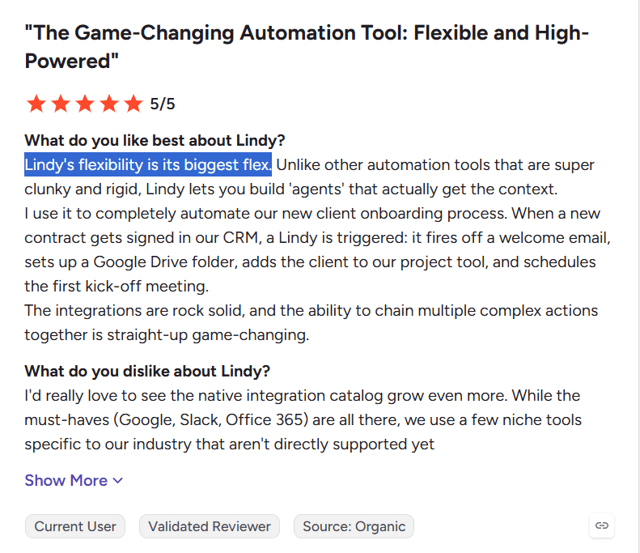
Another user automated his entire client onboarding: a signed contract triggers a welcome email, a Drive folder, a project-tool entry, and a kickoff meeting invite, all on its own.
Even the Happy Users Flag the Same Two Things
Here's what's telling. The complaints inside the five-star reviews are the same complaints as everywhere else.
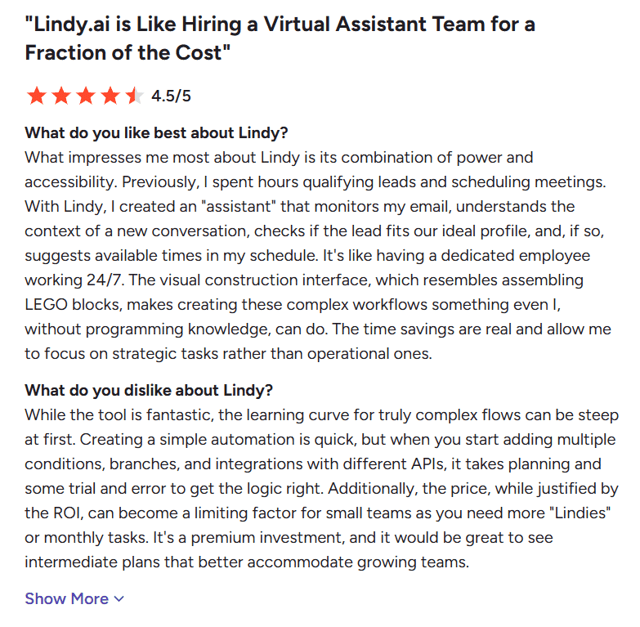
Complex flows are hard. Vera, who gave Lindy 4.5 stars, said building a simple automation is quick, but the moment you add conditions, branches, and multiple APIs, it takes planning and trial and error to get the logic right.
And the price pinches. She also said the cost, though justified by the return, becomes a limiting factor as a small team needs more agents or more monthly tasks. She specifically wished for a mid-tier plan.
When your biggest fans are naming the same two issues as your critics, those issues are real.
The Reliability Complaints Are Serious
This is where it gets uncomfortable, and I'm not going to soften it.
The negative reviews aren't vague grumbling. They're specific, detailed, and they describe things going wrong in ways that cost people real money and real trust.
One user documented fourteen separate failures over six to eight weeks on the top-tier plan. Email triage that never fired despite being switched on. A Gmail send channel that broke repeatedly and burned thousands of credits looping on failed attempts. Most seriously, emails sent to the wrong recipients on three separate occasions, putting personal messages in front of people who shouldn't have seen them.
Another user described the tool hallucinating and returning work in the wrong format, meaning he paid credits again to redo tasks he'd already paid for. One person canceled after their very first request failed.
I want to be measured here: these are individual accounts, not a controlled study. But they're consistent enough, and specific enough, that they'd give me pause before putting Lindy anywhere near communication that matters.
Billing Is Its Own Problem
Separate from whether the product works, several users describe difficulty getting out.
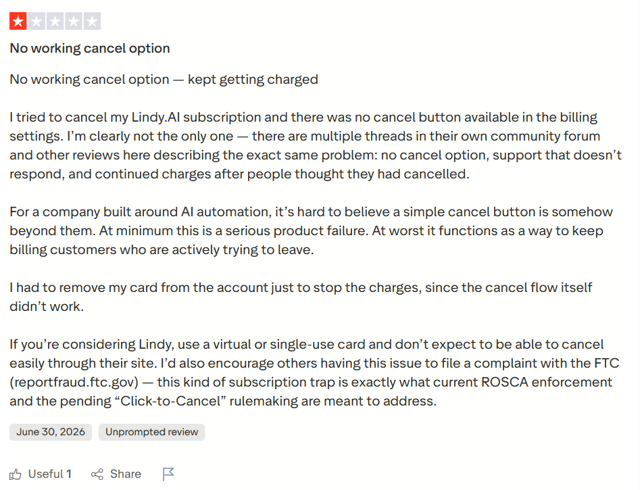
One reviewer reported no working cancel button in his billing settings and continued charges after trying to leave. He ended up removing his card from the account to stop the payments, and noted other users describing the same thing in Lindy's own community forum. Another said support promised credit refunds for wasted work and never delivered.
Whatever the cause, this is worth knowing before you enter your card details. If you're testing Lindy, use a card you can control easily.
One Pattern Worth Noticing
Something stood out as I read through these. The glowing reviews cluster around late 2025. The severe reliability and billing complaints are from mid-2026, after Lindy's February relaunch.
That might be coincidence, or a small sample telling me nothing. But it might also be what happens when a product changes direction significantly: new architecture, new problems, and a support team stretched thin catching up. Either way, it's a reason to weight recent experiences more heavily than older ones when you're deciding.
How I'd Read All of This
Lindy is genuinely good at one specific thing: taking a single, well-defined, repetitive task off your plate. Every happy user is describing that. If that's what you need, there's a real chance you'll be one of them.
The risk sits in three places. Complex workflows, where it becomes fragile. Reliability on anything sensitive, where the failure stories are hard to ignore. And the billing relationship, where enough people report friction that you should protect yourself going in.
None of that makes Lindy a bad product. It makes it a product with a narrow sweet spot, and a real cost to being outside it.
Lindy Pricing: What It Actually Costs
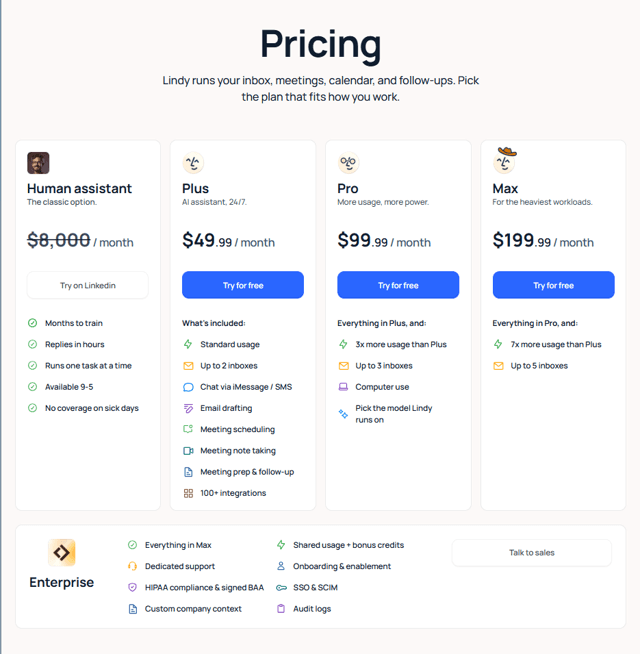
Lindy's pricing page opens with a comparison I have to give them credit for. Next to their plans, there's a column for "Human assistant" at $8,000 a month, crossed out, with a list of what you get for that money: months to train, replies in hours, one task at a time, available 9 to 5, no coverage on sick days.
It's a good pitch. Let's look at what you're actually buying instead.
The Plans
Plus — $49.99/month. Standard usage, up to 2 inboxes, email drafting, meeting scheduling, note-taking, meeting prep and follow-up, chat via iMessage or SMS, and 100+ integrations. This is the entry point for most people.
Pro — $99.99/month. Everything in Plus, three times the usage, up to 3 inboxes, computer use for tools without good APIs, and the ability to choose which AI model Lindy runs on.
Max — $199.99/month. Everything in Pro, seven times the Plus usage allowance, and up to 5 inboxes.
Enterprise — custom. Everything in Max plus dedicated support, HIPAA compliance with a signed BAA, SSO and SCIM, audit logs, custom company context, and onboarding help.
There's a free trial, but no permanent free tier. Lindy removed that in a 2026 pricing update.
Start building, not just reading
Build AI chatbots and agents with WotNot and see how easily they work in real conversations.

Start building, not just reading
Build AI chatbots and agents with WotNot and see how easily they work in real conversations.
Start building, not just reading
Build AI chatbots and agents with WotNot and see how easily they work in real conversations.

The Part the Pricing Page Doesn't Tell You
Notice how the plans describe their limits: "standard usage," "3x more usage," "7x more usage." Those aren't numbers. They're multiples of a baseline the page doesn't define.
Underneath, Lindy runs on credits, and every action your agent takes consumes some. Simple tasks like sorting an email cost very little. Research, drafting, and anything multi-step cost significantly more per run.
This is where the real cost lives, and it's the part you can't calculate before you sign up. Two people on the same $49.99 plan can have completely different experiences depending on what they're automating. Someone running basic inbox triage might never come close to their limit. Someone running daily research agents can burn through their allowance in the first two weeks of the month.
Is It Worth It?
There's a fair argument in both directions, and I think both are worth hearing.
The case for Lindy is straightforward. Even at $199 a month, you're nowhere near the cost of a human assistant. If it reliably saves you five hours a week, the math works easily. One commenter on a Lindy review made this point directly: you couldn't hire anyone for $300 a month to do this work, so calling it expensive misses the comparison.
The case against isn't really about the sticker price. It's about predictability and reliability. You're paying a fixed monthly fee for a variable amount of capability, and you can't know in advance how far it stretches for your specific use. Add the reliability issues from the last section, and the risk isn't that Lindy costs too much. It's that you pay for a month and get less working automation than you expected.
How I'd approach it. Start on Plus. Pick one or two workflows that genuinely matter to you and set only those up. Then watch two things closely: how fast your usage climbs, and whether the agents run correctly without you checking on them. If both look good after a month, moving up a tier is an easy decision. If either looks shaky, you've learned that cheaply.
When You'll Outgrow or Skip Lindy
Lindy has a clear sweet spot. Here's how to tell if you're outside it, before you spend a month finding out the hard way.
Simple, High-Volume Automations
If what you need is "when X happens, do Y," every single time, without variation, you don't need an AI making decisions. Zapier or Make will do that job more reliably and for less money. Lindy's intelligence is only worth paying for when the task actually requires judgment.
Predictable Monthly Costs
Some teams can absorb a bill that moves. Others need a fixed line item they can budget around. If you're in the second group, usage-based credit pricing will be a recurring source of friction, not a one-time annoyance.
Work That's Too Important to Double-Check
This is the one I'd weigh most heavily. Lindy works best on tasks where a mistake is inconvenient rather than costly. If an agent handling your email sends something to the wrong person, that's not a bug you shrug off. For anything client-facing, financial, or sensitive, keep a human in the loop or keep it off Lindy entirely.
Governance and Compliance Requirements
Audit logs, SSO, HIPAA compliance, a signed BAA. All of it sits behind Enterprise. If you're in a regulated industry and evaluating the lower tiers, you're looking at the wrong plan.
Customer-Facing Conversations
This one catches people out, so it's worth being clear about. Lindy is built to automate your work: your inbox, your calendar, your follow-ups. It isn't built to sit on your website and talk to your customers.
If your real goal is answering customer questions, qualifying leads, or handling support conversations, that's a different category of tool entirely. You'd want something with a chat widget, a knowledge base, multi-channel deployment, and proper human handoff. Platforms built for that job, including WotNot, price per conversation rather than per credit, which also makes the cost easier to predict as volume grows.
Complex Multi-Agent Systems
If you're constructing genuine multi-agent systems with deep custom logic, developer frameworks give you more control and better long-term economics. You'll spend more time upfront and save a lot later.
Lindy vs the Alternatives
If Lindy isn't the right fit, what you switch to depends entirely on which part didn't work for you. Here are the options worth looking at.
WotNot — If You Need to Talk to Customers, Not Manage Your Own Work
This is the mismatch I see most often with Lindy. People evaluate it expecting a customer-facing assistant and find a personal one instead.
If your actual need is a bot on your website or WhatsApp that answers customer questions, qualifies leads, and hands off to your team when it can't help, that's a different product category. WotNot is built for that side: a chat widget, a knowledge base your bot answers from, multi-channel deployment, and live chat with proper human handoff. It also bills per conversation rather than per credit, which makes the monthly number easier to forecast.
I'll be upfront that we build WotNot, so weigh that accordingly. But the distinction is real regardless of who's making the point: Lindy handles your inbox; a chatbot platform handles your customers.
Fyxer AI — If Your Only Real Problem Is Email
Lindy is broad. Fyxer is narrow, and for some people, that's the better trade.
Fyxer does email triage, drafts replies in your voice, and includes a meeting notetaker. That's roughly it. If your day isn't scattered across a dozen tools and your genuine bottleneck is inbox volume, Fyxer gets you there for less money with nothing to build. Pricing sits around $22.50 to $40 a month.
Worth knowing: like Lindy, Fyxer drafts and waits for your approval. Neither one sends an email on your behalf without a sign-off.
Zapier or Make — If Your Automations Don't Need Judgment
If your workflows are genuinely "when this happens, do that," you're paying for intelligence you don't need. Zapier and Make handle deterministic automation more reliably than any AI agent, and they start around $10 a month.
The trade-off is that you build the logic yourself, step by step, and it only does exactly what you told it. For repetitive, high-volume tasks with no variation, that predictability is the feature.
n8n — If You Want Complete Control
n8n is open-source and self-hostable, with a visual editor, hundreds of integrations, and built-in AI nodes. Host it yourself and you get unlimited workflows for free.
This is the answer to credit anxiety if you have the technical capacity for it. You take on the setup and maintenance, and in exchange, your costs stop scaling with your usage. For teams running high volume, the economics eventually make this hard to argue with.
Shortwave or Superhuman — If You Want a Better Inbox, Not an Assistant
Both of these replace your email client rather than sitting alongside it. Shortwave is Gmail-native with strong AI search, summaries, and drafting. Superhuman is built around speed and keyboard shortcuts, with AI layered on top.
Neither is trying to be an assistant that acts for you. They're trying to make you faster in your own inbox. If that's the actual goal, they'll feel better than an agent you have to configure.
Keep It Narrow and Lindy Works
If there's one thing I'd take away from all of this, it's that Lindy's value depends almost entirely on how narrow you keep it.
Every person who's happy with it is doing the same thing: one clear job, one clear trigger, running quietly in the background. Lead qualification. Meeting prep. Client onboarding. They picked a task, handed it over, and left it alone.
Every person who's frustrated tried to make it do more. Complex branching logic. Sensitive communication. Their whole operating system. That's where it gets fragile, expensive, and occasionally wrong in ways that cost something real.
So the question isn't whether Lindy is good. For a narrow job, it genuinely is. The question is whether you can resist expanding it past that point, because the tool will happily let you try.
If you want to test it properly, do it this way: take the single most annoying repetitive task in your week, set that up and nothing else, then watch two things for a month. How fast your usage climb, and whether it runs correctly without you checking. That tells you everything you need to know, and it costs you one month to find out.
And if what you actually need is something facing your customers rather than your inbox, you can try WotNot free and see if that's a closer fit.
FAQs
FAQs
FAQs
Is Lindy worth it?
For one or two well-defined tasks, yes. If it reliably saves you a few hours a week, even the $199 plan is cheaper than any assistant you could hire. Where it stops being worth it is when your workflows get complex, when the credit spend becomes unpredictable, or when you need it to be reliable enough for work you can't afford to double-check.
Does Lindy have a free plan?
Why is my Lindy bill higher than I expected?
Is Lindy better than Zapier?
Can Lindy handle customer support?
ABOUT AUTHOR
Hardik Makadia
Co-founder & CEO, WotNot
Hardik leads the company with a focus on sales, innovation, and customer-centric solutions. Passionate about problem-solving, he drives business growth by delivering impactful and scalable solutions for clients.
You may also like…
You may also like…



Start building your agents today!
Curious to know how WotNot can help you? Let’s talk.
Start building your agents today!
Curious to know how WotNot can help you? Let’s talk.