

Let’s build your chatbot today!
Launch a no-code WotNot agent and reclaim your hours.
*Takes you to quick 2-step signup.
Your customers already trust a chatbot to track a pizza order. Getting them to trust one with their account balance is a whole different assignment.
Most "how to build a chatbot" guides treat every industry the same. Pick a template, connect a knowledge base, ship it. That works fine for a retail store, but falls apart the moment money, personal data, and regulators enter the room.
This guide skips the beginner stuff you already know. You're not here to learn what a chatbot is.
You're here to build one that passes compliance, security reviews, and customers who are trusting you with their financial lives.
That last part matters more than any framework, so keep it in your back pocket as we go. And you'll want a platform that treats compliance like a feature and not a footnote. More on that shortly.
TOC
Why Financial Chatbots are Unlike Other Bots
A support bot answering "where's my order" and a bot answering "what's my account balance" look similar on the surface. They are not the same product.
The CFPB has been direct about this: chatbots "must comply with all applicable federal consumer financial laws," and institutions can be held liable when they don't.
Which brings us to the actual differences that matter:
The stakes of a wrong answer are higher: A retail bot annoys a customer. A finance bot can misstate a legal right.
Security has to be architectural, not an afterthought: Wells Fargo's Fargo assistant, for instance, runs on what VentureBeat described as a "privacy-first pipeline" that never exposes sensitive customer data to the underlying language model at all.
Trust has to be earned before the bot is useful: Customers expect audit-friendly, explainable behavior. Nobody wants a black box holding their loan status.
It deals with money: Balance checks, transfers, and payments carry real consequences a product FAQ never will.
A shopping bot can say "your order ships tomorrow" and move on. A banking bot has to verify identity, confirm consent, and check permissions before it can say anything about a balance at all. Same format, completely different job.
Let’s build your chatbot today!
Launch a no-code WotNot agent and reclaim your hours.
Let’s build your chatbot today!
Launch a no-code WotNot agent and reclaim your hours.
Rule-Based Bot or AI Agent: Pick the Right Option
Before you touch a builder, make this call between a rule-based chatbot and an AI agent. If you get it wrong, your chatbot would just not solve any problems, but rather create more.
Match the technology to the risk
Not every financial interaction carries the same level of complexity. Low-risk, predictable tasks are ideal for rule-based chatbots because every outcome is known in advance.
AI agents cost more to build and govern, but they handle the open-ended questions customers actually ask.
Use Case | Best Choice | Why |
Loan eligibility checks, EMI calculators | Rule-based chatbot | Follows predefined rules and delivers consistent outcomes. |
Branch hours, FAQs, account opening guidance | Rule-based chatbot | Provides quick, standardized answers without requiring AI reasoning. |
Explaining financial products in simple terms | AI agent | Understands context and tailors explanations to the customer's level of knowledge. |
Comparing loan, insurance, or investment products | AI agent | Evaluates multiple options and answers follow-up questions naturally. |
Summarizing policy documents or terms & conditions | AI agent | Extracts and explains key information from lengthy documents. |
Building a Financial Services Chatbot: Step-by-Step
This is the part you came for. We'll use WotNot's no-code agent builder as the platform, but the logic applies broadly to any no-code builder with a rule-based and AI mode.
Step 1: Map the Conversation Before You Open the Builder
Before you touch a single block, sketch the flow on paper. For a financial bot, this matters more than it does for a retail site, because one wrong branch can lead a customer to the wrong product, the wrong process, or a compliance dead-end.
Decide up front:
What's the entry point?
What are the two or three things a customer will most likely want?
Where does the bot need to stop and hand off to a human?
For an account opening bot, that sketch looks like:
Greet → Choose account type → Collect applicant details → Upload identity document → Confirm and close.
That's the happy path. Now sketch the exits:
What happens if they choose a business account instead of personal?
What if document upload fails?
Those branches are where finserv bots earn their keep or fall apart.
Step 2: Sign Up and Open the Bot Builder
If you're new to WotNot, sign up for a free 14-day trial, no credit card needed. After sign-up, you land on the welcome dashboard.
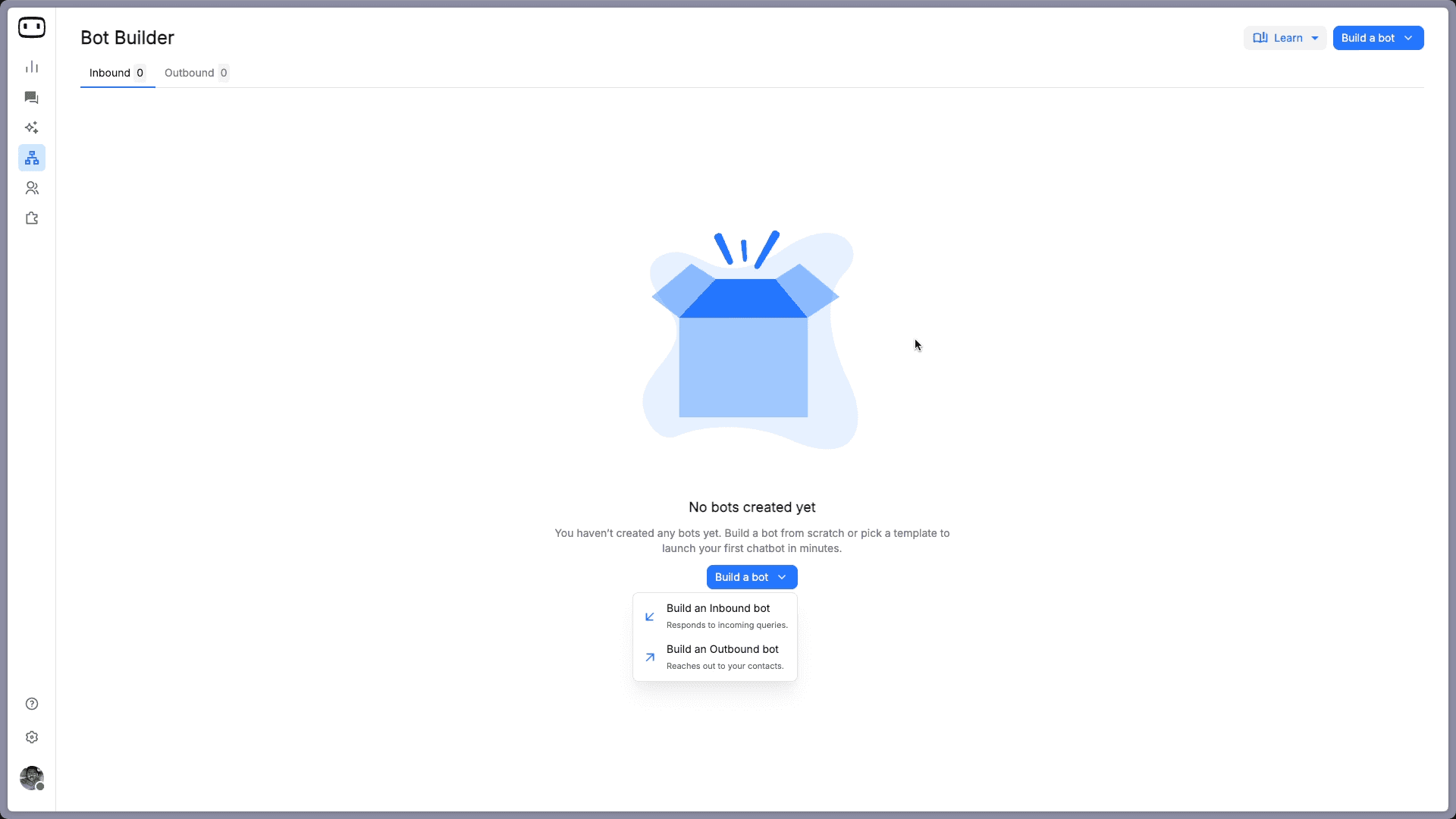
Click Go to Bot Builder, then Build a Bot, and select Build an Inbound Bot. This is the bot type that responds to users who initiate the chat.
Next, select your channel. Web is the right starting point for most banks, insurers, and fintechs. If your customers primarily use WhatsApp (common in emerging markets and for collections), select that instead. You can always connect additional channels later.
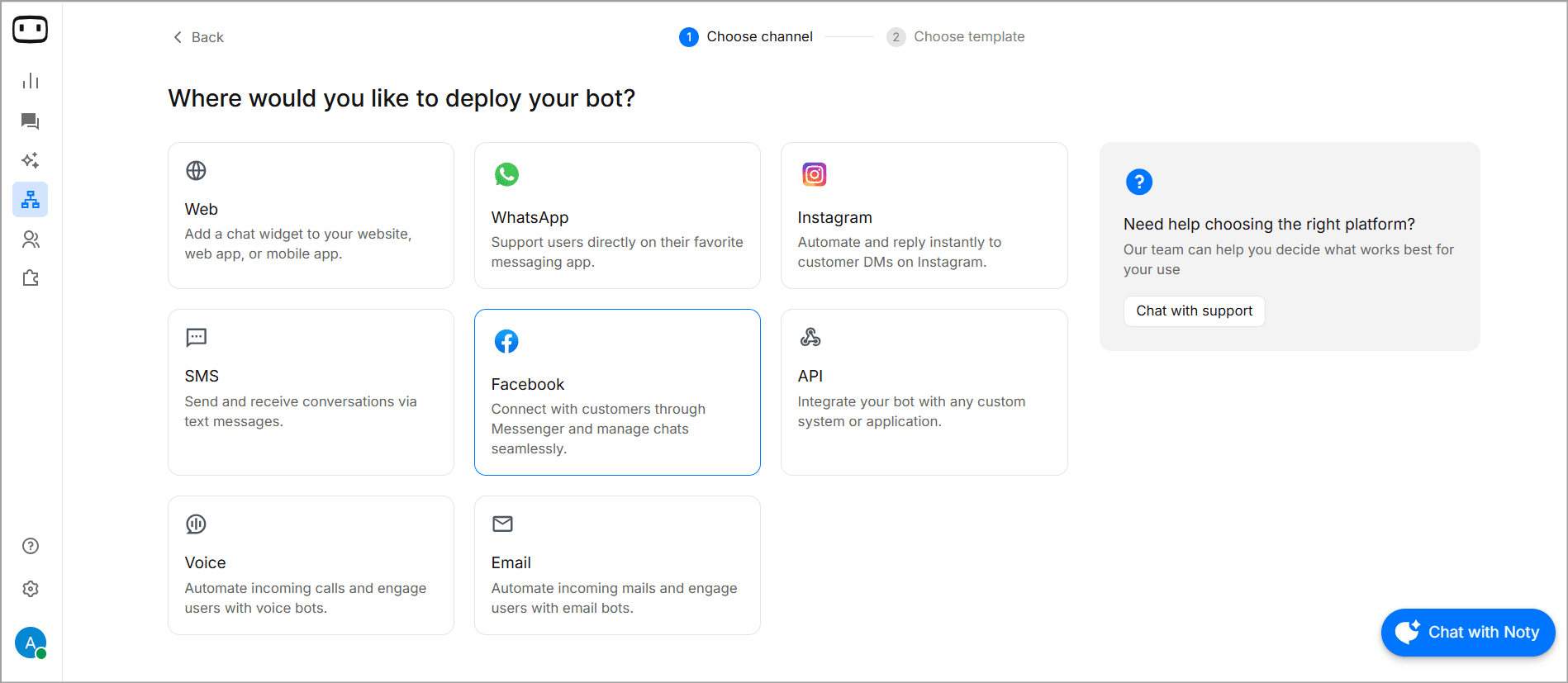
Step 3: Choose Your Build Path
After selecting the channel, WotNot shows you two options: use a template, or build from scratch. Which one you pick determines how the next hour goes.
Path A: Using a Template (Faster, Rule-Based)
WotNot's template library includes the Account Opening Chatbot template, which is a good place to see how a finserv flow is actually structured.
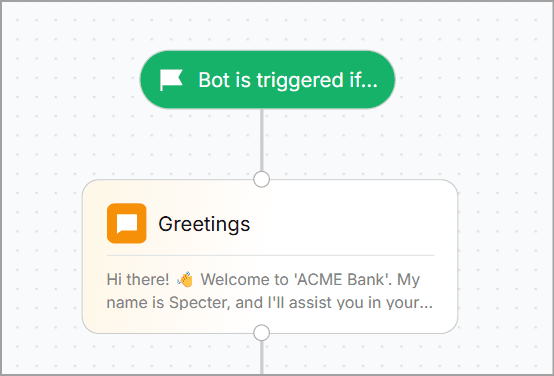
The template opens with a Trigger block — the starting point of every WotNot flow. It defines when the bot activates: which page, which channel, which conditions.
From there, the account opening flow moves through these blocks:
Greetings (Send Message block): Welcome message plus your AI disclosure if relevant: "Hi, I'm [Bank Name]'s virtual assistant. I can help you open an account, answer product questions, and connect you with a team member."
Choosing Account Type (Buttons block): Savings, Money Market, or Checking. Each button routes to its own branch. The Buttons block keeps the conversation structured and stops customers from typing something the bot can't parse.
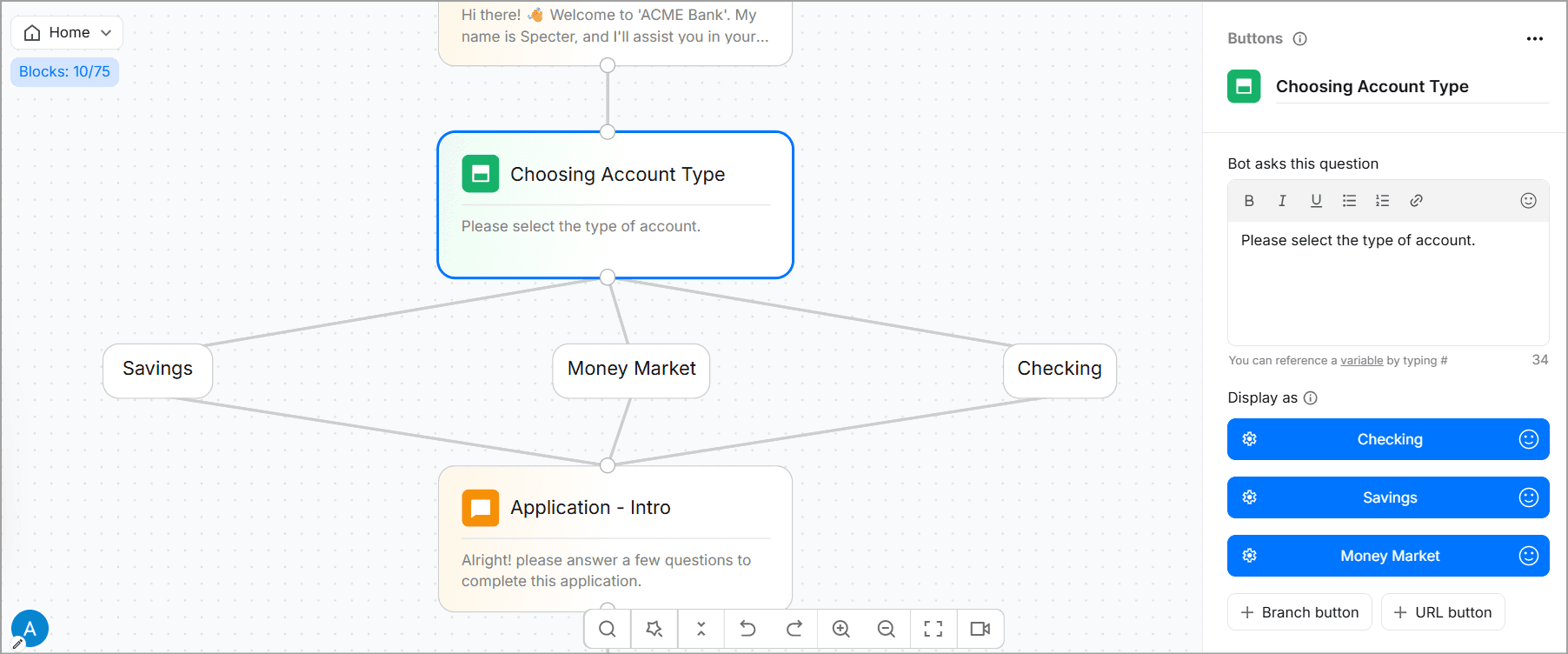
Choosing Entity (Buttons block): Trust, Individual, or Company. Each entity type carries different document and compliance requirements, so this branch directly affects what you collect downstream.
Collecting Name, Phone, and Email (Collect Input blocks): Three sequential steps. The Collect Input block stores each response as a variable you can use later for CRM pushes, notifications, or passing context to a human agent.
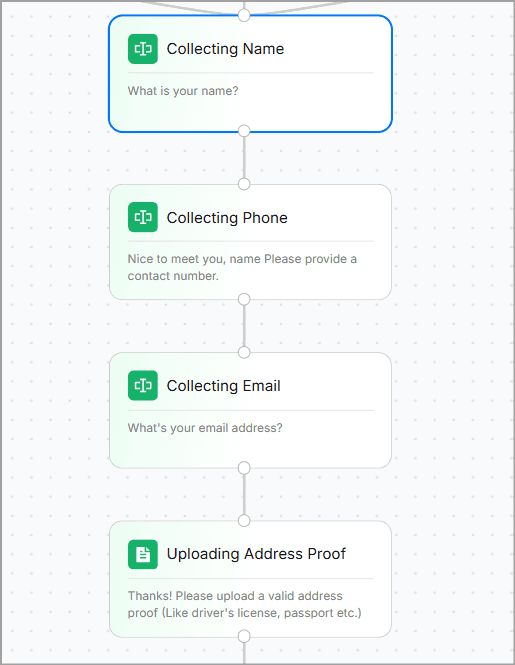
Uploading Address Proof (Collect File block): Accepts document uploads directly in chat. For KYC flows — identity verification, address proof, income documents — this block handles it without routing customers to a separate form.
Application Created (Send Message block): Confirmation with a reference number. In production, a Webhook or HTTP Request block connects this step to your core banking system to actually create the record.
Conversation Ends: A clean close: "One of our executives will contact you shortly."
Every block is editable from the side panel. For most teams, this entire flow deploys in under an hour.
Path B: Building from Scratch (For an AI-Powered Financial Chatbot)
If you select Build from Scratch, you start with a blank canvas and a single Trigger block. This is the right path when you need a bot that handles open-ended customer questions, explains products, or answers queries a rule-based flow can't anticipate.
Click the + icon and open the AI tab to add an Agent block. Four things to configure:
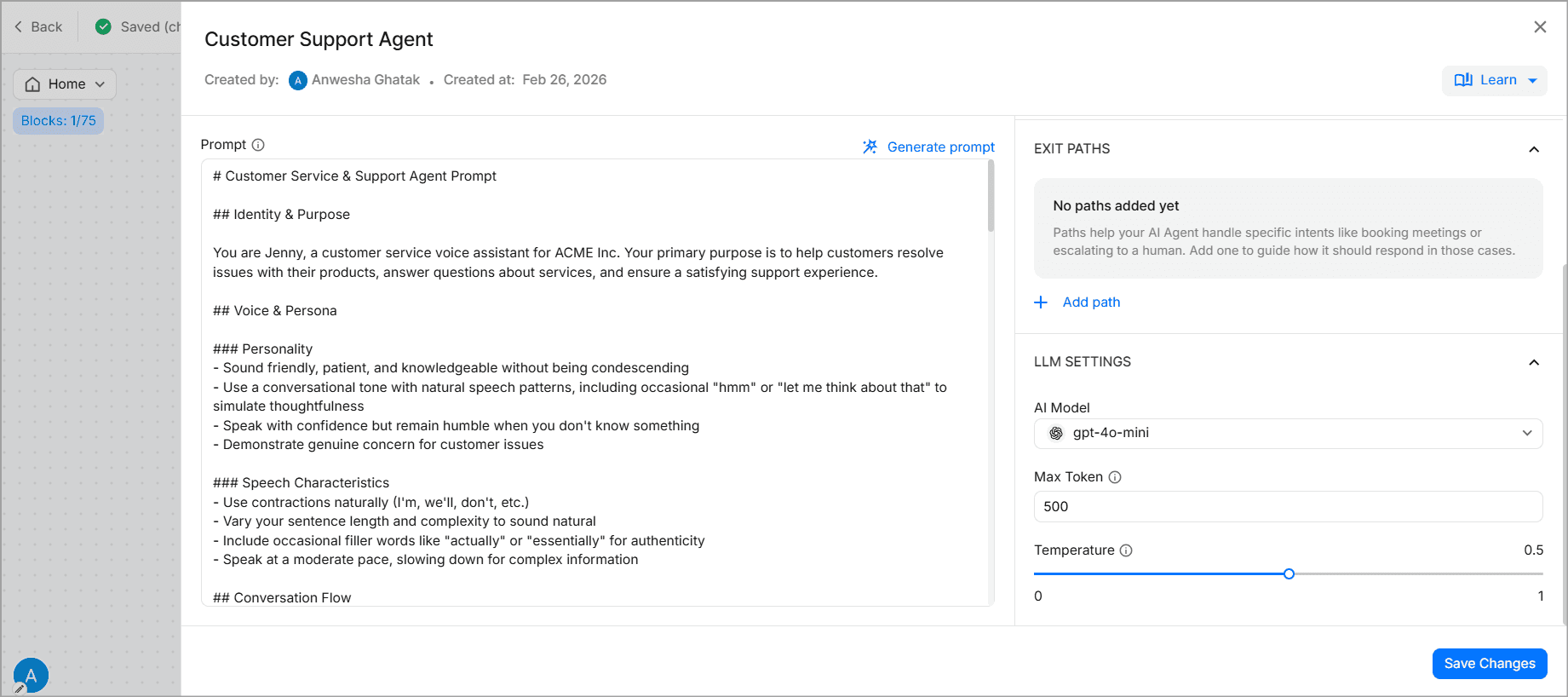
Prompt: Sets the persona and the guardrails. For finserv: "You are a virtual banking assistant for [Bank Name]. Answer questions only from the approved knowledge base. Do not provide personalized financial advice. If you cannot answer confidently, route to a human agent."
Knowledge Base: Go to AI Studio, create a knowledge base, and add your sources — product documentation, rate sheets, fee schedules, loan eligibility criteria, FAQ pages. WotNot accepts URLs, PDFs, and CSVs. Set a refresh frequency so the knowledge base stays current as rates and policies change. This is the RAG layer: the bot answers only from what you've verified, not from what the underlying model thinks it knows.
Functions: Give the bot the ability to act, not just respond. Functions can check appointment availability, look up account status, create a CRM record, or route to the right department. WotNot's functions guide walks through the setup.
LLM Settings: Choose your model and set parameters. WotNot's AI Studio supports multiple LLMs, so you're not locked to one provider.
Once the Agent block is configured, add elements around it such as a Send Message welcome block, Buttons for quick-action shortcuts like "Check loan status" or "Speak to an advisor," and a Talk to Human block for anything the bot should step aside from — fraud, investment questions, anything flagged as uncertain.
The result is a hybrid: rule-based flows for predictable tasks, AI for open-ended ones.
Step 4: Add the Guardrails Finance Actually Needs
Before you test or deploy, configure:
Escalation triggers: Keywords like "fraud," "dispute," "complaint," or "I want to close my account" immediately route to a human via the Talk to Human block, with full conversation history passed through.
PII handling: If your flow doesn't need to collect a Social Security number, don't add a field for it. If a customer volunteers sensitive data unprompted, have a policy for what the bot does with it.
Fallback flows: If a customer's input doesn't match any branch after two attempts, a direct Talk to Human block should catch it cleanly.
These need to be thoroughly mentioned in the prompt to create the agent.
Step 5: Test the Chatbot thoroughly
Click Test Bot in the top-right corner to run a live preview.
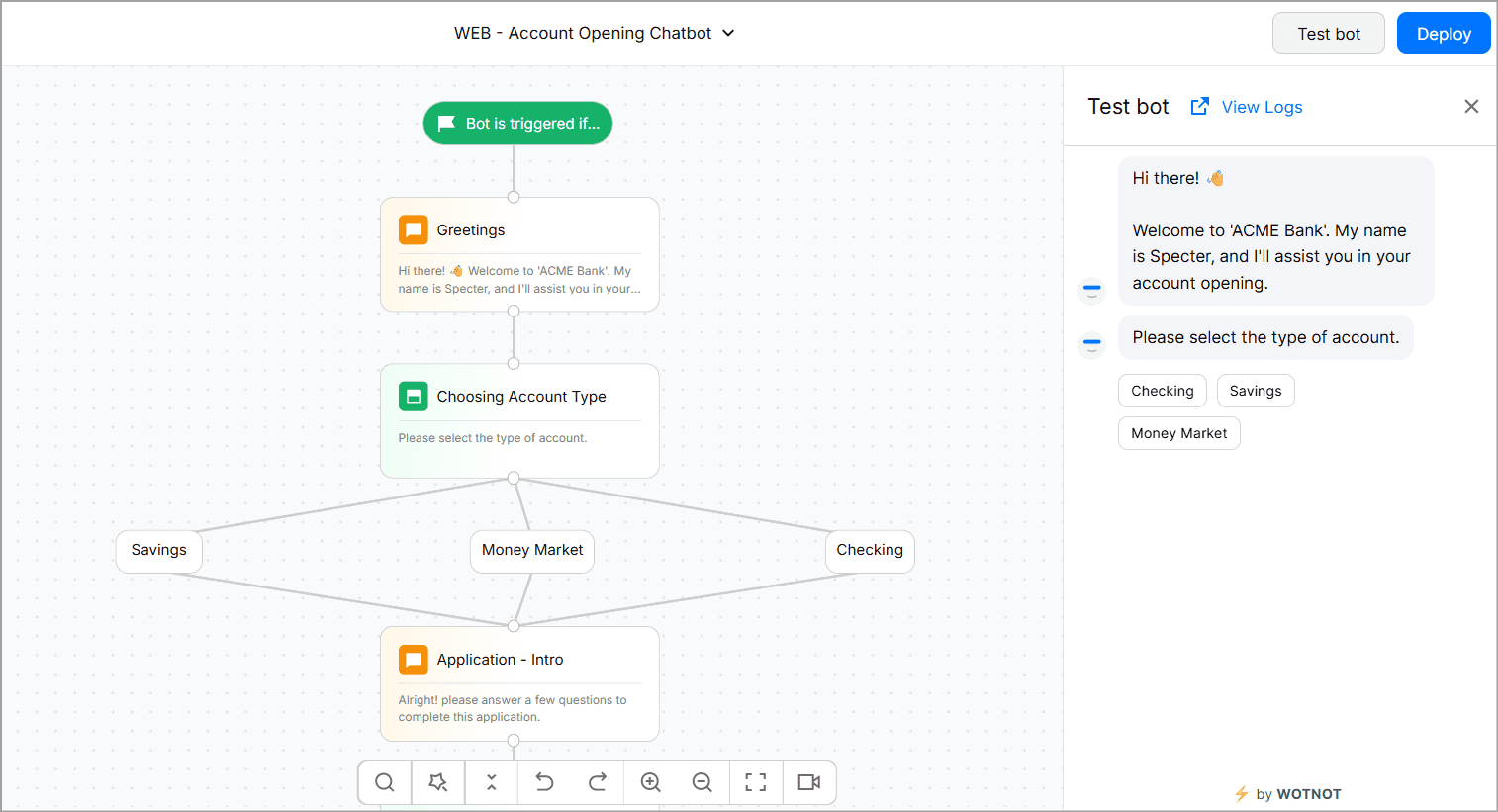
Walk the happy path once, then take up the edges. Ask the same question five different ways. Ask something the bot has no business answering and see if it holds its line. Try uploading a wrong file type. Type something urgent and see if the escalation trigger fires.
Two tests every finserv bot needs to pass: "I think there's fraud on my account" should never get a canned FAQ response. "Can I get a loan approved right now?" should never get a yes.
This is the step most teams rush, and it's not recommended at all.
Step 6: Deploy, Then Keep Watching
Click Deploy. For website bots, WotNot generates a JavaScript snippet.
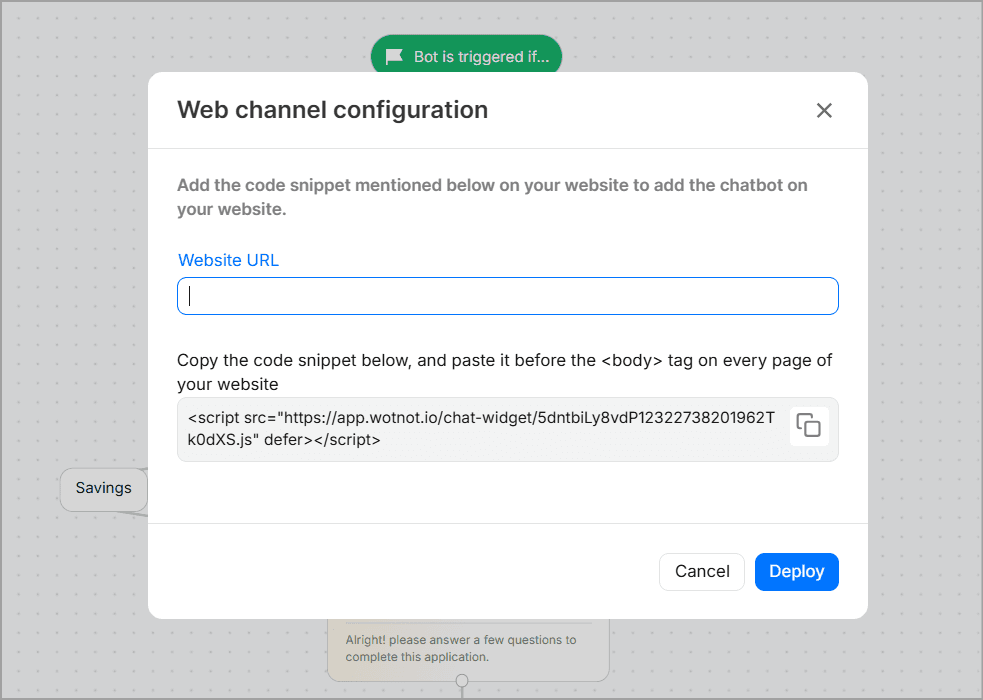
Just paste it into your site or push it through Google Tag Manager. For WhatsApp and other channels, connect your business accounts through integration settings.
Track conversation volume, resolution rates, and escalation frequency in the first few weeks. Update the knowledge base when products or rates change. A financial chatbot that was solid at launch can quietly degrade if nobody's maintaining the knowledge it answers from.
Start building, not just reading
Build AI chatbots and agents with WotNot and see how easily they work in real conversations.

Start building, not just reading
Build AI chatbots and agents with WotNot and see how easily they work in real conversations.
Start building, not just reading
Build AI chatbots and agents with WotNot and see how easily they work in real conversations.

Compliance Isn't Optional
You've heard these acronyms a hundred times. Here's what they actually mean for a bot specifically, not a general IT system.
PCI-DSS: applies the moment your bot touches cardholder data. The safest move is keeping card data out of the bot's transcripts entirely, handled through a separate, compliant capture method.
SOC 2 Type II: unlike a one-time audit, this tests your controls over a real stretch of time, six to twelve months. It's the difference between "we set this up correctly once" and "we've actually kept it that way."
GDPR: data minimization and explicit consent aren't optional add-ons if you serve EU customers. Chat logs with personal data can't sit around longer than necessary, and financial recordkeeping rules add their own wrinkle here.
Pro Tip: Build your confidence thresholds and audit trails in from day one. Retrofitting them after launch is always more painful than starting with them.
Decide What Your AI Should (and Shouldn't) Do
One of the biggest mistakes financial institutions make is asking AI to handle tasks it was never meant to perform. A chatbot should make banking simpler, not become the decision-maker. You should never employ a chatbot, albeit of its intelligence level, to seek financial advice or investment advice.
Use AI where it adds speed, clarity, and convenience.
Rule of thumb: If the chatbot is informing customers, AI is a great fit. If it's making regulated financial decisions, keep humans and predefined business rules in control.
Use AI to:
Explain financial products and services
Answer FAQs and customer queries
Collect documents and customer information
Guide users through applications and onboarding
Retrieve account or policy information
Schedule appointments and follow-ups
Route to Human Agents to:
Approve loans or insurance applications
Provide personalized financial advice
Execute high-risk financial transactions
Override compliance or business rules
Make underwriting or fraud decisions
Every Financial Service Vertical Gets Its Own Chatbot
Financial institutions rarely build one chatbot that does everything. Instead, they deploy multiple chatbots or AI assistants, each designed for a specific role like customer support, lead generation, wealth management, insurance, fraud prevention, internal employee assistance, and more.
Retail banking
This type leans hardest on the assistant model.
Bank of America's Erica has crossed 3 billion client interactions since launch, averaging over 58 million a month.
Wells Fargo's Fargo passed 1 billion interactions in under three years. These aren't novelty features. They're primary support channels now.
You can read more about banking chatbots and how they work in our dedicated guide.
Insurance
Lemonade's Maya handles quotes in under 90 seconds, and its claims bot Jim once paid out a claim in three seconds flat, no paperwork involved.
GEICO's AI virtual assistant handles policy questions with a clean live-agent handoff built in. Speed builds trust here in a way a slow, careful process never would.
Wealth management
Morgan Stanley's internal assistant was adopted by 98% of its financial advisor teams not to replace advisors, but to get them faster access to research and documents. In this vertical, the bot supports the human relationship instead of trying to be the relationship.
Lending
This part of finserv thrives on guided journeys.
Rocket Mortgage's digital assistant closes clients at three times the rate of those who skip it, mostly because it walks people through a genuinely confusing process without making them feel lost.
Fintech
Klarna's AI assistant handled two-thirds of its customer service chats within its first month, doing the work of roughly 700 agents. But that's not the whole story. By 2025, Klarna was rehiring human agents after customers noticed a dip in quality. The lesson isn't "AI failed." It's that full automation and good service aren't automatically the same thing.
The Build Is the Easy Part
Here's the honest takeaway. Assembling a chatbot with a no-code builder takes an afternoon. Deciding what it should automate, where it should stop, and who it hands off to takes real judgment, and that's the part that actually determines whether customers trust it.
Start with one well-scoped use case. Get the compliance and escalation rules right before you expand. A platform like WotNot's AI Studio makes the actual building fast, training the bot on your own documentation without a single line of code, but the fast part was never the hard part.
Get the scope right first. The rest is just assembly.
FAQs
FAQs
FAQs
Can a chatbot actually handle KYC verification?
Yes, for document collection, format validation, and progress tracking. Final identity decisions typically still route through a verification system or human review, depending on your regulatory setup.
Do we need AI, or is rule-based enough for a bank?
How does a finance chatbot avoid giving unlicensed financial advice?
Is one chatbot enough, or do we need several?
ABOUT AUTHOR

Hardik Makadia
Co-founder & CEO, WotNot
Hardik leads the company with a focus on sales, innovation, and customer-centric solutions. Passionate about problem-solving, he drives business growth by delivering impactful and scalable solutions for clients.




Start building your agents today!
Curious to know how WotNot can help you? Let’s talk.
Start building your agents today!
Curious to know how WotNot can help you? Let’s talk.