
14 min read
Lead Generation Chatbots: Best Tools, Use Cases & How to Build One (2026)

Hardik Makadia

Let’s build your chatbot today!
Launch a no-code WotNot agent and reclaim your hours.
*Takes you to quick 2-step signup.
Getting someone to your website is only half the job. The harder part is turning that visit into a lead.
And most visits don't convert. For B2B websites, the average visitor-to-lead conversion rate is just 2.23%. People land, look around, and leave without ever becoming an opportunity.
The missing link is the interaction. And handing someone a form to fill out isn't a conversation. It asks the visitor to do all the work while you wait.
A lead generation chatbot changes that. It starts the conversation, answers the questions holding someone back, qualifies their interest, and captures their details while they're still engaged.
There are two ways to use one. Inbound chatbots engage the visitors who come to you. Outbound chatbots qualify prospects before they ever reach sales. Most people only know the first kind.
This guide covers how both work and how to build a lead generation chatbot without writing code.
What Is a Lead Generation Chatbot?
A lead generation chatbot helps you turn people who show interest in your business into qualified sales opportunities. That interest can come from your website, WhatsApp, social media, or any other channel where prospects interact with your business.
The chatbot answers their questions, collects their details, understands what they're looking for, qualifies them, and passes the right leads to your sales team.
For example, someone visiting your pricing page might ask about your plans. The chatbot can answer their question, ask about their team size and requirements, and offer to book a meeting if they look like a good fit. What would have been an anonymous visitor who left is now a qualified lead in your CRM.
Most people assume a chatbot is just there to answer questions, but a lead generation chatbot serves a very different purpose. The difference comes down to the goal. A support bot exists to resolve questions and close tickets. A lead generation chatbot is built to move someone toward becoming a customer, and it does that around the clock, in any language, without anyone on your team stepping in.
Top 5 AI Chatbot Tools for Lead Generation
There's no shortage of tools in this space, and most "best of" lists blur together. Rather than run through a dozen, here are five that suit genuinely different situations, so you can match one to yours instead of guessing.
1. WotNot

WotNot is a no-code chatbot and AI agent platform designed to capture and qualify leads across your website and messaging channels. It covers the inbound side well, engaging visitors, qualifying them, and handing them off to your team, without needing a developer to set it up.
Key features
No-code visual builder with a ready-made lead generation template
AI agents trained on your own content, so answers stay accurate
Web, WhatsApp, Instagram, and SMS from one build
Live chat with human handoff, so hot leads reach a person fast
Native CRM integrations to sync leads automatically
Done-for-you setup if you'd rather have it built for you
Best for
Teams that want to capture leads across both their website and messaging channels, with clean handoff to sales, without a developer or a per-seat contract.
Limitation
It isn't built for outbound prospecting. It excels at capturing and qualifying inbound interest, but the active LinkedIn-style outreach model needs separate tooling.
Pricing
Lite: $29/month
Starter: $99/month
Premium: $299/month
Enterprise: Custom
Start building, not just reading
Build AI chatbots and agents with WotNot and see how easily they work in real conversations.

Start building, not just reading
Build AI chatbots and agents with WotNot and see how easily they work in real conversations.
Start building, not just reading
Build AI chatbots and agents with WotNot and see how easily they work in real conversations.

2. Intercom (Fin)

Intercom (Fin) is a premium, AI-first customer platform aimed at larger B2B and SaaS teams. Its Fin AI agent answers questions and qualifies leads using your support content, and it's strong when you need advanced routing and deep integrations across a big team.
Key features
Fin AI agent for qualification and support in one
Proactive messaging based on visitor behavior
Advanced routing and workflow logic for larger teams
400+ integration ecosystem
Works as a standalone agent across other helpdesks too
Best for
Established B2B and SaaS companies that already run advanced support tooling and want lead qualification built into the same platform.
Limitation
The pricing gets expensive and hard to predict. You pay per seat plus $0.99 per resolved outcome (and $9.99 per lead qualification outcome), so the bill climbs as your volume and team grow.
Pricing
Seats: from $29/seat/month (annual)
Fin AI: $0.99 per resolution, $9.99 per lead qualification outcome
14-day free trial
3. Tidio

Tidio is a lightweight, budget-friendly option built for small businesses and e-commerce stores. Its Lyro AI agent handles common questions and lead capture, and it sets up quickly without much configuration.
Key features
Lyro AI agent for conversational lead capture and support
Visual flow builder for simple qualification paths
Native Shopify integration with order lookups and cart recovery
Website widget plus WhatsApp and social channels
Permanent free tier to start
Best for
Small businesses and e-commerce stores that want an affordable, fast-to-deploy chatbot for capturing leads and answering common questions.
Limitation
The AI (Lyro) is billed separately from the base plan, so the real monthly cost often runs higher than the sticker price once you're handling real volume.
Pricing
Free tier available (50 conversations)
Starter: $29/month
Growth: $59/month
Lyro AI: billed separately, from around $39/month
4. Landbot

Landbot is a no-code chatbot builder best known for its visual, drag-and-drop flow canvas, one of the cleanest in the category. It covers web, WhatsApp, and Messenger, with an AI Agent layer you drop into a flow rather than build the whole bot around.
Key features
Visual drag-and-drop flow builder, with reusable "Bricks" subflows you can share across bots
AI Agents powered by GPT (with Gemini and DeepSeek connectors), added as a block inside a flow
Web, WhatsApp, and Facebook Messenger deployment
Conversational landing pages and a dedicated lead scoring block
Native integrations with HubSpot, Airtable, and Calendly on higher tiers
Flow-level analytics that show exactly where visitors drop off
Best for
Marketing and small teams that want a genuinely enjoyable visual builder for web-first lead capture, and don't mind sticking to text channels.
Limitation
WhatsApp sits behind a much pricier tier, and Meta's per-conversation fees stack on top. The AI is also a node inside the flow rather than an autonomous agent, so open-ended reasoning isn't its strong suit.
Pricing
Sandbox: Free (100 chats/month)
Starter: €40/month
Pro: €100/month
WhatsApp Pro: €200/month
Business: from €400/month
20% off on annual billing
5. HubSpot Chatbot

HubSpot Chatbot is the chat and chatflow tool built into HubSpot's CRM. If your pipeline already lives in HubSpot, its bots qualify leads, book meetings, and create tickets, then write everything straight to the contact record, no syncing required.
Key features
Rule-based chatbot (chatflows) builder available on HubSpot's free tools
Native tie-in with HubSpot CRM, so every captured lead lands on the contact record
Lead qualification, meeting booking, and ticket creation out of the box
Live chat with routing to the right rep or team
Breeze AI (HubSpot's newer AI layer) on paid tiers for content-trained answers
Works alongside HubSpot's marketing, sales, and service tools
Best for
Teams already running HubSpot who want lead capture that writes directly to the CRM without another integration in the middle.
Limitation
The free and Starter bots are mostly rule-based; the more capable AI and automation sit behind Professional, where the price (and a one-time onboarding fee) climbs steeply. Pricing is also per seat and per hub, so the real bill depends on how much of HubSpot you already run.
Pricing
Free tools: $0 (rule-based chatbot, HubSpot branding, up to 2 users)
Starter: from around $15/seat/month (removes branding)
Professional: from around $90–100/seat/month (Sales/Service Hub), plus a one-time onboarding fee
Enterprise: from around $150/seat/month
Choosing between them: If you want inbound lead capture across web and messaging with a low starting cost and clean handoff, WotNot fits.
If you're a larger B2B or SaaS team already invested in advanced support tooling, Intercom is built for that scale. If you're a small business or online store watching the budget, Tidio is the easiest place to start.
If a beautiful visual builder for web-first lead capture matters most, Landbot is hard to beat, just price the WhatsApp tier before you commit.
And if your whole pipeline already lives in HubSpot, its built-in bot keeps everything on the contact record without another integration. If you want to look beyond chatbots, we've also rounded up the best lead generation automation tools more broadly. Whichever you pick, weigh CRM integration and how cleanly it hands off to your sales team above the feature list.
Lead Generation Chatbot Use Cases
So what does a lead generation chatbot actually do once it's live? More than most people expect. Here are the jobs it quietly handles, day and night.
Qualify leads: It asks the questions a good rep would, need, budget, timeline, and separates a real buyer from someone just clicking around.
Score leads: Every answer nudges a score up or down, so your team knows who to call first instead of working the list top to bottom.
Segment leads: It sorts people by what they told you, industry, company size, use case, so your follow-up actually fits who's on the other end.
Collect contact information: No static form to ignore. The bot gathers names, emails, and numbers inside a conversation people are happy to have.
Hand out lead magnets and resources: Someone wants the pricing sheet or the ebook? The bot delivers it on the spot and captures a detail or two in return.
Answer FAQs: Trained on your own content, it clears up the pricing, setup, and "do you integrate with X" questions that stall a decision.
Book meetings and demos: It checks your calendar and lets a hot lead grab a slot right there, no email ping-pong.
Recommend products: Based on what someone says they need, it points them to the right plan or product instead of leaving them to guess.
Route leads to your CRM and sales team: Every qualified lead flows into your CRM with the full context of the chat, so sales picks up warm, not cold.
How to Build a Lead Generation Chatbot?
To build one, you don't need a developer. And since WotNot sits right in this space, I'll walk you through it, though the general approach applies to most no-code platforms.
We'll focus on the inbound bot, since that's what most businesses start with and what a no-code template handles cleanly. Then I'll explain how the outbound model works, because it's built differently.
Building an Inbound Lead Gen Bot
This is the bot that lives on your site and engages the visitors who come to you.
Step 1: Create the bot and pick your channel
Once you log in to WotNot, click Bot Builder and select Inbound Bot. You'll see the different channels you can deploy on. Start with Web, since that puts a chat widget on your website where most of your traffic already is.

Step 2: Choose the Lead Generation template
Instead of starting from a blank canvas, pick the Lead Generation Agent template and click Use Template. It comes with the conversation flow already structured, so you're customizing rather than building from scratch.
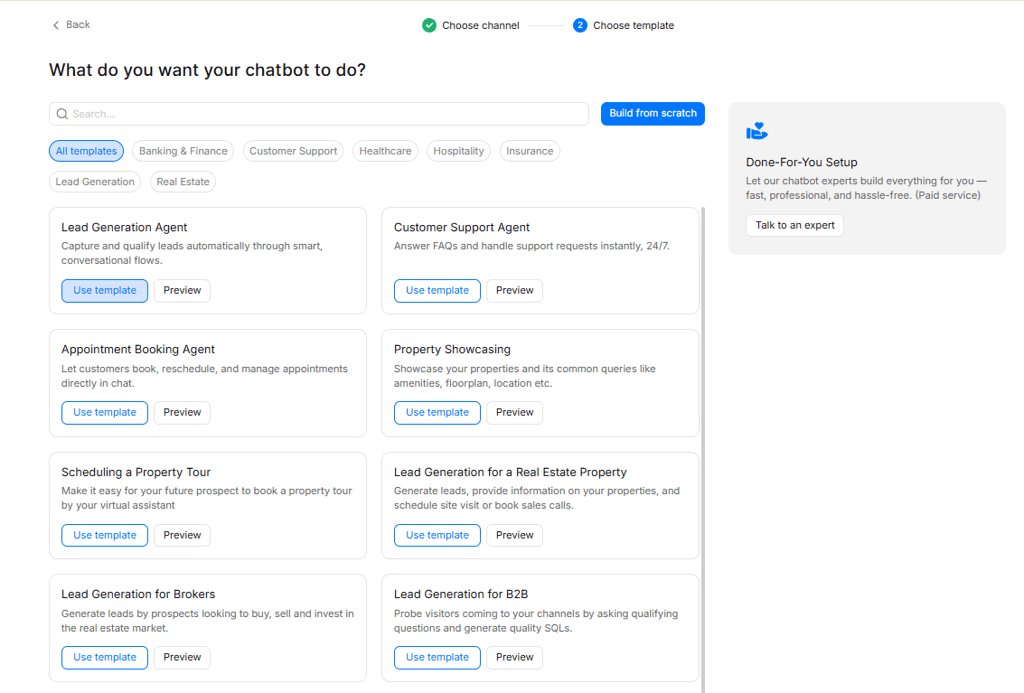
Step 3: Open the agent and connect a knowledge base
In the template, you'll see a branch under Bot Start called Lead Gen Agent. Click it to open the agent settings. Toggle on "Use data from knowledge base," which lets the bot answer visitor questions from your own content instead of guessing. You can edit an existing knowledge base here or add a new one.

Step 4: Add your content
When you create a new knowledge base, you get three ways to feed it: a URL to scan your site, plain text, or an uploaded file. Pick whichever fits, add your content, and submit. It takes a few seconds to train. Now the bot answers from your actual business information, your services, pricing, and FAQs, which is what keeps its answers accurate.

Step 5: Set your qualifying questions and CRM sync
This is where the lead generation part happens. Build in the questions that separate a buyer from a browser, the BANT logic from earlier: need, budget range, authority, timeline. Then connect your CRM so every qualified lead flows in automatically with the answers it gave, no manual copying.
Step 6: Test, then deploy
Run the flow the way a real prospect would. Ask the awkward questions, give unexpected answers, try to slip past the qualification. Once it holds up, deploy it. For a website bot, WotNot gives you a snippet to add to your site, and you can customize the widget's look to match your brand first.
Let’s build your chatbot today!
Launch a no-code WotNot agent and reclaim your hours.
Let’s build your chatbot today!
Launch a no-code WotNot agent and reclaim your hours.
Lead Generation Chatbot Scripts You Can Copy
A good script does three things: it opens with something relevant to what the visitor is doing, it asks questions in an order that feels natural, and it never pushes for sensitive information too early. Get the order wrong, ask for a phone number or a budget in the first message, and you'll lose most people before the third reply.
Here are two you can adapt, one for B2B SaaS and one for real estate. The structure matters more than the exact words, so adjust the wording to your brand.
B2B SaaS Script
The goal here is to sound like a helpful rep, not a form with a personality. Reference the page, understand the problem, then qualify.
|
Notice what's missing: nobody asked for an exact budget. That's a question for a human on a call, not a bot in message two. Pushing on budget early is one of the fastest ways to get a chat closed.
Real Estate Script
Here the first job is figuring out intent, buyer, seller, or renter, because each one needs a different path. Then keep it short.
|
In real estate, asking for a budget range works because it's expected and it genuinely helps match listings. Context changes what's appropriate to ask, which is exactly why you adapt the script to your industry rather than copying one blindly.
The Rules Behind Every Good Script
Whatever your industry, these hold true:
Open with the visitor's context, not a generic hello. "Comparing plans?" beats "Hi, how can I help you today?" every time.
Ask one thing at a time. A wall of questions feels like an interrogation. A single question feels like a conversation.
Save sensitive questions for last. Contact details and budget come after you've given the person value, not before.
Always give an out. "Or feel free to keep browsing" makes people more willing to engage, not less.
End with a clear next step. Book the call, send the listings, deliver the resource. Never leave the visitor wondering what happens now.
Benefits of a Lead Generation Chatbot
A form sits there and hopes. A chatbot goes to work. And the gap tends to show up in the numbers, conversational capture routinely converts several times better than a static form. Here's where those gains actually come from.
Lower cost per lead: The bot handles the repetitive qualifying and capturing that used to eat a rep's afternoon. Same pipeline, far less manual effort, a lower cost for every lead that lands.
It scales without a night shift: One bot can hold a hundred conversations at once, at 2 a.m., in a different time zone, without a queue. Your team can't. That's not a knock on your team, it's just math.
Better lead qualification: Because it asks the same questions every time and never skips them, the leads that reach sales come pre-sorted. In industry surveys, most businesses running AI chatbots say they get more qualified leads, not just more of them.
Faster conversion: A visitor who gets an answer in the moment stays in the moment. The bot qualifies and books while interest is still warm, instead of letting a form reply land three days late.
Cross-channel reach: Website, WhatsApp, Instagram, wherever your prospects already are, the same bot meets them there instead of making them come to a contact page.
Data you can actually use: Every conversation tells you what people ask, where they hesitate, and which questions kill the deal. That's a feedback loop a form never gave you.
Turn Your Traffic Into Actual Conversations
You don't have to build the perfect lead generation chatbot. To map out every question, branch, and edge before it goes live is an overwhelming approach.
The better move is to start narrow. Put a simple bot on one high-intent page; your pricing page is usually the best bet, with two or three qualifying questions and a CRM connection behind it. Let it run for a couple of weeks. Watch where people drop off and what they ask that you didn't expect. Then improve it based on what real visitors actually do, not what you guessed they'd do.
That's how the bots that convert well get built. So pick your page, write your questions, and get something live. You can build one for free and start learning from real visitors this week.
FAQs
FAQs
FAQs
What is a chatbot for lead generation?
How does a chatbot help lead generation?
What's the best chatbot tool for lead generation?
Where can I find a lead generation chatbot?
What's the difference between an inbound and outbound lead generation bot?
ABOUT AUTHOR
Hardik Makadia
Co-founder & CEO, WotNot
Hardik leads the company with a focus on sales, innovation, and customer-centric solutions. Passionate about problem-solving, he drives business growth by delivering impactful and scalable solutions for clients.

Start building your chatbots today!
Curious to know how WotNot can help you? Let’s talk.
Start building your chatbots today!
Curious to know how WotNot can help you? Let’s talk.


