Let’s build your chatbot today!
Launch a no-code WotNot agent and reclaim your hours.
*Takes you to quick 2-step signup.
One eye clinic in India put a chatbot on WhatsApp, and ninety days later, it had booked 1,646 appointments, and the ROI? 675%.
No developers. No custom code. No six-month implementation timeline.
That's Grewal Eye Institute, and they did it with a no-code chatbot builder.
But here's the thing. Most healthcare organizations still haven't built one. Only 19% of medical group practices have integrated any form of chatbot for patient communication, according to MGMA's 2025 data.
The rest are still answering the same phone calls, printing the same intake forms, and watching the same no-shows drain their revenue.
This guide is for the healthcare operations leader, practice manager, or digital health team that wants to change that. You'll get the real problems chatbots solve (with named case studies), the compliance requirements that aren't optional, a step-by-step build tutorial using a no-code platform, and honest cost breakdowns so you know exactly what you're signing up for.
Why Healthcare Organizations Are Betting on AI Chatbots
User expectation
One in three U.S. adults now uses AI chatbots for health information. That's roughly double the rate from the year before, according to a 2026 KFF poll on user behavior in 2025.
So it's clear people have started to depend on chatbots for their healthcare information. So companies are bound to adapt to this trend, which has become a common expectation more or less.
At its core, a healthcare chatbot is a patient support tool. The ROI and operational savings are a byproduct. Patients get instant answers, self-service access to booking and information, and proactive reminders that keep their care on track. Staff get time back. The math works because the patient experience works first.
The Operational Math
Healthcare admin staff spend a disproportionate amount of their time on scheduling, insurance verification, and intake. These are high-volume, repetitive tasks that don't require clinical expertise. They just require someone attending to them constantly.
AI chatbots deflect a large percentage of routine inquiries. The cost comparison is hard to argue with. A chatbot interaction costs $0.50 to $2.00. A human agent interaction costs $5 to $12. Multiply that gap across hundreds of daily patient touchpoints, and the math speaks for itself.
Who's Building Healthcare Chatbots (And the Results They're Getting)
This isn't theoretical anymore. Users span hospitals, eye clinics, academic medical centers, and multi-location health systems. The use cases vary. The direction doesn't.
Here's what real deployments look like:
Grewal Eye Institute used WotNot's WhatsApp chatbot for appointment booking. Result: 7,000+ chats, 1,646 appointments, $618K pipeline revenue, 675% ROI in 90 days.
Tampa General Hospital deployed Hyro Voice AI in November 2025 and saw a 58% reduction in patient wait times.
Weill Cornell Medicine launched an AI chatbot for scheduling and saw a 47% increase in appointment bookings.
Let’s build your chatbot today!
Launch a no-code WotNot agent and reclaim your hours.
Let’s build your chatbot today!
Launch a no-code WotNot agent and reclaim your hours.
What Can a Healthcare Chatbot Actually Do?
A healthcare chatbot takes repetitive administrative work off their plate, so clinicians and staff can focus on delivering care.
Here's where it makes the biggest impact.
1. Appointment Booking, Rescheduling, and Reminders
Patients can book, reschedule, or cancel appointments without calling the clinic. The chatbot syncs with your clinic scheduling system, checks doctor availability in real time, and automatically sends reminders to reduce no-shows.
2. Patient FAQs
Healthcare organizations answer the same questions every day. A chatbot handles them instantly, 24/7.
Visiting hours and locations
Departments and specialists
Insurance accepted
Procedure costs
Parking and directions
3. Patient Intake and Charting
Instead of paper forms in the waiting room, patients complete intake before they arrive.
The chatbot collects:
Symptoms and reason for visit
Medical history and allergies
Current medications
Insurance and contact details
The information is passed directly into your healthcare systems, reducing paperwork and waiting time.
4. Symptom Guidance and Care Navigation
A chatbot can ask structured questions and guide patients toward the appropriate department or level of care.
Its role is to route, not diagnose.
It should never:
Diagnose conditions
Recommend medications
Suggest treatment plans
Instead, it should always encourage patients to consult a healthcare professional.
5. Prescription Refills
Patients can submit refill requests through the chatbot instead of calling the clinic. It gathers the required details and routes the request to the appropriate care team for approval.
6. Lab Results and Billing Support
Patients frequently contact healthcare providers to ask whether reports are ready or to clarify billing questions.
A chatbot can:
Notify patients when lab results are available
Share test preparation instructions
Explain common billing and insurance questions
Collect documents for insurance or pre-authorizations
Escalate complex claims to billing staff
7. Medication Adherence
For patients managing chronic conditions or recovering from procedures, the chatbot sends medication reminders, checks on treatment progress, and encourages follow-up when necessary.
8. Emergency Detection and Escalation
Certain conversations should never remain with AI.
When patients mention symptoms like severe chest pain, difficulty breathing, heavy bleeding, or suicidal thoughts, the chatbot should immediately display emergency guidance and transfer the conversation to the appropriate healthcare professionals.
9. Proactive Patient Outreach
The most valuable healthcare chatbots don't just respond—they initiate conversations when appropriate.
They can automatically:
Follow up after appointments or procedures
Remind patients about preventive screenings and annual checkups
Re-engage patients who abandoned appointment bookings
Invite eligible patients to schedule vaccinations, health campaigns, or chronic care reviews
This helps healthcare providers maintain continuity of care while bringing patients back into the system at the right time.
Precursors to Building a Chatbot for Healthcare
If you’ve decided what you want to automate with a chatbot, you’re almost ready to build one. However, prep steps are very important for the building part.
Three decisions need to happen before you open any platform.
1. Chatbot, AI Chatbot, or AI Agent: Know the Difference Before You Commit
These aren't interchangeable, and picking the wrong architecture for your use case costs you time and money.
Rule-based chatbot: Follows a script. Predictable, fast to build, and exactly right for high-volume, low-variation tasks like scheduling and FAQs.
AI-powered chatbot: Uses NLP to understand what patients mean. Handles open-ended questions, variation in how people phrase things, and draws from a knowledge base to respond.
AI agent: Reasons across context, takes actions in multiple systems, and handles multi-step workflows without hand-holding. Books the appointment, verifies the insurance, updates the record, sends the confirmation.
Most healthcare deployments in 2026 use a hybrid, but if you want to understand the difference between a chatbot vs conversational AI. agent, check our comprehensive guide on it.
And you don't have to pick a lane on day one. No-code platforms like WotNot support rule-based flows and AI agent functionality from the same dashboard. Launch a booking bot this week. Upgrade to agentic workflows as your needs grow.
2. Pick What to Automate First (Hint: Not Everything)
If you are a clinician, a health organization, or a large hospital, there might be multitudes of things you’d want to automate. But start with the ones creating the most friction right now.
A useful filter before you decide: use cases that don't touch Protected Health Information (PHI) are faster, cheaper, and lower-risk to launch. These are low-risk healthcare use cases to tackle initially:
Appointment booking
FAQs
Clinic information
Appointment reminders
Use cases that do touch PHI (symptom triage, insurance verification with patient identifiers, EHR-connected intake) need proper compliance infrastructure and cost significantly more. Not off the table, just not where you start.
Here’s a very comprehensive account of multiple healthcare chatbot use cases and how they’ve been executed in the real world before you move ahead.
3. Pick a Platform
This can be confusing if you don't know what you are looking for.
You don't need a 20-tool comparison table. You need a framework.
No-code chatbot builders (WotNot, ChatBot.com, Landbot) are the starting point for non-technical teams. Fast deployment, visual flow builders, omnichannel support.
Enterprise healthcare platforms (Orbita, Hyro, Kore.ai HealthAssist) are built for large health systems with deep EHR integration needs.
Symptom triage engines (Ada Health, Infermedica) specialize in clinical assessment flows.
Custom-build frameworks (Rasa, Microsoft Bot Framework) give maximum flexibility but require developers. For organizations with more complex workflows or integration requirements, Custom healthcare software development can provide a more tailored approach than adapting a general-purpose chatbot platform.
4. EMR Integration Check
Your EMR or EHR system is the one integration you can't work around. Appointment availability, patient history, booking confirmations, and intake data all run through it. Even a simple scheduling chatbot that doesn't sync with your EMR ends up creating duplicate records or requiring staff to manually reconcile two systems. Before you pick a platform, confirm which EMR you're on.
How to Create a Healthcare Chatbot Without Coding
This is the part you came for. Here's how to build a healthcare chatbot on a no-code platform, step by step. We'll use WotNot as the example, but the general process applies to most no-code builders.
Step 1: Create Your Chatbot Script
First of all, map out the conversational flow of the chatbot on paper, including all the routes, menus, and options. Suppose you are creating the bot for a multispeciality clinic.
You don't need to put all the details of the clinic in this chatbot script, but you need to have that data stored somewhere.
The purpose of the chatbot script is to act like a blueprint that you can follow while building.
Step 2: Sign Up into the Chatbot Builder
If you are a new user, sign up into WotNot. You don't need to buy a plan right away as it has a 14-day free trial.
Once you sign up, you land on the welcome dashboard, where WotNot lays out the setup process in four simple steps: Build the chatbot flow, Create your knowledge base, Test your bot, and Deploy the bot.
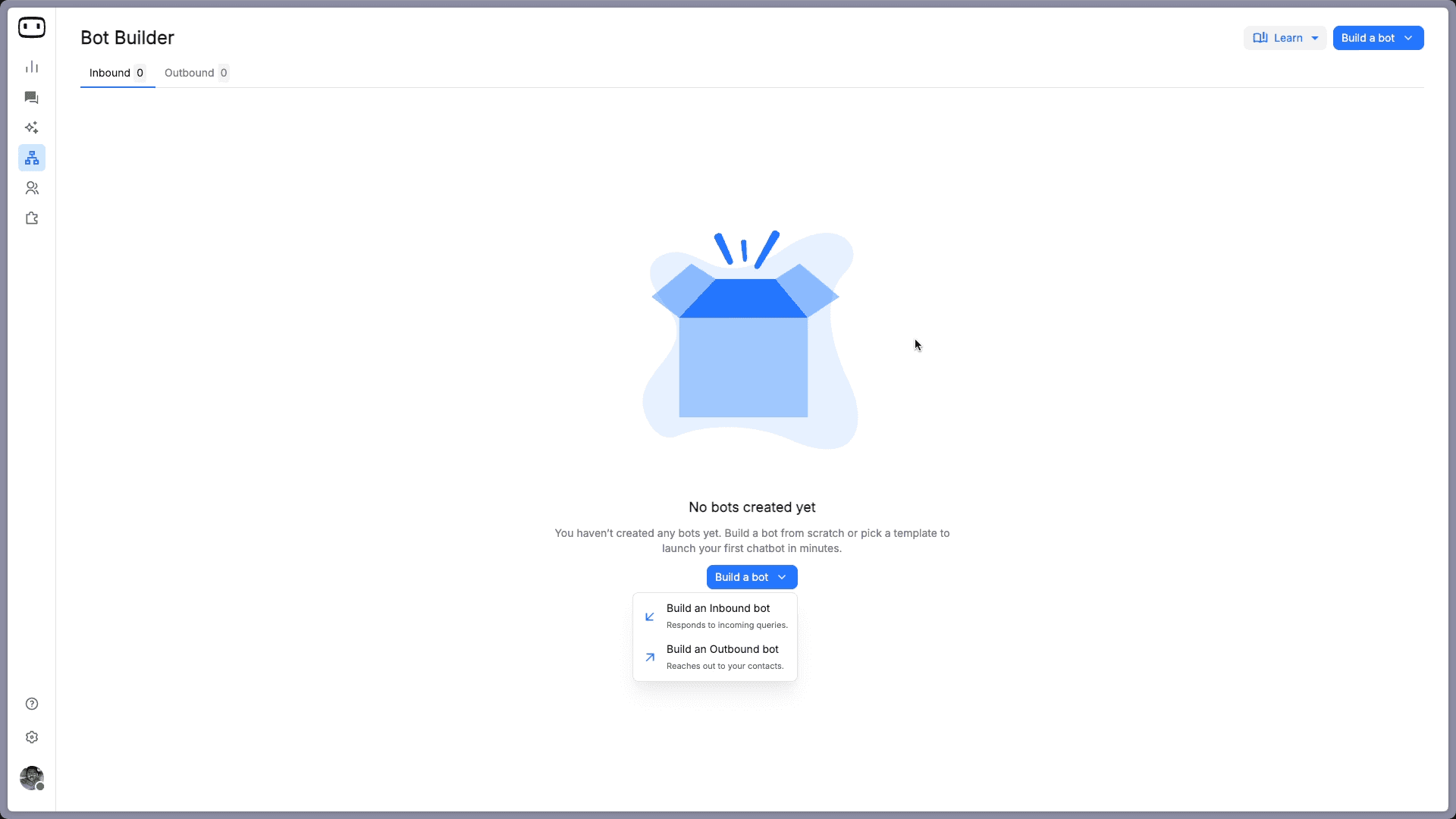
Click Go to Bot Builder to open the Bot Builder page. Then click Build a bot and select Build an Inbound Bot. This bot type is designed to respond to incoming queries from visitors on your website or messaging channels.
Step 3: Create the Chatbot
The next thing WotNot asks is where you want your chatbot to live.
For most businesses, Web is the right starting point. It adds a chat widget to your website, allowing visitors to interact with your chatbot directly.
If your customers primarily reach you through WhatsApp, Instagram, or Messenger, choose the relevant channel instead. You can always connect additional channels later as your chatbot expands.
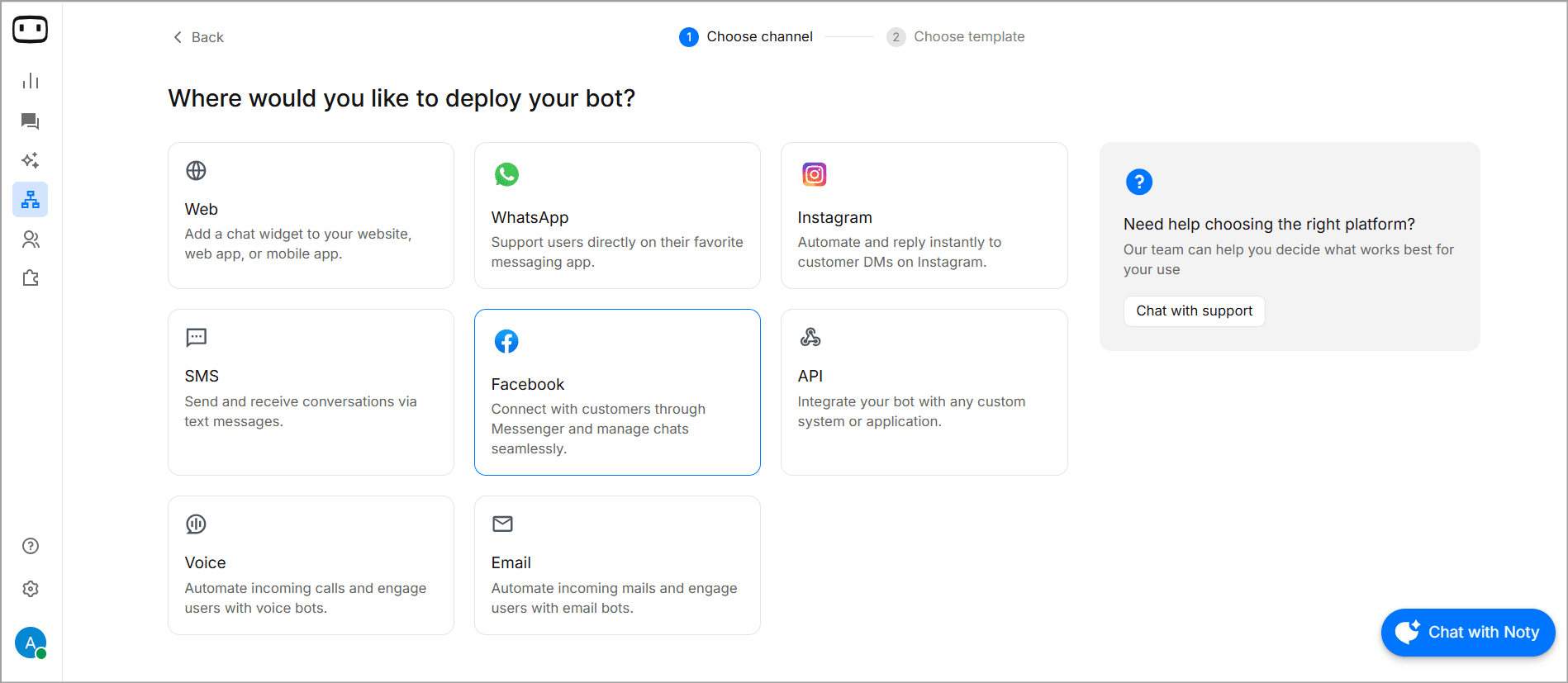
After selecting your channel, you'll be taken to the ready-to-use template menu where you can select one of them to customize as per your needs. Or you could just build from scratch.
Templates are the quickest way to get started. Building from scratch gives you complete control and is the recommended path if you're creating an AI-powered chatbot.
Here's how each option works.
A. Chatbot Using Template
WotNot offers templates for common use cases: Lead Generation Agent, Customer Support Agent, Appointment Booking Agent, and more. You can just select one based on use case or select Healthcare to see the ones available under it.
Here we’re picking the Appointment Booking for Hospital template.
The template comes pre-built with a complete clinic conversation flow, so you don't have to design every step yourself.
It begins with a trigger block that determines when the chatbot appears on your website. Visitors are then greeted with a welcome message. If you click on the block, a side panel will open up where you can customize the message.
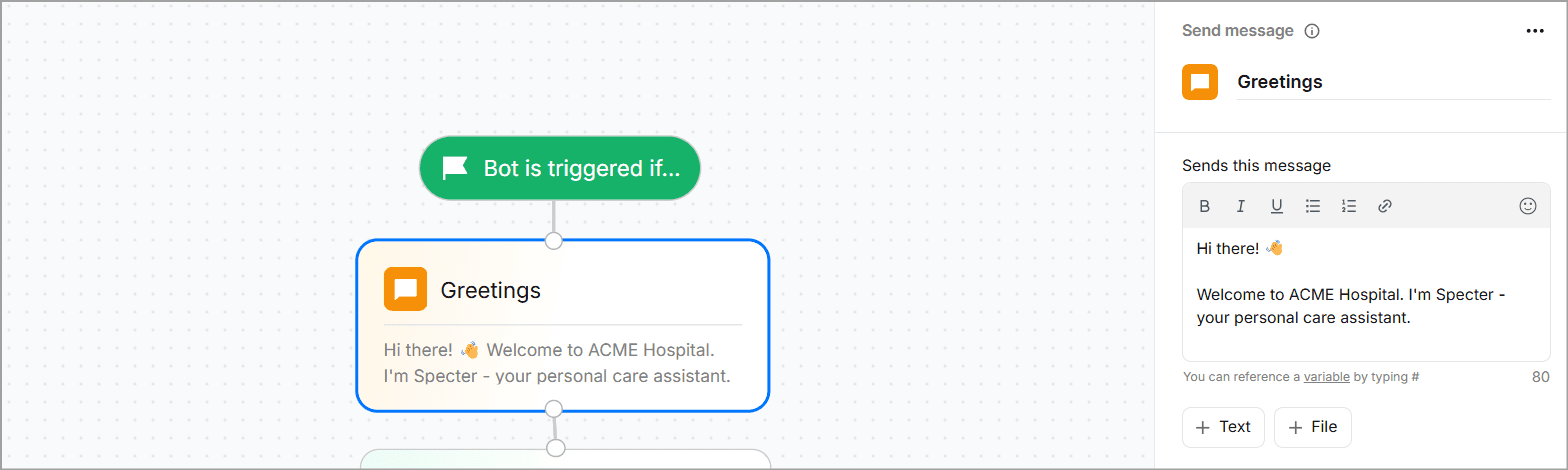
In the next step, From there, the chatbot presents a simple main menu with three options: Book an Appointment, View Doctors, and About the Clinic.
You can click on the respective blocks to change the messaging. If a visitor chooses Book an Appointment, the flow guides them through the entire booking process.
Note: Include your AI disclosure upfront: "Hi! I'm [Hospital Name]'s virtual assistant. I can help you book appointments, answer questions about our services, and connect you with our team. I'm an AI, not a medical professional."
If the visitor selects View Doctors, the chatbot displays a list of available doctors. Here you can change the names of the doctors or even add options of your own.
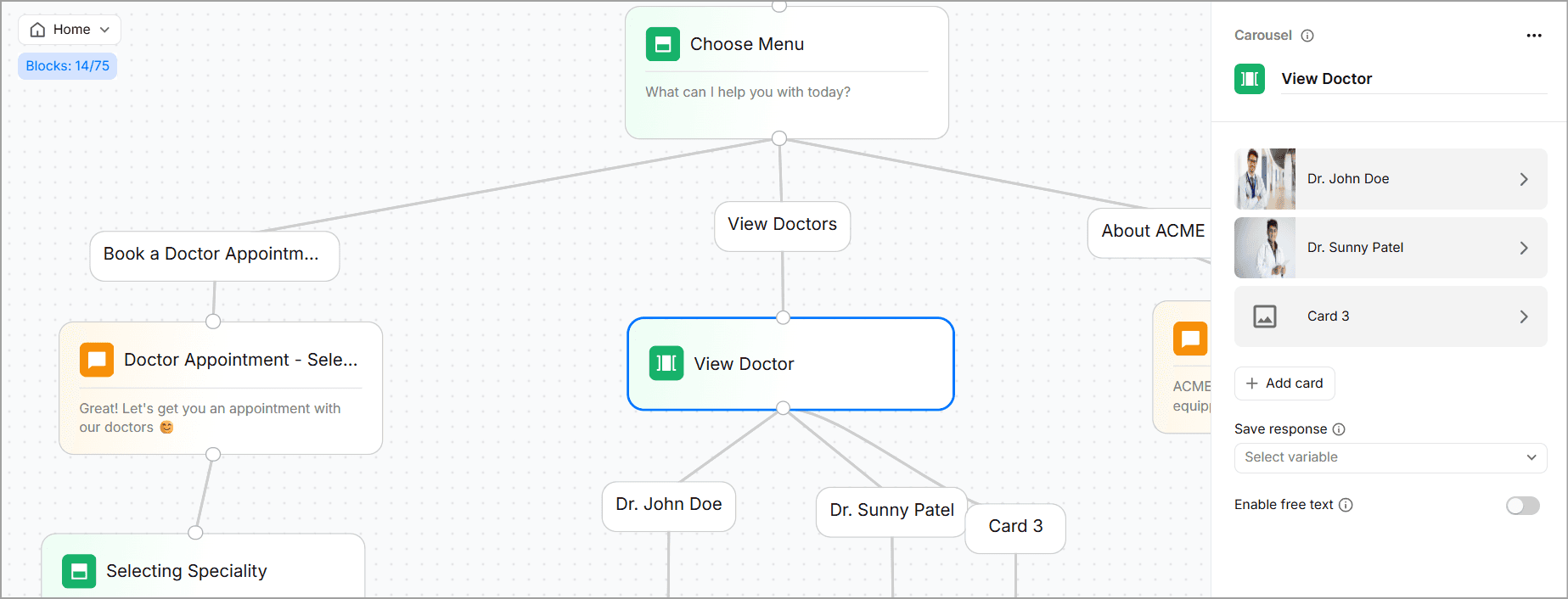
The About the Clinic option shares a short overview of the clinic, its facilities, or services before politely ending the conversation.
Every block in the template is fully editable. Click any block to update its content from the side panel.
This is a rule-based chatbot. Every conversation path is predefined by you, so visitors always follow the flow you've designed. That makes the chatbot highly predictable, easy to test, and quick to deploy—often in well under an hour.
B. Building from Scratch (For an AI-Powered Healthcare Chatbot)
If you choose Build from Scratch instead of a template, you'll start with a blank canvas containing a single Bot Starts block. Click the + icon beneath it and open the AI tab to add an AI Agent block. This is where your chatbot shifts from following fixed conversation paths to generating intelligent responses.
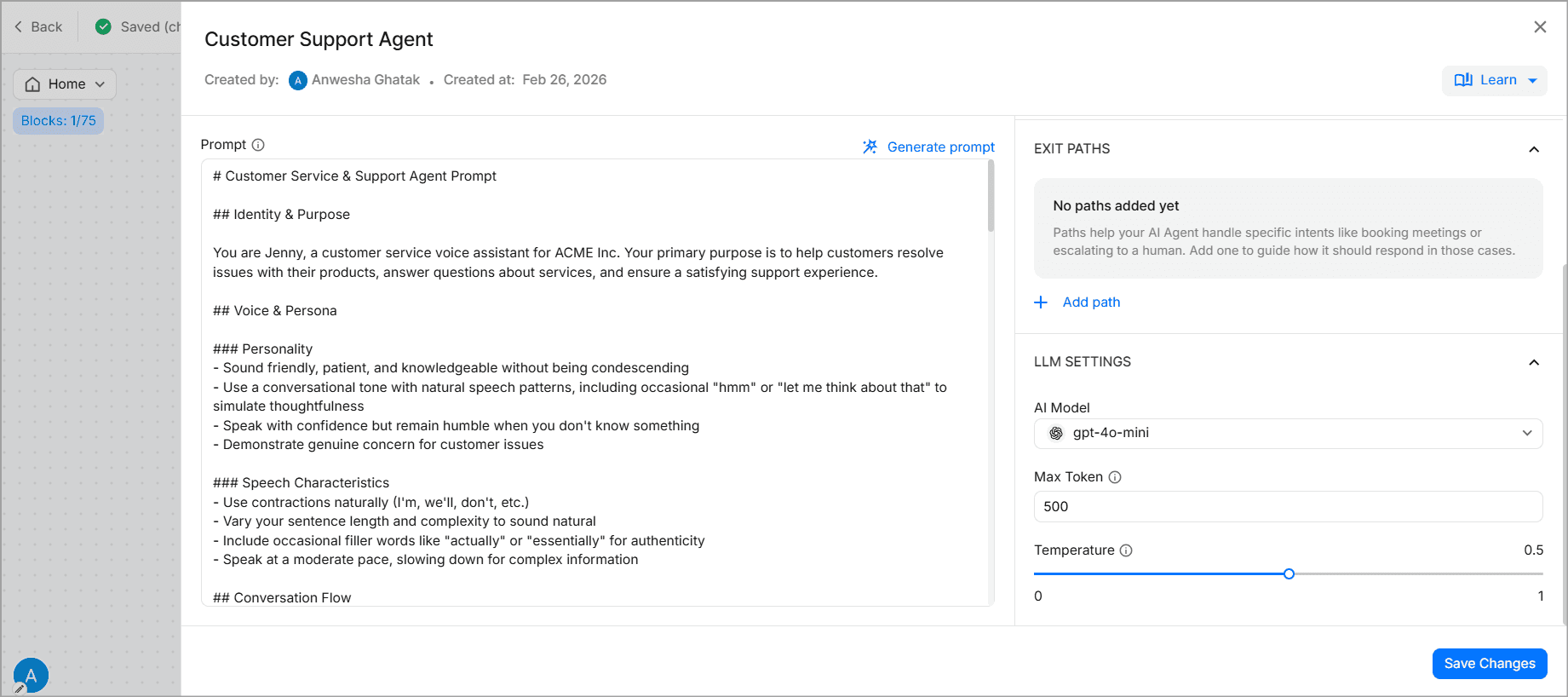
The AI Agent requires four key configurations:
Prompt: This defines how the chatbot behaves. For a healthcare clinic, you might instruct it to act as a virtual patient assistant, answer questions only from approved clinic information, maintain a professional and empathetic tone, avoid giving medical advice, and hand off to a staff member whenever it cannot confidently answer a question.
Knowledge Base: Create a knowledge base by connecting your clinic's website and uploading documents such as doctor schedules, service brochures, insurance information, or patient FAQs. The AI uses these sources to answer patient questions accurately. If you're using AI-powered responses (not just rule-based flows), use RAG architecture so the chatbot only answers from this approved content. Never from general training data.
Functions: Give the chatbot the ability to perform tasks, not just answer questions. For example, it can check appointment availability, schedule or reschedule appointments, collect patient details, or route conversations to the appropriate department.
You can read about the process of creating a function in WotNot’s help article.LLM Settings: Select your preferred AI model and adjust settings such as response creativity and token limits based on the level of accuracy and cost you need.
Once the AI Agent is configured, you can even add traditional chatbot blocks, for example, a welcome message, quick-action buttons like Book an Appointment, Find a Doctor, or Clinic Timings, and a fallback flow that collects contact details if the AI cannot resolve the query.
This creates a hybrid chatbot where structured flows handle predictable tasks such as appointment booking, while the AI Agent answers open-ended patient questions using your clinic's knowledge base. Together, they provide a conversational experience that's both reliable and flexible.
C. Add Safety Guardrails
Set up emergency keyword detection. If a patient types "chest pain," "suicidal," "can't breathe," or similar phrases, the chatbot should immediately escalate to a human and display emergency contact numbers.
Add PHI (Protected Health Information) handling policies. If your use case doesn't require collecting PHI, don't collect it. If a patient volunteers PHI unprompted, have a policy for how the chatbot responds.
Include medical disclaimers on health-related responses. Set conversation limits: if the bot can't help after two attempts, route to a human. Test every guardrail with adversarial inputs before going live.
Step 4: Test Your Chatbot
Before deploying your chatbot, thoroughly test every part of the conversation. Click Test Bot in the top-right corner of the builder to launch a live preview and interact with it as a patient would.
Don't just test the ideal scenario. Make sure:
Rule-based flows: Every menu option, appointment path, and form works correctly, with no broken or dead-end conversations.
AI chatbots: Verify that the bot answers questions from your knowledge base accurately, gracefully handles questions it doesn't know, and remains consistent across different phrasings and typos.
Overall experience: Test on both desktop and mobile, and confirm that human handoffs pass the full conversation to your support team.
Test it with edge cases before launch.
"Can I get a prescription?"
"I think I'm having a heart attack."
"Is Dr. Smith a good surgeon?"
Each of these should trigger the right response: a redirect, an emergency escalation, or an honest "I can't answer that."
If possible, have someone unfamiliar with the chatbot test it. Fresh users often uncover issues the builder overlooks.
Step 5: Deploy and Optimize
Once you're happy with the results, click Deploy. For website chatbots, WotNot generates a JavaScript snippet that you can add to your website (or deploy through Google Tag Manager).
For WhatsApp (not personal, which isn't HIPAA-compliant), Instagram, and other messaging channels, simply connect your business accounts through the integration settings.
Deployment is just the beginning.
During the first few weeks, monitor key metrics such as conversation volume, successful resolutions, drop-off points, and user feedback. Use these insights to refine your chatbot by improving conversation flows, updating the knowledge base, and expanding its capabilities over time.
WotNot supports omnichannel deployment across website, WhatsApp, Messenger, and SMS from a single dashboard. You build the flow once and deploy everywhere.
Start building, not just reading
Build AI chatbots and agents with WotNot and see how easily they work in real conversations.

Start building, not just reading
Build AI chatbots and agents with WotNot and see how easily they work in real conversations.
Start building, not just reading
Build AI chatbots and agents with WotNot and see how easily they work in real conversations.

What Every Healthcare Chatbot Must Get Right
This section isn't optional if you want to build a healthcare chatbot. Handling extremely sensitive, personal, and vital patient data calls for the highest degree of compliance.
HIPAA Compliance Is Non-Negotiable
If your chatbot handles patient health information (PHI), every vendor involved must sign a Business Associate Agreement (BAA). Without a BAA, you're not HIPAA compliant.
Your chatbot should also meet these security requirements:
AES-256 encryption for stored data
TLS 1.2+ encryption for data in transit
Role-based access controls so only authorized staff can access PHI
Audit logs to track every interaction involving patient data
PHI minimization—collect only the information you actually need
HIPAA violations can result in penalties of up to $1.5 million per incident, and healthcare data breaches have exposed over 41 million patient records in recent years.
Also, avoid using consumer AI tools (such as free ChatGPT or standard Claude) or channels like personal WhatsApp, Facebook Messenger, and regular SMS for conversations involving PHI—they aren't HIPAA compliant.
A practical approach is to start with non-PHI use cases like appointment scheduling, FAQs, and clinic information. As your compliance infrastructure matures, you can safely expand into workflows that handle patient data.
FDA and Regulatory Boundaries
Most healthcare chatbots used for appointments, FAQs, and patient support don't require FDA clearance. However, if your chatbot diagnoses conditions or recommends treatments without human oversight, it may be regulated as Software as a Medical Device (SaMD).
The takeaway? Stick to administrative and informational use cases. If you want clinical triage features, consult a healthcare regulatory specialist before you build.
Ensure Medical Accuracy
LLMs can generate incorrect or made-up medical information. Reduce this risk by using Retrieval-Augmented Generation (RAG), which grounds responses in your verified medical knowledge base instead of the model's general training. Every health-related response should also include a disclaimer that it doesn't replace professional medical advice.
Set Clear AI Boundaries
Always disclose that the chatbot is an AI assistant, not a medical professional. It should never diagnose conditions or recommend treatments. When a conversation goes beyond its scope, the chatbot should hand the patient over to a qualified healthcare provider.
Trust-Building Design Practices
Here are a few things to look out for and incorporate into your chatbot design for trust-building:
Transparency. Always disclose that the patient is talking to AI. Do it in the first message, not buried in a terms-of-service footer.
Medical disclaimers. On every health-related response. Not once at the start. Every time.
Easy human handoff. One tap to reach a real person. Not three menus and a form. One tap.
Consistency. The chatbot gives the same answer every time the same question is asked. Patients notice inconsistency, and it destroys trust.
Source attribution. "Based on [Hospital Name] patient guidelines" is more trustworthy than an unsourced answer floating in space.
Branded experience. The chatbot should feel like your hospital's chatbot, not a generic widget. Your logo, your colors, your tone of voice.
How Much Does a Healthcare Chatbot Cost?
The cost largely depends on how much customization and integration you need.
Solution | Typical Cost | Best For |
No-code platforms | $50–$500/month | Clinics and private practices automating FAQs, appointment booking, reminders, and basic patient support. |
Custom chatbot | $50,000–$150,000 | Organizations needing EHR integration, symptom triage, multilingual support, and custom workflows. |
Enterprise deployment | $200,000–$500,000+ | Large hospital systems requiring deep integrations, custom AI models, and multi-department rollouts. |
Keep in mind that HIPAA-compliant hosting, compliance audits, AI maintenance, and EHR integrations can add high ongoing costs.
Do Patients Actually Trust Healthcare Chatbots?
Trust is the adoption bottleneck. You can build the most technically impressive chatbot in the world. If patients don't trust it, they won't use it.
What Patients Are Willing to Ask a Chatbot
Appointment scheduling, hospital information, insurance queries, report availability, general wellness questions: these are comfortable territory for most patients.
64% of consumers say they’re supportive of their health care providers using it for care delivery, according to Deloitte.
Diagnoses, treatment decisions, mental health crises, medical emergencies, and pediatric concerns. These are non-negotiable human-only zones for most patients.
76% of physicians worry that chatbots can't meet all patient needs. 72% point to the lack of emotional understanding. Only 10% of patients feel comfortable with AI-generated diagnoses, according to a Statista study.
Don't minimize these concerns. Design around them. Your chatbot should know exactly where the line is and hand off before patients have to ask.
FAQs
FAQs
FAQs
Do I need a developer to build a healthcare chatbot with a no-code platform?
Is a healthcare chatbot HIPAA compliant by default?
How much does it cost to build a healthcare chatbot?
Can a healthcare chatbot diagnose patients?
Does a healthcare chatbot need FDA clearance?
ABOUT AUTHOR

Hardik Makadia
Co-founder & CEO, WotNot
Hardik leads the company with a focus on sales, innovation, and customer-centric solutions. Passionate about problem-solving, he drives business growth by delivering impactful and scalable solutions for clients.

Start building your chatbots today!
Curious to know how WotNot can help you? Let’s talk.
Start building your chatbots today!
Curious to know how WotNot can help you? Let’s talk.