
Let’s build your chatbot today!
Launch a no-code WotNot agent and reclaim your hours.
*Takes you to quick 2-step signup.
I've recently noticed that companies now have a perception that their chatbot gave bad answers because the AI wasn't smart enough. But I know for certain that the problem started much earlier. It is the content you are feeding it.
Most knowledge base chatbots don't fail because the AI is weak. They fail because the knowledge base behind them wasn't built for a bot to read.
The traininglearning you are giving the AI is based on outdated articles, answers buried inside long documentation pages, inconsistent wording across different sources, or messy formatting.
AI undoubtedly is smart to navigate through it but I reckon it can't parse it cleanly, or better say, the way you expect the delivery. And these things reduce chatbot accuracy long before the AI model becomes the bottleneck.
In this guide, I break down what a knowledge base chatbot actually is, how to prepare your content so the bot gets it right from day one, and the mistakes I keep seeing teams make after they go live.
What Is a Knowledge Base Chatbot?
A knowledge base chatbot is a virtual assistant that answers questions by pulling information directly from your company's own content. Help articles, FAQs, product documentation, policy pages, whatever you have.
Instead of relying on pre-written scripts or generic AI responses, it searches your chatbot knowledge base for the most relevant piece of information and generates a response grounded in that content.
This is what makes it an AI knowledge base chatbot rather than a simple scripted bot. The technology behind this is called Retrieval-Augmented Generation, or RAG. In simple terms, when a customer asks a question, the chatbot doesn't guess. It retrieves the closest matching content from your knowledge base and uses that as the foundation for its answer. That is what separates a knowledge base chatbot from a generic AI that makes things up when it doesn't know the answer.
Now, there are two ways businesses use these chatbots.
1. External Knowledge Base Chatbot
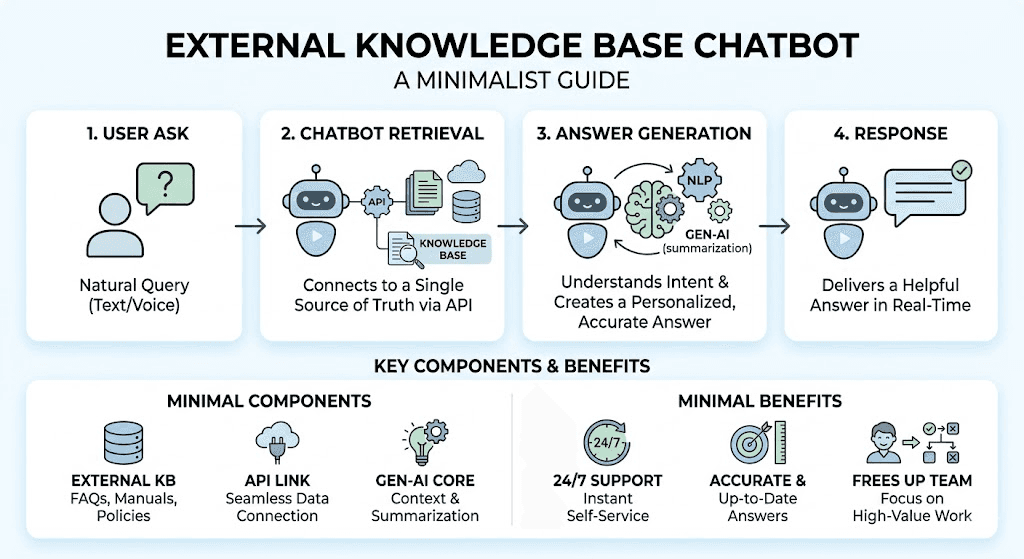
External knowledge base chatbots are customer-facing. They are placed on your website or WhatsApp or Messenger and answer questions about your product, pricing, shipping, returns, or anything else a customer might ask. The stakes here are high because a wrong answer doesn't just frustrate the customer, it can cost you a sale or damage trust.
2. Internal Knowledge Base Chatbot
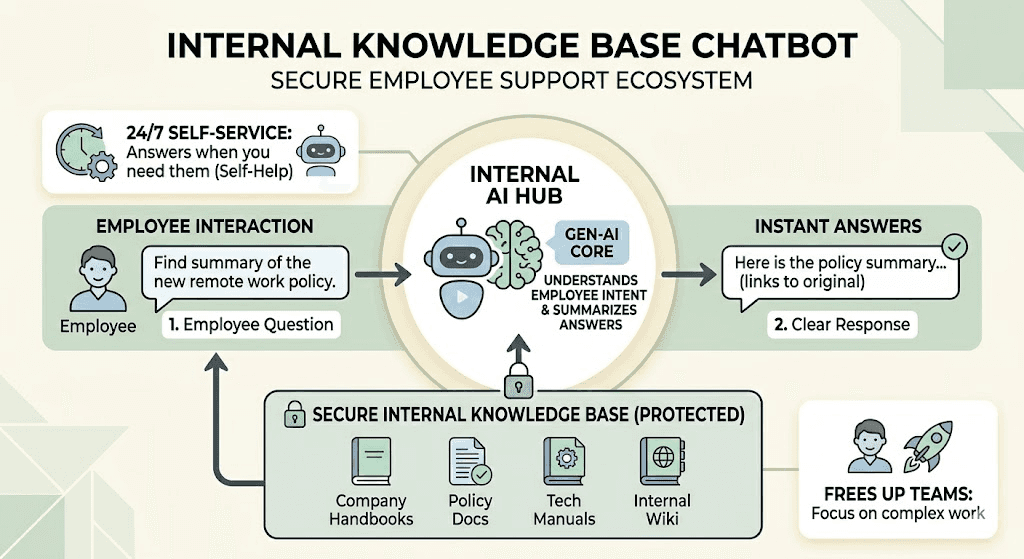
Internal knowledge base chatbots serve your own team. IT helpdesk questions, HR policy inquiries, onboarding checklists, internal SOPs. The stakes are different because your employees are more forgiving than your customers, which actually makes internal use a safer starting point if you are building a chatbot for the first time.
Let’s build your chatbot today!
Launch a no-code WotNot agent and reclaim your hours.
Let’s build your chatbot today!
Launch a no-code WotNot agent and reclaim your hours.
Why Your Knowledge Base Matters More Than Your AI Model
Every chatbot vendor will tell you their AI is the smartest in the room. And honestly, in 2026, most of the major models are good enough. The difference between GPT, Claude, Gemini, or Mistral powering your chatbot is marginal compared to the difference between a well-structured knowledge base and a messy one.
And I can confidently say this because I have seen this play out enough times now.
A team picks a top-tier AI model, uploads their entire documentation folder, connects the chatbot, and wonders why it keeps giving wrong answers.
Because there is nothing wrong with the model, your content is the culprit. The bot pulled from a product guide that was last updated eight months ago, or it retrieved a paragraph from a 3,000-word page where the actual answer was buried in the middle, or it found two articles that said slightly different things about the same policy and picked the wrong one.
What makes a knowledge base work for a chatbot is different from what makes it work for a human reader. A human can skim a long page, ignore the irrelevant parts, and find what they need. A chatbot retrieves chunks of text based on similarity, and if those chunks are poorly written or poorly organized, the response quality drops fast.
You may ask - do I have to create knowledge bases separately for humans and robots?
Not really.
Before you spend time comparing AI models or evaluating platforms, you need to ask yourself these questions about your content:
Are your answers direct and specific, or buried inside long paragraphs?
Does each article solve one problem, or is it a giant page covering everything?
Is the language written the way your customers ask questions, or the way your internal team writes documentation?
When was the last time someone reviewed and updated the content?
If the answers to those questions make you uncomfortable, that is where the work needs to start. Not with the AI but with the knowledge base.
WotNot's AI Studio uses RAG across multiple LLMs to generate grounded responses from your content. However, even with that flexibility, the output quality always starts with how well your knowledge base is prepared.
Before connecting a bot to your content, it helps to define what a well-structured knowledge base should contain, how it should be governed, and how teams keep it trustworthy over time.
How to Prepare Your Knowledge Base (The Five-Step Audit)
Before you connect any chatbot to your knowledge base, run your content through these five steps. They take a few hours and will save you weeks of debugging wrong answers later.
Before you start the audit, get a full picture of what's actually on your site - pull every URL from your sitemap here, then work through the five steps below to decide what earns a place in your knowledge base.
Step 1: Start With Real Customer Questions, Not Your Documentation
Companies upload their entire docs folder and hope the AI figures it out. This approach will not give you the desired results. The smarter approach is to start from the other end.
Pull the 20 most common questions from your inbox, your chat logs, or your support tickets. Those questions are what your knowledge base needs to answer first.
You are not building a library. You are building a response system. And that system should be shaped by what customers actually ask, not by what your team has already written.
Step 2: Organize Into Clear Categories
An AI knowledge base that dumps everything into one folder is asking the AI to dig through a pile instead of opening the right drawer.
Structure your content into logical groups: account and login, billing, product features, setup and onboarding, troubleshooting, and policies.
This isn't just for the chatbot. It also helps your human agents. But for the AI specifically, organized content means the retrieval step pulls from the right category instead of matching a random paragraph from an unrelated article.
Step 3: Write Answers the Way You Actually Talk
I have seen knowledge bases where the answer to "how do I cancel my subscription?" starts with three paragraphs about the company's cancellation philosophy before telling you how to actually cancel.
That might work for a blog post. It does not work for a chatbot.
The bot needs direct answers up front. If a customer asks how to cancel, the first sentence should tell them how to cancel. The context and the "why" can follow, but the answer comes first.
Write the way you would reply if a customer asked you face-to-face. That tone is what makes a chatbot's design feel helpful instead of robotic.
Step 4: Keep Articles Modular
One article per problem. "How to Reset Your Password" is better than "Complete Account Management Guide." And I mean this seriously because this is one of the most common mistakes I see.
When an article covers five different topics, the chatbot retrieves a chunk that might contain pieces of three different answers mixed together. The response sounds half-right, which is actually worse than being completely wrong because the customer thinks they got the answer but acts on incomplete information.
Smaller articles mean the chatbot can pull exactly what it needs without the noise.
Step 5: Include Variations of Customer Language
Your documentation probably says "Subscription Cancellation Policy." Your customer types "how do I stop my plan?" Same question, completely different words. If your knowledge base only contains the formal version, the chatbot's retrieval step has to work harder to make the match, and sometimes it doesn't.
The fix is simple. Write your articles naturally and include the phrases your customers actually use. Look at your chat logs and support tickets for the exact wording people use when they ask these questions. That language should show up in your knowledge base, not just in your customers' messages.
WotNot's AI Studio connects to your knowledge base using RAG and supports multiple LLMs, including OpenAI, Anthropic, Gemini, and Mistral. But even with that flexibility in the AI layer, I always tell teams the same thing: prepare the content first. The model can be swapped later.
|
The Knowledge Base Audit Checklist
Step | What to Do | Why It Matters |
Start with real questions | Pull top 20 from inbox and tickets | You build around what customers actually ask |
Organize into categories | Group by topic logically | AI retrieves better from structured content |
Write conversationally | Direct answers, simple language | Bot responses sound human, not robotic |
Keep articles modular | One problem per article | Retrieval precision improves dramatically |
Include language variations | Add synonyms and phrasing customers use | Matches real queries to right content |
Start building, not just reading
Build AI chatbots and agents with WotNot and see how easily they work in real conversations.

Start building, not just reading
Build AI chatbots and agents with WotNot and see how easily they work in real conversations.
Start building, not just reading
Build AI chatbots and agents with WotNot and see how easily they work in real conversations.

Common Mistakes That Kill Chatbot Accuracy
You can get the five-step audit right and still run into problems if these patterns creep in after launch. I see them often enough that they are worth calling out specifically.
1. Uploading everything at once
I get the temptation. You have 200 help articles, 50 product docs, and a folder full of PDFs, so you upload all of it, thinking more content means better answers.
Sadly, it doesn't. What actually happens is the chatbot starts pulling from irrelevant or outdated sources because it has too much to sift through and no way to know which version is the authoritative one.
Start with the content that answers your top 20 questions. Add the rest gradually as you see what customers are actually asking.
2. Letting the knowledge base go stale
This one is silent and dangerous. The chatbot that gave perfect answers at launch will start giving wrong answers within a few months if nobody updates the content.
Pricing changes, product features get added or removed, and return policies shift seasonally.
And the bot keeps serving the old version with full confidence. I'd recommend scheduling at least 30 minutes a week to review chatbot transcripts and update the knowledge base based on what the bot got wrong or couldn't answer. That single habit is the highest-ROI maintenance activity for any knowledge base chatbot.
3. Writing for your team instead of your customers
Your product team writes documentation in a way that makes sense internally. "Revenue Operations: Refund Processing Workflow" is a perfectly fine title for an internal wiki.
But when a customer asks, "How do I get my money back?" the chatbot needs content that matches how they think and speak, not how your team organizes information. If the language gap between your knowledge base and your customers is wide, the bot's retrieval quality drops no matter how good the AI model is.
4. No fallback when the bot doesn't know
This is the mistake that damages trust the fastest. When the knowledge base doesn't contain the answer, some bots hallucinate a response instead of admitting they don't have one.
A customer who gets a confidently wrong answer loses trust not just in the chatbot but in your brand. The better design is a clean handoff: "I don't have that information, let me connect you with someone who does."
WotNot builds this into the core product with live chat handoff that preserves the full conversation, so the human agent sees everything the bot already covered, and the customer never has to start over.
Start With Your 20 Most Common Questions. The Bot Handles the Rest.
The companies I have seen get knowledge base chatbots right all started the same way. They didn't begin with a platform comparison or an AI model evaluation. They opened their inbox, looked at what customers were actually asking, and built their knowledge base around those questions first.
That is the whole secret, if you can even call it one. Get the content right, structure it so the bot can read it, and keep it updated as your business evolves. The AI layer on top of that is the easier part to solve.
If you want a knowledge base chatbot live without spending weeks preparing the content yourself, WotNot's managed services team handles both the knowledge base setup and the bot deployment. Start with the 20 questions your customers ask most. The rest builds from there.
FAQs
FAQs
FAQs
What is a knowledge base chatbot?
How to create a knowledge base for a chatbot?
Can I build an AI chatbot with custom knowledge base?
What is the difference between an internal and external knowledge base chatbot?
ABOUT AUTHOR

Hardik Makadia
Co-founder & CEO, WotNot
Hardik leads the company with a focus on sales, innovation, and customer-centric solutions. Passionate about problem-solving, he drives business growth by delivering impactful and scalable solutions for clients.

Start building your chatbots today!
Curious to know how WotNot can help you? Let’s talk.
Start building your chatbots today!
Curious to know how WotNot can help you? Let’s talk.