

Let’s build your chatbot today!
Launch a no-code WotNot agent and reclaim your hours.
*Takes you to quick 2-step signup.
If you're into real estate, you've got a very short window to capture your customer. Buyers rarely reach out to just one agent; they send inquiries to several listings at once. That's why in this industry, the faster reply usually wins the deal.
And that's not just a saying. According to the National Association of Realtors, 78% of homebuyers work with the first agent who responds to their inquiry. Not the most experienced agent. The first one to reply.
Most leads don't wait. Someone likes a property, sends an inquiry, and if they don't hear back quickly, they move on to your competitor. And a lot of these inquiries come in at night or over the weekend, exactly when no one's around to answer.
That's the gap a chatbot fills. It replies in seconds, any time of day, and can ask the right questions to qualify a lead before an agent ever gets involved. That's why chatbots have become one of the highest-ROI tools in real estate today.
But "get a chatbot" is vague advice. This guide is specific. I'll show you the real ways real estate businesses use chatbots, what those conversations actually look like, and how to build one yourself, step by step. I'll also be honest about where chatbots don't help, because they aren't the answer to everything in this business.
Let's start with how real estate teams are putting them to work.
Let’s build your chatbot today!
Launch a no-code WotNot agent and reclaim your hours.
Let’s build your chatbot today!
Launch a no-code WotNot agent and reclaim your hours.
6 Ways Real Estate Businesses Actually Use Chatbots
These aren't hypothetical use cases. Each one solves a real problem agents and brokerages deal with every day, and I'll show you what the bot actually does in each situation.
Qualifying Leads Before an Agent Steps In
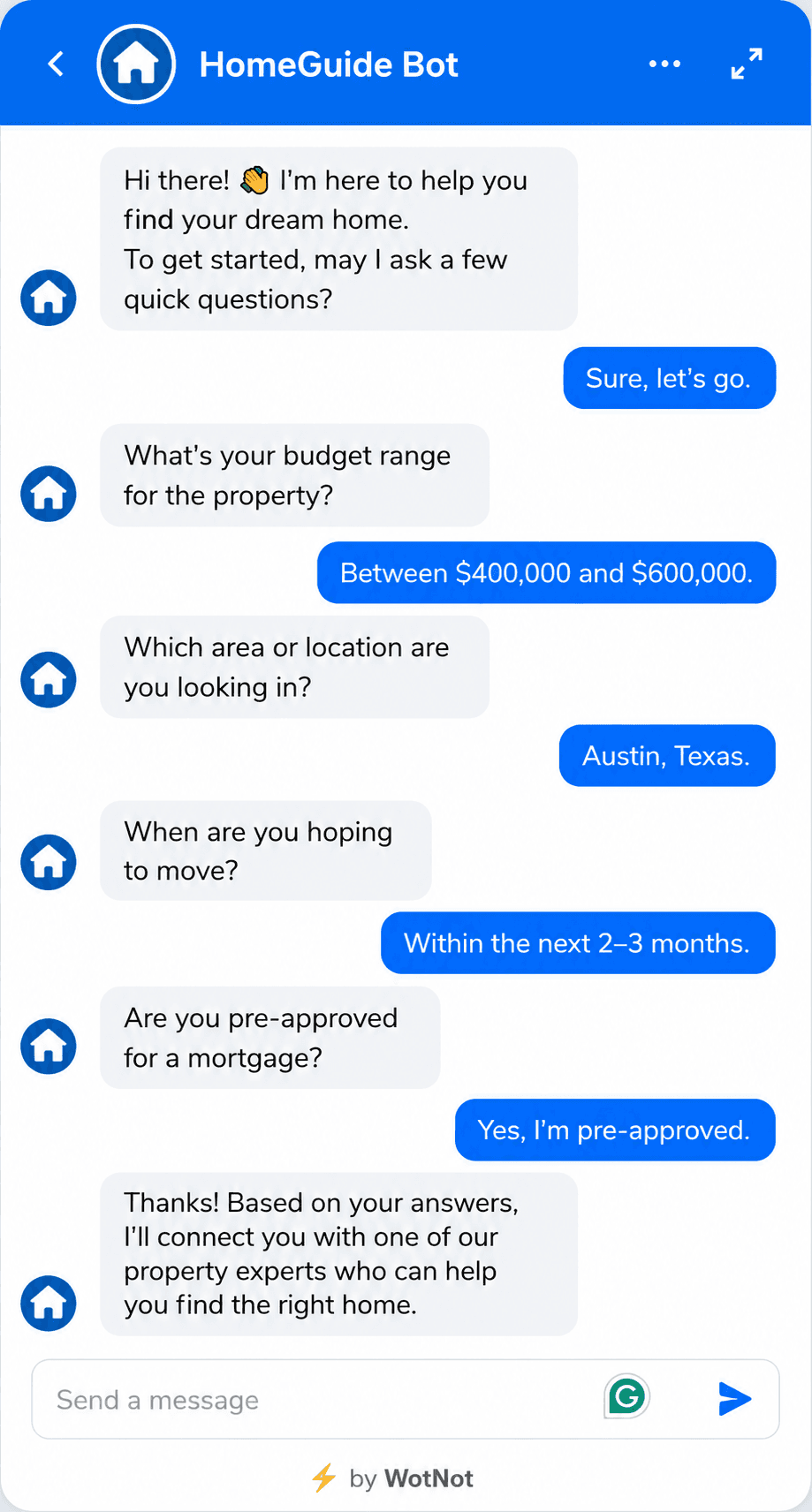
Not every lead is worth a phone call, and a chatbot helps you figure out which ones are before you spend any time on them. When someone reaches out, the bot can ask the questions that actually matter: what's your budget, what area are you looking in, when are you hoping to move, and are you already pre-approved for a mortgage?
By the time an agent picks up the conversation, they already know whether they're talking to a serious buyer or someone who's just browsing. That means your team spends its energy on the leads most likely to close, instead of chasing everyone equally.
Answering Property and Listing Questions 24/7
Before a buyer is ready to talk to anyone, they usually have a handful of quick questions. How much is it, is it still available, how many bedrooms, what are the HOA fees, is parking included. These questions don't need an agent; they just need a fast, accurate answer.
A chatbot connected to your listings can respond instantly, any time of day. The buyer gets what they need in the moment, which keeps them engaged with your listing instead of clicking away to the next one.
Capturing After-Hours and Weekend Leads
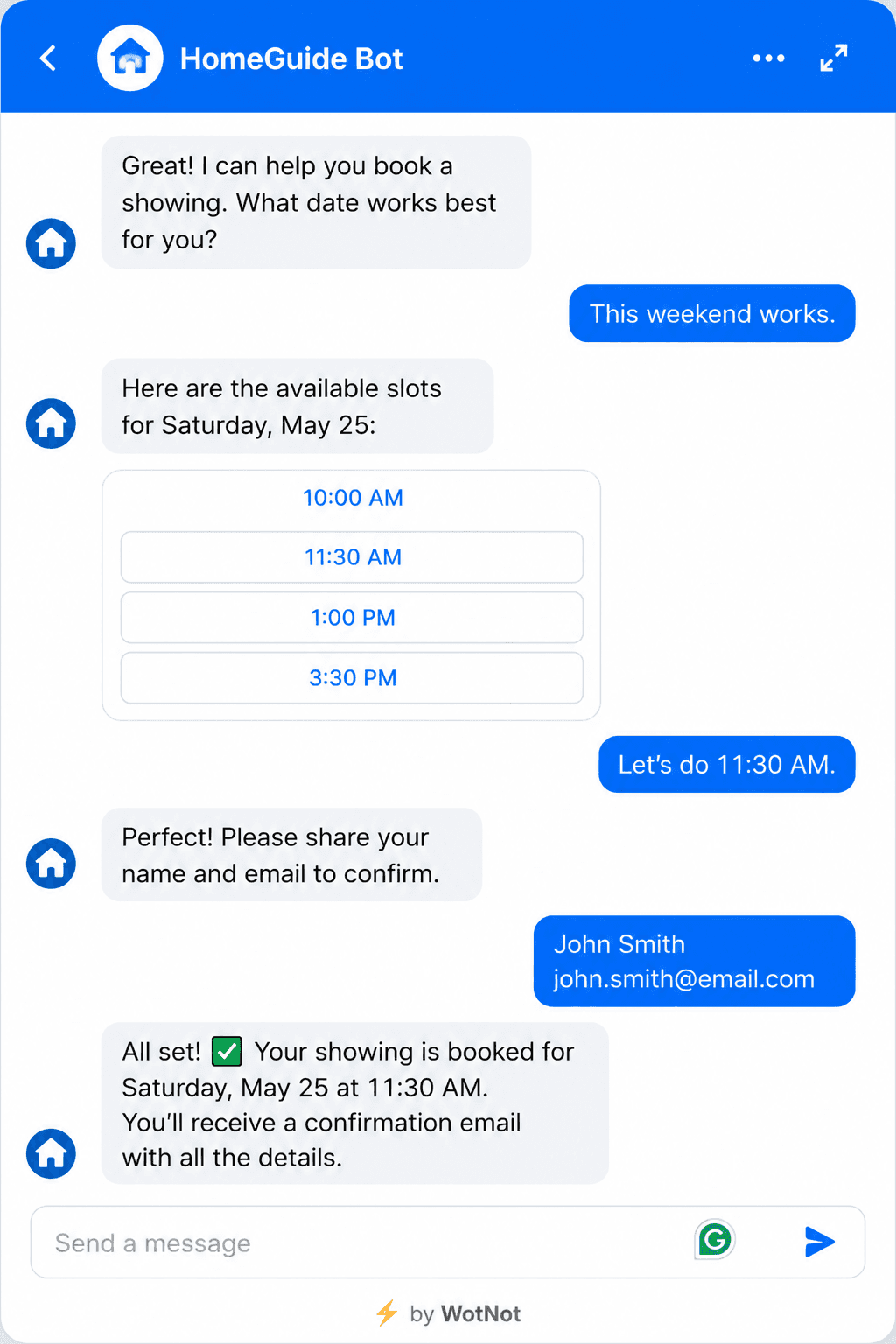
A lot of property searching happens in the evening and on weekends, when people finally have time to think about moving. That's also when most offices are closed. Every inquiry that comes in during those hours is a lead sitting unanswered until Monday, and by then it's often gone.
A chatbot covers those hours for you. It greets the visitor, answers their questions, qualifies them, and captures their details, so the lead is warm and waiting when your team gets back online.
Nurturing Leads Over a Long Sales Cycle
Buying or selling a home isn't a quick decision. Someone who reaches out today might not be ready to move for weeks or even months, and it's easy for those leads to go cold in the meantime. Staying in touch with every one of them manually just isn't realistic.
A chatbot, paired with your CRM, can keep the relationship warm with timely, relevant follow-ups over that longer stretch. It checks in, shares new listings that match what they're looking for, and keeps you top of mind, so when they're finally ready, you're the one they call.
Handling Tenant and Property Management Requests
Chatbots aren't just for sales. If you manage properties, a big chunk of your day goes to tenant questions that repeat constantly. How do I pay rent, how do I submit a maintenance request, what's the policy on guests, how do I book the amenity room?
A chatbot can handle all of these on its own, and route the ones that genuinely need a person to the right team member. That takes a real load off your property managers and gives tenants faster answers than waiting for someone to return a call.
Where Chatbots Fall Short in Real Estate
I'd be doing you a disservice if I made it sound like chatbots handle everything. They don't, and knowing where they stop is just as important as knowing where they help.
They can't close a deal:
Real estate is an emotional, high-stakes decision, often the biggest one a person makes in their life. The trust, negotiation, and reassurance that get someone from "interested" to "signed" require a human.
A chatbot can bring a lead to the table, but a person has to close them.They struggle in the luxury and relationship-driven segment:
If your business runs on personal relationships, referrals, and white-glove service, an automated first touch can feel out of place. High-net-worth buyers usually expect a person from the very first interaction. In that world, a chatbot handling the front end can work against the premium experience you're selling.They're only as good as the information you give them:
A chatbot answering property questions needs accurate, up-to-date listing data. If your listings change often and the bot isn't connected to a reliable source, it can give wrong answers about price or availability, which does more harm than not having a bot at all.They can frustrate people if overused:
A buyer with a genuinely complex or unusual question doesn't want to be stuck in a loop with a bot that can't understand them. Without a clean, fast handoff to a human, the very tool meant to improve the experience ends up hurting it.
So here's the honest way to think about it. A chatbot is excellent at the top of the funnel: capturing leads, answering common questions, qualifying, and booking. It's not built for the bottom of the funnel, where deals are actually won. The teams that get the most out of chatbots use them to handle the repetitive early work so their agents have more time for the high-value conversations that need a human. Used that way, a chatbot doesn't replace your agents. It makes them more effective.
How to Build a Real Estate Chatbot (Step by Step)
You don't need a developer or a single line of code to build a real estate chatbot. Modern no-code platforms handle the heavy lifting, and you can have a working bot live in an afternoon. I'll walk through it using WotNot, but the general process applies to most no-code builders.
Before we start, one quick decision. There are two ways to build:
Use a template:
WotNot ships with pre-built real estate templates that already have the conversation flow mapped out. You just customize the details. This is the fastest path and the one most teams should start with.Build from scratch:
You start with a blank canvas and design every step yourself, or add an AI Agent block for open-ended, AI-powered conversations. More control, more effort.
We'll walk through the template path here, since it gets you live the fastest. Once you're comfortable, you can always build from scratch or layer in AI.
Step 1: Sign Up and Open the Bot Builder
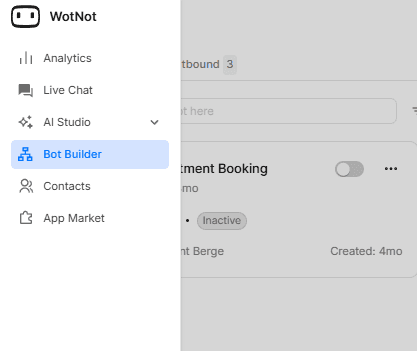
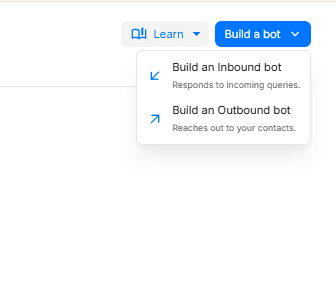
Sign up for WotNot. There's a 14-day free trial, so you don't need to commit to a plan to start building. Once you're in, head to the Bot Builder, click Build a bot, and select Build an Inbound Bot. Inbound is what you want here, since the bot's job is to respond to visitors who reach out to you.
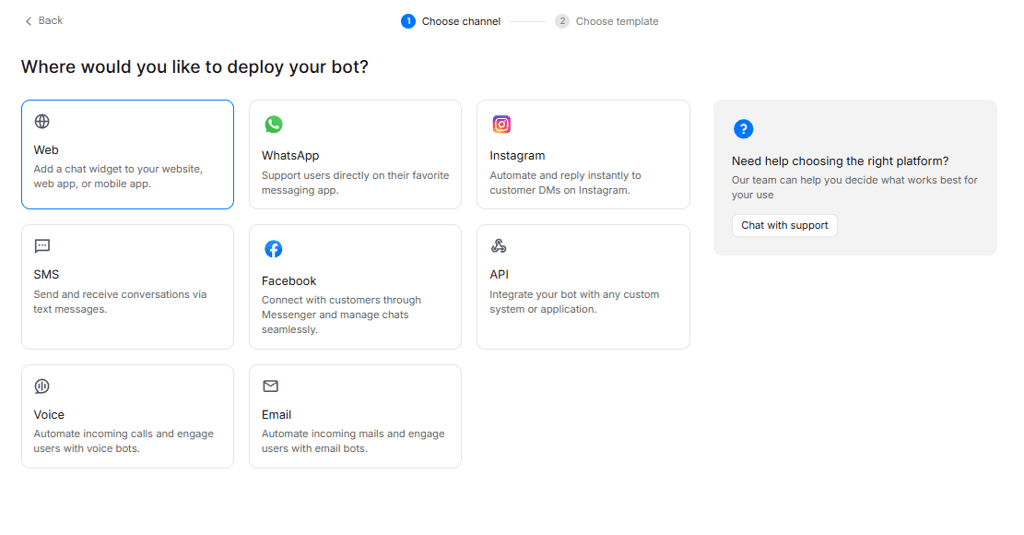
Step 2: Choose Your Channel
Next, WotNot asks where you want the bot to live. For most real estate businesses, Web is the right starting point. It adds a chat widget to your website so visitors browsing your listings can interact with it directly.
If most of your leads come through WhatsApp or Instagram instead, pick that channel. You can always add more channels later.
Step 3: Pick the Real Estate Template
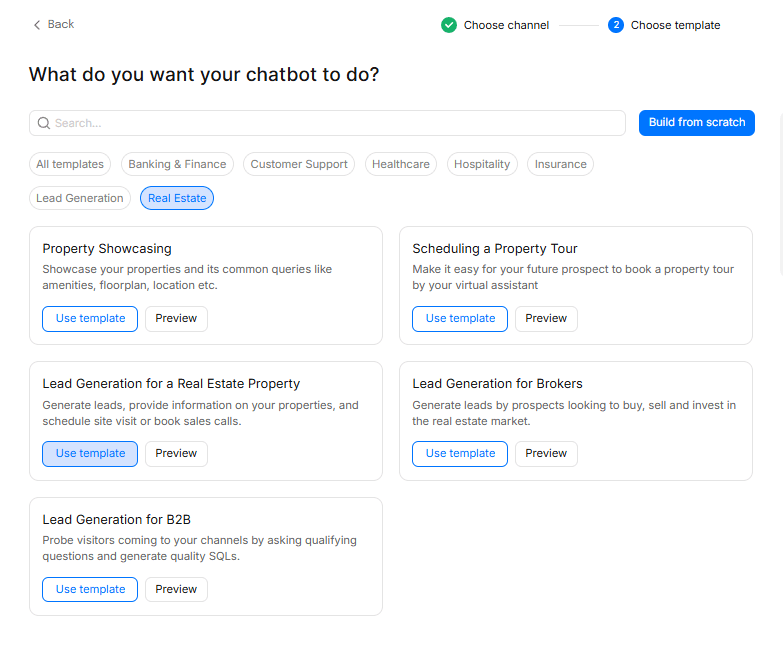
After choosing your channel, you'll land on the template menu. Select the Real Estate category to see the options built for this industry. You'll find templates for property showcasing, scheduling tours, and lead generation.
For a bot that does a bit of everything, choose Lead Generation for a Real Estate Property. It comes pre-built to answer property questions, capture leads, and schedule site visits, so you're not designing the whole flow from zero.
Step 4: Customize the Flow
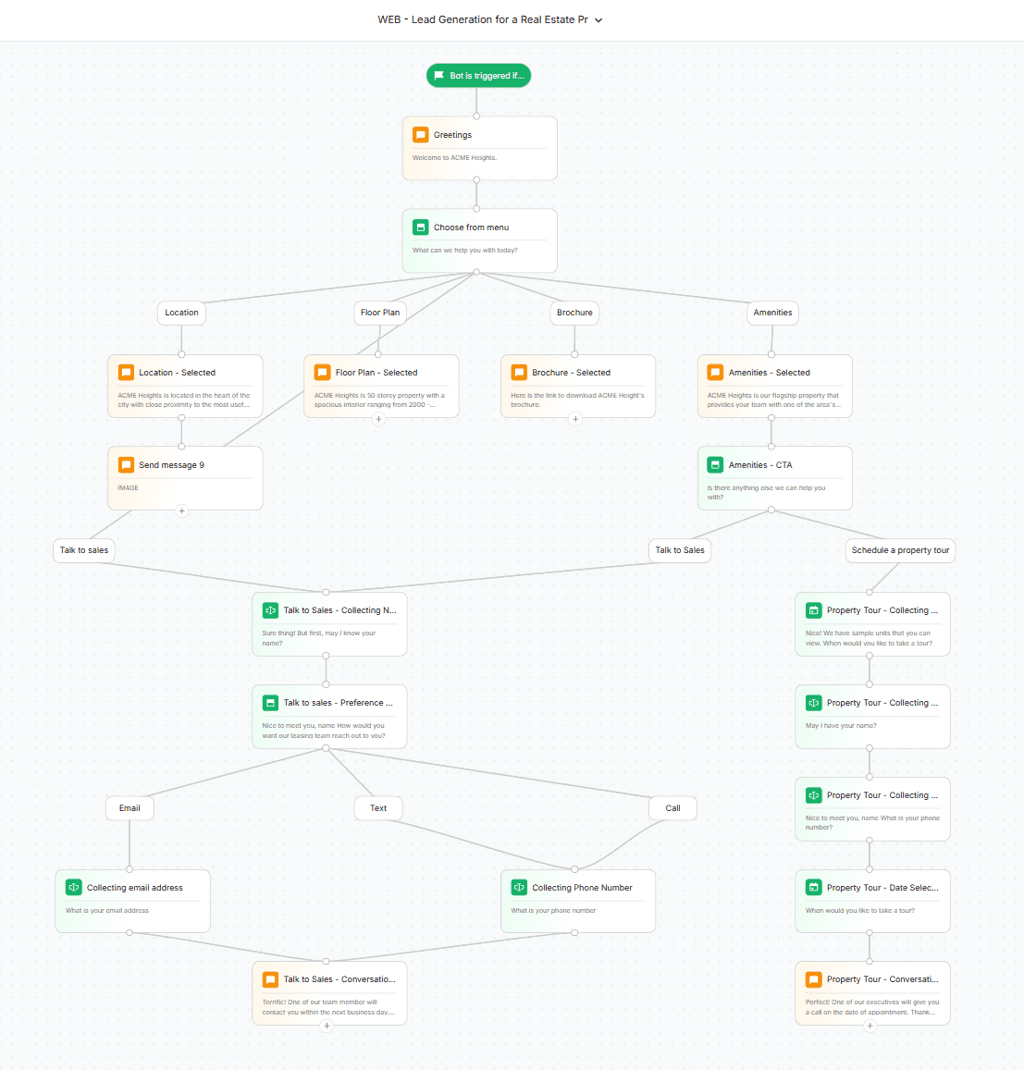
Here's where you make the bot yours. The template opens as a visual flow you can edit block by block. Click any block to change its content in the side panel.
The template starts with a greeting, then shows visitors a menu with options like Location, Floor Plan, Brochure, and Amenities. Each one leads to a pre-written response that you swap out for your actual property details. From there, the flow branches into two key paths: Talk to Sales, which collects the lead's name and preferred contact method, and Schedule a Property Tour, which walks them through picking a date and leaving their details.
You're not building this logic yourself. You're just filling in your information where the template has placeholders.
Step 5: Connect Your CRM
A lead the bot captures is only useful if it lands where your team works. Connect the bot to your CRM, whether that's Follow Up Boss, HubSpot, Salesforce, or something else, so every qualified lead flows in automatically with their answers attached. WotNot's native integrations handle this without any custom setup. No copy-pasting, no leads slipping through the cracks.
Step 6: Test Before You Launch
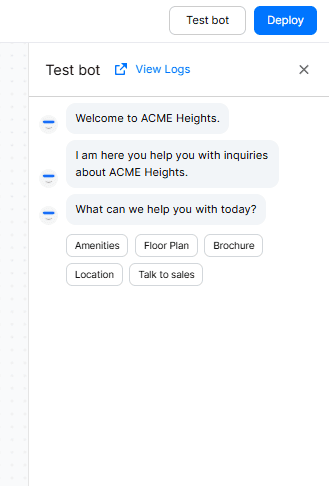
Don't just click through the happy path. Test the bot the way a real visitor would, including the messy questions. Try booking a tour, ask about a property, and throw in something the template doesn't expect to see how it handles it.
Click Test Bot in the builder to launch a live preview. Check that every menu option works, that the lead capture saves correctly, and that the handoff to a human passes along the full conversation. If you can, have someone unfamiliar with the bot try it. Fresh eyes catch things you'll miss.
Step 7: Deploy
Once it's working the way you want, hit Deploy. For a website bot, WotNot gives you a small snippet to add to your site (or push through Google Tag Manager). For WhatsApp or Instagram, you connect your business account through the integration settings.
Deployment isn't the finish line, though. For the first few weeks, watch how real visitors use it. Look at where they drop off, what questions the bot fumbles, and which paths get the most traffic. Use that to refine the flow and tighten the responses over time.
One more thing worth knowing: the bot we just built is inbound; it responds when visitors come to you. WotNot also supports outbound bots, which is what you'd use for the lead nurturing we talked about earlier, reaching out to past leads with new listings or follow-ups. Same dashboard, different bot type.
Start building, not just reading
Build AI chatbots and agents with WotNot and see how easily they work in real conversations.

Start building, not just reading
Build AI chatbots and agents with WotNot and see how easily they work in real conversations.
Start building, not just reading
Build AI chatbots and agents with WotNot and see how easily they work in real conversations.

What to Look For in a Real Estate Chatbot
If you're evaluating tools rather than building right away, here's a checklist of what actually matters for real estate. Not every platform does all of these well, so use this to separate the ones built for your use case from the generic ones.
CRM integration:
Your bot should push leads straight into whatever you already use: Follow Up Boss, Lofty, HubSpot, Salesforce. If it can't sync with your CRM, you're back to manual data entry, which defeats the purpose.The ability to take real actions:
Answering questions is table stakes. The bot should also book showings on your calendar, send listing details, and update lead records on its own. A bot that only talks but can't do anything leaves half the value on the table.Strong lead qualification:
Collecting a name and email isn't qualification. Look for a bot that can actually dig into budget, timeline, location, and financing status, so your agents know who's worth calling first.Omnichannel support:
Your leads aren't only on your website. They're on WhatsApp, Instagram, and Messenger too. A good real estate bot meets them wherever they are, ideally from one dashboard so you're not managing five separate tools.Human handoff with context:
When a qualified lead is ready for a person, the handoff should be instant and carry the full conversation with it. A proper live chat handoff means your agent never has to ask the lead to repeat what they just told the bot.Analytics that show conversion:
You want to see more than chat counts. Look for metrics that tell you how many leads the bot captured, how many showings it booked, and where people drop off, so you can prove ROI and keep improving.
Run any tool you're considering against this list. If it checks most of these boxes, it's built for real estate. If it only does one or two, it's a generic chatbot wearing a real estate label.
Let the Bot Handle the Busywork
Chatbots aren't here to replace real estate agents. The relationship, the negotiation, the judgment that closes a deal- none of that is going anywhere. What a chatbot does is clear the busywork off your plate so you have more time for the parts that actually need you.
It answers the same questions you've answered a thousand times. It qualifies leads while you sleep. It books showings without the phone tag. And it makes sure that the buyer who reaches out at 11pm gets a response before they move on to the next agent.
That's the real value. Not replacing the human, but making sure the human spends their time where it counts. In an industry where the fastest reply often wins the deal, a chatbot is how you make sure you're always the one who replied first.
If you want to see what that looks like for your business, you can try WotNot free and build a real estate bot in an afternoon.
FAQs
FAQs
FAQs
How much does a real estate chatbot cost?
It depends on the path. No-code platforms start around $23 to $99 per month for a working bot you set up yourself. If you want a team to build and manage it for you, managed services run higher. Custom-built bots cost significantly more upfront. For most agents and brokerages, a no-code platform delivers everything you need without the heavy price tag.
Can a chatbot replace a real estate agent?
What's the best channel for a real estate chatbot?
Do real estate chatbots integrate with my CRM?
Are real estate chatbots worth it for solo agents?
ABOUT AUTHOR

Hardik Makadia
Co-founder & CEO, WotNot
Hardik leads the company with a focus on sales, innovation, and customer-centric solutions. Passionate about problem-solving, he drives business growth by delivering impactful and scalable solutions for clients.




Start building your agents today!
Curious to know how WotNot can help you? Let’s talk.
Start building your agents today!
Curious to know how WotNot can help you? Let’s talk.