
Let’s build your chatbot today!
Launch a no-code WotNot agent and reclaim your hours.
*Takes you to quick 2-step signup.
AI agents are known to be stupid. Which is because they're poorly built.
And the biggest negligence while building an AI agent is its architecture.
For most teams, AI agent architecture means they will pick a good model, write a solid prompt, connect an API, and ship it." (That's it!)
But in reality, it’s much deeper than that.
It’s about designing how an agent thinks, plans, remembers, and acts consistently and reliably.
That’s how important AI agent architecture is!
If you get the architecture wrong, even the most powerful model will fail.
But if you get it right, even a simple setup can deliver surprisingly strong results.
In this guide, you'll find:
What AI agent architecture actually means (with real examples, not textbook fluff)
The five core AI agent architecture components every agent needs to function properly
Four architecture patterns that show up in real production environments
A practical framework for designing your own agent architecture
Common mistakes that ruin most agent projects before they even launch
Let’s build your chatbot today!
Launch a no-code WotNot agent and reclaim your hours.
Let’s build your chatbot today!
Launch a no-code WotNot agent and reclaim your hours.
What's AI Agent Architecture & What's In It Exactly?
AI agent architecture is basically the internal wiring that lets an agent take in information, reason through it, do something useful, and then learn from what happened.
That sounds a bit abstract, so let me give you a quick example. Think about a basic support bot sitting on a website.
Customer types "Where's my order?" and the bot scans for the keyword "order," matches it to a canned response, and spits out a generic tracking page link.
That's a typical chatbot. It reacts, but it doesn't actually think about anything.
Now, picture a support agent handling the same question.
It reads the message, understands the customer wants a specific update, pulls up their order from the CRM, checks shipping status in real time, and comes back with the exact tracking number and delivery date.
If there's a delay, it creates a trigger to check if there’s any specific reason for the delay and apologizes to the customer while sharing the updated delivery date.
What’s the difference between the two? The architecture!!
Sales agents work the same way. A well-architected sales agent doesn't just sit there answering product questions.
It qualifies the lead by pulling CRM data, scores their buying intent based on behavior, and routes the hot ones straight to your sales team. Every single one of those steps runs on a different layer of the architecture.
So what exactly are those layers?
Let me walk you through them.
Core Components of AI Agent Architecture
Every AI agent runs on five core components, and these AI agent architecture components work in a continuous loop where each one feeds into the next.
Here's what that loop looks like as a simple AI agent architecture diagram:
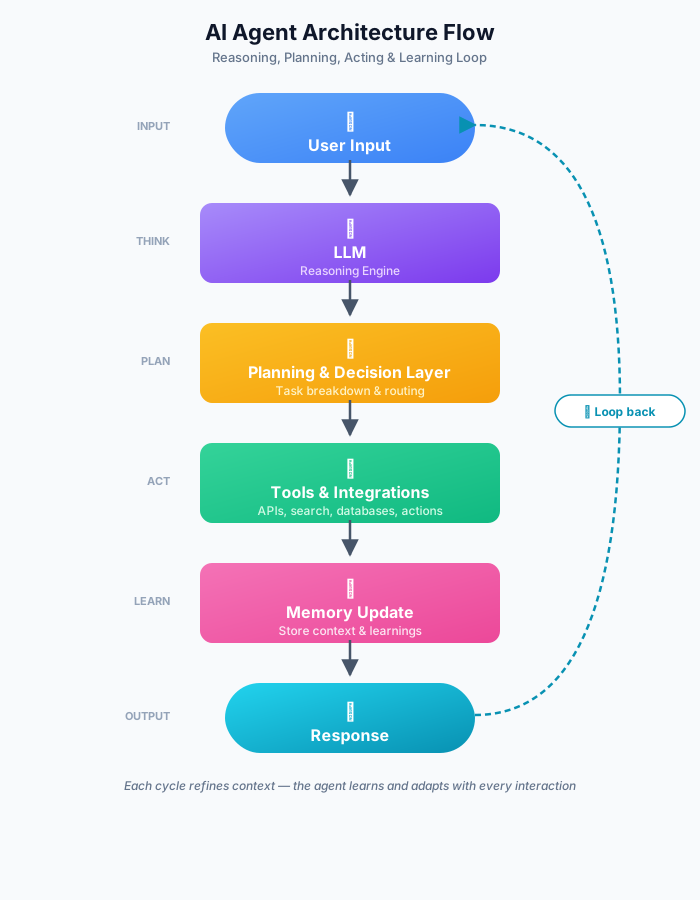
So a customer asks, "Where's my order?" and the LLM interprets what they're really asking. Planning figures out that it needs to hit the order system.
Tools make the API call to Shopify.
Memory saves the interaction, so there's context if the customer follows up. And then the agent responds with the tracking link.
That loop is the backbone of every agent.
Now I'd like to walk you through each piece so you can see how they all connect.
1. The LLM (Reasoning Engine)
The LLM is the brain of the whole thing. It handles language understanding, intent classification, reasoning through ambiguity, and generating responses that actually make sense.
That said, here's where most teams go wrong.
They treat the LLM like it IS the agent when it's really just one component of a much bigger system.
Anthropic's engineering team actually found something interesting here.
The most successful agent implementations don't use fancy, complex frameworks at all. They use simple, composable patterns built around the model.
So the model does the reasoning, but everything around it handles the doing.
Which model you pick matters, but how you architect around it matters the most.
Need a starting system prompt for your agent's reasoning layer? Generate prompt here instead of writing it from scratch or already have a prompt but the agent's reasoning feels inconsistent? Run it through the prompt optimizer here.
2. Memory (Short-Term vs. Long-Term)
This is the component that decides whether your agent feels smart or frustratingly forgetful. And from what I've seen across hundreds of deployments, it's the one most teams underestimate badly.
Short-term memory is your agent's scratchpad. It holds whatever's happening right now in the conversation: what the user said, what the agent already did, and what's still pending.
Long-term memory is the stuff that sticks around between sessions. Past conversations, user preferences, and resolution history. Most teams store this using vector databases that retrieve context through semantic similarity instead of basic keyword matching.
And here's why this matters more than people think.
An agent that remembers your last conversation feels like a helpful colleague. One that asks "what's your name?" for the fifth time feels broken.
Memory is honestly the single biggest factor in whether users trust your agent or abandon it.
3. Tools & Integrations
Tools are what take your agent from "thing that talks" to "thing that actually does stuff."
I would like to highlight something here that gets missed way too often.
Without tools, your agent can have a lovely conversation about processing a refund but it literally cannot process the refund. With tools, it connects to Stripe and just handles it. Updates the CRM record.
Book the follow-up call. Done.
An AI agent for customer service might use Zendesk for pulling ticket history, Stripe for handling payments, and Slack for looping in a human when things get tricky.
The tool layer is what makes the agent operational instead of just conversational.
4. Planning & Decision Layer
This is the layer most teams skip entirely, and it's the exact reason their agents crumble on anything more complex than a one-line question.
So how would you actually handle this? When a user says, "Cancel my subscription and give me a prorated refund," the agent can't just freestyle it. The planning layer needs to break that down into clear steps:
Verify the user's identity
Pull up their subscription details
Calculate the prorated amount
Cancel the subscription
Process the refund
Confirm everything with the user
Without planning, the agent tries to do all of this at once and inevitably gets confused. With planning, it works through the problem step-by-step like a human support rep would.
5. Execution Layer
This is where all the plans actually turn into real-world actions. The execution layer takes each step, calls the right tool, handles whatever errors pop up, retries if something fails, and feeds results back to the LLM.
The thing that separates production agents from demo agents? Fallback logic.
CRM goes down? Tell the user honestly instead of hallucinating an answer.
API sends back weird data? Validate it before doing anything with it.
Tool calls take forever? Graceful timeout with a fallback response that keeps the conversation going.
From my experience, this layer alone is why some agents handle thousands of real conversations every day while others completely crash within a week of launching.
Now that you've got a clear picture of all five AI agent architecture components and how they fit together, let's look at how they get organized into actual architecture patterns.
The 4 AI Agent Architecture Patterns You'll Actually Encounter
Here's the thing: not every problem needs the same architecture. And picking the wrong pattern is one of the quickest ways to either massively overbuild or dangerously underbuild for what you actually need.
These are the four patterns that consistently show up in real production environments.
1. Single-Agent (Reactive)
This is the simplest pattern out there. One LLM, one prompt, straight input-output.
The user sends a message, and the LLM generates a response. That's it. No multi-step reasoning, no tool calls, no memory between turns.
Works for: FAQ bots, basic knowledge base queries, and simple chatbot use cases where the agent only needs to answer questions, not actually do anything.
Breaks when: The task requires even a single additional step or any kind of external action.
When to use this: Your scope is very narrow, all the answers already live in your knowledge base, and the agent literally never needs to take action beyond responding with text.
2. Tool-Using Agents (ReAct-Style)
This is where agents start getting genuinely useful. The ReAct pattern, which stands for Reasoning + Acting, comes from Yao et al.'s 2022 paper "Synergizing Reasoning and Acting in Language Models." It lets the agent think about which tool to use, actually use it, look at the result, and then decide what to do next.
Instead of just firing off a response, the agent enters a loop: think, act, observe, repeat. Here's what that AI agent architecture diagram looks like for a ReAct agent:
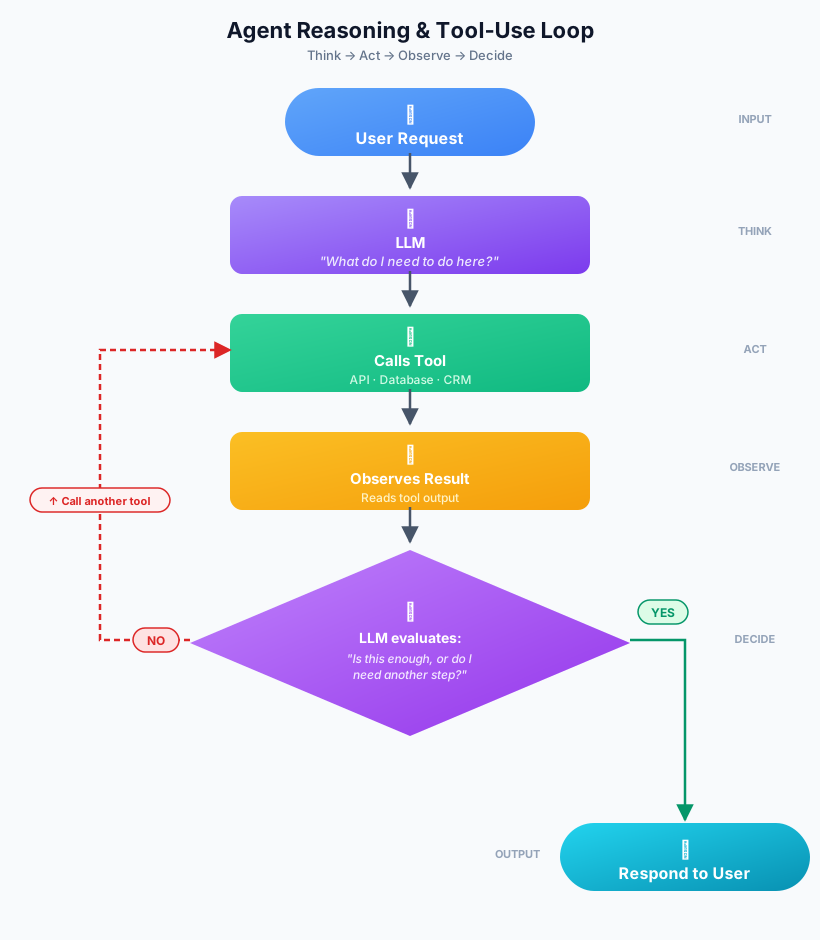
Customer asks about their return status? The agent reasons that it needs the order management system, calls that API, checks what's going on, and then decides whether to just share the update or proactively offer to speed things up.
Works for: Support agents that need CRM access, sales qualification bots, basically any agent that has to touch external systems to get the job done.
Breaks when: You don't set proper guardrails and the agent loops forever, or when tool calls pile up, and everything gets slow and expensive.
When to use this: Your agent needs to interact with real systems like CRMs, databases, or payment processors to actually complete tasks. This is by far the most common pattern I've encountered in production.
3. Multi-Agent Systems
Instead of making one agent do absolutely everything, you split the work across multiple specialized agents that collaborate.
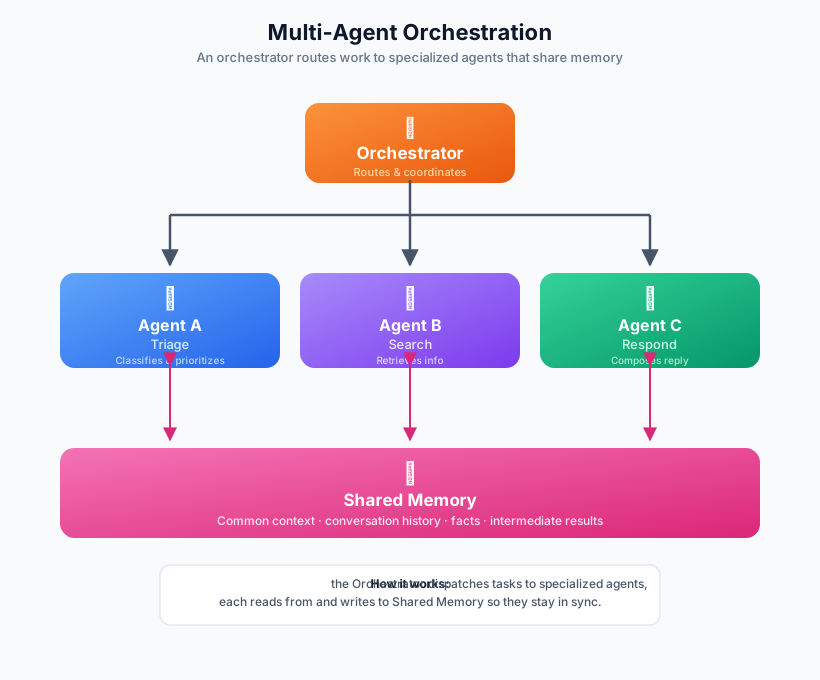
One agent handles triage, another digs through the knowledge base, and a third actually drafts and sends the response. They all share memory and coordinate through an orchestration layer.
Works for: Complex enterprise workflows that span multiple departments or pull from several different data sources.
Breaks when: Nobody clearly defines what each agent is responsible for, or the communication protocols between agents are sloppy.
When to use this: The workflow is genuinely too complex for a single agent to handle well. That said, please don't reach for a multi-agent architecture just because it sounds cool. The coordination cost is very tricky to handle because I've personally seen teams burn months debugging agent-to-agent communication problems that one well-built ReAct agent could have avoided entirely.
Businesses deploying custom artificial intelligence capabilities for these advanced orchestration models often rely on specialized development solutions to streamline agent coordination, memory management, and workflow automation.
4. Planner-Executor Architecture
One agent does all the thinking and planning. Other agents handle the actual doing. The planner keeps an eye on progress and rewrites the plan on the fly if something goes sideways.
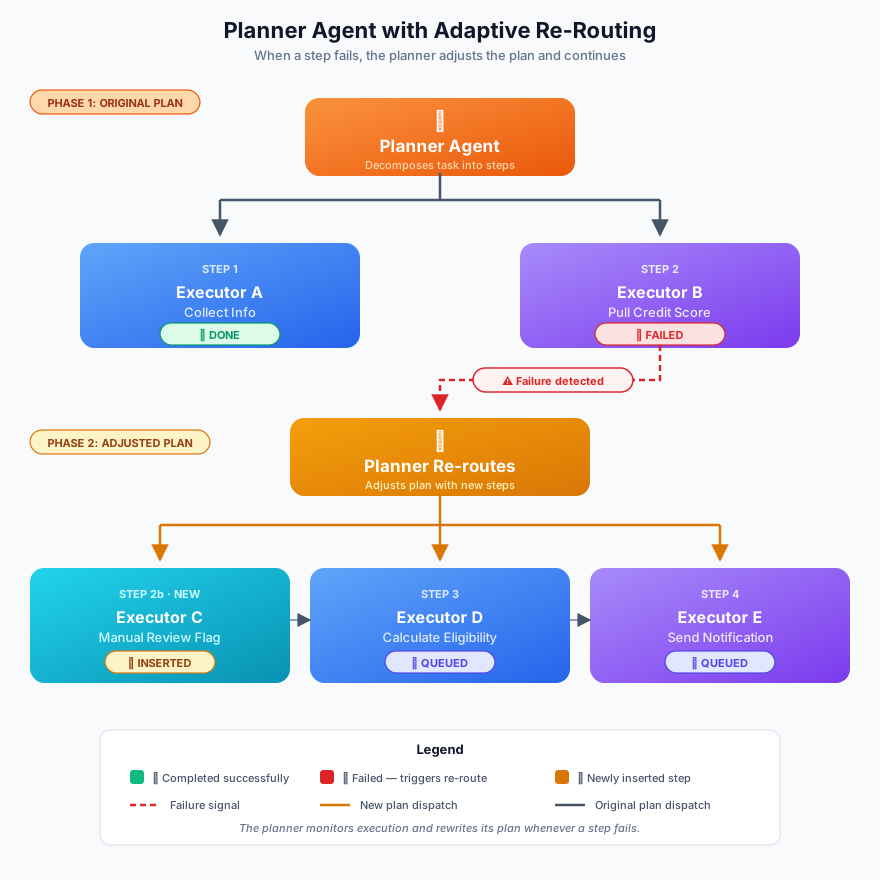
For something like a loan application, the planner might lay out: collect applicant info, pull credit score, verify employment, calculate eligibility, generate the offer, send notification.
Each step gets its own executor. And if the credit score pull fails? The planner reroutes instead of blindly pushing forward with a broken plan.
Works for: Sequential multi-step processes where the order of operations genuinely matters.
Breaks when: The planner gets the initial sequence wrong because everything downstream just follows a bad plan off a cliff.
When to use this: You're dealing with business processes that have real sequential dependencies, think employee onboarding, loan processing, or complex order fulfillment, where something going wrong at step 3 should intelligently change what happens at step 4.
Alright, now you know which patterns exist and when each one actually makes sense. Let's get into the practical side of designing your architecture from scratch.
Start building, not just reading
Build AI chatbots and agents with WotNot and see how easily they work in real conversations.

Start building, not just reading
Build AI chatbots and agents with WotNot and see how easily they work in real conversations.
Start building, not just reading
Build AI chatbots and agents with WotNot and see how easily they work in real conversations.

How to Design a Robust AI Agent Architecture
Knowing the patterns is great, but designing something that actually survives contact with real users is a completely different game. Here's the decision framework I'd recommend following.
Step 1: Define the Agent's Scope Clearly
Before you write a single prompt, get brutally specific about what the agent does and, more importantly, what it doesn't do.
A support agent that handles billing questions? That's a solid, viable scope. A support agent that's supposed to handle billing AND shipping AND returns AND account management, and upselling? That's a guaranteed way to do all five of those things poorly.
Here's a stat that should make this feel urgent. Gartner predicts that over 40% of agentic AI projects will be canceled by the end of 2027, and the main reasons are escalating costs, unclear business value, and inadequate risk controls.
The root cause behind most of those failures? Teams that never properly defined the scope before they started building.
Step 2: Choose the Right Architecture Pattern
Once you know your scope, match it to the simplest pattern that gets the job done:
Use Case | Best Pattern |
FAQ/knowledge base Q&A | Single-Agent (Reactive) |
Support with CRM or API access | Tool-Using (ReAct) |
Multi-department workflows | Multi-Agent |
Sequential, dependency-heavy processes | Planner-Executor |
Or if you prefer a quick decision flow:
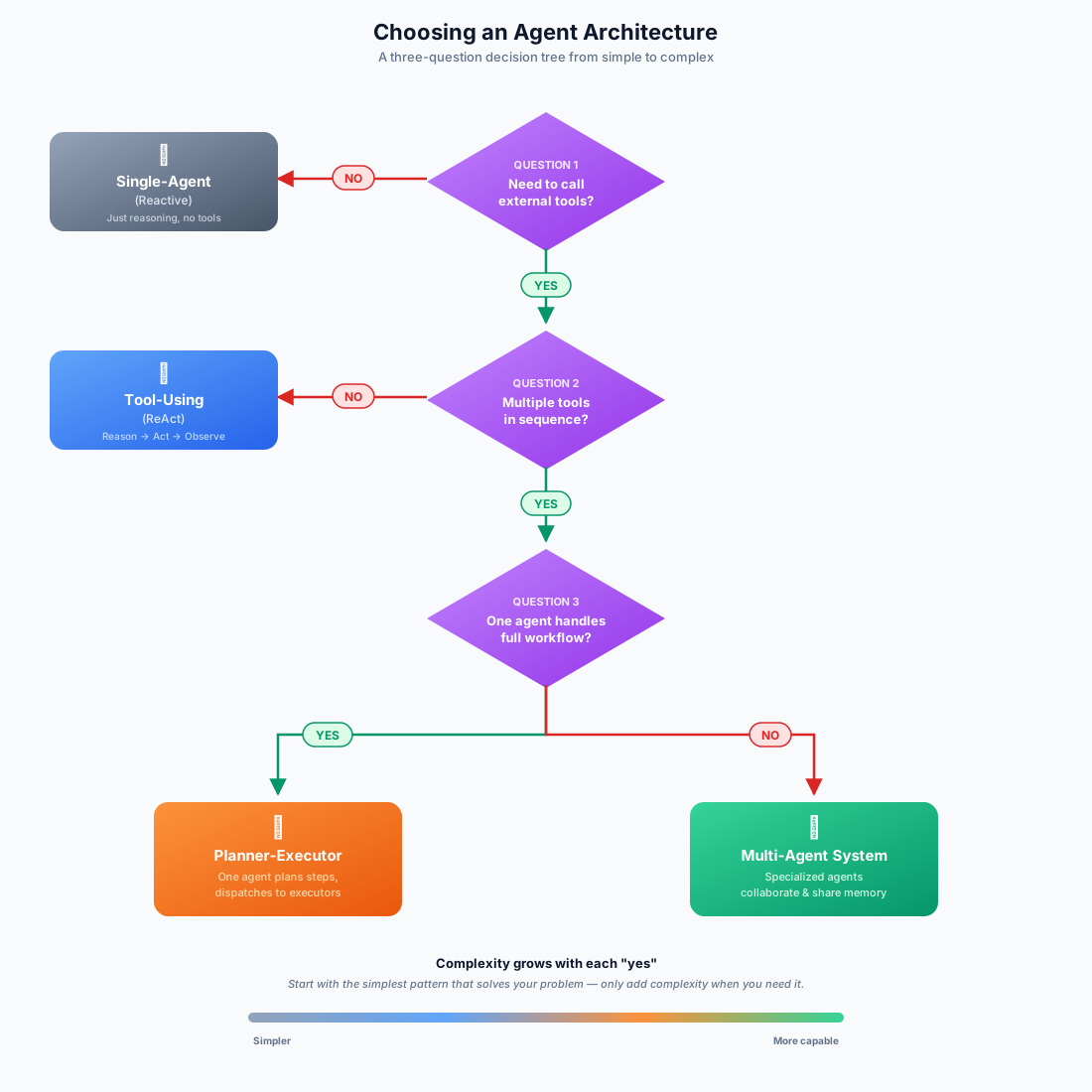
Golden rule: don't overarchitect. If a ReAct agent solves your problem, you genuinely do not need a multi-agent system.
Every extra layer you add means more latency, more maintenance headaches, and more surface area for things to quietly break.
Step 3: Decide Memory Strategy Early
This particular decision gets exponentially harder to change the longer you wait, so I'd strongly suggest making it before you build anything.
If you're only dealing with single-turn interactions, session memory will do fine. But the moment your use case involves anything like "remember what we talked about last time," you need long-term memory baked in from day one.
Most chatbot frameworks come with session memory out of the box. But cross-session persistence requires a vector store and retrieval logic woven into the agent's reasoning loop. Trying to bolt that on after launch is messy, expensive, and usually involves rewriting half of what you already built.
Step 4: Plan for Tool Failures
Every external API your agent depends on will fail at some point. That's not pessimism, that's just how APIs work. The only question is when it happens and how your agent handles it.
Build graceful degradation into your architecture from the start. CRM goes down? Acknowledge it honestly instead of letting the agent make stuff up. API returns garbage data? Validate it before acting on it. Tool calls take too long? Have a fallback response ready that keeps the conversation alive.
From what I've seen, teams that skip this step are consistently the same ones scrambling to write incident reports three weeks after launch. A well-structured incident response playbook doesn't prevent every failure, but it turns those 3 AM incidents from chaos into a documented process.
Step 5: Add Human Checkpoints Where Needed
Full autonomy makes for a killer demo, but production environments absolutely need escape hatches.
Add human-in-the-loop checkpoints wherever the stakes are high, or the action is irreversible:
Refund approvals above a certain dollar amount
Escalations with visibly frustrated customers
Any modification that permanently changes account data
The best AI agent architectures aren't trying to get rid of humans. They're built to handle the repetitive 80% of the work so your human team can pour their energy into the 20% that actually needs real judgment and empathy.
Want to Build AI Agents Fast?
If you've made it this far, you've got a solid understanding of what goes into a properly built AI agent architecture.
And you're probably also realizing that wiring all of this up from scratch, the LLM layer, the memory system, tool integrations, planning logic, and error handling, takes way longer than anyone expects.
That's exactly the kind of problem WotNot was built to solve.
You get a no-code builder where you just design the agent workflow, and the architecture handles itself underneath.
Book a demo to see how it works, or check out pricing to find what fits your setup.
ABOUT AUTHOR

Hardik Makadia
Co-founder & CEO, WotNot
Hardik leads the company with a focus on sales, innovation, and customer-centric solutions. Passionate about problem-solving, he drives business growth by delivering impactful and scalable solutions for clients.



Start building your chatbots today!
Curious to know how WotNot can help you? Let’s talk.
Start building your chatbots today!
Curious to know how WotNot can help you? Let’s talk.