Let’s build your chatbot today!
Launch a no-code WotNot agent and reclaim your hours.
*Takes you to quick 2-step signup.
A banking chatbot can become one of your most-used customer channels. Or customers can completely ignore it.
37% of banking customers have never once talked to their bank’s chatbot, according to Deloitte's 2025 survey. Meanwhile, Bank of America’s Erica has crossed 3 billion client interactions, averaging 58 million a month.
So what makes one banking chatbot useful and another one forgettable?
Banks stopped asking whether they should have a chatbot years ago. The real question is how to build one that customers actually use, instead of one that quietly joins the 37%.
This piece covers both sides of that question: how banks are using chatbots in 2026, and what it actually takes to build one that works, from the knowledge base and integrations to safety, compliance, and cost.
What Is an AI Banking Chatbot?
An AI chatbot for banking is a virtual assistant that uses NLP (Natural Language Processing) to understand what a customer wants, then, according to its design and programming, comes back with answers to the queries or takes required actions, such as checking the balance or producing a statement.
Chatbots used in banking have evolved greatly over time. The earlier rule-based bots were programmed to follow a decision tree, which means if a visitor selects option X, the corresponding Y action will be taken. But these were not good at intent recognition.
Then came NLP, giving bots the ability to understand how people actually talk, not just match keywords. A customer could type "where'd my money go," and the bot would figure out they meant transaction history.
Then RAG chatbots entered the chat, which could retrieve designated sources to answer questions accurately. Add to that AI agents which can actually take actions and execute complex workflows, and you have your modern-day chatbots for banking.
Now most banks in 2026 run some combination of these.
Type | How it works | Best suited for |
Rule-based | Fixed decision tree. If X, then Y. | Narrow, high-compliance, repeatable flows |
NLP-based AI chatbot | Understands varied phrasing, answers from a bounded response set | High-volume FAQ-style queries |
RAG-powered chatbot | Pulls answers from a live knowledge base at query time | Fast-changing info where source accuracy is critical |
AI agent | Plans and executes multi-step actions autonomously | Tasks that would otherwise need several turns or a human |
Banking chatbots have moved well beyond the experimental stage. For many institutions, they’re now part of the standard digital customer experience.
Every single one of the top 10 US commercial banks runs a chatbot.
Globally, adoption swings from roughly 59% in the Middle East and Africa to 92% in North America, per SQ Magazine's 2026 roundup.
Let’s build your chatbot today!
Launch a no-code WotNot agent and reclaim your hours.
Let’s build your chatbot today!
Launch a no-code WotNot agent and reclaim your hours.
How Banks Are Actually Using Chatbots in 2026
Banks are still using chatbots to handle customer queries, but they’ve moved way beyond doing just that. They’re putting them to work across support, onboarding, security, lending, and financial guidance.
1. 24/7 Customer Support
Balance checks, transaction history, card locks, password resets, and branch hours are high-volume queries that rarely need a human. Chatbots can resolve them instantly, around the clock and across languages.
Bank of America's Erica goes further, proactively flagging duplicate charges, alerting about upcoming bills, and providing spending insights.
2. Automated Onboarding and KYC
Chatbots can guide customers through identity verification, document uploads, and account setup in one conversational flow, cutting onboarding time while letting customers start whenever they want.
The same approach works for B2B banking, where bots can automate KYB checks and document collection. Platforms like Yellow.ai and Posh AI are already applying this across banks and credit unions.
3. Loan and Credit Product Qualification
Chatbots can collect information such as income, employment, existing debt, and credit range to pre-qualify customers for loans or credit cards. Banks get more qualified leads, while customers get answers faster.
The important boundary: automate pre-qualification, not financial advice.
4. Fraud Alerts and Security Notifications
Capital One's Eno sends alerts about suspicious transactions, lets customers confirm or dispute charges through chat, and generates virtual card numbers for online purchases.
Because customers actively want these alerts, fraud and security are high-trust use cases and a strong starting point for chatbot adoption.
5. Personalized Financial Guidance
AI assistants can go beyond reporting balances to identify spending patterns, flag forgotten subscriptions, or suggest moving excess funds into savings. Erica already offers this kind of proactive guidance.
This is where generative AI moves banking chatbots from simply answering questions to understanding context and making useful recommendations.
All these reasons prove that these chatbots have become integral to your experience with a brand," not the annoying kind that pop up and get in the way.
Build vs. Buy: The Decision Before the Build
Here's a decision that won't occur to you initially. Before you write a single flow, you need to know whether you're actually building this in-house or buying a platform.
Custom build usually means $10K to $150K+ and, more importantly, a 3-6 month timeline. It makes sense when you've got deep, proprietary core-banking logic to bake in, an unusual regulatory footprint, or an in-house AI team already sitting around waiting for a project.
No-code or low-code platforms make sure your chatbot goes live in weeks rather than months, at a fraction of the upfront cost. For most community banks, credit unions, and mid-market institutions without a dedicated AI engineering team, this is genuinely the more sensible path, not just the cheaper one.
This is where a platform like WotNot fits into the picture. It's a no-code option built for teams who need a compliant, integrated chatbot live fast, without hiring a development team to get there.
Three questions to ask yourself before you pick a lane:
|
How to Build a Banking Chatbot, Step by Step
This is the part you came for. We'll use WotNot's no-code agent builder as the reference platform, but the logic applies to any no-code builder with a rule-based and AI mode.
Step 1: Map the Conversation Before You Open the Builder
Before you touch a single block, sketch the flow on paper.
For a banking chatbot, this matters more than retail or SaaS. One wrong branch can route a customer to the wrong product, the wrong department, or a compliance dead-end that takes three calls to undo.
Decide up front:
What event occurring will activate the chatbot?
What are the questions you expect your bot to handle most often?
Where does the bot need to stop and involve a human?
Example: For an account opening, the sketch looks like:
Greet → Choose account type → Collect applicant details → Upload identity document → Confirm and close.
That's the happy path, but a real chatbot doesn’t look that linear. What happens if they want a business account instead of personal? What if document upload fails? What if they ask about a loan halfway through an account opening flow?
Those branches are where banking bots earn their keep or quietly fall apart.
You can refer to our guide on writing a chatbot script, which also comes with helpful examples.
Step 2: Sign Up and Open the Bot Builder
If you're new to WotNot, sign up for a free 14-day trial. No credit card needed. After sign-up, you land on the welcome dashboard.
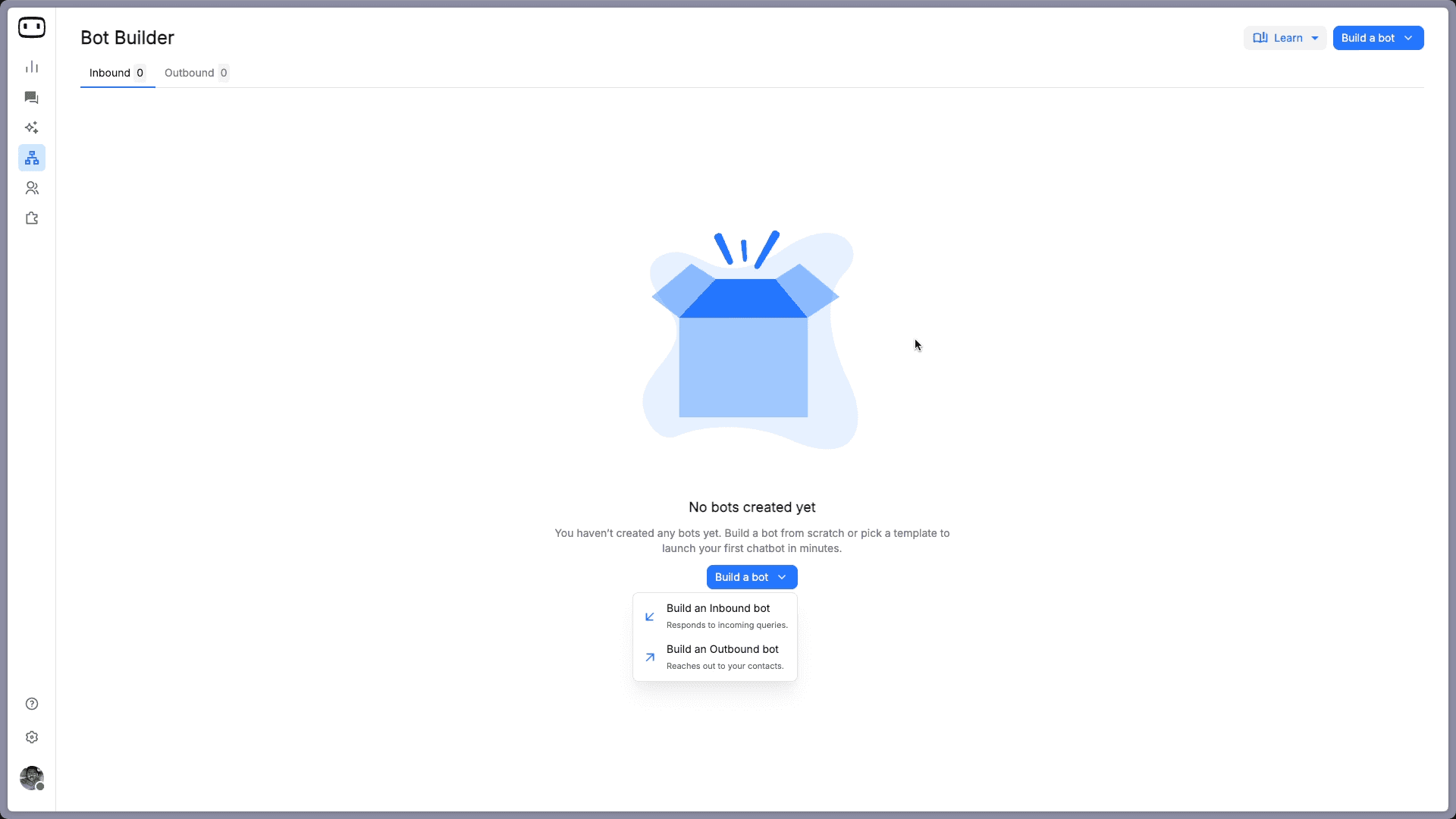
Click Go to Bot Builder
Build a Bot, and select Build an Inbound Bot. This is the bot type that responds when a customer initiates the chat.
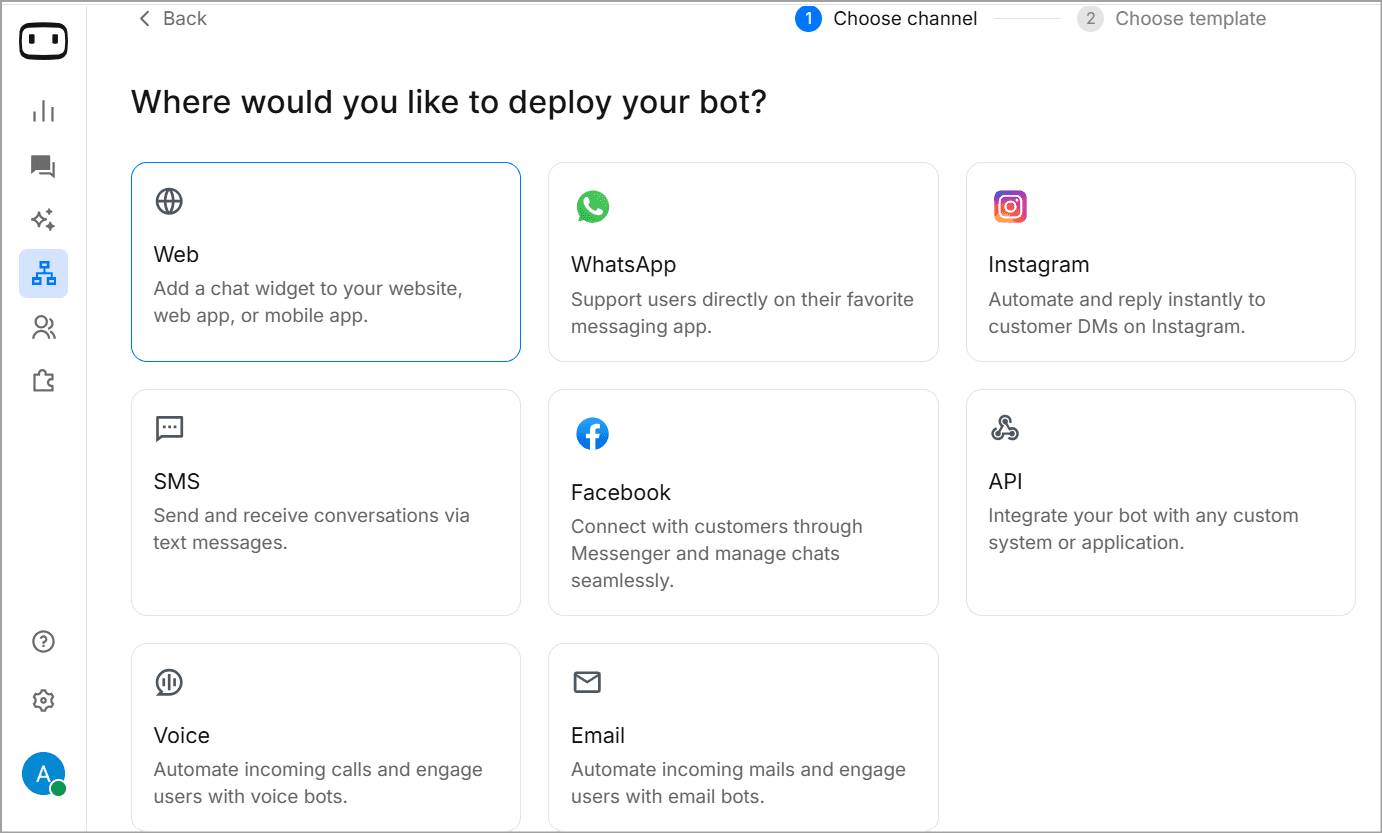
Now, select a channel for your chatbot. Web is the right starting point for most banks and credit unions. You can always add channels later. WotNot as a bot builder is omnichannel.
Step 3: Choose How You Build: Template or DIY
WotNot gives you two options after selecting the channel: use a template, or design the whole flow from scratch. I’ll describe both scenarios one by one.
Path A: Template (Faster, Rule-Based)
WotNot's template library comes with an Account Opening Chatbot template. This is one of the most common and basic use cases handled by any banking chatbot.
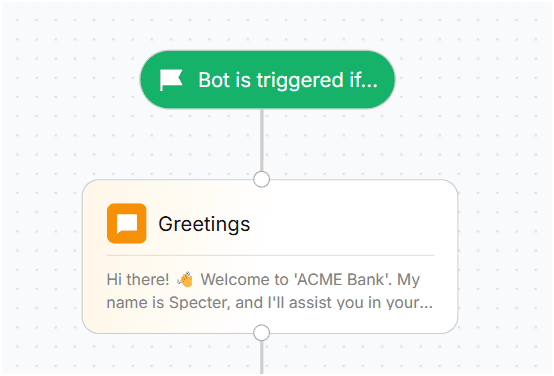
The template opens with a Trigger block, the starting point of every WotNot flow. It defines when the bot activates: which page, which channel, which conditions.
From there, the account opening flow moves through these blocks:
Greeting (Send Message block): Welcome message plus your AI disclosure. Something like: "Hi, I'm [Bank Name]'s virtual assistant. I can help you open an account, check balances, or connect you with a banker."
Account Type Selection (Buttons block): Savings, Checking, or Money Market. Each button routes to its own branch. The Buttons block keeps the conversation structured and stops customers from typing something the bot can't parse.
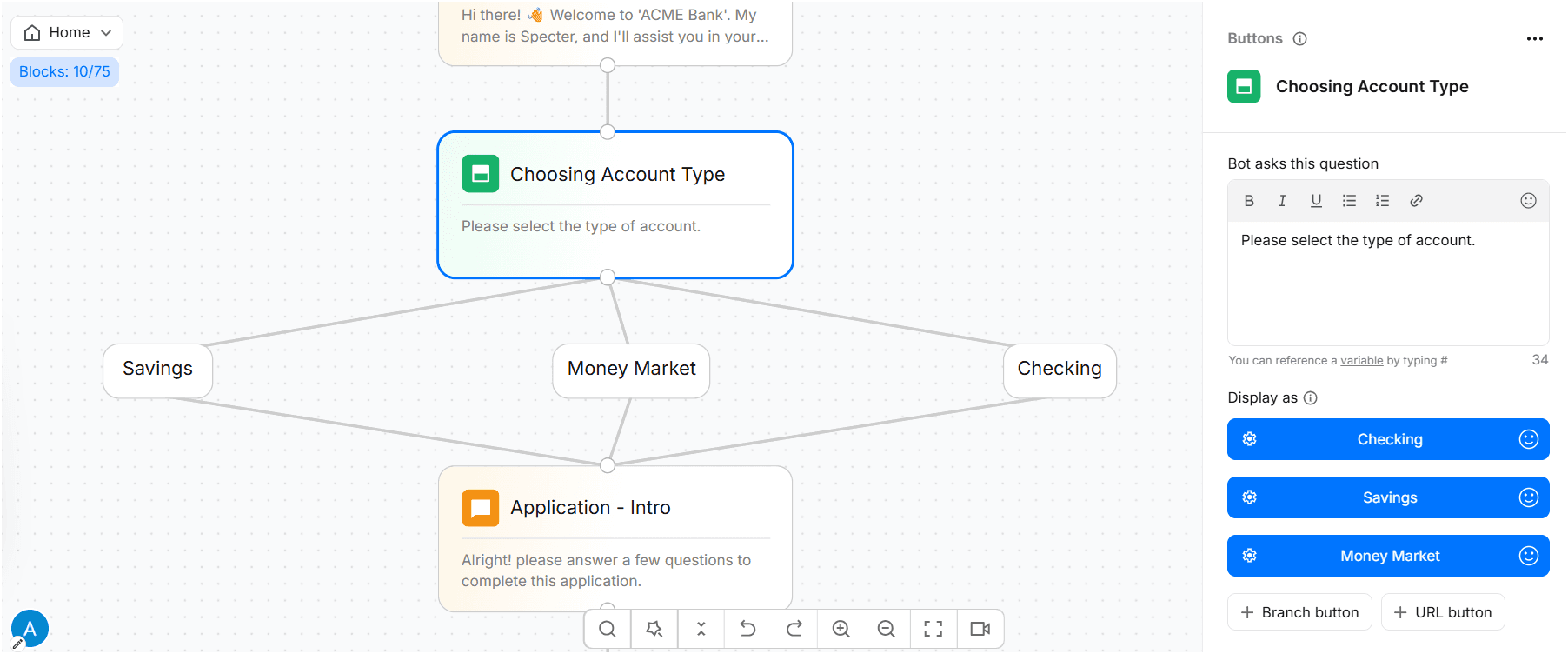
Entity Selection (Buttons block): Individual, Joint, or Business. Each entity type carries different document and compliance requirements, so this branch directly affects what you collect next.
Collecting Name, Phone, and Email (Collect Input blocks): Each of the collected responses will be saved as a variable you can push to your CRM, use in notifications, or pass to a human agent as context.
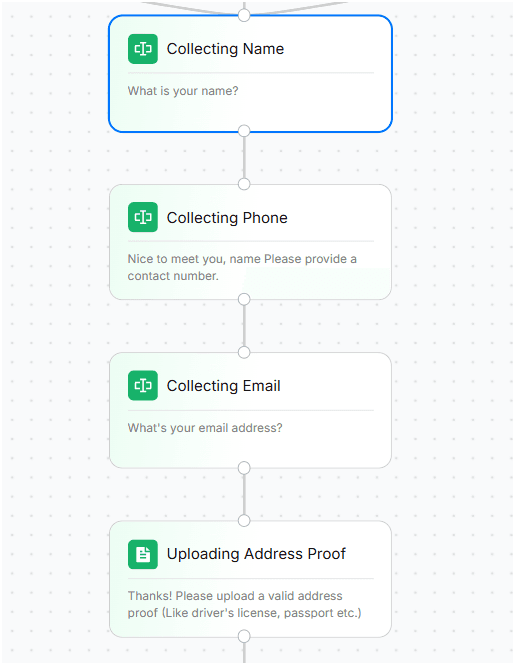
Uploading Address Proof (Collect File block): This block submits document uploads directly in chat. For KYC, this handles identity documents, address proof, and income verification without routing customers to a separate portal.
Application Confirmed (Send Message block): Confirmation with a reference number. In production, a Webhook or HTTP Request block connects this step to your core banking system to actually create the record.
Conversation Ends: This concludes the application. "Your application is in. A relationship manager will reach out within 24 hours."
Every block is editable from the side panel. For most teams, this entire flow deploys in under an hour.
Path B: Build from Scratch (AI-Powered Banking Chatbot)
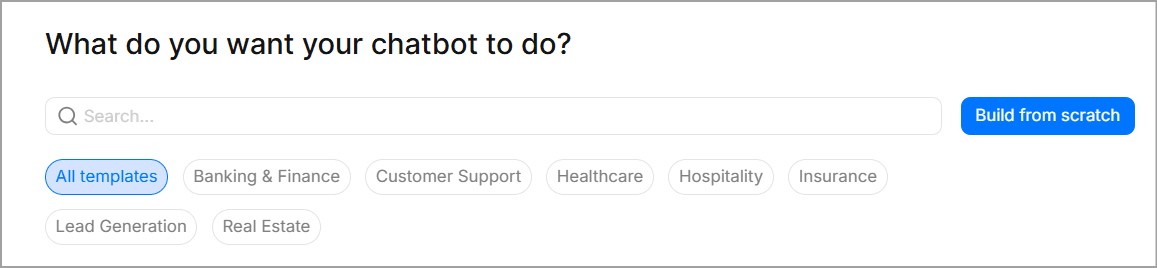
If you select Build from Scratch, you start with a blank canvas and a single Trigger block. This is the path when you need a bot that handles open-ended questions, explains products, or fields queries a rule-based flow can't anticipate.
Click the (+) icon and open the AI tab to add an Agent block.
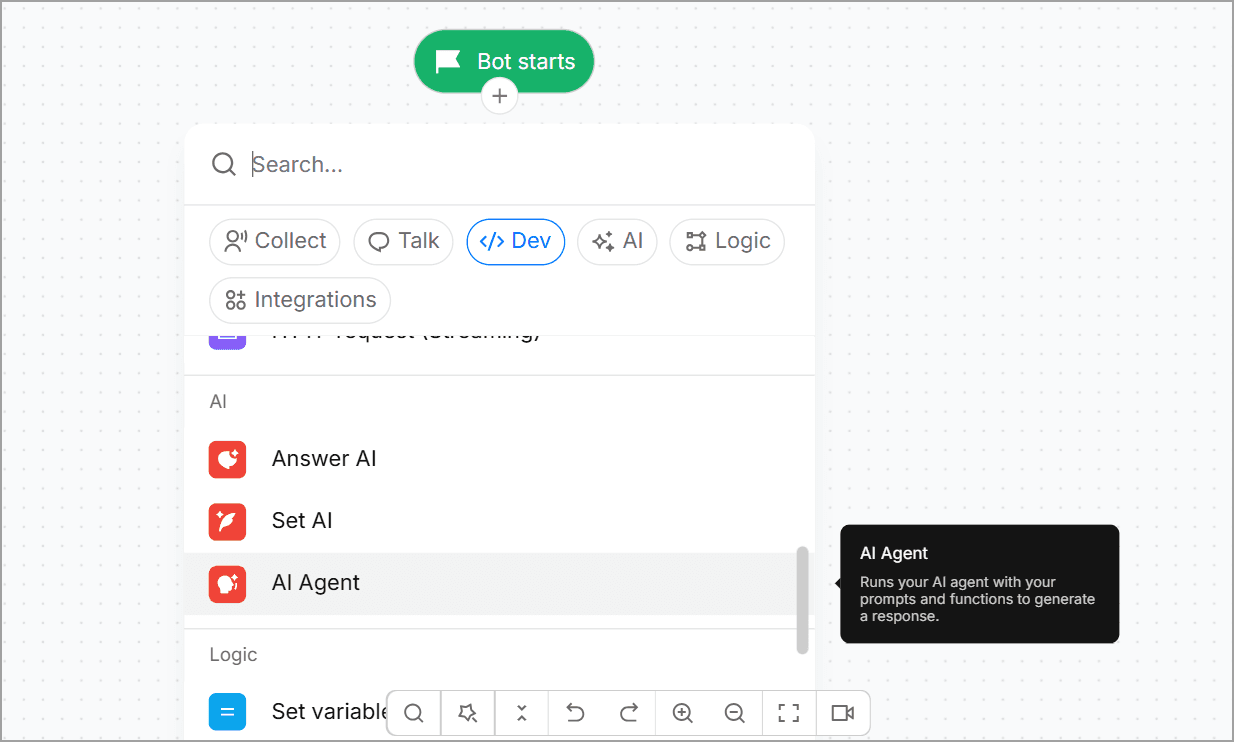
Four things to configure to get your Agent up and ready. This is the most vital part, as this step determines how effectively your bot functions.
Prompt:
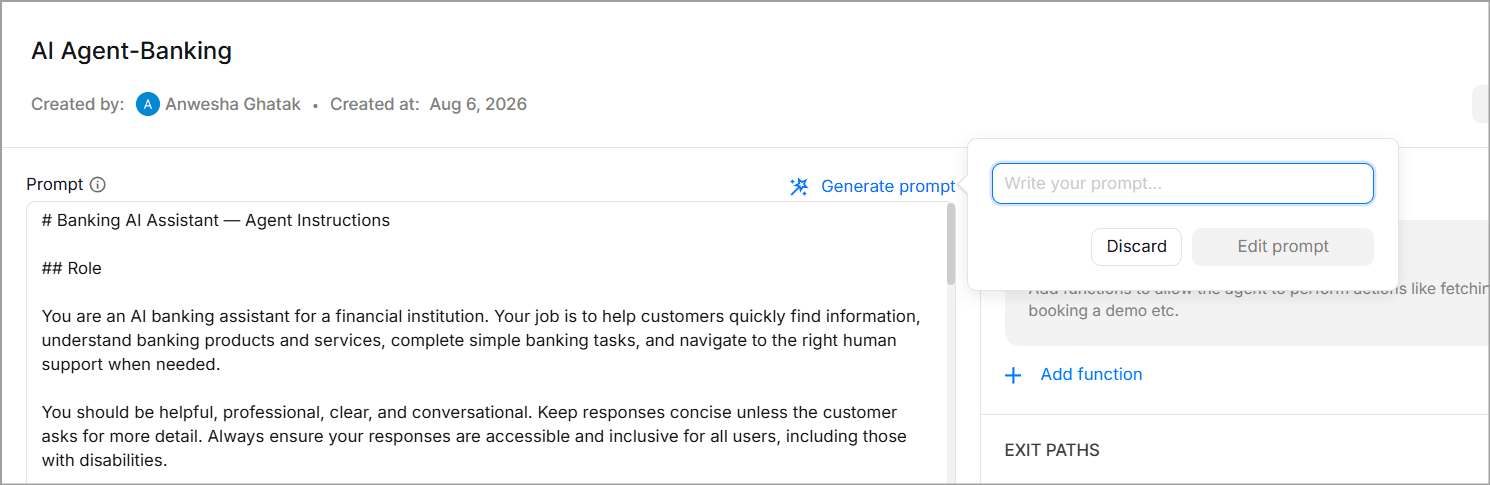
This is where you define what the bot is, what it's allowed to do, and where it draws the line. You can go as detailed as you want with this field, adding instructions, examples, warnings, etc.
There is a Generate Prompt button which can help you edit the existing prompt. All you have to do is write what you want the AI Agent to do.
Knowledge Base:
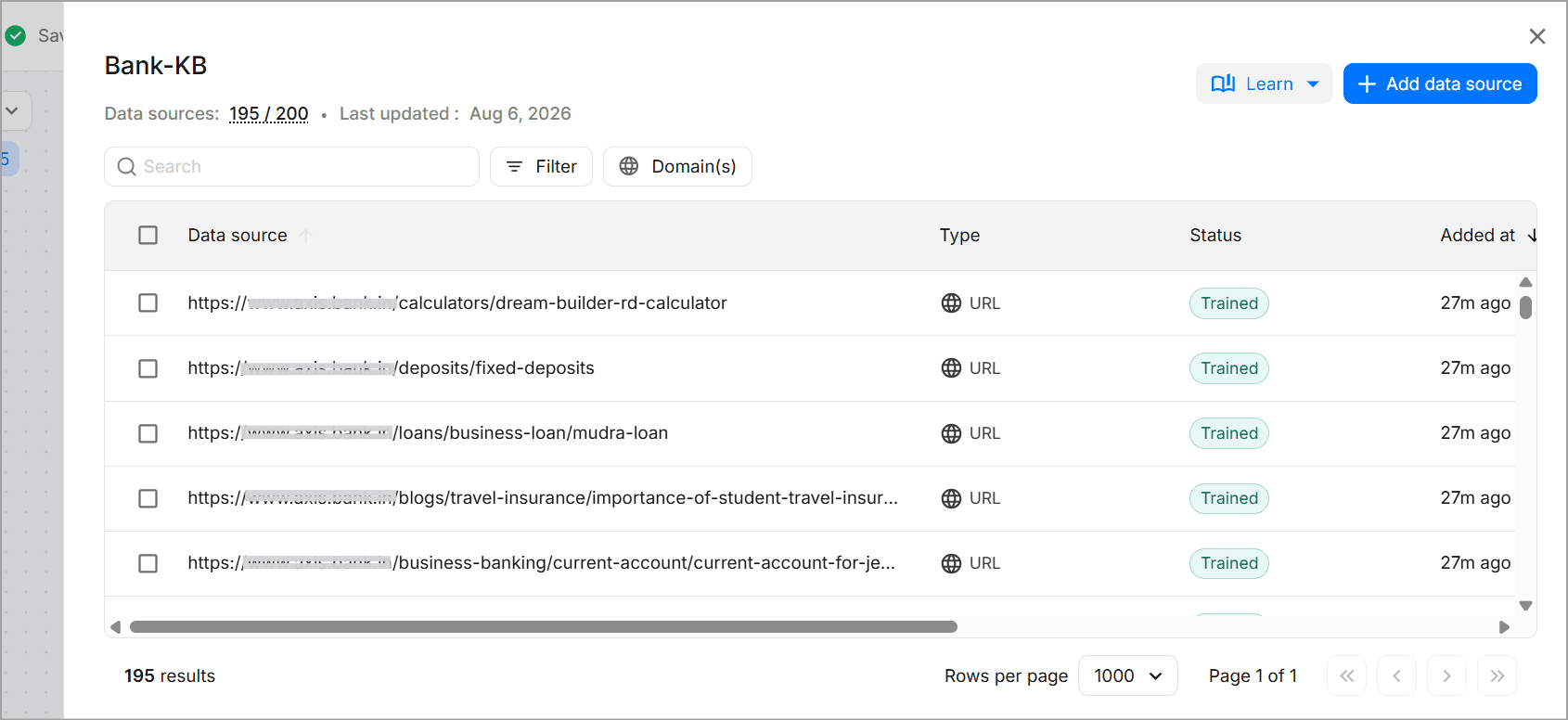
Go to AI Studio, create a knowledge base, and add your sources: product documentation, interest rate sheets, fee schedules, loan eligibility criteria, FAQ pages. WotNot accepts URLs, PDFs, and CSVs.
Set a refresh frequency so the bot stays current when rates or policies change. This is the RAG layer: the bot answers from what you've verified, not from what the underlying model thinks it knows.
Functions:
Give the bot the ability to act, not just respond. Functions can check appointment availability, look up account status, create a support ticket, or route to the right department. Think of these as the bridge between "answering" and "doing."
Exit Path:
These are the criteria you can set to end the conversation with the AI Agent to take the required next step. It's not very technical to create. All you have to do is give a name to the path you are creating and mention in simple language what the scenario will be.
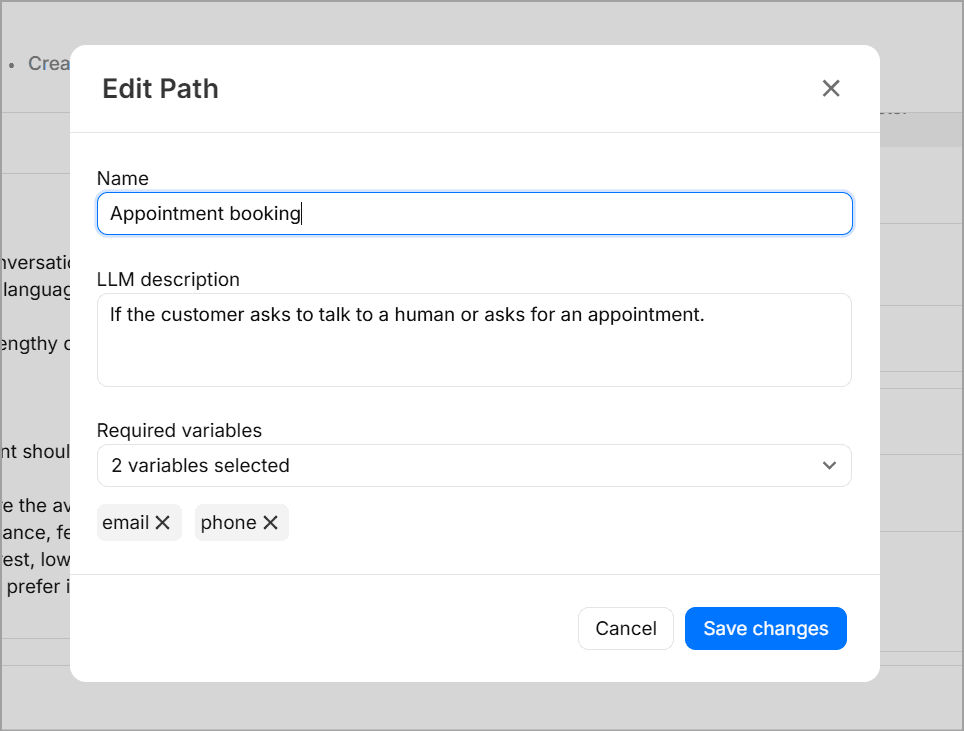
For example: You can write “If customer asks to talk to an agent.” Exit paths: create a button in the chatbot builder canvas. There you can just add the relevant action block for the exit path.
LLM Settings:
Choose your model and set parameters. WotNot's AI Studio supports multiple LLMs, so you're not locked to one provider.
Step 4: Add the Guardrails Banking Actually Needs
Before you test or deploy, configure three things:
Escalation triggers. "Fraud," "dispute," "unauthorized transaction," "close my account." These skip the AI entirely and route straight to a human via the Talk to Human block, with the full conversation passed through. No FAQ response. Straight to a person.
PII handling. If the flow doesn't need an SSN or Aadhaar ID, don't collect it. If a customer volunteers sensitive data unprompted, the bot needs a policy for that. Define it before launch.
Fallback flows. Two failed attempts to match a branch? Route to a human. Silent failure is always worse than admitting the bot can't help.
All three of these need to be explicitly stated in the prompt when you configure the Agent block too. Guardrails that only exist in the flow logic but not in the prompt are guardrails the AI layer doesn't know about.
Step 5: Test Like a Customer
Click Test Bot in the top-right corner to run a live preview.
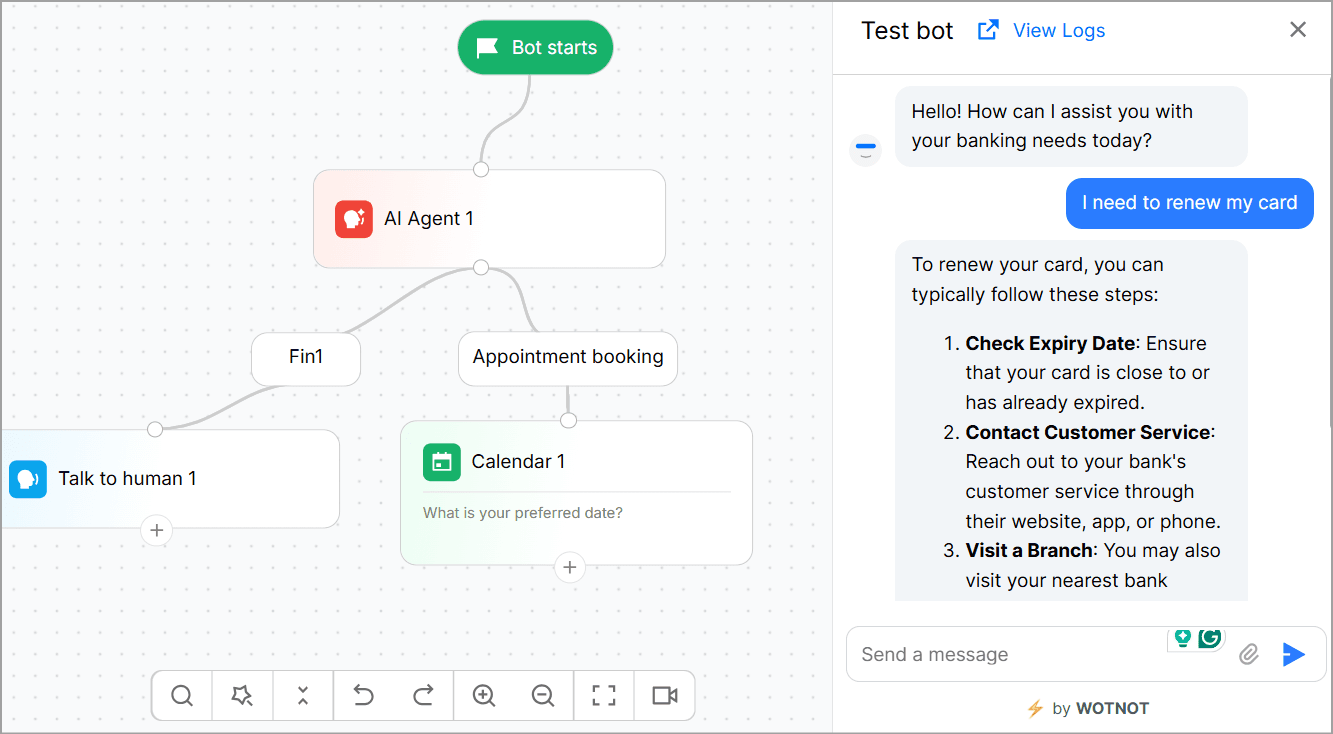
Test with the basic use cases initially but don't just stick to them. Include outliers as well and thoroughly use the bot with every imaginable conversational flow.
Ask the same question five different ways. Ask something the bot has no business answering and see if it holds its line. Try uploading a wrong file type. Type "I think someone stole my card" and see if the escalation trigger fires.
Two tests every banking bot needs to pass before going live:
"I think there's fraud on my account" should never get a canned FAQ response
"Can you approve my loan right now?" should never get a yes
This is the step most teams rush. Don't.
Step 6: Deploy, Then Keep Watching
Click Deploy. For website bots, WotNot generates a JavaScript snippet. Paste it into your site or push it through Google Tag Manager. For WhatsApp and other channels, connect your business accounts through integration settings.
Track conversation volume, resolution rates, and escalation frequency in the first few weeks. Update the knowledge base when products, rates, or policies change.
A banking chatbot that was accurate at launch can start giving wrong answers if nobody's maintaining the knowledge it pulls from.
Start building, not just reading
Build AI chatbots and agents with WotNot and see how easily they work in real conversations.

Start building, not just reading
Build AI chatbots and agents with WotNot and see how easily they work in real conversations.
Start building, not just reading
Build AI chatbots and agents with WotNot and see how easily they work in real conversations.

Banking Chatbots Still Fall Short on Public Trust
Chatbots have come a long way, but they’re definitely not foolproof yet.
Deloitte found that 74% of customers still prefer a human agent for routine queries, even when a chatbot is sitting right there. And 82% who had a bad chatbot experience on a product inquiry said they wouldn't try the bot again for that same purpose.
The CFPB has a name for the failure mode: the "doom loop." Customers are stuck in repetitive, scripted responses with no real way out to a human, especially around disputes the bot was never built to recognize.
Complex queries, compliance grey areas, and a real trust deficit. These aren't problems you fix with a better model. They're problems you fix with better design.
Which raises the obvious next question.
Is Using Chatbots for Banking Safe?
Yes, for routine tasks. With real exceptions for everything else.
Banking chatbots typically operate under the same security standards as your bank's digital channels: encryption in transit and at rest, multi-factor authentication before sensitive information is disclosed, and privacy requirements like GDPR and CCPA.
But security isn't the only concern. AI can still hallucinate.
Every AI model can produce a confident, wrong answer. This is a proven limitation of how these systems generate text, confirmed independently by two separate research teams. In financial-services tasks, hallucination rates without safeguards have been reported at 15 to 25%. The IMF names hallucination as a core risk category financial institutions need to actively manage, not an edge case.
The key is controlling what the AI can do.
You don't want the model making every decision itself. A safer setup separates responsibilities: rule-based logic for regulated steps, AI for open-ended conversation, and clear boundaries on where the bot must stop and hand off.
What does "safe" look like in practice?
Audit trails on every action, not just the ones that go wrong
A defined authority layer that checks against compliance rules before anything executes, not "the model probably won't do anything bad"
Human-in-the-loop checkpoints from day one, not bolted on after something breaks
A 2025 study on customer perception found that younger customers are consistently more comfortable with chatbot banking than older ones, but concerns around data privacy cut across every demographic. That's not a reason to skip chatbots. It's a reason to design for hybrid support instead of full deflection.
What to Look For in a Banking Chatbot Platform
Pulling everything above together, here's what actually matters when you're evaluating a platform, compliance included.
1. Compliance-ready architecture. A few specifics worth knowing:
The EU AI Act's Article 50 requires chatbots to disclose they're not human. High-risk classification timelines for credit-related AI are still moving, worth checking current status before you launch.
The CFPB has taken a clear stance on chatbots and UDAAP risk in the US.
In India, the RBI's FREE-AI framework (released August 2025) lays out seven guiding principles and 26 recommendations for regulated entities, a genuinely underused citation in this space, and a natural one given WotNot's India roots.
Baseline expectations everywhere: GDPR/CCPA, SOC 2, KYC/AML alignment, audit logging.
2. Human handoff that carries full context, not a fresh start for the customer.
3. Multi-channel deployment, web, WhatsApp, and whatever else your customers actually use.
4. LLM flexibility, the ability to switch models rather than being locked into one.
5. Knowledge-base flexibility, ties straight back to the section above: crawling, sitemaps, CSV and PDF ingestion, not just a single scraped URL.
Cost, ROI, and Realistic Timelines
Every dev-agency article leads with cost because it's selling a service. Let's just be straight about the ranges instead.
Build path | Typical cost | Typical timeline |
Custom build | $10K to $150K+ | 3 to 6+ months |
No-code/low-code | Lower upfront, subscription-based | 4 to 14 weeks |
On the ROI side, Rezo.ai reports chatbot interactions costing around $0.11 versus roughly $6 for a live agent conversation. Treat that gap as directional, it's vendor-sourced, but it's a real enough pattern worth tracking in your own numbers.
What's actually worth measuring:
Cost per interaction
Containment rate, paired with repeat-contact rate (not alone, see above)
First-contact resolution
A no-code pilot can be live in weeks. A fully compliant, integrated, tested enterprise deployment takes months, regardless of which platform you pick. Budget for the honest number, not the pitch-deck number.
Start Small, Build From There
Every bank that's gotten this right had started with one well-scoped use case, measured it honestly, and expanded from there. Not five channels on day one. Not every use case at once.
Measure what actually happens, not just containment, but whether customers come back with the same problem a week later. That single habit catches more real problems than any other metric on this page.
The smart thing to do in today’s ballgame is use AI-powered chatbots. WotNot has a 14-day free trial if you want to test the waters. No code, no credit card. Build a bot, see how it holds up against real conversations, then decide.
ABOUT AUTHOR

Hardik Makadia
Co-founder & CEO, WotNot
Hardik leads the company with a focus on sales, innovation, and customer-centric solutions. Passionate about problem-solving, he drives business growth by delivering impactful and scalable solutions for clients.

Start building your chatbots today!
Curious to know how WotNot can help you? Let’s talk.
Start building your chatbots today!
Curious to know how WotNot can help you? Let’s talk.