Let’s build your chatbot today!
Launch a no-code WotNot agent and reclaim your hours.
*Takes you to quick 2-step signup.
In 2024, Tidio quietly restructured its pricing, and some long-time customers watched their monthly bill double overnight with no email warning.
A Capterra Reviewer said, “We used Tidio for over 6 years in conjunction with our tourism website. Unfortunately, in December of 2024 Tidio changed their pricing structure, and our bill doubled from $32 a month to $64 a month.”
So is Tidio still worth it in 2026?
Short answer: read ahead to find the right answer.
This review breaks down every feature, every plan, and every trap, so you can decide before you sign up.
What is Tidio and Why Do People Use It?
Tidio started in 2013 in Poland, founded by Tytus Gołas and Marcin Wiktor.
The product itself is an all-in-one customer service suite. It has,
Live chat,
Help desk ticketing,
No-code chatbot builder (Flows),
AI agent called Lyro.
Everything runs from a single dashboard that pulls in conversations from your website, email, Messenger, Instagram, and WhatsApp.
Who uses it? Over 300,000 businesses worldwide across 205+ countries, with the live chat widget reaching 510 million unique users monthly, heavily weighted toward small companies.
On Capterra, 93% of reviewers are small businesses, with the biggest slice in Information Technology and Services. The core audience is Shopify stores, DTC brands, and lean support teams that want automation without enterprise complexity.
This is irrespective of what the users think, but Tidio itself has positioned itself as affordable and easy-to-use at the end of the market. It has a free plan, and the Starter costs around $24.17/ month when billed annually. However, you can adjust the limits to your plan, adding Lyro and Flow credits as per your requirements.
That said, the segregated pricing becomes difficult to handle, and claims of affordability go out the window when your usage grows. Users who start small don't see this hike coming and have no other option than to seek an alternative. More on this later.
Let’s build your chatbot today!
Launch a no-code WotNot agent and reclaim your hours.
Let’s build your chatbot today!
Launch a no-code WotNot agent and reclaim your hours.
What Do You Need & How to Get Started with Tidio
Not much, honestly. You need a website or any other channel, an email address, and about 20 minutes.
No credit card is required to start, and there is a 7-day trial of all paid features that reverts to the free plan afterward.
Now, here are all the basics you’ll need to configure when starting out with Tidio.
Let’s begin from the beginning.
Creating Account
The onboarding runs through a step-by-step wizard.
It asks for some basic information like your industry, company, and team size, website URL, main goal you want to achieve with the platform, etc.
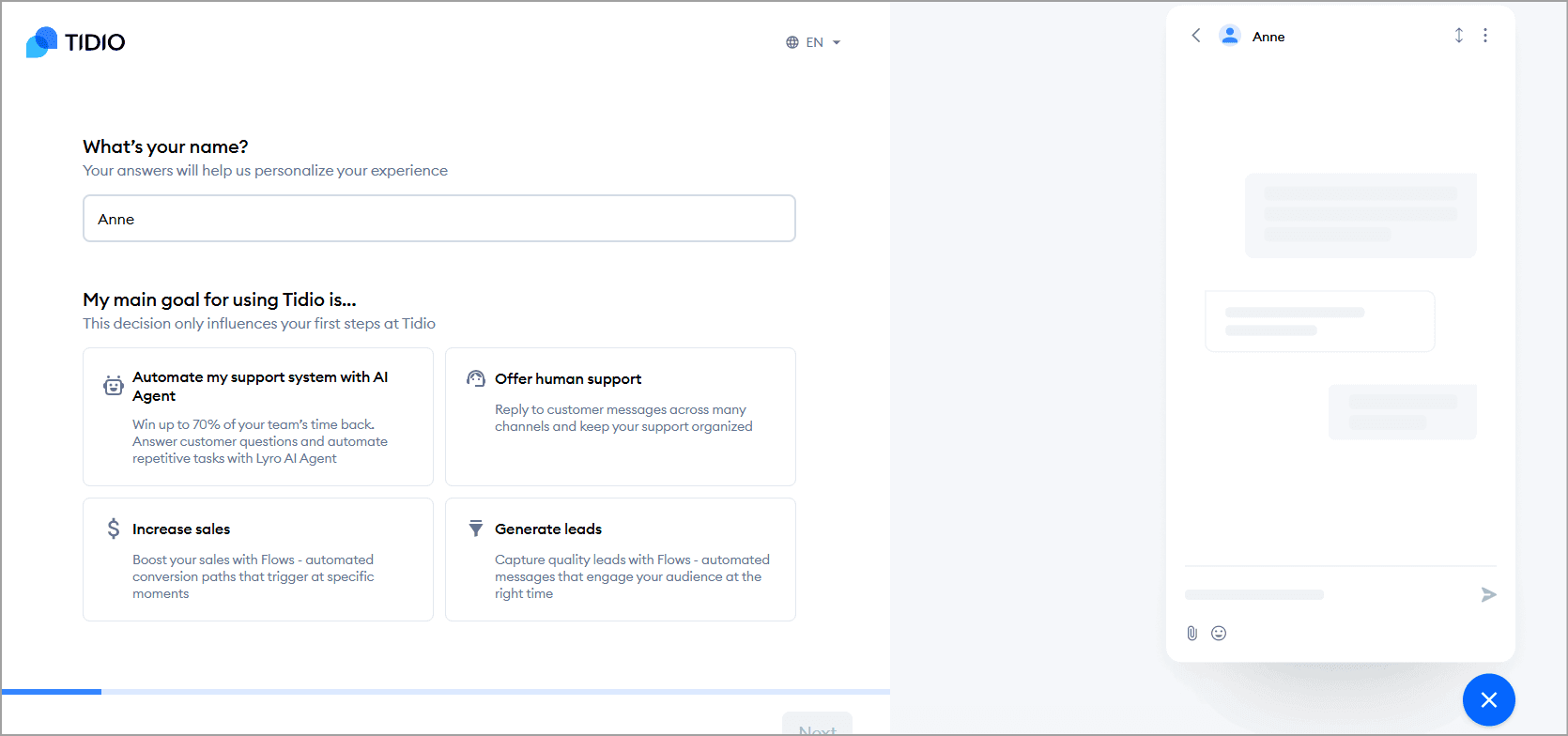
Unlike traditional help desk platforms that require extensive configuration before they're usable, Tidio keeps the initial onboarding intentionally lightweight.
You can create an account, install the chat widget, and start receiving conversations without spending hours configuring the platform.
Tidio users have repeatedly commented that the set-up process is quick and easy.
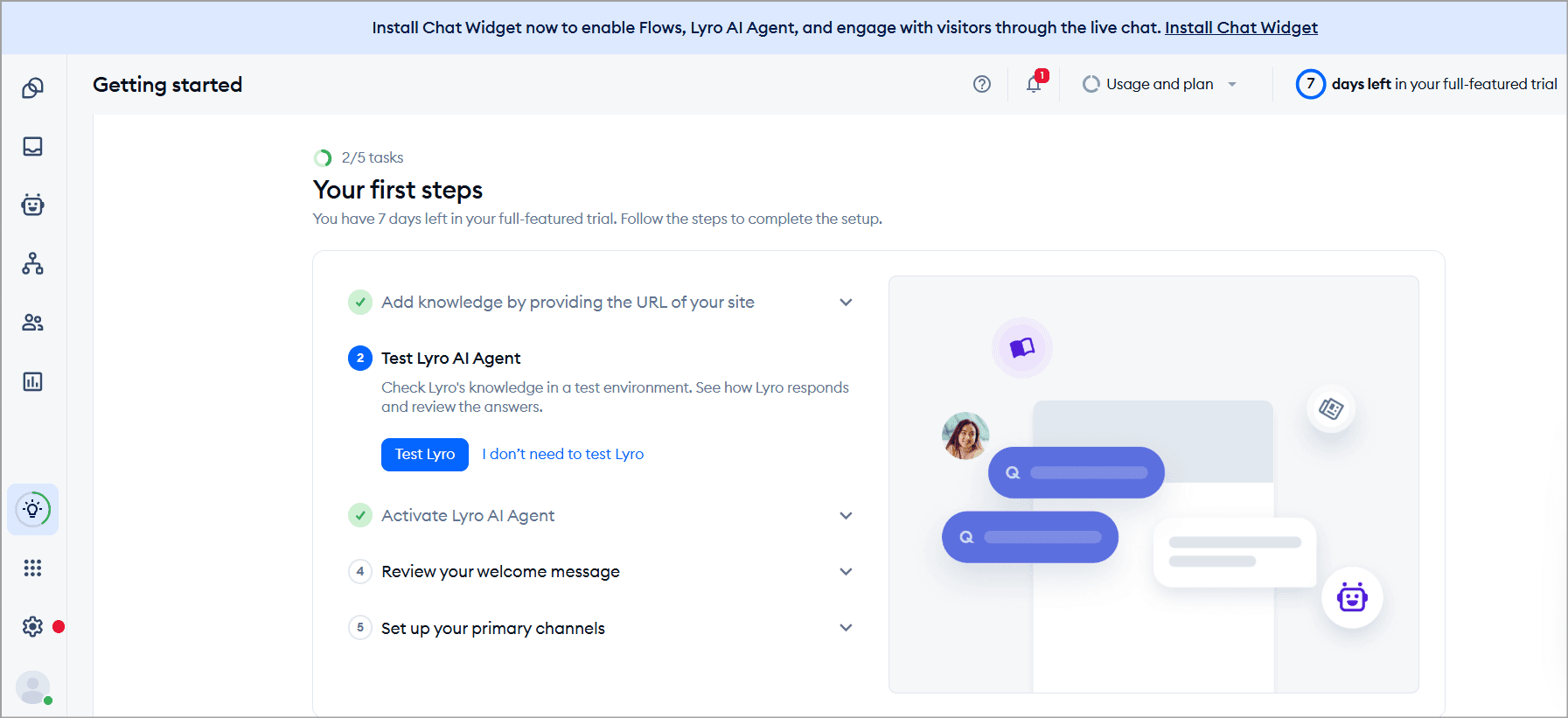
After you are done with the initial sign-up, you are taken to the dashboard. The onboarding wizard shows you the steps to complete.
Add sources for the knowledge base
Test Lyro AI
Activate Lyro AI agent
Set welcome message for Flows
Set up communication channels
Setting Up the Widget
When you go to the “Activate Lyro” chat widget, it’ll take you to the Hub dashboard where you can see all the details of Lyro AI when it is up and running.
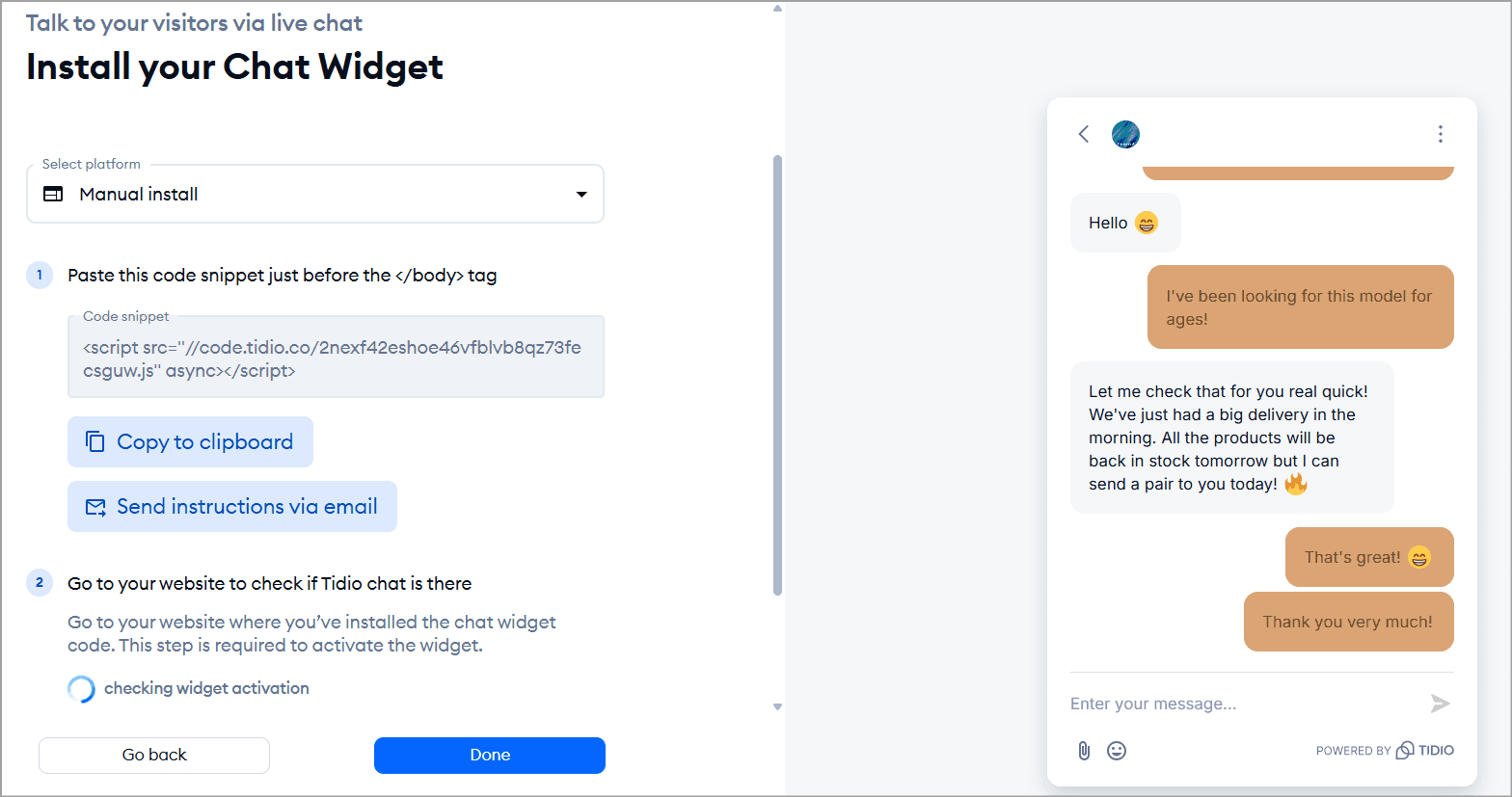
During setup, you can click on Install chat widget at the top of the dashboard. You can customize the color and name of the widget to align it with your brand.
When your widget is ready, you can copy the JavaScript and paste it into the HTML of your website.
For most popular website builders including Shopify, WordPress, Wix, and BigCommerce, the process is largely plug-and-play through native integrations.
When you connect a Shopify or WordPress site, Tidio auto-detects your brand colors and logo to pre-configure the widget. The onboarding wizard also auto-suggests a welcome message.
One catch: uploading your own logo instead of Tidio's default branding is only available to Plus subscribers.
Widget customization: You control the widget under Settings > Live Chat > Appearance, where you set colors, position (right or left), the home screen, and a live preview shows changes before you publish.
A step-by-step video tutorial from Tidio's channel walks through it.
Inbox setup
There is no setup for the Inbox as such. Once you connect your communication channels, i.e., email, Facebook Messenger, Instagram, WhatsApp, and make your chat widget live, your Inbox will be up and running.
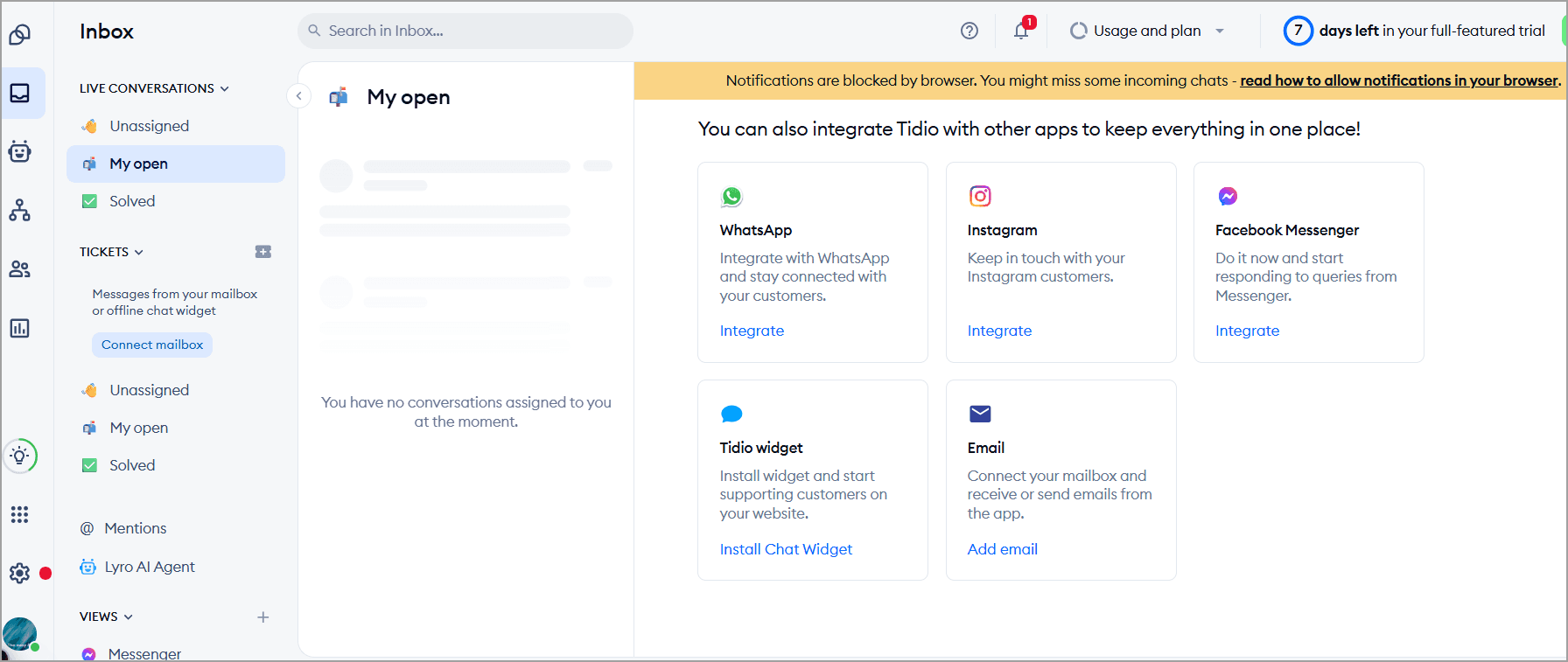
For ticketing, you connect an external mailbox (Gmail, Outlook, or any provider). Tidio sends a verification email to your Tidio inbox, and you click the link inside. Heads up: it can land in spam, so check that folder if you cannot find it. Ticketing setup takes about 15 minutes.
The basic configurations typically involve:
Setting business hours
Choosing notification preferences
Creating departments (if needed)
Inviting teammates
Assigning user roles
For small businesses with one or two support agents, this step is largely self-explanatory. Larger teams may spend more time defining routing rules and responsibilities. But the platform doesn't overwhelm you with enterprise-level configuration options during onboarding.
Team invitations
You invite team members by email under Settings > Team and assign them to departments or conversation types.

Here you can assign a department (specific group for task allocation) and permissions for the invitee.
Building Chatbot with Automation
The onboarding experience changes once you move beyond live chat and start configuring Lyro AI or chatbot workflows.
Once you go to the Flow section, you can spot multiple templates for creating automations. You can pick any of the template flows and launch it. If you want to make some granular changes, open the flow in Advanced editing to visually edit it.
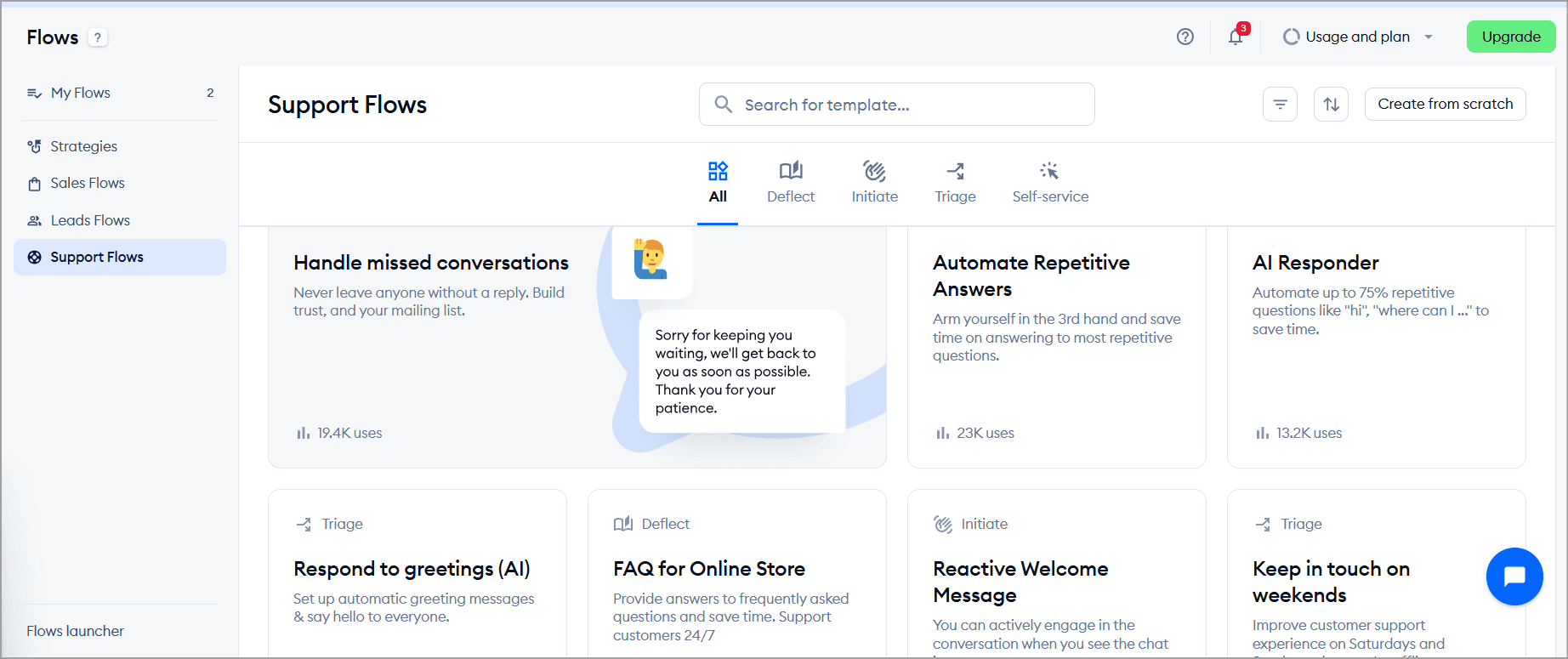
Creating a basic chatbot from Tidio's templates is relatively easy thanks to its visual builder. However, making the bot consistently useful requires more than simply publishing a workflow.
Even customers have mentioned that the chatbot is fairly basic and needs higher-level customizations.
Time and difficulty: Setup is genuinely fast. Most reviewers report the widget goes live in under 20 minutes end-to-end, and on Shopify it takes about 5 minutes.
Difficulty level? Beginner. No coding required for roughly 80% of what you will do.
Note: That said, there's a difference between getting Tidio live and getting it optimized. The basic setup is straightforward, but extracting the most value from its automation and AI features requires additional refinement over time.
Detailed Overview & Review of Tidio's Core Features
Now that we’re done with discussing the setup experience, let’s get to the core pillars of the platform’s capabilities.
Live chat
Standing at the center of Tidio’s capabilities is its live chat.
The live chat widget is the flagbearer of live conversation management, lightweight, fully customizable, and multilingual.
The shared inbox is where agents can track, monitor, and take over conversations, even assign chats to particular team members. There are filters and smart views to access specific conversations in split seconds.
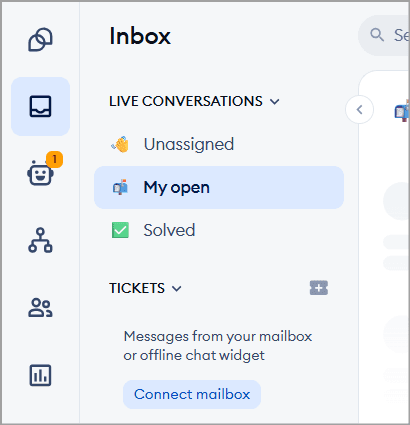
When a new chat comes in, it is in the Unassigned tab. You can take up a conversation yourself or assign it to a team member. There’s also an auto-assign feature which you can enable to keep the conversations instantaneous.
Tidio gives a lot of flexibility in chat handling from an agent’s perspective. Chats can be reassigned to available agents mid-conversation, and even multiple people can jump into an ongoing chat.
Once conversations begin, agents work from a shared inbox that supports features such as:
Live typing previews
File sharing
Pre-saved replies (canned responses)
Conversation assignment
Internal notes
Chat ratings
Conversation history
Mobile app support
There is a built-in AI Reply Assistant (the magic wand icon in the reply window) that can rewrite, elaborate, or shorten whatever you've drafted. For email threads, it can also summarize the full conversation history. It runs on GPT-4.
Ease of use is the single most praised attribute across reviews. It runs in-browser, on desktop apps, and on mobile.
Lyro (AI agent)
Here is the star of the show. Lyro is Tidio's conversational AI agent, and it is powered by Anthropic's Claude rather than OpenAI's GPT, which most competitors use.
What does that mean in practice? Lyro learns from your help center, website content, FAQ pages, PDFs, or CSV files, and answers only from that verified content. It responds almost immediately and can handle 47 languages.
Critical setup note: When you add your site, Lyro scans all pages on that domain as a knowledge source (junk/outdated pages get pulled in too). It’s better to give an exact source link or upload docs; don't rely on auto-training from the URL alone.
If the answer isn't in the knowledge base, it tells the visitor it doesn't know and hands off to a human.
Once Lyro is live, you get a command center called the Hub inside the Lyro AI Agent panel. It shows your resolution rate, quota usage, and a knowledge score that grades how well your data sources are configured, with actionable tips on what to improve.
There is also a Suggestions tab that shows you the exact questions Lyro couldn't answer from real conversations, so you always have a clear list of gaps to fill.
There are a lot more cool things Lyro can do.
Before going live, you can test Lyro inside a built-in sandbox called the Playground. You can instruct Lyro how to behave using Guidance. Choose between neutral, friendly, or formal tone, write a custom prompt, turn off emojis, disable "Read more" source links if they feel clunky for your brand.
You can also create custom Audiences, think segments based on country, channel, email address, or custom contact properties, and assign different knowledge sets or instant handoff rules to each audience.
When Lyro hits its limit, it hands off cleanly. The ticket Lyro creates includes a full conversation transcript so your agent walks in with context, not a blank screen. Handoff messages are also auto-translated for non-English visitors.
Lyro is more than a Q&A bot now. It ships Smart Actions so it can check Shopify orders, book Calendly meetings, and create CRM contacts. Tidio also shipped native Model Context Protocol (MCP) support, which lets Lyro connect to operator-provided context sources beyond the basic knowledge base, something most chatbot competitors have not done yet.
A few limitations of Lyro you should know:
Lyro's website crawler is capped at 60 pages, the total URL cap is 500, and CSV imports max out at 10,000 entries, with PDF uploads gated to the Plus plan.
There is no phone or voice channel at all.
Lyro cannot combine with custom Flows in the same conversation, because the two systems run on separate logic tracks and cannot share context mid-chat.
Start building, not just reading
Build AI chatbots and agents with WotNot and see how easily they work in real conversations.

Start building, not just reading
Build AI chatbots and agents with WotNot and see how easily they work in real conversations.
Start building, not just reading
Build AI chatbots and agents with WotNot and see how easily they work in real conversations.

Flows (chatbot builder)
Flows is Tidio's no-code, drag-and-drop chatbot builder. It works on a simple logic of triggers, actions, and conditions.
The normal chatbot chronology goes here as well. A trigger starts the flow, actions are what the bot does, and conditions branch the conversation.
While Lyro is designed for open-ended AI conversations, Flows is where Tidio handles structured, rule-based automation.
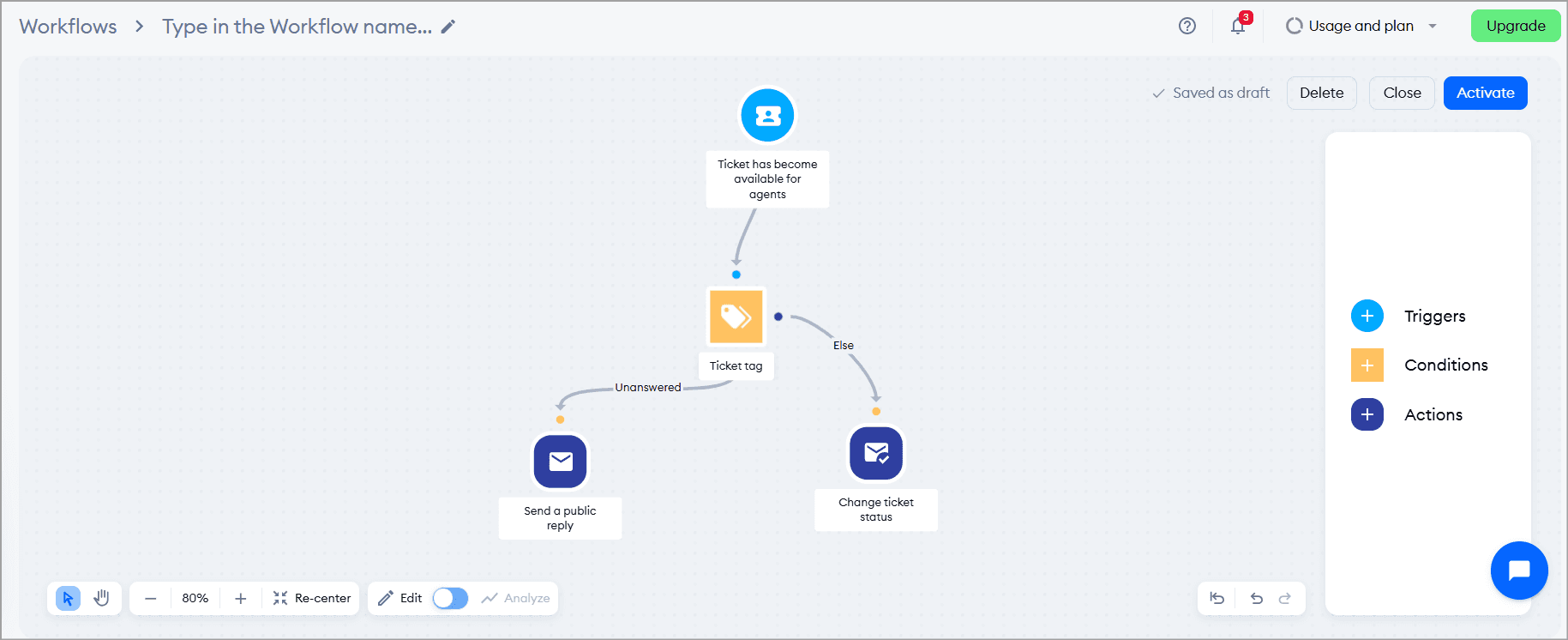
Tidio organizes its 40+ pre-built templates into three buckets: Lead Flows, Sales Flows, and Support Flows. Pick one, customize the copy, and you're live.
There is also a Strategies tab that bundles multiple flows that work together, recommended based on what you said during onboarding. For anyone who has never built a bot before, this removes most of the guesswork.
Note: The honest trade-off. Flows and Lyro are separate systems. You can run them on the same account, but they don't share context mid-conversation. Enabling Lyro disables your "Visitor says" flow triggers, so you have to make a choice on a per-conversation basis: structured path or AI.
Help Desk
Tidio's help desk turns emails, forms, live chat, and social conversations into tickets you can route, tag, prioritize, and assign. It supports a shared inbox, internal notes, canned responses, and SLA-based priorities.
If you need advanced ticket routing, SLA tracking, or custom workflows, Tidio falls short. It is a live chat platform with ticketing, not a dedicated enterprise help desk.
Analytics
Tidio's analytics are designed less for executive reporting and more for improving everyday support operations.
It brings together insights from live conversations, tickets, AI performance, lead generation, and even sales attribution (for Shopify users).
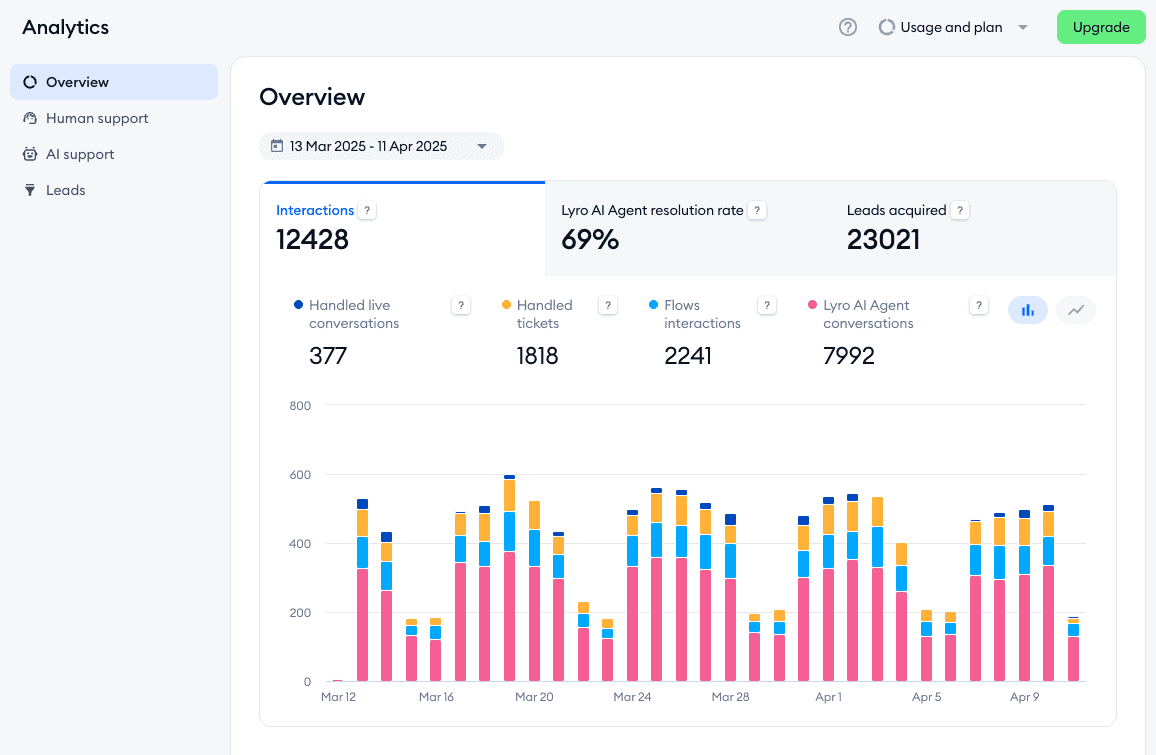
The platform tracks traditional support metrics such as:
Conversation volume
Resolution rates
Response times
Customer satisfaction
Agent performance
For businesses using Lyro, there's also a dedicated AI analytics dashboard showing:
AI resolution rate
Questions answered versus unanswered
Human handoff rate
Frequently detected intents
Knowledge base performance
Customer satisfaction over time
Flow analytics are the bigger gap. You can see how many visitors a flow reached, but you can't see where they dropped off inside it. Without those insights, optimizing each flow becomes more difficult. You'll know a flow is underperforming, but not why.
Another catch is depth and time windows. Advanced analytics are locked behind Growth and above. The Overview tab shows insights from the last 30 days for quick reference, and viewed pages history via the API is limited to the past 30 days.
Reviewers consistently call reporting basic, wishing for more advanced analytics options. The Overview panel only goes three months back. For teams that need quarterly comparisons or longer trend lines, Tidio does not do the job.
Lead Gen and Engagement
This is where Tidio's ecommerce side shows. The whole setup is built around the purpose of reaching out to customers before they even raise a query.
You can trigger a chat message when someone spends more than 60 seconds on your pricing page, when they hover over the exit area, when they add something to their cart and go quiet, or when they land from a specific referrer. Each trigger connects to an action: send a discount code, collect an email address, ask if they need help, book a demo slot, and many more.
The proactive engagement toolkit runs through Flows and Lyro's Proactive Roles.
Flows can proactively engage visitors on specific pages (pricing, product, support), collect contact details, run satisfaction surveys, and send coupon codes without leaving the chat window.
There are a number of customer engagement flow templates and thousands of uses on the flows dashboard, which are readily available for use.
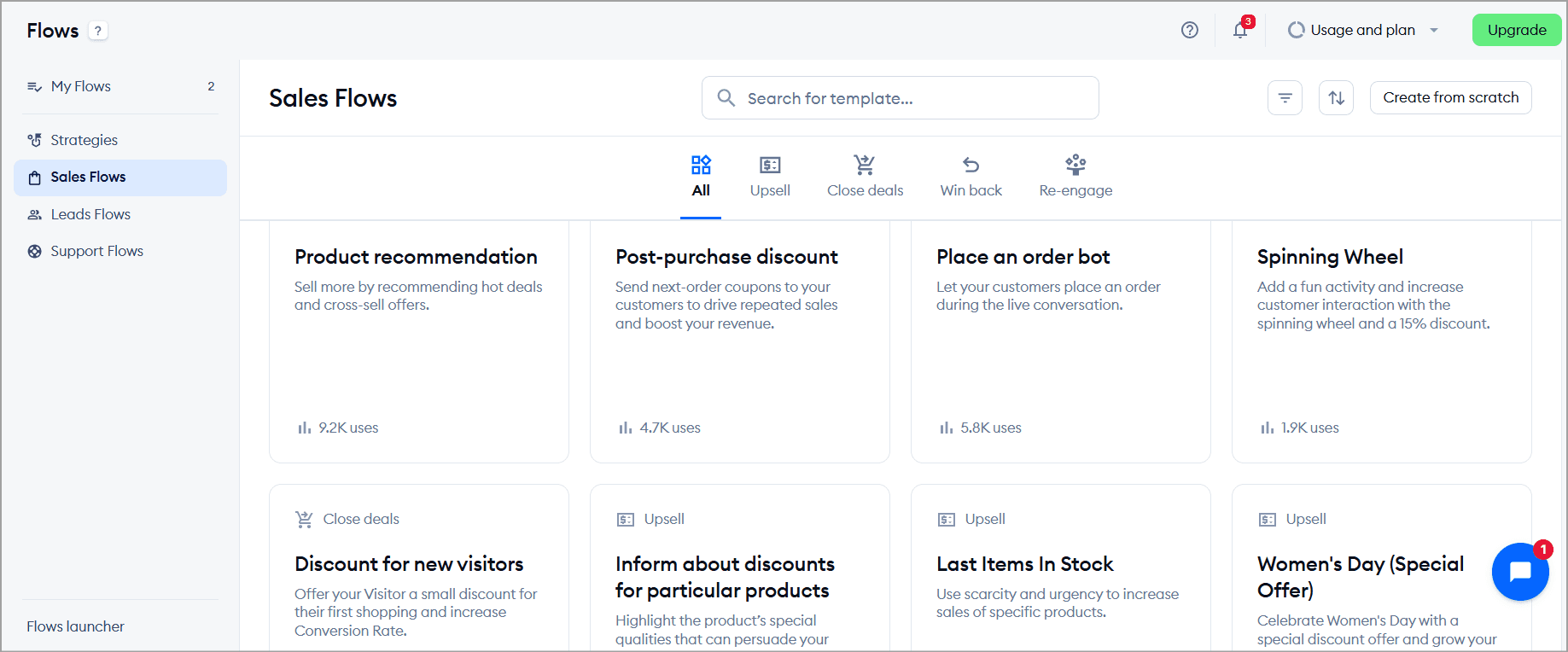
Lyro can qualify leads by triggering custom forms and guiding visitors through pre-set questions.
Real results back this up. Multi-brand eyewear store eye-oo achieved €177K in revenue growth after installing Tidio.
Tidio is a strong inbound engagement and lead capture tool, particularly for website-first stores on Shopify. But it's not a marketing automation platform.
Visitor tracking
Using the Visitors section, you get a live list of everyone currently on your site. Not aggregated session data. Not a report you pull tomorrow morning. Actual people, on your site, right now.
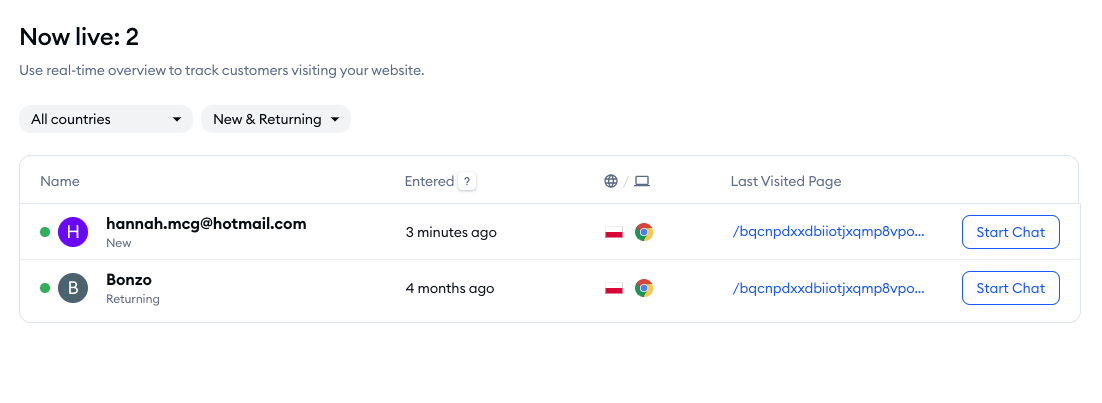
This information helps agents understand who they're talking to before the conversation even begins. Depending on your integrations, you can view:
Current page URL the visitor is browsing
Browser, operating system, and device information
IP address and country for basic geographic context
Page visit history with timestamps, showing the visitor's journey across your website
Previous conversation history, allowing agents to continue past interactions without asking customers to repeat themselves
For Shopify stores, the context becomes even richer. Agents can see:
The visitor's live shopping cart
Past order history
All of this information is available directly within the chat window, eliminating the need to switch between multiple tabs while assisting customers. One Shopify App Store reviewer came back specifically for this feature:
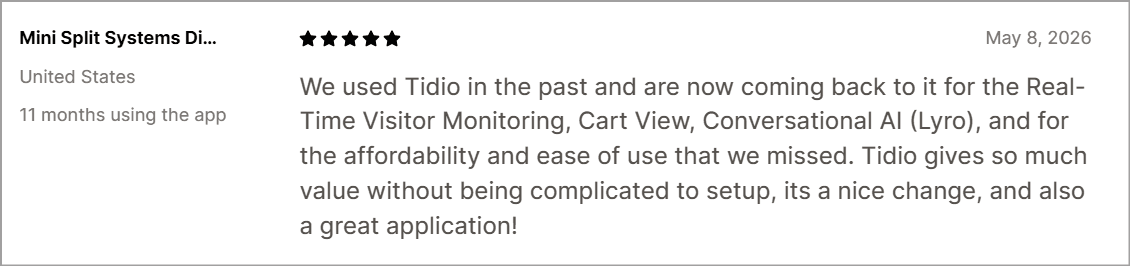
Although Tidio's tracking tells you which pages someone visited and in what order, it doesn't show you how they interacted with those pages.
One note: on some plans, tracking a user's location requires paying extra.
Multi-channel support
Tidio pulls live chat, email, Facebook Messenger, Instagram DMs, and WhatsApp into one inbox. For a lean team, this consolidated view eliminates tab-switching. The website widget is the core channel and works best. The WhatsApp side, as noted, is less reliable for AI-driven conversations.
Security, compliance & data handling
Tidio takes this seriously for a small-business tool. It completed its SOC 2 Type II audit, covering Security, Availability, and Confidentiality, announced in October 2025 and conducted by A-LIGN.
Data in transit is encrypted with TLS 1.2+ using 256-bit SSL certificates, and data at rest with AES-256.
On data residency, Tidio services run on Amazon Web Services (AWS) in ISO-certified data centers within the EU, and all data is stored on servers located in EEA member countries. It is GDPR and CCPA compliant and a participant in the EU's voluntary AI Pact.
The one gap to flag: HIPAA. Tidio states plainly that "while we comply with the rules set in HIPAA, we don't have formal compliance documentation yet". If you are in healthcare, verify this directly with Tidio sales before committing.
Integrations
Tidio claims 120+ native integrations, and here's the breakdown.
Ecommerce integrations: Native Shopify, WooCommerce, BigCommerce, Magento, and PrestaShop connections. The Shopify app holds a 4.7/5 rating with over 1,100 reviews.
CRM integrations. Native HubSpot, Salesforce, Zoho CRM, Pipedrive, and Zendesk Sell.
Marketing tools: Native Klaviyo, Mailchimp, ActiveCampaign, Omnisend, Brevo, and MailerLite.
Automation platforms: Zapier connects Tidio to thousands of apps, and Make (Integromat) works too.
API and custom integrations: Tidio offers OpenAPI access (Plus and above), a Widget SDK for developers, and webhooks.
Skills You Need to Use Tidio
Tidio is one of the most beginner-friendly platforms in its category. About 80% of Tidio's value can be unlocked without writing any code. The remaining 20% (deep custom triggers, API work) needs basic JavaScript.
Must-haves: Comfort navigating a dashboard and the ability to write clear customer-facing copy. That is it for the core product.
Good-to-haves: An understanding of conversation design (for building effective Flows), knowledge base curation skills (to make Lyro perform), and basic JavaScript or Zapier familiarity (for custom integrations).
Here is the task-vs-skill breakdown:
Task | Skill level |
Live chat (answering, canned responses) | Beginner |
Widget customization | Beginner |
Help desk/ticketing setup | Beginner |
Chatbot builder (Flows) | Beginner–Intermediate |
Lyro AI agent (training, guidance config) | Intermediate |
Analytics interpretation | Intermediate |
API / custom integrations | Advanced |
The learning curve is genuinely the easiest in the AI Tools competitive set: 20 minutes to a live bot, weeks (not months) to master advanced features.
Tidio Pricing Explained
Here is where you need to pay attention, because the headline prices do not tell the whole story.
All the pricing plans
Tidio sells three core products (Lyro AI Agent, Customer Service, and Flows) that can be bought individually or bundled. The main Customer Service plans:
Plan | Monthly price | Annual price | Conversations | Seats | Best for |
Free | $0 | $0 | 50/mo + 50 lifetime Lyro + 100 Flows visitors | Up to 10 | Solo operators, testing |
Starter | $29/mo | $24.17/mo | 100/mo | Up to 10 | Tiny teams, low volume |
Growth | $59/mo | $49.17/mo | 250–2,000/mo | Up to 10 | Growing SMBs, most popular |
Plus | from $749/mo | — | Custom | 11+ | Mid-market, needs API/CSM |
Premium | ~$2,999/mo | — | Unlimited | Custom | Enterprise, HIPAA needs |
1. Free — $0/month
What's included:
50 billable conversations/month
10 agent seats
50 Lyro AI conversations (one-off lifetime, not monthly)
100 Flows visitors/month
Live chat, ticketing, email management
Messenger, Instagram, WhatsApp integrations
Desktop and mobile apps
The free plan is genuinely usable. Ten seats at zero cost is unusual for this category, and the channel access is full even at this tier.
Good for: solo operators, low-traffic sites, and agencies evaluating the platform without pressure.
Watch out: that 50 Lyro allocation is a lifetime one-off. Once it's gone, Lyro stops responding until you upgrade.
2. Starter — $24.17/month (annual) | $29/month (monthly)
What's included, on top of Free:
100 billable conversations/month
Live visitors list
Operating hours settings
Dedicated chat page
Good for: Small service businesses or solo founders who need a few more conversations and basic visitor visibility.
Watch out: Ticketing automations, macros, advanced analytics, typing preview, viewed pages history, satisfaction surveys, and Shopify-native actions are all absent here. You still get only the one-off 50 Lyro conversations from Free — there is no monthly Lyro renewal on Starter without buying the add-on separately.
3. Growth — starts at $49.17/month (annual) | $59/month (monthly)
What's included, on top of Starter:
250 to 2,000 billable conversations/month (selectable)
Ticketing automations
Advanced analytics (agent performance, CSAT, channel breakdowns)
Macros (canned responses with actions)
Live typing preview
Viewed pages history and visitor notes
Visitors info
Automatic chat assignment and conversation solving
Offline auto-reply
User permissions
Satisfaction surveys
Native Shopify actions (cart view, order history, product cards)
Good for: Shopify and DTC stores, lean support teams of 3 to 10 people, anyone who needs real workflow automation and performance data.
Watch out: the 10-seat cap still applies. Lyro AI conversations do not renew monthly on Growth unless you buy the Lyro add-on separately. The one-off 50 lifetime conversations carry over from the free plan, but meaningful AI automation requires purchasing the Lyro AI Agent add-on (starts at $32.50/month annually). Removing the "Powered by Tidio" badge is a $16.67/month extra add-on at this tier.
4. Plus — starts at $749/month
What's included, on top of Growth:
Custom conversation limits (breaks the 2,000 ceiling)
Custom seat count (breaks the 10-seat cap)
Departments
Multiproject management (multiple websites under one account)
Custom branding and custom Lyro name
Ticketing automations
OpenAPI access
Custom channels
Lyro Connect (embed Lyro inside Zendesk, Salesforce, or any other help desk)
100MB file uploads
Dedicated Success Manager
Live chat support from Tidio
Training sessions, account reviews, Flows building assistance
The plan is well-constructed for what it delivers. Lyro Connect is genuinely useful for teams that want Lyro's AI on top of an existing enterprise setup without migrating everything. The dedicated CSM and onboarding support also make a real difference at this volume.
Good for: teams above 10 agents, businesses running Tidio alongside an existing enterprise help desk, mid-market companies needing API access and onboarding support.
Watch out: This is a 12x price jump from “Growth Plan” to “Plus Plan” with nothing in between. If you hit the 10-seat wall on Growth, Plus Plan is your only option regardless of whether you need the full feature set.
5. Premium — custom pricing (contact sales)
What's included, on top of Plus:
Minimum 3,000 Lyro AI conversations/month
Contractual 50% Lyro resolution rate guarantee
Pay-per-resolution billing
Lyro as a fully managed service (Tidio's team configures and optimizes it)
Custom analytics
Advanced Copilot
Mobile SDK
Super admin role
SSO
Compliance documentation
Slack support channel
Dedicated services team
Priority premium support
The resolution guarantee is the standout. Tidio commits in writing to a 50% Lyro resolution rate and backs it with pay-per-resolution billing, confirmed as a contractual SLA by Contractor ToolStack, not just marketing language. Compliance documentation and SSO also make this the only viable tier for healthcare or finance buyers with regulatory requirements.
Good for: enterprise teams with high volumes, regulated industries needing compliance documentation, and teams that want Tidio's team to handle the AI configuration entirely.
Watch out: there's no public pricing. If you're not comfortable with a sales call before you know the number, this tier isn't designed for you.
The two add-ons
Lyro AI Agent — starts at $32.50/month (annual) for 50 AI conversations. This refreshes monthly, unlike the lifetime 50 on the free plan.
Flows — starts at $24.17/month (annual) for 2,000 visitors reached. Billed per unique visitor who sees the flow, not per interaction. Paid ad traffic burns through this faster than organic traffic, so watch the math if you're running paid social campaigns.
Is Tidio actually as affordable as it looks?
Yes and no.
For a team under 10 people, Tidio is genuinely cheaper than per-agent competitors. Growth at $59/mo for 10 agents beats a lot of competitors who charge per agent. Setup, onboarding, and implementation are $0 across all tiers, unlike Zendesk or Intercom charging thousands in implementation fees.
At first glance, $29 a month looks like a steal. But the advertised price understates reality once you add AI and automation. Remember you stack the three separate meters: base plan, Lyro AI Agent, and Flows.
Hidden costs to watch for:
Automated greeting messages count as billable conversations
Flows bills by visitors reached, not by interactions
Lyro's 15-minute inactivity rule resets the conversation counter, so one drawn-out customer interaction can burn multiple quota units.
All self-serve plans cap at 10 seats. There is no 11th-seat add-on. Adding one more agent means jumping to Plus at $749/mo.
Independent reviewers note real-world costs typically run 2-3x the base price. Some reviewers calculated that a 10-person Growth team adding Lyro AI ($32.50) and Flows ($24.17) pays $105.67/month, more than double the advertised price.
So the honest verdict is this: Tidio is affordable if you go in knowing what the real number looks like.
Pro Tip: Before you commit annually, disable auto-upgrade in settings and monitor your usage monthly. Just know the tradeoff: with auto-upgrade off, conversations stop entirely at 100% quota until the limit resets, so watch that banner.
Performance & User Experience
Weighing the two big review platforms, Tidio scores well. On G2 it holds 4.6/5 across 1,879 reviews, and on Capterra it holds 4.7/5 across 590 reviews. A weighted average lands around 4.65.
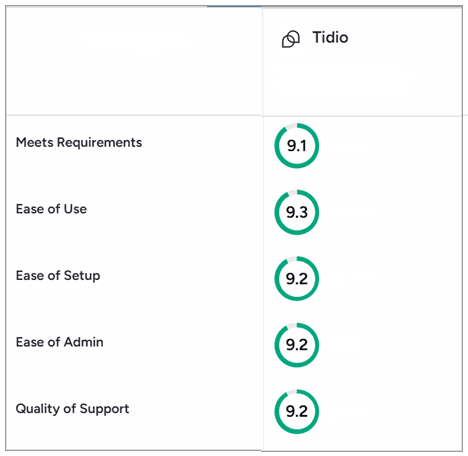
Source: G2
What Users Like About Tidio
Ease of use. The single most praised attribute was how the tool is so intuitive and easy to use.
Modern interface. Reviewers consistently praise the clean, intuitive dashboard and customizable widget that blends with their site.
AI quality. The Claude-powered Lyro earns real praise. Compliance platform Secureframe increased resolution rates from 2-3% to 53% after switching to Lyro.
Fast setup. Users have launched it in about a day, and setup speed is a recurring theme across every review platform.
Ecommerce focus. Shopify Plus users specifically call out the seamless store integration.
Automation templates. The 40+ pre-built Flow templates help beginners capture leads quickly without starting from scratch.
Where Users Face Issues With Tidio
Enterprise scalability: The 10-seat cap and $749 spike mean growing teams outgrow Tidio faster than most platforms.
Reporting depth: The most common feature complaint: analytics are basic and lack depth for data-driven teams.
AI limitations: Lyro's knowledge caps (60-page crawl, no learning from past conversations), no voice channel, and patchy WhatsApp frustrate users who need automation depth.
Pricing complexity: Pricing transparency is the most common complaint. Juggling three separate billing meters (conversations, Lyro, Flows) makes the bill hard to predict.
Limited customization: Reviewers note the chatbot rules feel basic and inflexible unless you upgrade, and widget position is limited to two options.
Advanced workflow constraints: Flows and Lyro cannot share context in the same conversation, which limits sophisticated proactive-AI journeys.
Mobile experience: Multiple reviewers flag their Android mobile app never really worked well, and users missed many visitor chats.
Reliability: Some users report real-time message delays during peak hours and missed new-chat notifications.
Data portability: There is no export option for chat transcripts or Lyro Q&A pairs. If you decide to migrate to another platform, your knowledge base stays behind. Tidio confirmed this directly in response to a user complaint in July 2026.
Top 3 Tidio Alternatives
If Tidio does not fit, these three are worth a look. And if you need a detailed breakdown, then you can check out my article on best Tidio alternatives (updated for 2026).
Alternative | Best for | Why consider it |
Teams with advanced workflow and AI customization needs | A platform with many more AI capabilities and a complex workflow builder with customization scope but similar pricing plans. | |
Intercom | Enterprises with budget | Deeper conversational automation and workflows, though overkill for most SMBs at $39-299/seat |
Gorgias | Shopify-first stores | Deep native Shopify integration: pulls order data, processes refunds, handles returns inside the ticket |
Ideal Tidio User Profiles
Tidio is a pretty intuitive tool with features surrounding customer support and lead capturing, and customer engagement. However, here are some of the demographics the platform fits better with than others.
Shopify stores. The deepest integration in the category, with cart preview, order management, and AI product recommendations.
DTC brands. Proactive Flows, abandoned cart recovery, and behavior-based triggers fit online retail perfectly.
Small SaaS teams. Onboarding assistance, trial support, and FAQ automation without enterprise overhead.
Agencies. The generous free tier and quick setup make it easy to deploy for clients.
Small customer support teams. If your team is under 10 people and your queries are mostly repetitive, Tidio gets the job done.
Who should consider alternatives?
Large enterprises. The 10-seat cap and $749 cliff make scaling painful.
High-volume support teams. Conversation-based billing and forced tier upgrades get expensive fast for busy stores.
Businesses needing extensive customization. Basic chatbot rules and limited widget options constrain advanced use cases.
Teams with complex omnichannel workflows. Because Flows and Lyro run as separate siloed systems, sophisticated multi-channel journeys are hard to build cleanly.
Final Verdict
So, should you use Tidio in 2026?
For the right buyer, absolutely. If you run a Shopify store, a DTC brand, or a small support team under 10 people, Tidio delivers a genuinely easy-to-use platform with a Claude-powered AI agent that punches above its price.
Setup takes minutes, the free tier is real, and the ecommerce integrations are among the best in the category.
But go in with clear eyes. The real cost runs 2-3x the headline price once you add Lyro and Flows, the pricing spike hinders growth while sticking to budgets.
If you are an enterprise, a high-volume team, or need deep customization, look elsewhere. For everyone else, Tidio remains one of the smartest-value picks in its class.
FAQs
FAQs
FAQs
Is Tidio really free?
What AI model powers Lyro?
How much does Tidio really cost per month?
Does Tidio work well on WhatsApp?
How long does it take to set up Tidio?
ABOUT AUTHOR

Hardik Makadia
Co-founder & CEO, WotNot
Hardik leads the company with a focus on sales, innovation, and customer-centric solutions. Passionate about problem-solving, he drives business growth by delivering impactful and scalable solutions for clients.

Start building your chatbots today!
Curious to know how WotNot can help you? Let’s talk.
Start building your chatbots today!
Curious to know how WotNot can help you? Let’s talk.