Let’s build your chatbot today!
Launch a no-code WotNot agent and reclaim your hours.
*Takes you to quick 2-step signup.
Botpress is one of the most capable AI agent platforms you can get your hands on right now.
I’ll say that upfront because this review is not going to pretend otherwise.
But “capable” and “right for your team” are two different questions. And that’s the part most Botpress reviews skip over.
I run WotNot, which competes with Botpress. So let me be transparent about that before you read further. I have a horse in this race.
But I also have context that most reviewers don't: I've seen teams thrive on Botpress, and I've seen teams come to us after months of trying to make it work. Both happen for real reasons.
This review is my honest assessment of where Botpress delivers, where it doesn't, what it actually costs at real usage volumes, and who it's genuinely built for.
Everything here is sourced from G2, Capterra, Reddit, and hands-on observation.
If you're evaluating Botpress, you're probably close to a decision. Let me help you make the right one.
Quick Verdict: Should You Use Botpress?
Yes, if you have a developer (or a team with one) who's comfortable with JavaScript, APIs, and flow logic. Botpress gives you a level of control over your AI agent that very few platforms can match. The visual builder is genuinely good, the LLM flexibility is real, and the open-source roots mean you're never fully locked in.
No, if your business teams need to build and manage the bot themselves without engineering support. The first week feels approachable. By week three, you're deep in variables, custom actions, and debugging sessions that require technical knowledge.
If that sounds like a problem for your team, there are Botpress alternatives better suited to how you work.The pricing catch: Botpress recently bundled AI Spend into every plan, which fixes the unpredictability problem older reviews complain about. But the base prices went up to match. The Plus plan is now $189/month for 250 conversations, with overages at $0.65 per conversation. At real volumes, that math adds up fast.
The short version: Botpress rewards teams that want to build exactly what they want and have the technical resources to do it. It frustrates teams that just want a working AI agent without an engineering project attached to it.
What Is Botpress in 2026?
Botpress started as an open-source chatbot framework back in 2017. If you used it then, you'd remember it as a developer tool for building scripted conversation flows. That's not what it is anymore.
After raising a $25M Series B in June 2025 (led by Framework Venture Partners, with HubSpot Ventures and Deloitte Ventures joining), Botpress repositioned itself as an AI agent platform.
This now means that you're no longer just building rule-based chatbots. You're building autonomous agents that can reason through problems, call external tools, pull from knowledge bases, and decide how to move a conversation forward on their own.
The platform is cloud-first now. The open-source roots are still there, and you can still self-host on Enterprise. But new features ship to cloud first, and the self-hosted version sometimes lags behind. If open-source purity is a hard requirement for your team, that's worth knowing upfront.
So in short: Botpress in 2026 is a developer-friendly AI agent builder with a visual studio, multi-channel deployment, and LLM flexibility baked in.
It's true that it’s more capable than it's ever been. The question this review answers is whether the functionalities match what your team actually needs.
Well, we’ll find out.
Let’s build your chatbot today!
Launch a no-code WotNot agent and reclaim your hours.
Let’s build your chatbot today!
Launch a no-code WotNot agent and reclaim your hours.
What Botpress Does Well
Let’s have a look at where Botpress actually stands out once you start building with it.
1. The Visual Flow Builder
This is the centerpiece of the platform, and it earns that spot.

When you open the builder, you're working with visual flows. You can add branching logic, set conditions, wire up variables, and attach actions to each node. One node sends a message, the next calls an API, the one after that queries the knowledge base or hands off to a human agent. You can map genuinely complex multi-step conversations here, and it doesn't feel like fighting the tool to do it.
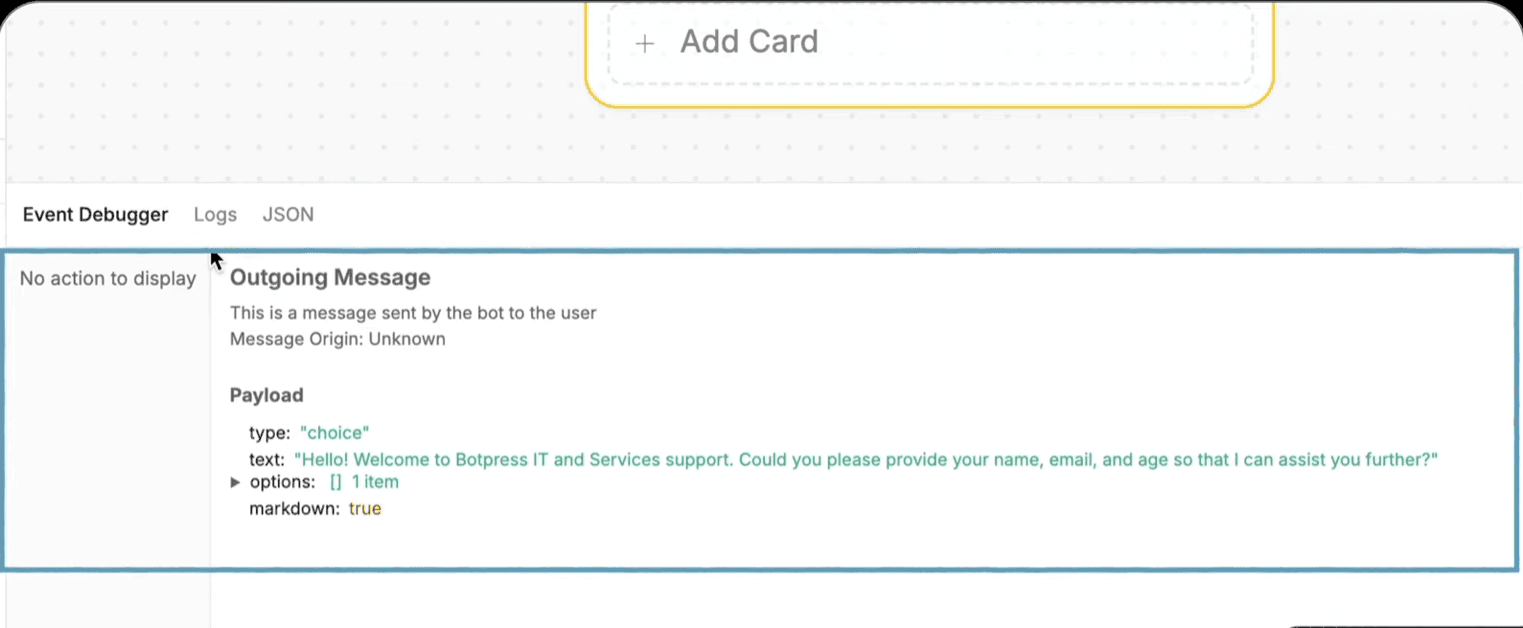
What I think Botpress nailed is the Event Debugger. When you test a flow, the active nodes light up in real time so you can see exactly where the conversation is and why it went there. For debugging complex bots, that's a real time-saver compared to staring at logs trying to figure out what went wrong.
Source: Botpress Academy
2. Knowledge Base and AI Features
This is where Botpress separates itself from simpler chatbot tools. And it's not one feature; it's a combination of a few that work together.
Knowledge base ingestion is the foundation. You upload documents, paste website URLs, or connect existing content, and the bot grounds its responses in your data.
LLM flexibility sits on top of that. Botpress supports multiple providers: OpenAI, Anthropic, Groq, Hugging Face. You're not locked into one model. If costs shift or one provider performs better for your use case, you swap without rebuilding the bot.
Hallucination controls are the part worth paying attention to. You can set confidence thresholds so low-confidence answers trigger a fallback flow instead of a bad response. You can constrain the system prompt to define what the AI should and shouldn't discuss. And for critical paths like billing or compliance questions, you can use scripted responses instead of AI generation entirely. No system eliminates hallucinations completely, but Botpress gives you the tools to manage the risk.
No system eliminates hallucinations completely. But Botpress gives you the tools to manage the risk, which is more than most platforms offer at this price point.
3. Multichannel Deployment
One of the things that saves real time with Botpress is how it handles channels. You build your bot once, and you can deploy it to web chat, WhatsApp, Messenger, Slack, and Telegram from the same project. These are built-in connectors, not just API endpoints you have to wire up yourself.
If you look at Botpress's G2 reviews, integrations and ease of integration are among the most frequently praised aspects of the platform. For teams that need to be on multiple channels without rebuilding the bot for each one, this works well.
One thing to note: WhatsApp is only available on the Plus plan ($189/month) and above. On the Free plan, you're limited to web chat.
4. Developer Flexibility
This is Botpress's real moat.
Native JavaScript and CSS access means developers can build custom actions, execute code directly in flows, make API calls, and deeply customize the chat UI. The Agent Development Kit (ADK) opens up code-first workflows for teams that prefer working outside the visual builder.
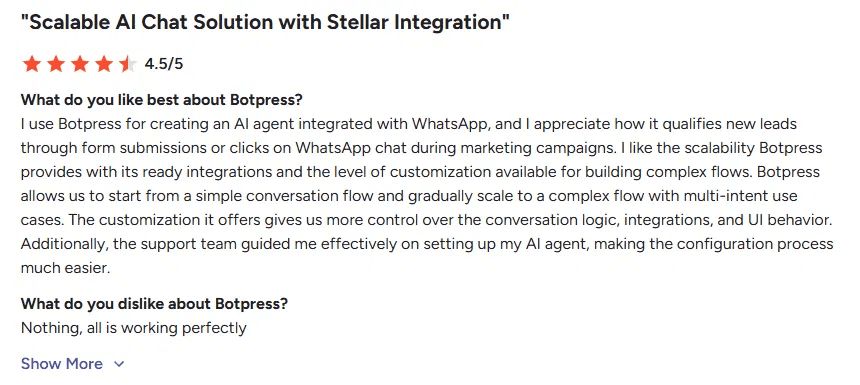
Users on G2 consistently highlight how Botpress balances ready-made integrations with the freedom to build custom ones, which is rare in this space.
Source: G2
A word of caution though: even basic flow logic like expressions and conditions runs on JavaScript under the hood. Botpress does offer AI assistance that generates code from plain English prompts, which helps. But when things break or need fine-tuning, someone on your team needs to be comfortable reading and editing JavaScript. That's the trade-off.
If your team wants to build exactly what they want with no ceiling on customization, this is where Botpress delivers. The catch (and we'll get into this in the next section) is that this same flexibility is what makes the platform hard to use without a developer.
Where Botpress Falls Short
No platform gets everything right. And to Botpress's credit, they're actively shipping improvements.
But these are the areas where users consistently run into friction.
1. Gap Between Onboarding and the Actual Builder
Here's the most interesting thing we found. Botpress has rebuilt onboarding into a chat-style setup. Which is super promising for non-tech folks. It asks about your brand and your use case, then assembles a first bot for you.
It feels far more no-code than the Botpress described above. But we were not able to see these features after the first bot. And functionalities were half-connected.
Maybe this feature is still in beta, and they are testing with users. Along with it, human handoff and deeper analytics look like part of the same push. It's a promising direction, and it tells you Botpress knows the no-code gap is real. But as of July 2026, it's fragmented enough that you can't build around it yet for more bots.
2. Documentation Gaps
For a developer-first platform, this one stings.
The basics are covered well. But the moment you get into variables, custom actions, or API integrations, the guidance gets thin. Error messages can be cryptic, and you'll find yourself jumping between docs, Discord threads, and GitHub issues trying to piece together an answer.
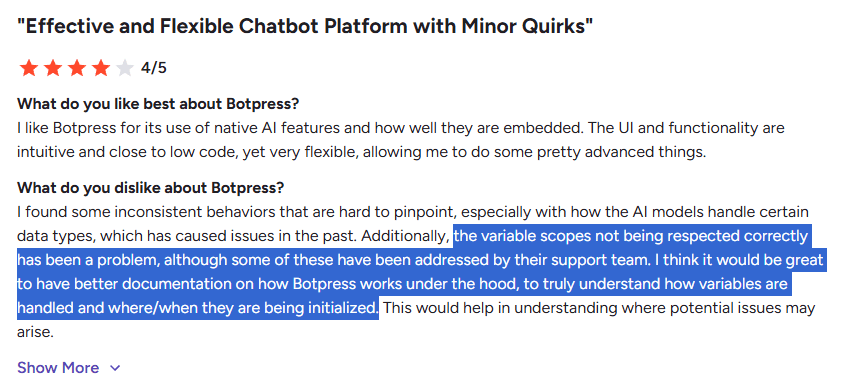
I noticed this myself when trying to understand how variable scopes work across different flows. The docs tell you variables exist. They don't always tell you how they behave when things get complex. And I'm not alone in feeling that way:
Source: G2
To be fair, Botpress has a strong YouTube channel and an active Discord community that partially compensate for this.
But when your platform expects developers to write JavaScript in flows, the docs themselves need to carry more weight.
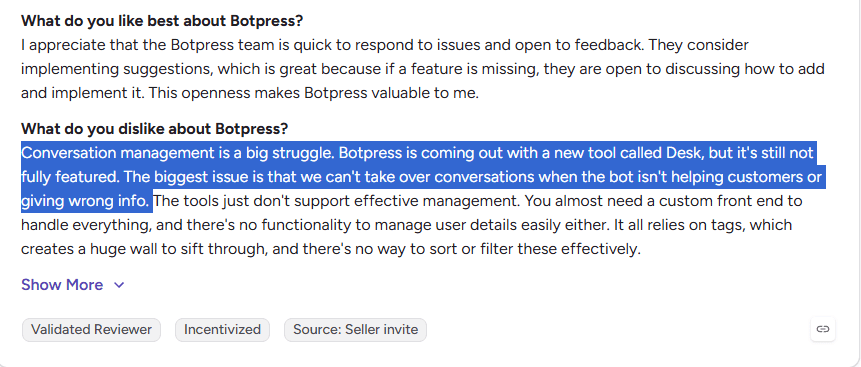
3. Conversation Management Needs Work
This is the one that surprised me most.
If you're building a customer support bot, you'd expect to be able to manage those conversations natively. Track them, jump in when the bot gets stuck, view user details, filter and sort. The basic stuff.
Botpress recently launched Desk (their help desk layer) to address this. But as of now, it's still not fully featured. This review captures the frustration better than I can:
Source: G2
For teams building support bots, you're either adding a third-party tool for live agent handoff or building your own management layer. Both add cost and complexity.
4. Analytics Are Surface-Level
You'll get the basics: message counts, session data, monthly users. For a high-level pulse check on whether the bot is working, that's enough.
But try to go deeper and you'll hit walls.
Where exactly are users dropping off in a flow?
Which questions is the bot consistently getting wrong?
Want to export conversation data to Looker Studio or your own BI setup? Not straightforward.
This isn't unusual for the category. Most chatbot platforms treat analytics as an afterthought. But if reporting matters to your team, plan on piping data to an external tool from day one.
5. Bugs and Inconsistencies
This one's harder to pin down because it shows up differently for different users.
What you'll hear about in reviews and community threads is inconsistent behavior: variables not respecting scopes, AI models handling certain data types unpredictably, flows that work fine in testing but break in production.
It’s important to note that this is not a single big issue. It's a collection of small ones that compound when you're building something complex.
And that ties directly into the learning curve problem. When something breaks and you can't tell if it's your logic, a platform quirk, or a documentation gap, debugging turns into guesswork.
That's where teams lose the most time with Botpress, not in building the first bot, but in figuring out why the tenth flow isn't behaving the way it should.
6. Support Depends on What You're Paying
Free and lower-tier users rely on Discord and community forums for help. To be fair, the Botpress community is one of the more active ones in this space, and you'll often get useful answers there.
But direct support from the Botpress team is gated behind higher plans. If you're on Free or Plus and hit a complex issue, you're largely on your own. Multiple G2 reviewers mention that response times vary significantly depending on which plan you're on. Worth factoring in if your team doesn't have in-house expertise to troubleshoot independently.
The Learning Curve: Where Exactly It Gets Hard
Every review of Botpress mentions the learning curve. But none of them tell you where it actually bites.
So we tried it ourselves.
I had a few non-technical folks from our team build a bot on Botpress and tracked where they got stuck. What I found matched almost exactly what G2 reviewers describe, but with a clearer picture of when it happens.
Here's what that progression looks like in practice.
What's Easy (Week 1)
Setting up your first bot is genuinely fast.
Botpress’ new onboarding flow has made the very start smoother. There is a chat-style onboarding that asks what you're building and hands you a starting point. As of July 2026, it feels much closer to a real no-code tool. But as I said earlier, this functionality is not there for other bots that you create.
For the usual builder part, you just need to connect a knowledge base (upload docs, paste a few URLs), drop some nodes on the canvas, wire a basic Q&A flow, and you have something working. The visual builder at this stage feels approachable. If you've used any flowchart tool before (like Whimsical or Draw.io), you'll feel at home.
We had a few folks from our customer success team try this out. They don’t have a background in development, but they built a basic bot that answers product questions within a couple of hours.
At that stage, Botpress does feel like the no-code platform it claims to be.
What Gets Hard (Week 2-4)
Then you try to make the bot actually useful for your business.
You want to personalize a response based on the user's name or account type. Now you're working with variables and expressions. You want to pull data from your CRM before the bot responds. Now you're configuring API calls inside the flow. You want the bot to behave differently based on three conditions at once.
Now you're writing JavaScript in Expression Cards.
This is where our non-technical team members stopped being able to work independently. Not because the interface changed, but because the thinking required did. You're no longer arranging blocks but debugging logic.
One G2 reviewer described the same experience: he could get through setup with AI assistance, but couldn't figure out basic workflow triggers on his own. The platform walked him part of the way, then left him stranded.
What Requires a Developer (Month 2+)
This is where our experiment effectively ended. The moment we needed custom actions, complex integrations with internal tools, or any logic that went beyond what the visual cards offered, our non-technical team couldn't move forward without engineering stepping in.
And once engineering got involved, they stayed involved. Maintaining flows, updating business logic, debugging production issues. None of that went back to the business team. The project ownership shifted permanently.
That tracks with what I see on review platforms as well.
One CEO (Eudald C.) captured the pattern: "While Botpress is feature-rich, it can feel overwhelming at first for beginners. The documentation sometimes lacks real-world examples or deep explanations for advanced use cases."

Source: G2
The takeaway isn't that Botpress is too hard. It's that you can start without a developer, but you can't scale without one.
If your team looks like ours did in that experiment, you'll hit a ceiling by week three. If you have a developer ready to pick up where the visual builder leaves off, that ceiling doesn't exist.
Start building, not just reading
Build AI chatbots and agents with WotNot and see how easily they work in real conversations.

Start building, not just reading
Build AI chatbots and agents with WotNot and see how easily they work in real conversations.
Start building, not just reading
Build AI chatbots and agents with WotNot and see how easily they work in real conversations.

Botpress Pricing: What It Actually Costs
If you've read older reviews of Botpress, you'll see a lot of complaints about unpredictable billing. That was the AI Spend model: a separate, usage-based charge on top of your base plan for LLM inference, embeddings, and web search. You'd see your base price and think "that's manageable," then get a bill that told a different story.
Botpress has since fixed this. As of 2026, AI usage is bundled into every plan. No more separate AI Spend line item. Now, that's a genuine improvement.
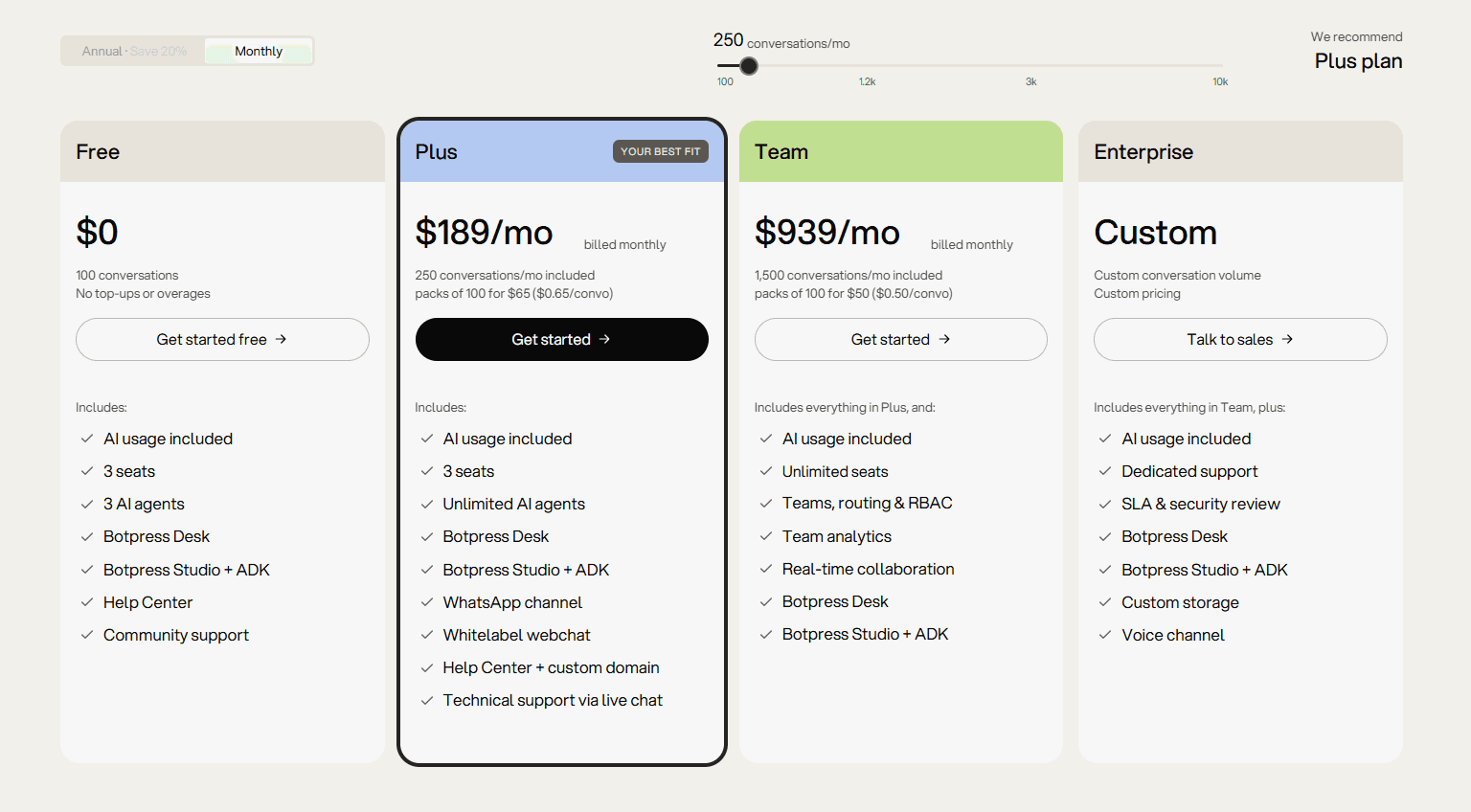
But the base prices went up to match. Here's what you're looking at now.
The Plans
Source: Botpress Pricing
Free: $0/month. 100 conversations. No overages, no top-ups. Good for testing, not for production.
Plus: $189/month (billed monthly). 250 conversations included. Overages at $0.65 per conversation.
Team: $939/month (billed monthly). 1,500 conversations included. Overages at $0.50 per conversation.
Enterprise: Custom pricing.
Annual billing saves 20% across the board.
The Math Most People Don't Do
The sticker price is clear now. But what matters is the per-conversation economics once your bot is handling real traffic.
Some math time:
On the Plus plan at 250 included conversations, you're paying $0.76 per conversation at base. Go over, and each additional conversation costs $0.65. So a bot handling 1,000 conversations a month on Plus would cost roughly $189 + (750 × $0.65) = $676/month.
On Team at 1,500 included conversations, the base rate drops to $0.63 per conversation. Overages are $0.50 each. A bot doing 5,000 conversations monthly would run $939 + (3,500 × $0.50) = $2,689/month.
Those numbers aren't outrageous for what you're getting. But they're a long way from $189/month. If you're presenting this to your finance team, present the projected number, not the sticker price.
What Else Costs Extra
The conversation pricing is the headline. But a few things still sit outside the base plan worth knowing:
WhatsApp channel is only available on Plus and above. Free plan is web chat only. If WhatsApp is a priority, some platforms include it at lower tiers.
Extra collaborator seats beyond the included 3 (Free and Plus) cost additional. Worth checking if your team is larger than three.
Custom storage is an Enterprise feature. On lower plans, storage for bot changes and temp files adds up, and as one G2 reviewer noted, there's no easy way to clean it up without buying more.
Voice channel is Enterprise only. If voice is a core use case, there are dedicated platforms built for it.
Is It Worth the Price?
Well, that depends on what you're comparing it to. For a developer-led team building a custom AI agent with full control over logic, LLM choice, and multi-channel deployment, Botpress at $189/month is competitive. You'd pay more for comparable flexibility on most enterprise platforms.
For a non-technical team that just needs a working support bot, you're paying for flexibility you won't use, and you'll likely need a developer on top of that. The total cost of ownership goes well beyond the subscription.
Who Should Use Botpress
I'll keep this specific. If your team looks like one of these profiles, Botpress is worth serious consideration.
Developer-led teams building custom AI agents:
You have at least one developer comfortable with JavaScript, APIs, and flow logic. You want control over how the bot reasons, what tools it calls, and how it integrates with your stack. Botpress was built for this team. The flexibility is real, and the ceiling is high.Agencies building bots for clients:
The customization depth, multi-channel deployment, and white-label options on Plus make Botpress a solid agency tool. Just factor in what we covered in the learning curve section: when you hand the bot off to a client's team for maintenance, they'll likely need technical support to manage it.Companies with strict data and compliance requirements:
If data residency, self-hosting, or on-premise deployment is a hard requirement (healthcare, finance, government), Botpress is one of the few platforms in this category that offers it on the Enterprise plan. That matters when the alternative is being told: "we only offer cloud."Teams already on Botpress and making it work:
If you're here to validate a decision you've already made, and things are going well, this review probably confirmed that. The switching cost isn't worth it unless you're hitting specific walls that won't go away.
Who Should Skip Botpress
This isn't about Botpress being bad. It's about recognizing when the platform's strengths don't match your team's reality.
Support teams that need to update the bot without engineering:
If your support lead needs to change an answer, add a new FAQ, or tweak a flow, and they can't do that without touching variables or JavaScript expressions, every small update becomes a ticket to engineering. That bottleneck compounds over time. If bot ownership needs to sit with a non-technical team, you need a platform that was built for that from the ground up.Small businesses that need a bot live in under two weeks:
The setup, knowledge base configuration, flow building, testing, and edge case handling is a real-time investment. Our non-technical team couldn't get past basic flows independently within a week. If speed to deployment is the priority, a more opinionated platform with pre-built templates and managed implementation will get you there faster.Teams that need predictable monthly costs:
Botpress has improved this significantly by bundling AI Spend into every plan. But conversation-based overages still make the bill variable. If your finance team needs a fixed line item they can budget around, the per-conversation model at $0.50 to $0.65 per overage will be a recurring conversation.Non-technical founders evaluating chatbot tools for the first time:
The demo looks approachable. The visual builder feels friendly in week one. But by week three, you're either learning JavaScript or hiring someone who knows it.
If you want a sense of what this looks like in practice, the top-ranking Reddit thread for "Botpress review" is literally about why agencies charge so much to build a bot on the platform. That tells you something about its real accessibility for non-technical teams.
How Botpress Compares to Alternatives
I'm not going to do a full breakdown here. We've already written a detailed Botpress alternatives comparison that covers platforms side by side. If you want the deep dive, that's where it lives.
What I will do is answer the three comparison questions I hear most often.
"I like what Botpress can do, but my team can't manage it. What's the alternative?"
That's where WotNot comes in. And yes, I'm biased here, so take this accordingly.
WotNot doesn't try to match Botpress's customization ceiling. What it does is get AI agents into production faster with a no-code builder, native integrations, and built-in live chat. If your team doesn't have the time or technical resources to build the AI yourself, WotNot's team can design, build, and deploy it for you through their managed services.
Support turnaround is fast, and hosting is flexible (cloud, private cloud, or on-premises depending on your compliance needs). The trade-off is straightforward: less flexibility, more speed, lower dependence on developers.
You can check WotNot's pricing to see how the plans compare.
"What if conversation design matters more than backend flexibility?"
Voiceflow is a better alternative in this case. If your team is design and product-led, Voiceflow's canvas makes it easier to prototype conversations, test different user journeys, and get stakeholders aligned before engineering gets involved.
Multiple people can review and iterate on the same flow together, which Botpress doesn't handle as naturally. Botpress pulls ahead once the agent needs to call APIs, execute logic, and integrate with backend systems. Different tools for different stages of the build.
"What if I need more control than Botpress gives me?"
Rasa is a better fit if you need even more control. You own the code, the models, and the infrastructure. If self-hosting and data sovereignty are hard requirements for your organization, not just preferences, Rasa is built specifically for that. Banking, healthcare, and insurance teams gravitate toward it because the architecture keeps the AI from improvising on critical paths. The trade-off is real though: you need Python developers, your own infrastructure, and significantly more time to get to production.
Final Take
Botpress is a genuinely good platform. I wouldn't have spent this much time reviewing it if it weren't.
But "good" isn't the same as "right for everyone." The teams that thrive on Botpress are the ones that walked in knowing they'd need a developer. The ones that struggle are the ones that expected a no-code tool and got an engineering project.
If you have the technical resources, Botpress will reward you with a level of control most platforms can't match. If you don't, you'll spend more time building the bot than the bot will ever save you.
That's the honest answer. I hope this review helped you figure out which side of that line your team is on.
FAQs
FAQs
FAQs
Is Botpress free to use?
Can I use Botpress without coding?
Is Botpress better than Dialogflow?
How much does Botpress actually cost per month?
What are the best Botpress alternatives?
ABOUT AUTHOR

Hardik Makadia
Co-founder & CEO, WotNot
Hardik leads the company with a focus on sales, innovation, and customer-centric solutions. Passionate about problem-solving, he drives business growth by delivering impactful and scalable solutions for clients.

Start building your chatbots today!
Curious to know how WotNot can help you? Let’s talk.
Start building your chatbots today!
Curious to know how WotNot can help you? Let’s talk.