
24 min read
8 Best Botpress Alternatives in 2026 (Compared & Reviewed)

Hardik Makadia

Let’s build your chatbot today!
Launch a no-code WotNot agent and reclaim your hours.
*Takes you to quick 2-step signup.
Botpress is one of those platforms that becomes more impressive the more you use it. And I realized after my research that the reason teams start looking for an alternative is not that it can't build what they need.
Quite the opposite. “It can build almost anything.”
This is exactly where the search begins; when you realize how much work it takes to get there.
And somewhere along the way, you start wondering whether you bought an AI platform or another engineering project.
For engineering teams, I get it - that's often a worthwhile trade-off because it gives them complete control.
But not every team is looking for that level of flexibility. Many simply want to deploy an AI agent quickly without spending weeks building and maintaining it.
In this guide, I've compared the best Botpress alternatives based on AI capabilities, ease of use, deployment speed, pricing, and the type of team each platform is built for, so you can find the one that fits the way your team works.
Which Botpress Alternative Should You Choose? TL;DR
If you're... | Choose... | Why? |
A startup or small business | WotNot / Landbot | WotNot is ideal if you want AI agents that automate support and business workflows. Landbot is a great fit if your priority is conversational lead generation and customer engagement. |
A designer, product team, or conversation architect | Voiceflow | Best for designing, testing, and iterating AI conversations before they go into production. |
A developer or engineering team | Rasa | Complete ownership, self-hosting, and extensive customization make it ideal for engineering-led organizations. |
Looking for maximum flexibility | LangGraph (Botpress is also a good choice if you prefer a managed AI agent platform.) | LangGraph gives developers unmatched control over agent orchestration and custom workflows, while Botpress offers similar flexibility with a more structured platform experience. |
Running enterprise customer support | Cognigy / Dialogflow CX / Microsoft Copilot Studio | Choose Cognigy for enterprise contact centers, Dialogflow CX for Google Cloud environments, and Microsoft Copilot Studio if your organization is already invested in the Microsoft ecosystem. |
Looking for the fastest deployment | WotNot | One of the quickest ways to launch production-ready AI agents with a no-code builder, pre-built integrations, and optional managed implementation. |
Let’s build your chatbot today!
Launch a no-code WotNot agent and reclaim your hours.
Let’s build your chatbot today!
Launch a no-code WotNot agent and reclaim your hours.
Why Teams Are Moving Beyond Botpress
Botpress is a capable platform with a lot of features.
But over time, some teams realize they're spending more effort building and maintaining agents than they expected. That's when they start exploring other options.
Here’s a detailed list of problems Botpress’ users face:
1. Unexpected Developer Involvement
One of the reasons many teams choose Botpress is because it's positioned as a low-code platform. And it is. You can visually build AI agents without writing every line of code.
But as your AI grows, so does the complexity behind it. APIs, variables, custom actions, and integration logic become part of the workflow. What looked like a simple change often ends up needing engineering support.
And if your developers are already involved, that's a fair trade-off for the flexibility Botpress offers.
But if your goal is to let business teams build and manage AI agents on their own, you'll probably start looking for a platform that's truly no-code from deployment to maintenance. We've covered some of these in our comparison of chatbot development frameworks if you want a deeper technical breakdown.
2. Longer Time to Deploy
Launching an AI agent is a daunting task, which I agree with. But many teams underestimate how many decisions they have to make before it’s ready.
You'll need to design workflows, connect the right tools, test different scenarios, refine prompts, and handle edge cases as they appear.
None of this is unique to Botpress, but a platform that gives you more flexibility also expects you to make more of those decisions yourself.
If your team enjoys building AI from the ground up, that's part of the appeal. But if you're looking for the fastest path to production, platforms with more built-in capabilities can get you there much sooner.
A quick note before we move on: I'll use the words framework and flexibility a few times throughout this guide. By that, I simply mean platforms that give you more freedom to decide how your AI agent is built, behaves, and integrates with the rest of your stack.
3. Starts From a Blank Canvas
There's a difference between a platform that lets you build almost anything and one that already knows what most businesses need.
With Botpress, you're often starting with a blank canvas. That's a huge advantage if you want complete control over how your AI agent works. But it also means you're responsible for designing much of the experience yourself.
Not every team wants that.
Many are simply looking for an AI agent that connects to their existing tools, understands their knowledge base, and starts handling conversations with minimal setup. For them, a more opinionated platform can often be the better choice.
Note: I reviewed and compared each platform based on the factors that actually influence the buying decision: AI capabilities, ease of use, deployment speed, integrations, pricing, customer reviews, and the type of teams they're built for. The goal wasn't to find one winner, but the right fit for different business needs.
Best Botpress Alternatives in 2026
Here are the best Botpress alternatives I've compared, along with where each platform stands out and where it may fall short.
1. WotNot
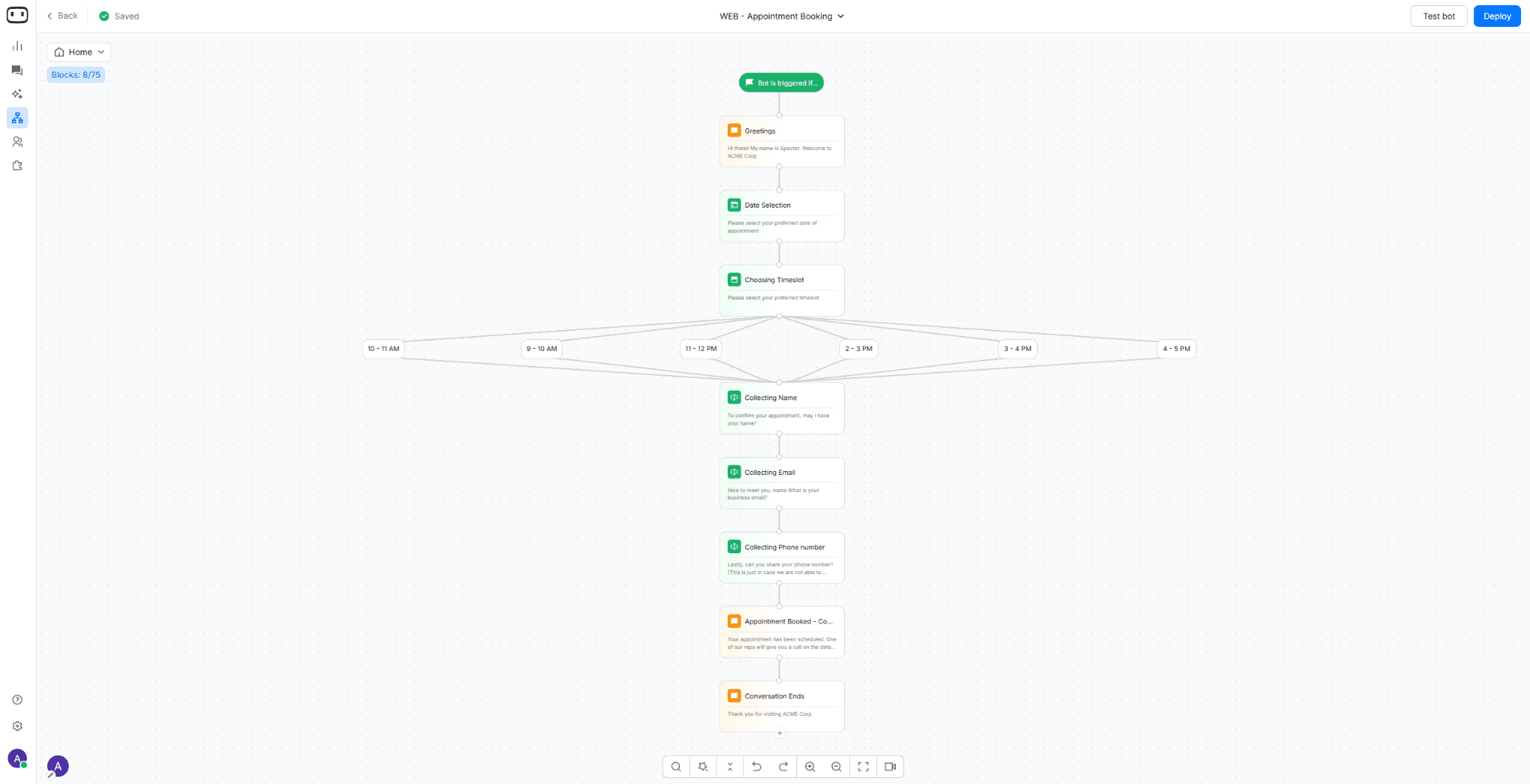
If the biggest reason you're looking beyond Botpress is the time and technical effort required to build AI agents, WotNot is one of the strongest alternatives to consider.
WotNot tops this list as the easiest AI agent platform. Instead of giving you a framework to build everything from scratch, it focuses on helping businesses deploy AI agents quickly through a no-code builder, pre-built integrations, and optional managed implementation.
In other words, if you don't have the time or technical resources to build the AI yourself, WotNot's team can help design, build, and deploy it for you. That makes it a strong fit for businesses that want to get AI into production without relying heavily on internal developers.
G2 rating: 4.6/5
How WotNot Compares to Botpress
WotNot and Botpress both are used to build AI agents. But the real difference shows up when you start building the bot.
Let’s talk about the builder canvas. (It’s where you actually build the bot).
Botpress gives you a node canvas. You wire the nodes, variables, and logic branches by hand. It's powerful, and unforgiving.
WotNot is a drag-and-drop flow builder that strips out the technical bits. Everything comes as ready-made blocks. You just drop them in and configure.
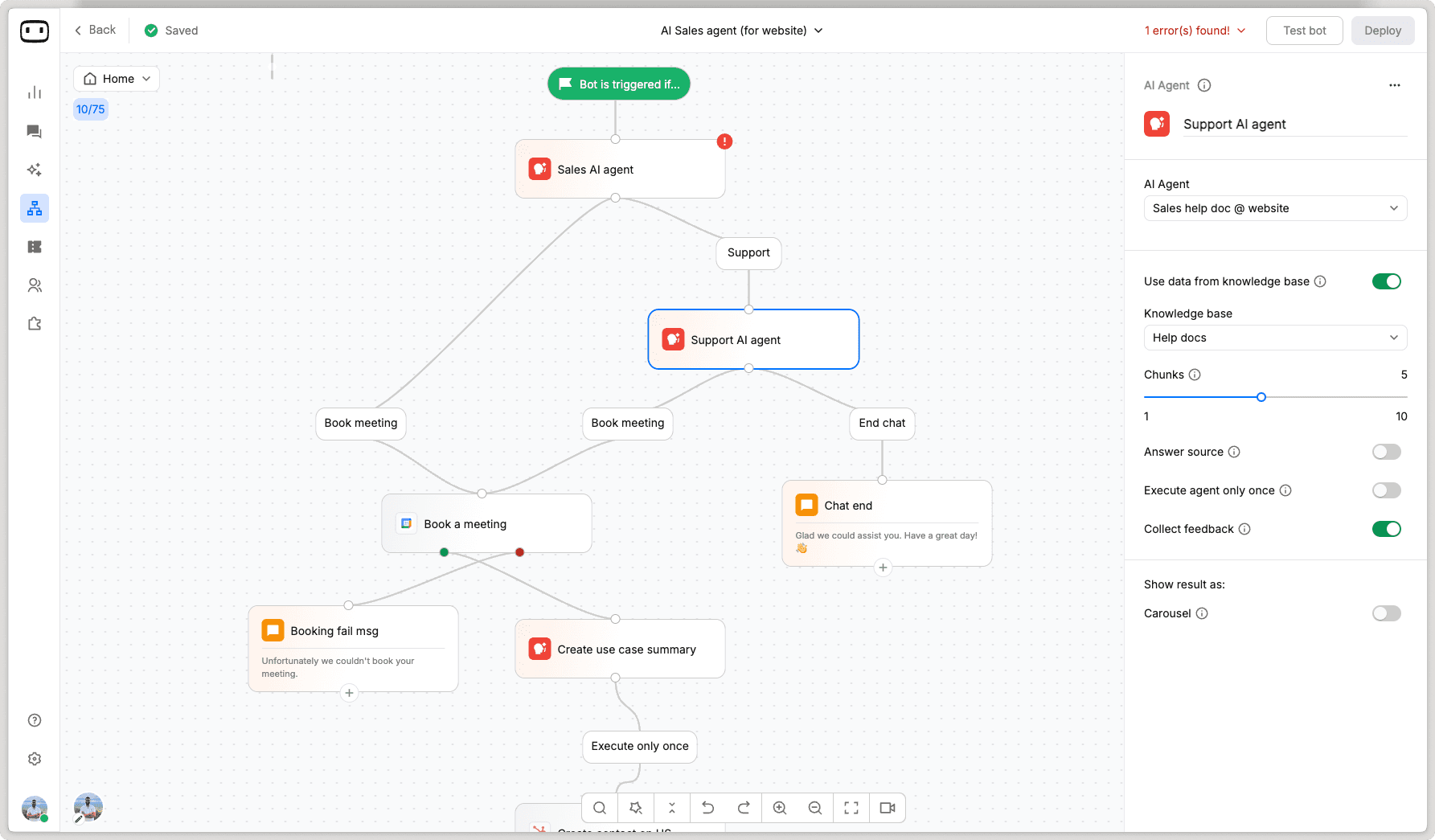
Now, functionality. On paper, Botpress looks ahead of WotNot. And that's a fair take, because there's a lot you can do and tinker with.
But is that practical? A lot of it, you have to wire up yourself. Say you want to manage replies coming into your bot; you can't do that directly inside Botpress.
You need to add a third-party tool for it. And that's another subscription, plus the setup and upkeep that comes with it.
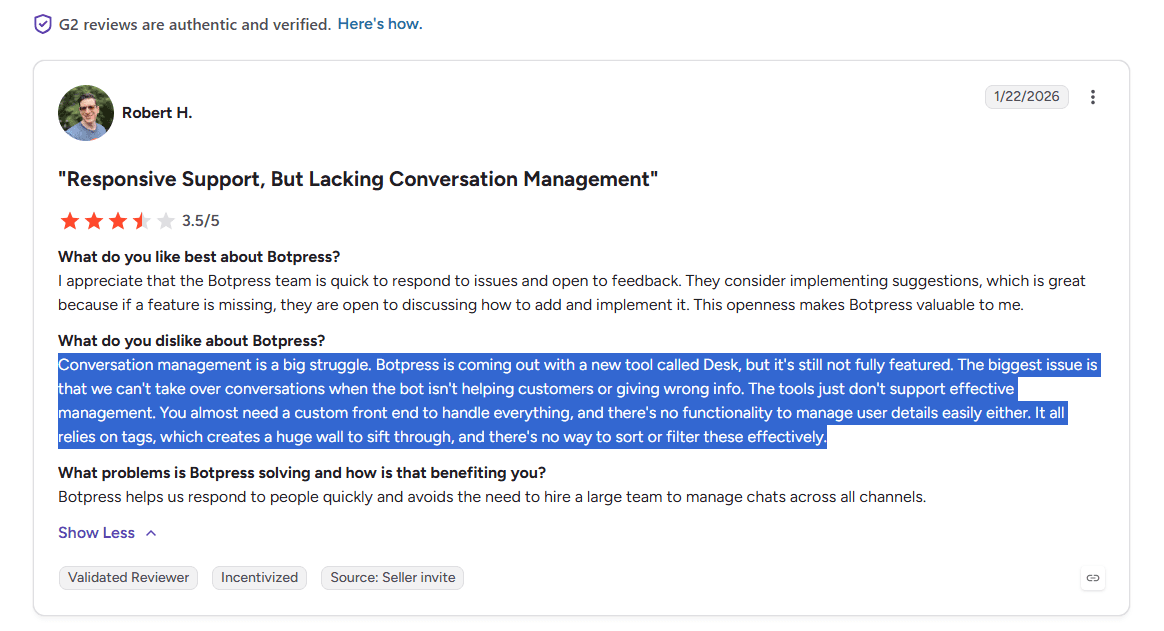
Source: G2
This adds to your cost and implementation costs.
In WotNot, you get everything you need on a platter. There’s a live-chat inbox and human handoff built in, so when the bot hits its limit, a real person picks up the same conversation.
Same story when it comes to integrations. In Botpress, you'd have to connect various tools with APIs, but in WotNot it’s all integrated natively.
So Botpress "can do more" is true and a little misleading. More of that "more" is you, doing the connecting – and paying for the pieces.
And the reviews line up with all of this. Botpress users love the flexibility, then flag the same two things over and over: the learning curve past the basics, and costs that are tough to forecast at scale.
WotNot's reviews run the other way (easy setup, quick support) with third-party integrations
Best For
Businesses looking for a true no-code AI agent platform.
Customer support, sales, and lead generation automation.
Teams that want to deploy AI agents quickly without relying heavily on developers.
Organizations that prefer managed implementation over building everything in-house.
Pricing
(after 20% discount)
Lite: $23/month (1,000 chats, 1,000 AI credits)
Starter: $79/month (5,000 chats, 5,000 AI credits)
Premium: $239/month (10,000 chats, 10,000 AI credits)
Enterprise: Custom pricing
Done For You: Starts at $12,000/year (managed implementation included)
Free trial: 14-day free trial
Comment: We are still working on our third-party tools to have fewer hiccups, as some users have complained in the past.
Choose It When
You want to launch AI agents in weeks, not months.
Your business teams should be able to build and manage AI agents without depending on developers.
You want the option of having experts build and deploy the AI for you.
Speed to deployment matters more than unlimited customization.
Skip It When
You need complete control over every workflow, prompt, and piece of business logic.
Your engineering team prefers building AI agents from the ground up.
An open-source platform is a requirement.
Case Study: Read how the Chevening Awards used WotNot to automate applicant support during one of the world's most competitive scholarship programs, helping answer thousands of queries instantly while reducing the workload on their support team. |
Start building, not just reading
Build AI chatbots and agents with WotNot and see how easily they work in real conversations.

Start building, not just reading
Build AI chatbots and agents with WotNot and see how easily they work in real conversations.
Start building, not just reading
Build AI chatbots and agents with WotNot and see how easily they work in real conversations.

2. Voiceflow
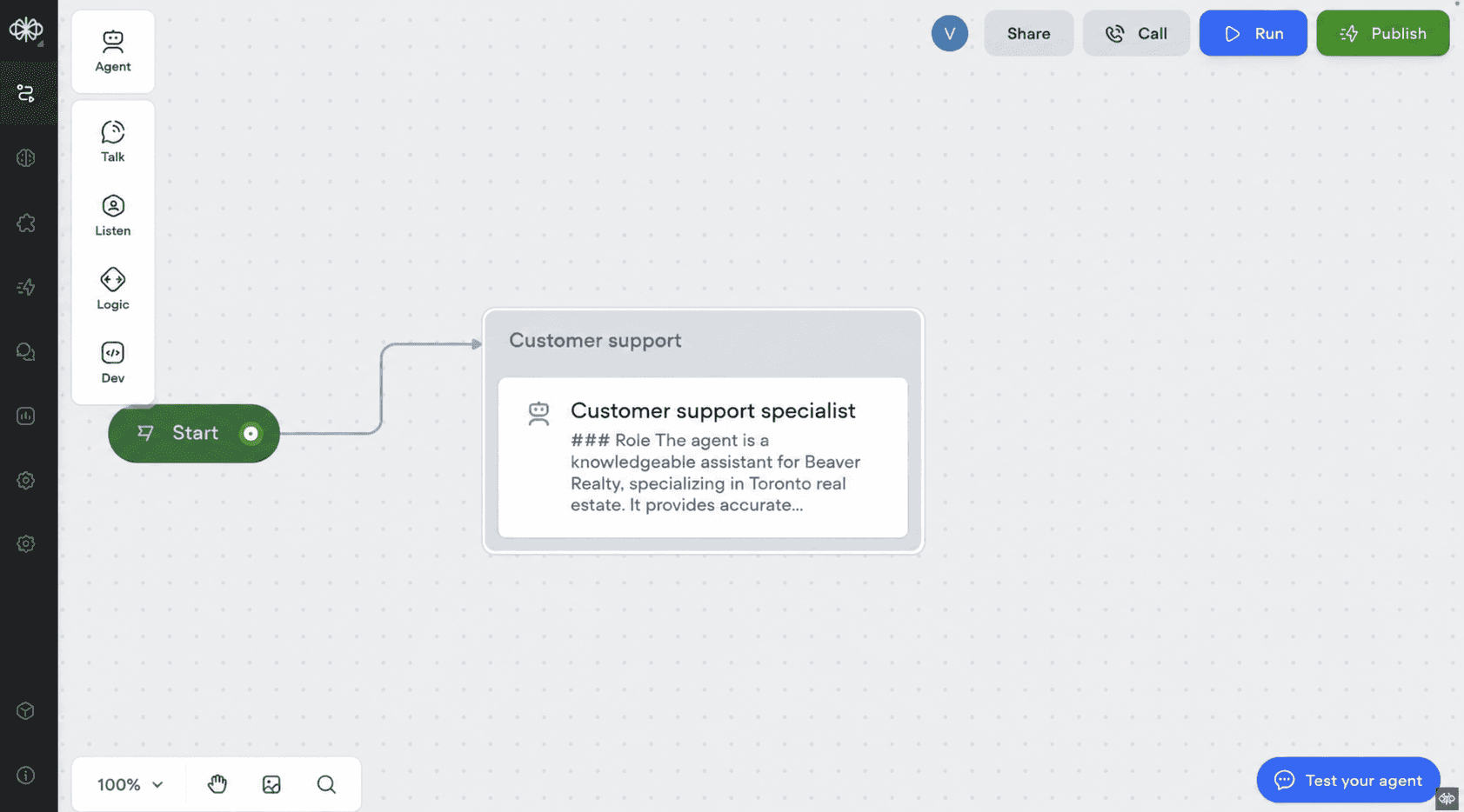
Voiceflow is a conversational AI platform that approaches AI agent development from a different direction than Botpress.
Instead of starting with workflows and logic, it starts with the conversation itself. Its visual builder makes it easy to design, prototype, and test AI interactions before worrying about the technical implementation, which is why it's become a popular choice among product teams, conversation designers, and UX teams.
G2 Rating: 4.7/5
How Voiceflow Compares to Botpress
Botpress and Voiceflow both have a visual canvas. But they're optimizing for different people.
Botpress is where you build the logic. Voiceflow is where you design the conversation. That's the split, and it runs through everything.
Let's start with the builder.
Voiceflow's canvas is laid out so the entire conversation is visible — every prompt, condition, and API call. Designers, PMs, and developers can all look at the same flow and actually understand what's happening. That makes iteration fast. You move blocks, tweak prompts, and test different journeys without waiting on engineering.
Botpress gives developers more control, but the trade-off is that once APIs, variables, and custom actions enter the picture, non-technical team members can't really own the project anymore.
Where it gets interesting is what happens after you build.
Voiceflow bills on credits, and credits can't be topped up mid-cycle. Run out, and the agent just stops. No fallback, no graceful degradation. Now that’s a genuine operational risk for a support bot handling real traffic.
Integrations need glue code. There are no native webhooks, no built-in CRM connectors, no live chat handoff. Want to connect your helpdesk? You're writing it yourself. Botpress ships 50+ direct integrations. That gap adds up in setup time and in ongoing maintenance.
LLM choice is gated by plan. Meaning, the free tier gets ChatGPT only. OpenAI and Anthropic unlock on paid plans. Bring-your-own-model? Enterprise only.
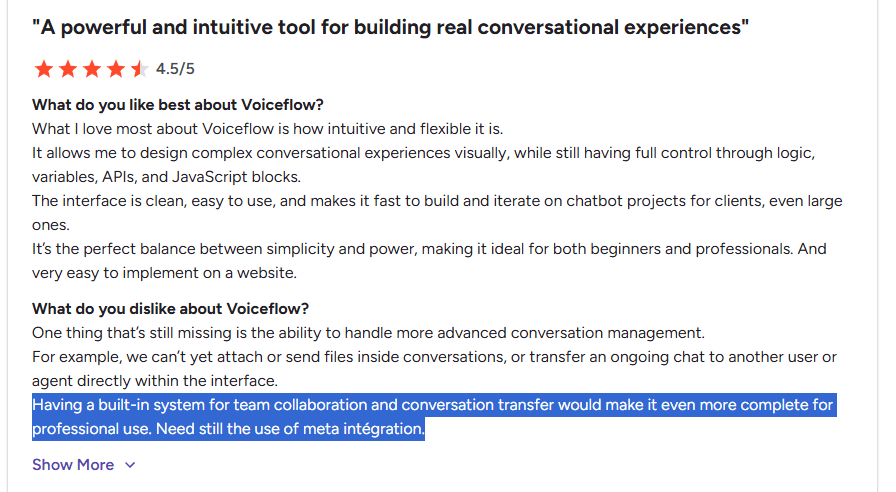
And analytics keeps coming up on G2. One reviewer puts it directly: "The analytics feature is still limited, so if you need more detailed insights about your agents, you'll need to use a BI tool." Another flags "limited built-in reports; hard to track detailed performance."
It's part of a broader pattern — Usage Limitations and Missing Features are the two most common complaints on Voiceflow's G2 page.
Source: G2
That said, conversation prototyping is where Voiceflow genuinely pulls ahead. If your team needs to design, test, and iterate on how an AI agent talks before worrying about backend complexity, it's one of the best tools for that. The collaboration is real — multiple stakeholders can review and refine flows together in a way Botpress doesn't match.
Voiceflow is the pick when the conversation experience matters most. Botpress is the pick when what the AI does matters most.
Best For
SaaS companies building customer-facing AI agents.
Product, UX, and conversation design teams.
Mid-sized and enterprise organizations with collaborative AI workflows.
Teams creating voice and chat experiences across multiple channels.
Pricing
Free: Available
Starter: $60/month
Pro: $150/month
Enterprise: Custom pricing
Free trial: Free plan available
Choose It When
You want to prototype and validate conversations before development begins.
Your AI projects require frequent collaboration across product, design, and engineering.
You expect your conversational flows to change often after launch.
The quality of the customer experience matters as much as the underlying AI.
Skip It When
You want complete control over backend logic from the start.
Your team prefers a developer-first workflow over visual design.
Your priority is building highly customized AI infrastructure rather than refining customer conversations.
3. Landbot
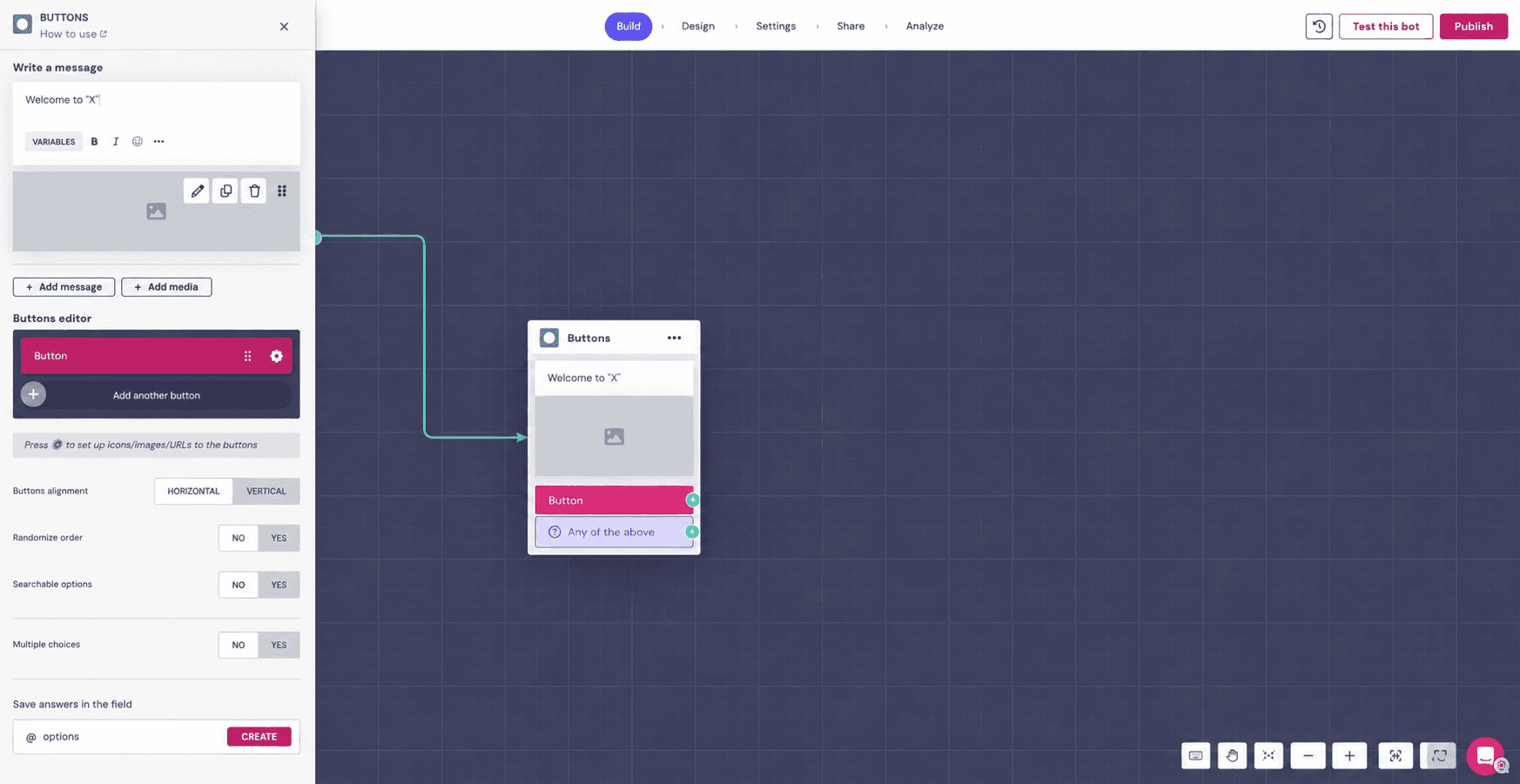
Landbot is a conversational AI platform built around one idea: making customer interactions feel more like conversations than forms.
Whether it's qualifying leads, booking meetings, answering common questions, or guiding customers through a purchase, it lets businesses create interactive chat experiences across their website and WhatsApp without writing code. That's why it's become a popular choice for marketing, sales, and customer success teams.
G2 rating: 4.7/5
How Landbot Compares to Botpress
Both platforms allow you to build conversational experiences using a visual builder, integrate with third-party tools, and add AI capabilities to your chatbot.
The difference becomes obvious once you decide what you're actually trying to build.
Landbot is designed around customer journeys. Every conversation starts with a predefined goal, whether that's qualifying a lead, booking a meeting, collecting customer information, or answering a common question. You decide the path users follow, and the AI helps make that journey feel more natural.
Botpress takes a different approach. It's built around AI agents that can reason, retrieve information, use external tools, and decide how to move a conversation forward. Instead of defining every possible path, you're giving the AI more responsibility for reaching the outcome.
Now that difference affects almost everything else.
Suppose you want to build a lead qualification bot.
In Landbot, you’d typically map out the entire journey yourself. You’ll decide which questions to ask, which answers move users down different paths, when to collect contact details, and when to hand the conversation to sales. Now the result is predictable because you’ve defined every major decision in advance.
And Botpress is a platform that gives you the extra freedom.
Rather than defining every possible conversation path, you can give the AI an objective and let it decide how to move the conversation toward that outcome. That's powerful, especially for more complex use cases. But it also means you're relying more heavily on prompt design, AI behavior, testing, and integrations. As your AI grows, engineering teams often become more involved in maintaining it.
So if your goal is to improve customer engagement rather than engineer advanced AI agents, Landbot can often get you there with far less effort.
Best For
Marketing and sales teams using conversational experiences to generate leads.
Businesses running website and WhatsApp chat automation.
Companies focused on customer engagement rather than complex AI workflows.
Small and mid-sized businesses looking for a visual chatbot builder.
Pricing
Sandbox: (best for testing the platform rather than building production-ready AI agents.)
Starter: ~$47/month (500 web & Messenger chats, 100 AI chats, 2 seats)
WhatsApp Pro: ~$117/month (2,500 web & Messenger chats, 300 AI chats, 3 seats)
Business: ~$468/month (Custom chat volume, 1,000 AI chats, 5 seats)
Free trial: Available on paid plans
Comment: Word of caution - The WhatsApp and AI chat pricing is much more expensive as compared to its alternatives.
Choose It When
You want to leverage conversational experiences for turning website visitors into qualified leads.
Your AI is primarily used for lead generation, booking meetings, or customer engagement.
You prefer building interactive conversations instead of complex AI workflows.
Most of your automation happens on your website or WhatsApp.
Skip It When
You need AI agents that reason, use tools, and complete multi-step business workflows.
Your use case involves complex backend integrations and custom business logic.
You're building enterprise-scale AI applications beyond conversational marketing.
4. Rasa
Rasa is one of the few platforms on this list that gives you complete ownership of your AI stack.
As an open-source framework, it lets you build, host, and customize AI assistants without being tied to a vendor's infrastructure. That level of control has made it a popular choice for enterprises with strict security, compliance, or deployment requirements, as well as engineering teams building highly customized conversational AI.
G2 Rating: 4.5/5
How Rasa Compares to Botpress
This isn't really a "which platform is better" comparison. It's a "how much do you want to own" question.
Botpress is a managed platform. You build in the visual editor, connect integrations, hit deploy. Rasa is a framework. You decide where it's hosted, how it's trained, how every piece of the AI behaves, and you maintain all of it yourself.
That trade-off runs through everything.
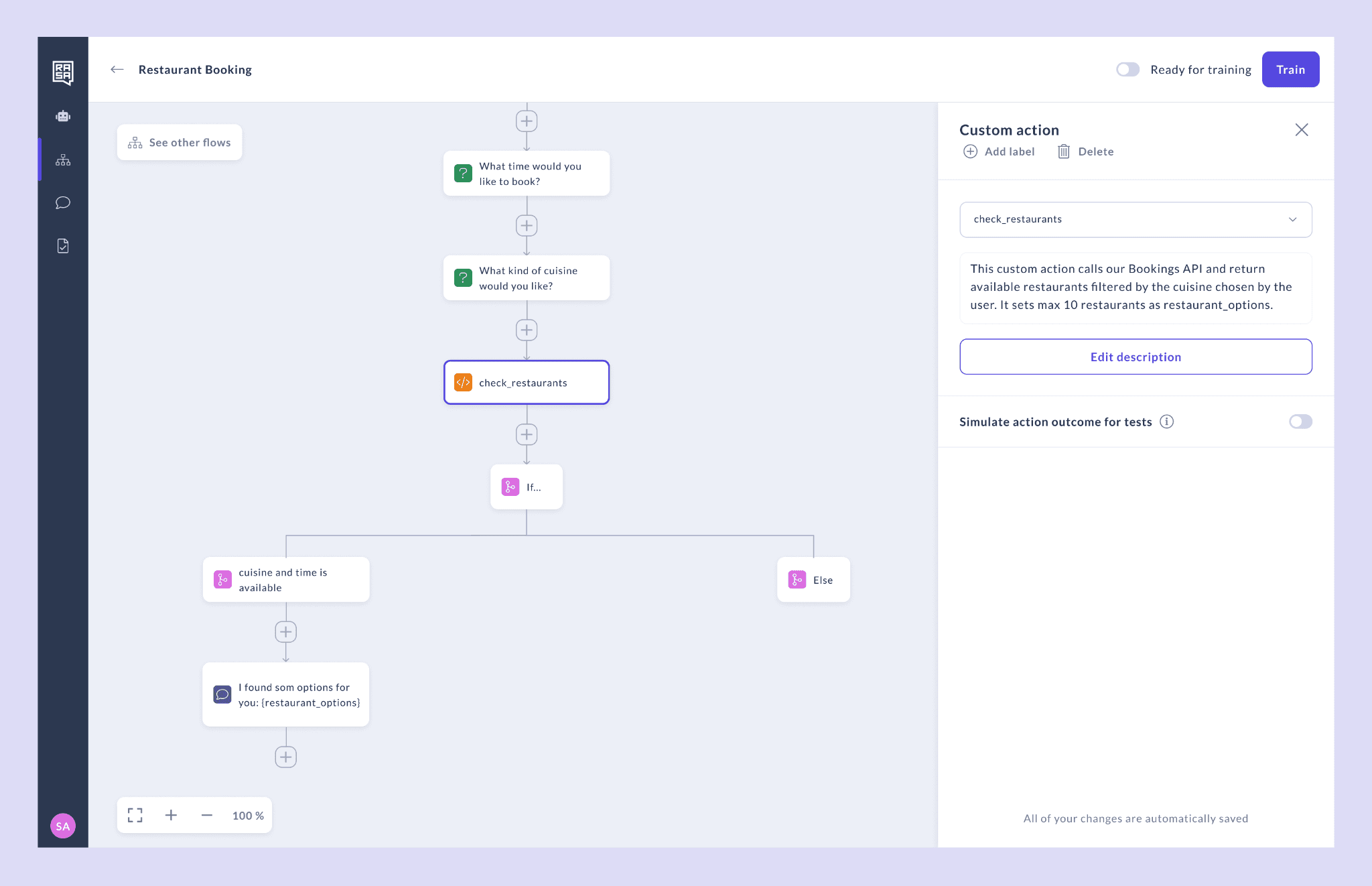
With Botpress, deployment is a button click. With Rasa, you're provisioning servers, managing training pipelines, handling upgrades, and debugging action servers. The G2 comparison between the two puts it simply: Rasa offers strong integration capabilities, but "the complexity of the platform can be a barrier for those without a technical background."
So why would anyone choose Rasa?
Control. The kind of control regulated industries actually need.
Rasa's CALM architecture separates what the AI understands from what it's allowed to do. The LLM reads the user's intent. Your code defines exactly which actions the agent can take. That separation is the reason banking, healthcare, and insurance teams gravitate toward Rasa. It keeps the AI from improvising its way into a compliance problem.
Botpress can't match that level of guardrail precision. But Rasa can't match Botpress's speed to production.
And there's one thing worth saying plainly: with Rasa, there's no vendor lock-in. You own the code, the models, the deployment. If the vendor changes pricing or gets acquired, you're not stuck migrating. With every other tool on this list, including Botpress, that's not true.
Rasa is the right choice when your constraint is control, not speed. If your constraint is speed, Botpress or nearly anything else on this list will get you to production faster.
Pricing
Open Source: Free
Rasa Platform: Custom pricing
Enterprise: Custom pricing
Free trial: Community Edition available
Comment: The free plan incurs substantial ops expenses. They evidently don’t publicize any per-message or per-user fees, but the hidden costs come from the required infrastructure and developer time. So again, if you are a smaller business, this tool is definitely not for you.
Choose It When
You want complete ownership of your AI infrastructure and data.
Self-hosting or on-premise deployment is a business requirement.
Your team has the engineering resources to build and maintain custom AI applications.
Flexibility matters more than deployment speed.
Skip It When
You want to launch AI agents quickly with minimal setup.
Your business teams need a visual no-code builder.
You don't have dedicated developers to maintain the platform.
5. LangGraph
LangGraph is an open-source framework from LangChain built specifically for developing stateful, multi-agent AI applications. Rather than providing a visual builder, it gives developers the tools to orchestrate how multiple AI agents reason, make decisions, share context, and collaborate to complete complex tasks. If you're evaluating the broader agentic AI landscape, LangGraph sits firmly on the developer-first end of the spectrum.
GitHub: 36k+ stars
(I've not given G2 ratings here because LangGraph doesn't have the same commercial SaaS presence as the other tools.)
How LangGraph Compares to Botpress
Honestly, comparing these two is a stretch. They solve different problems for different people.
Botpress is a platform. You get a visual builder, integrations, a chat widget, deployment to channels. LangGraph is a Python framework for orchestrating how AI agents reason, share state, and hand off tasks to each other. There's no UI. No drag-and-drop. No "deploy to WhatsApp" button.
If you need a chatbot on your website that answers questions and books meetings, LangGraph is the wrong category entirely.
Where LangGraph earns its place on this list is when the use case sounds more like: "I need three specialized agents to research, analyze, and synthesize data across multiple tools, and I need to control exactly how they coordinate, retry on failure, and maintain state across sessions."
That's the gap it fills. Multi-agent orchestration with full programmatic control.
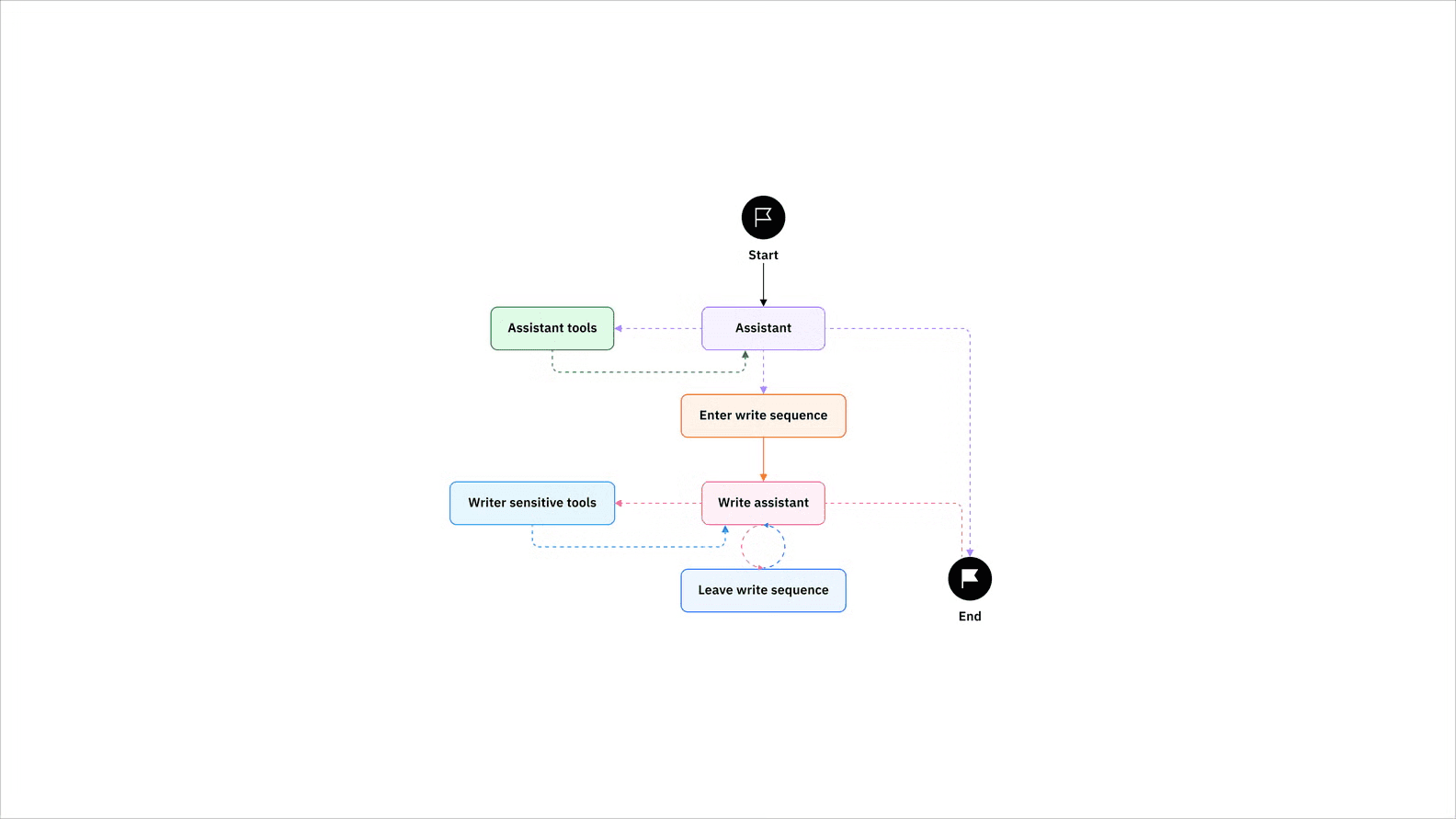
LangGraph uses a graph-based architecture where each node is a function and edges define how agents transition between states. You can build cyclical workflows, loops where agents iterate until a condition is met, which Botpress's linear flow model doesn't naturally support.
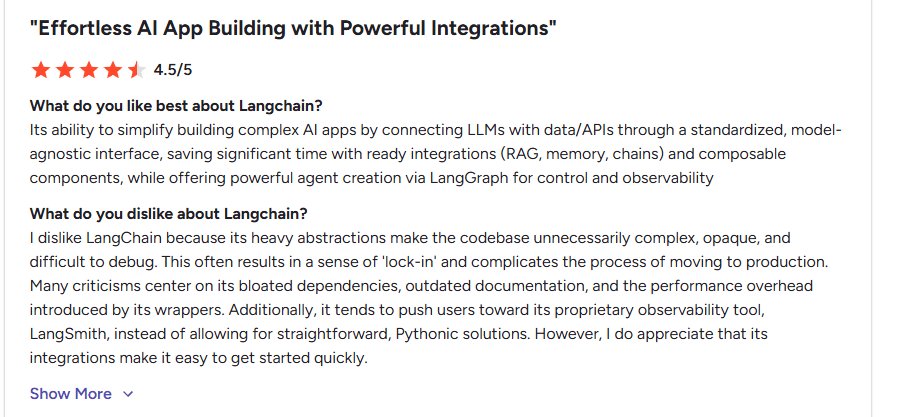
But you need to be a developer - there are no exceptions to that. Everything is code. And since LangGraph is built on top of LangChain, it inherits that ecosystem's baggage too. On G2, users consistently flag the heavy abstractions, bloated dependencies, and debugging pain that come with the underlying LangChain layer.
Source: G2
The other thing to know: LangGraph doesn't ship anything on its own. No chat interface, no channel connectors, no analytics dashboard. You're building all of that yourself or stitching it together with other tools. Botpress gives you the full stack out of the box.
If you're an engineering team building custom AI systems where multiple agents need to collaborate, LangGraph is purpose-built for that. If you're a business team deploying an AI agent, you probably don't need it, and you already know if you do.
Pricing
Developer: Free
Plus: $39/seat/month
Enterprise: Custom pricing
Free trial: Developer plan available
Comment: The Plus plan offers you 100,000 node executions, but beyond that, usage costs $0.0001 per additional node execution. Meaning, for scaling, this is not reasonable just because of this fact, as it makes it 10x more costly.
Choose It When
You're building multi-agent AI systems rather than traditional chatbots and have a technical team ready.
Your application requires custom orchestration, long-running workflows, or persistent state.
You're already invested in the LangChain ecosystem.
Your engineering team wants full control over how AI agents reason, collaborate, and use tools.
Skip It When
You need a production-ready AI agent platform rather than a development framework.
Your business teams need to build and manage AI agents without developers.
Your priority is launching AI agents quickly instead of building custom agent architectures.
6. Microsoft Copilot Studio
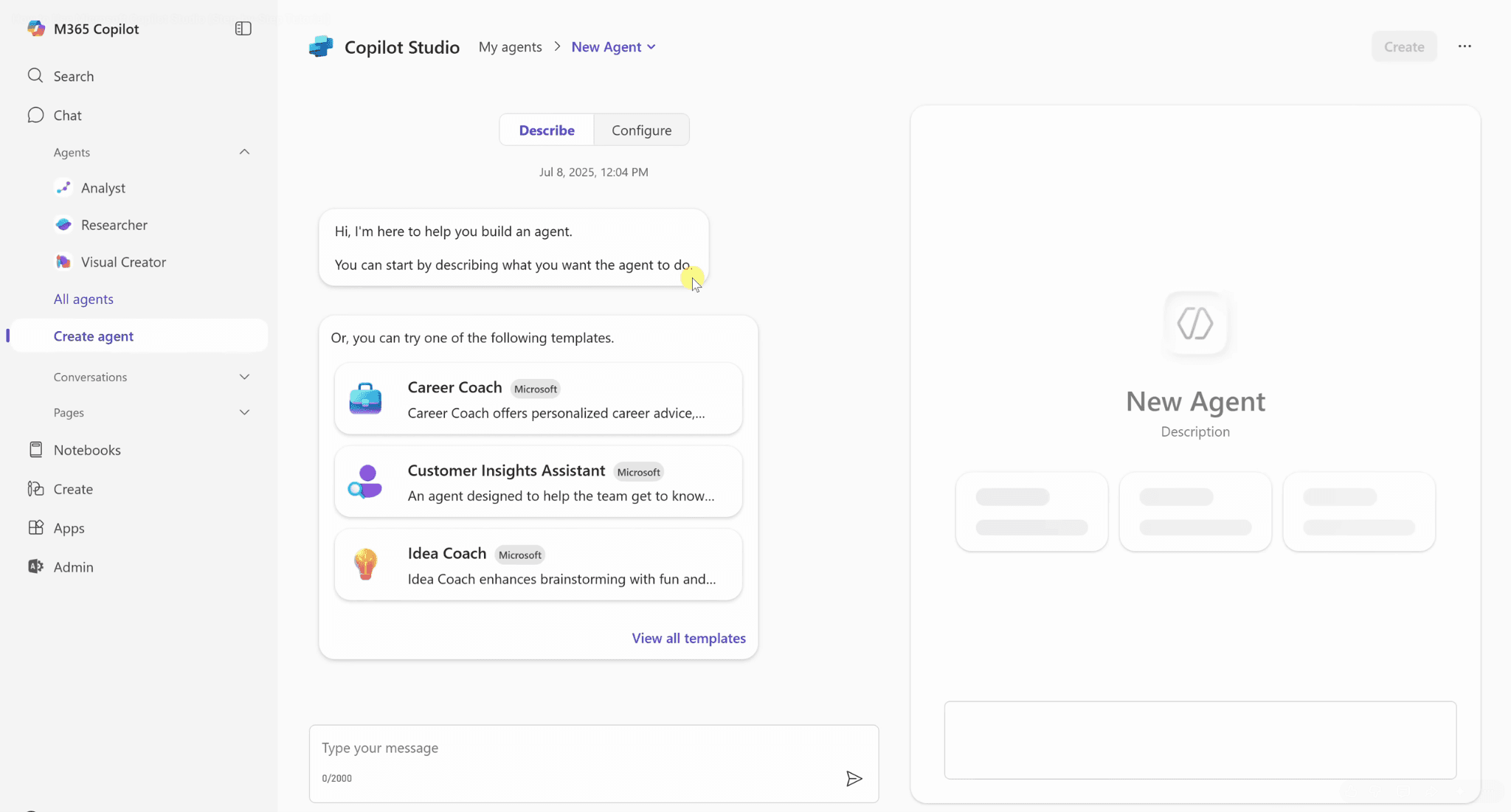
Microsoft Copilot Studio is Microsoft's platform for building AI copilots and autonomous agents across the Microsoft ecosystem.
It allows businesses to create AI experiences that connect with Microsoft 365, Teams, SharePoint, Dynamics 365, Power Platform, and hundreds of other enterprise data sources. For organizations already invested in Microsoft, it's one of the most seamless ways to bring AI into existing business workflows.
G2 Rating: 4.5/5
How Microsoft Copilot Studio Compares to Botpress
At first glance, Botpress and Microsoft Copilot Studio seem to solve the same problem. Both let you build AI agents. But they do it for very different audiences.
Botpress builds AI for your customers. Website chatbots, WhatsApp support, live chat agents across public channels. Copilot Studio builds AI for your employees. Assistants that live inside Teams, pull answers from SharePoint, route tasks through Dynamics 365, and work within the Microsoft 365 ecosystem.
That changes everything about how you evaluate them.
If your organization runs on Microsoft and the use case is internal, Copilot Studio's integration is genuinely impressive. An HR bot that answers policy questions from SharePoint? An IT helpdesk inside Teams? That's where it shines, and G2 reviewers consistently praise this. Ease of Use gets 51 mentions. Easy Integrations gets 24.
But there's a catch that keeps showing up in those same reviews.
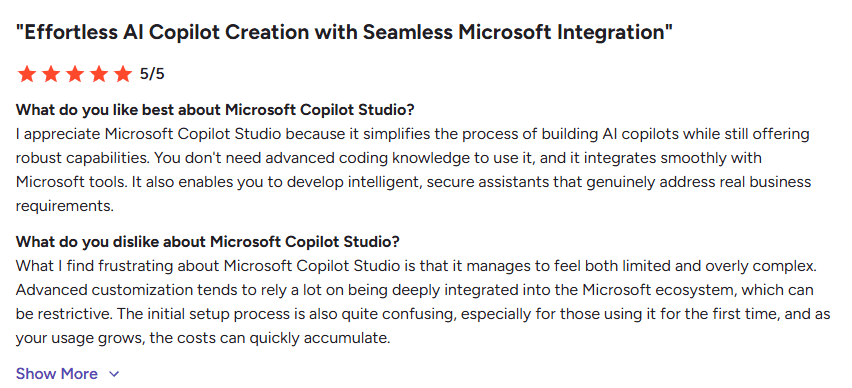
It manages to feel both limited and overly complex at the same time.
Source: G2
That's the core tension. Standard use cases feel easy. The moment you try to go beyond them, you hit walls. Another reviewer on G2's bot platforms page puts it bluntly: "It's great for standard use cases, but if you want to go beyond that, it can feel a bit boxed in."
The ecosystem lock-in is real. You need an Azure subscription and qualifying M365 accounts to even get started. You're tied to Microsoft's LLM models. You can't swap in Anthropic, Mistral, or an open-source model. Botpress is model-agnostic. If your team isn't already deep in Microsoft's stack, the onboarding cost alone makes this a tough sell.
And if you're building for customers, not employees, Copilot Studio isn't really designed for that job. Botpress is.
Copilot Studio is the pick when your AI lives inside Microsoft's ecosystem and serves your internal teams. Botpress is the pick when your AI faces your customers across open channels.
Pricing
Microsoft 365 Copilot: $30/user/month (annual commitment)
Microsoft Copilot Studio: From $200/month (25,000 messages included)
Pay-as-you-go: Available for agent usage
Free trial: Available
Comment: For basic use cases, this platform is good. But when you think of scaling, the complexity adds up. You’ll need an Azure subscription and qualifying M365 accounts to even activate Studio. Also note that Copilot Studio ties you to Microsoft’s GPT-4/4o models and its Power Platform ecosystem.
Choose It When
Your organization already runs on Microsoft 365 and Teams.
You want AI to work across SharePoint, Outlook, Dynamics 365, and Power Platform.
Most of your business data already lives inside Microsoft's ecosystem.
Reducing integration work is more important than using a platform-agnostic solution.
Skip It When
You need an AI platform that's independent of a single ecosystem.
Your business relies on a diverse mix of third-party tools outside Microsoft.
You're looking for maximum deployment flexibility across different environments.
7. Dialogflow CX
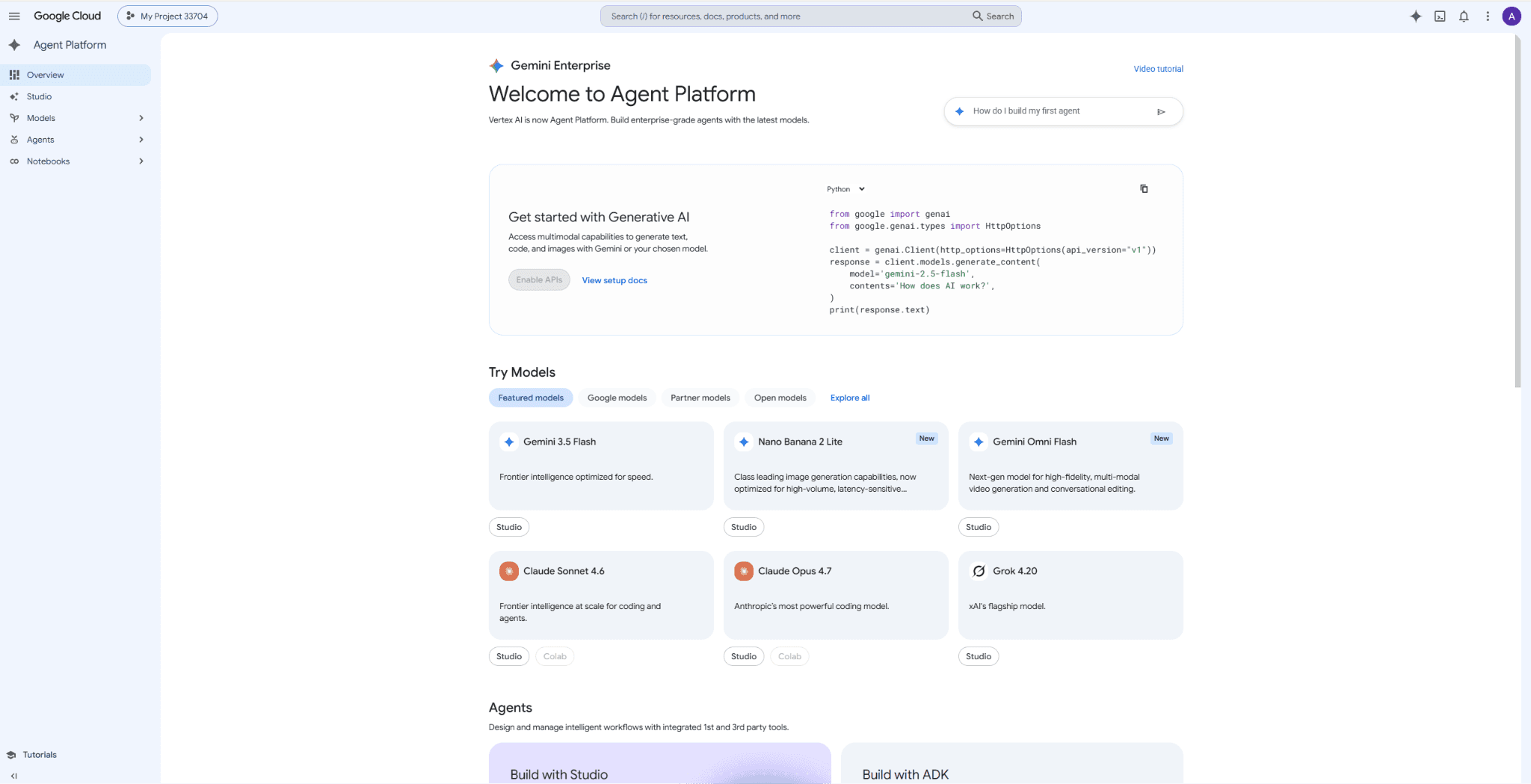
Dialogflow CX is Google's enterprise platform for building conversational AI experiences across chat, voice, and telephony.
It's widely used by organizations that need AI to handle structured customer interactions such as support, appointment booking, IVR systems, and contact center automation. Built on Google Cloud, it combines visual conversation design with Google's natural language understanding capabilities, making it a popular choice for enterprise customer service.
G2 Rating: 4.4/5
How Dialogflow CX Compares to Botpress
Botpress and Dialogflow CX both automate customer conversations. But they come at it from opposite ends.
Botpress focuses on what the AI agent can do: reason through questions, call tools, complete tasks across systems.
Dialogflow CX focuses on how conversations are managed at scale: routing, state machines, IVR flows, and contact center orchestration.
Note this: If you're building AI agents that take actions, Botpress is stronger. If you're managing thousands of structured phone calls, Dialogflow CX was literally built for that.
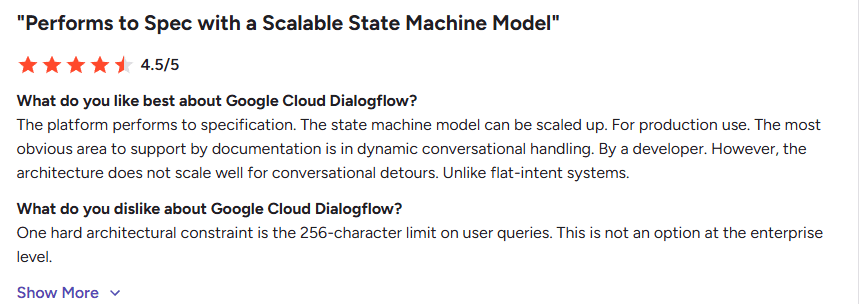
The architecture is where the real difference lives. Dialogflow CX uses flows, pages, and route groups instead of intent lists. It's a state machine. One enterprise reviewer on G2 called out two things in the same review: the state machine model is the key technical differentiator over brittle NLU intent lists, and there's a 256-character limit on user queries that she calls "not an option at the enterprise level."
That's Dialogflow CX in a nutshell. Architecturally sophisticated, practically frustrating.
Source: G2
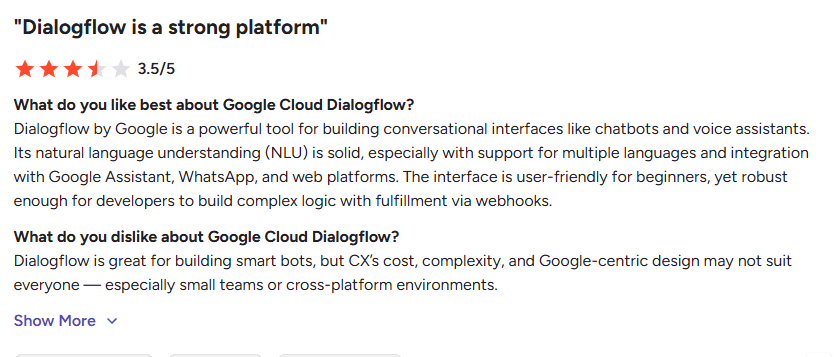
The learning curve is steep and reviewers are consistent about it. One developer on G2 puts it plainly: "Dialogflow CX has a steeper learning curve. Designing conversation flows using states and transitions takes time to master." Botpress has its own learning curve, but the visual builder is more forgiving for non-technical users.
You're locked into Google Cloud. Dialogflow CX integrates beautifully with BigQuery, Vertex AI, and Google's contact center stack. That's a strength if you're a GCP shop. It's a cage if you're not.
Source: G2
Where Dialogflow CX genuinely wins: voice and telephony. If your business runs a high-volume contact center and you need AI managing structured phone conversations, IVR routing, appointment booking via voice, call deflection, this is purpose-built for that. Botpress doesn't have a comparable telephony offering.
Dialogflow CX is a contact center AI platform. Botpress is an AI agent platform. If you're routing phone calls at scale, Dialogflow CX. If you're building agents that take actions across channels, Botpress.
Best For
Enterprise customer support teams.
Businesses running contact centers or IVR systems.
Organizations using Google Cloud.
Companies handling high-volume customer conversations.
Pricing
Custom pricing
Comment: I found the enterprise version much more complex than what they had earlier: the older ES version. So here you’ll have to involve developers.
Choose It When
You need AI to manage large volumes of structured customer conversations.
Your customer support relies on voice, telephony, or IVR automation.
You're already invested in Google Cloud.
Reliability and conversation routing matter more than highly autonomous AI behavior.
Skip It When
You're looking for an AI platform focused on agentic workflows and tool execution.
Your primary use case is building autonomous AI agents rather than conversational systems.
You want a platform that's independent of a cloud ecosystem.
8. Cognigy
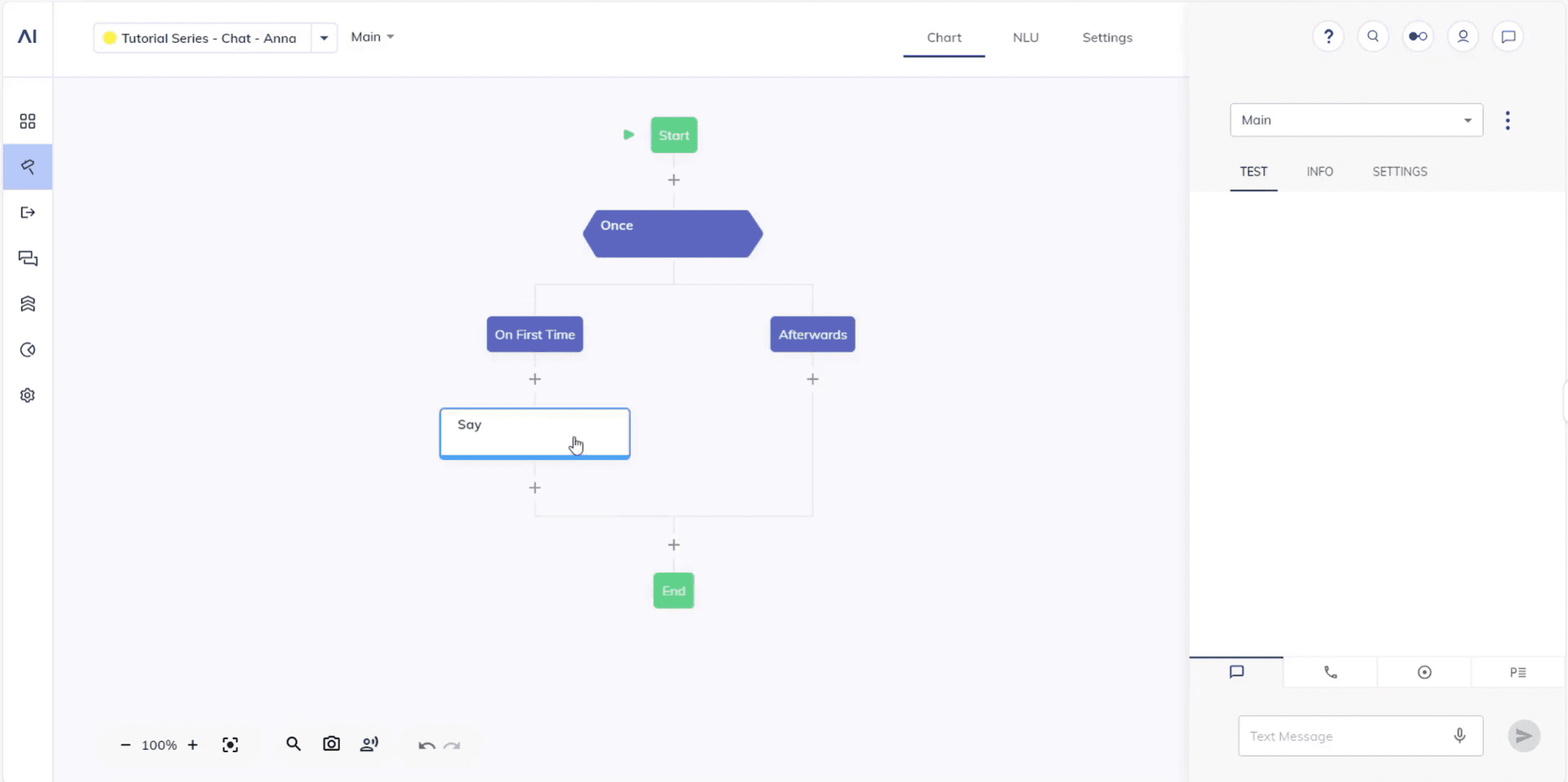
Cognigy is an enterprise AI platform built for automating customer service at scale.
It combines conversational AI, voice AI, and contact center automation into a single platform, helping businesses handle customer interactions across phone, chat, messaging apps, and virtual assistants. It's particularly popular among large enterprises that want to modernize their customer service operations without replacing their existing contact center infrastructure.
G2 Rating: 4.7/5
How Cognigy Compares to Botpress
Firstly, Cognigy isn't really competing with Botpress for the same buyer.
Cognigy is competing for the same budget, inside enterprises evaluating AI for large-scale customer service operations.
Botpress gives you a flexible platform to build AI agents across different use cases. Cognigy focuses specifically on enterprise customer service: AI that works alongside contact center software, voice systems, human agents, and the operational machinery of a large support operation.
You wouldn't pick Cognigy for a lead-gen chatbot. You'd pick it when you're automating 50,000 calls a month across six languages.
First, the acquisition. NICE completed its $955 million acquisition of Cognigy in September 2025. The platform now operates as NiCE Cognigy, available both as part of NICE's CXone suite and standalone. If you valued Cognigy's independence from major CCaaS platforms, that's worth re-evaluating.
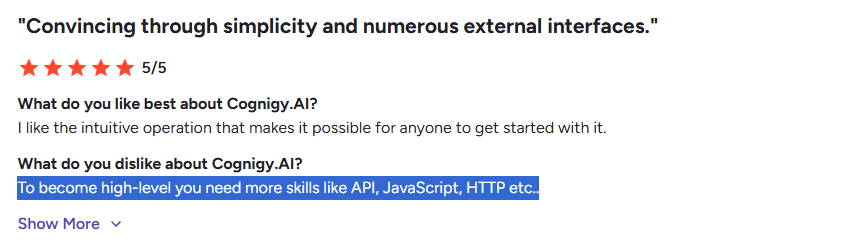
The flow editor is genuinely praised on G2. Business users can handle simple content updates and basic flows without writing code. But anything beyond that surface level requires technical depth.
Source: G2
And about that price point. Cognigy doesn't publish pricing, but based on analyst reviews and user reports, entry-level pilots run $2,500 to $5,000/month and full enterprise deployments land in the $100,000 to $350,000+ per year range. Voice minutes and LLM token costs are billed separately. Implementation typically takes 3 to 6 months with professional services.
You also can't just sign up and start building. There's no self-serve option. You need a sales conversation, a pilot agreement, and usually an implementation partner. That's standard for enterprise software. But if you're a mid-market team trying to evaluate platforms side by side, you can't even get your hands on Cognigy without a commitment conversation. Botpress lets you build a working agent this afternoon.
Where Cognigy genuinely wins: enterprise-scale voice and chat customer service with strict compliance requirements. If you're managing thousands of conversations across voice and digital channels, need GDPR/HIPAA compliance, and have the budget and timeline for a full rollout, Cognigy provides capabilities Botpress doesn't offer at that scale.
Cognigy is for enterprises automating customer service at contact-center scale. Botpress is for teams building AI agents with broader use cases and faster deployment. If you have the budget and timeline, Cognigy fits. If you need something live next month, it doesn't.
Best For
Large enterprises with established customer support operations.
Businesses running contact centers across voice and digital channels.
Organizations modernizing enterprise customer service with AI.
Companies requiring enterprise security, governance, and scalability.
Pricing
Enterprise: Custom pricing
Free trial: Demo available on request
Comment: Its analytical capabilities are limited, meaning it doesn’t give you easy AI insights.
Choose It When
You want to automate customer service across chat and voice.
Your business already operates a large contact center.
Enterprise security, governance, and scalability are key buying requirements.
You're looking for AI that works alongside your existing customer service infrastructure.
Skip It When
You're a startup or small business looking for a lightweight AI platform.
You need a general-purpose AI agent builder rather than an enterprise customer service platform.
Your use case extends well beyond customer service into broader business automation.
The Best Botpress Alternative Depends on Your Team
After comparing these platforms, one thing becomes clear: there isn't a single "best" Botpress alternative. There are platforms that are better suited to different teams, different technical capabilities, and different business goals.
I placed WotNot at the top because it addresses the most common reason businesses start looking beyond Botpress in the first place. Most teams aren't trying to build a more customizable AI platform. They're trying to deploy AI agents faster without adding unnecessary complexity. For those teams, WotNot offers one of the strongest balances between ease of use, AI capabilities, and deployment speed.
That doesn't make it the right choice for everyone. Every platform in this guide makes a different trade-off. Some prioritize conversation design. Others focus on enterprise customer service, open-source development, multi-agent orchestration, or deep integration with platforms like Microsoft and Google Cloud. The right choice depends on which of those trade-offs aligns with the way your team wants to build and deploy AI.
And if you've read this guide and realized your team values maximum flexibility and customization above everything else, you may find that Botpress is still the right platform.
The best AI platform isn't the one with the most features. It's the one your team can adopt with confidence, maintain without friction, and continue to scale as your AI ambitions grow.
FAQs
FAQs
FAQs
What are the best Botpress alternatives in 2026?
Some of the best Botpress alternatives include WotNot, Voiceflow, Landbot, Rasa, LangGraph, Microsoft Copilot Studio, Dialogflow CX, and Cognigy. Each platform is built for a different type of user. WotNot is ideal for businesses looking for a no-code AI agent platform, while Rasa and LangGraph are better suited to developer-led teams that need complete control over their AI stack.
Which Botpress alternative is best for no-code users?
How do Botpress alternatives compare in terms of pricing?
What should I look for when choosing a Botpress alternative?
Is Botpress still a good choice for building AI agents?
ABOUT AUTHOR
Hardik Makadia
Co-founder & CEO, WotNot
Hardik leads the company with a focus on sales, innovation, and customer-centric solutions. Passionate about problem-solving, he drives business growth by delivering impactful and scalable solutions for clients.
You may also like…
You may also like…



Start building your chatbots today!
Curious to know how WotNot can help you? Let’s talk.
Start building your chatbots today!
Curious to know how WotNot can help you? Let’s talk.