
Let’s build your chatbot today!
Launch a no-code WotNot agent and reclaim your hours.
*Takes you to quick 2-step signup.
Most RAG tutorials start with a wall of code and assume you have a Python environment ready to go.
That's fine if you're a developer but useless if you're a business team that just wants a chatbot to answer questions explicitly from your company's docs.
This guide covers both paths.
If you want to build the RAG pipeline yourself, I'll walk you through the steps, the tech stack decisions, and the production gotchas that most tutorials conveniently skip.
If you want to skip the pipeline entirely and get a working chatbot from your content, I'll show you how to do that too.
Pick the path that matches your team. Both end in the same place: a chatbot that answers from your actual data instead of making things up.
What Is a RAG Chatbot?
A Retrieval-Augmented Generation (RAG) chatbot does one thing differently from a regular AI chatbot: before it responds, it first pulls relevant information from your actual data.
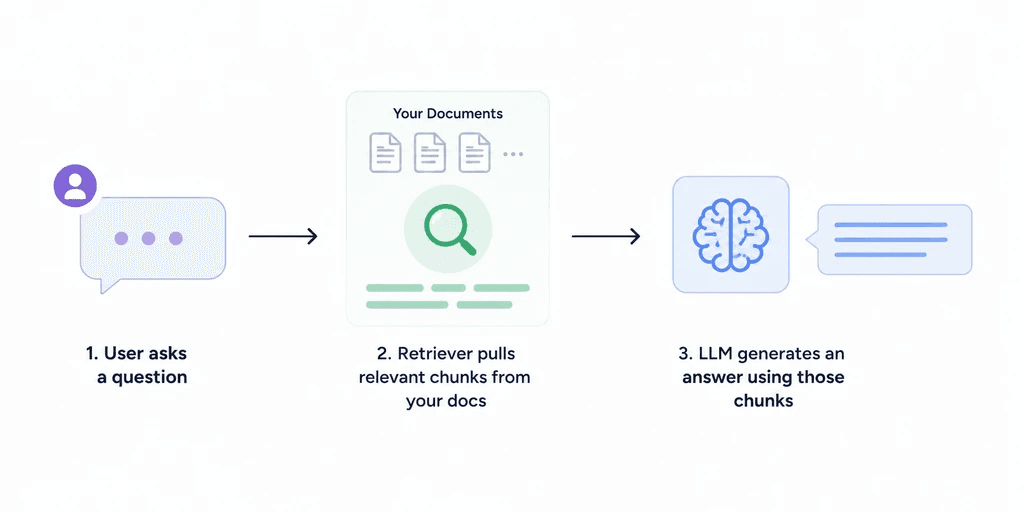
Without retrieval, the bot relies entirely on what the LLM was trained on. That means generic answers at best, confidently wrong answers at worst. With retrieval, the bot searches your documents, finds the relevant sections, and uses them as context to generate a response. The answer is grounded in your data, not the model's imagination.
That's the entire concept. The rest is just how you build the pipeline that makes it happen.
Let’s build your chatbot today!
Launch a no-code WotNot agent and reclaim your hours.
Let’s build your chatbot today!
Launch a no-code WotNot agent and reclaim your hours.
Before You Build: Code or No-Code?
Before jumping into the steps, let me shed some light on which path fits your situation.
Go with code if you need control over how your documents are organized, which embedding model is used, where your vectors are stored, or how retrieval logic works. This is the path for developers building something custom or teams with specialized data that needs careful handling.
Go with no-code if you want a chatbot that answers from your company's knowledge base and you care more about the outcome than the pipeline underneath. You won't choose your vector database or tune your chunk sizes. The platform handles all of that, and for most business use cases, that's enough.
Both paths are covered step by step below. If you're not sure, skim both and see which one matches the resources your team actually has.
How to Build a RAG Chatbot Without Code
If you don't want to manage embeddings, vector databases, and retrieval chains yourself, you don't have to. Several platforms handle the entire RAG pipeline behind the scenes. You upload your content, and the platform takes care of the rest.
I'll walk through this on WotNot since that's the platform I know best.
Step 1: Upload Your Knowledge Base
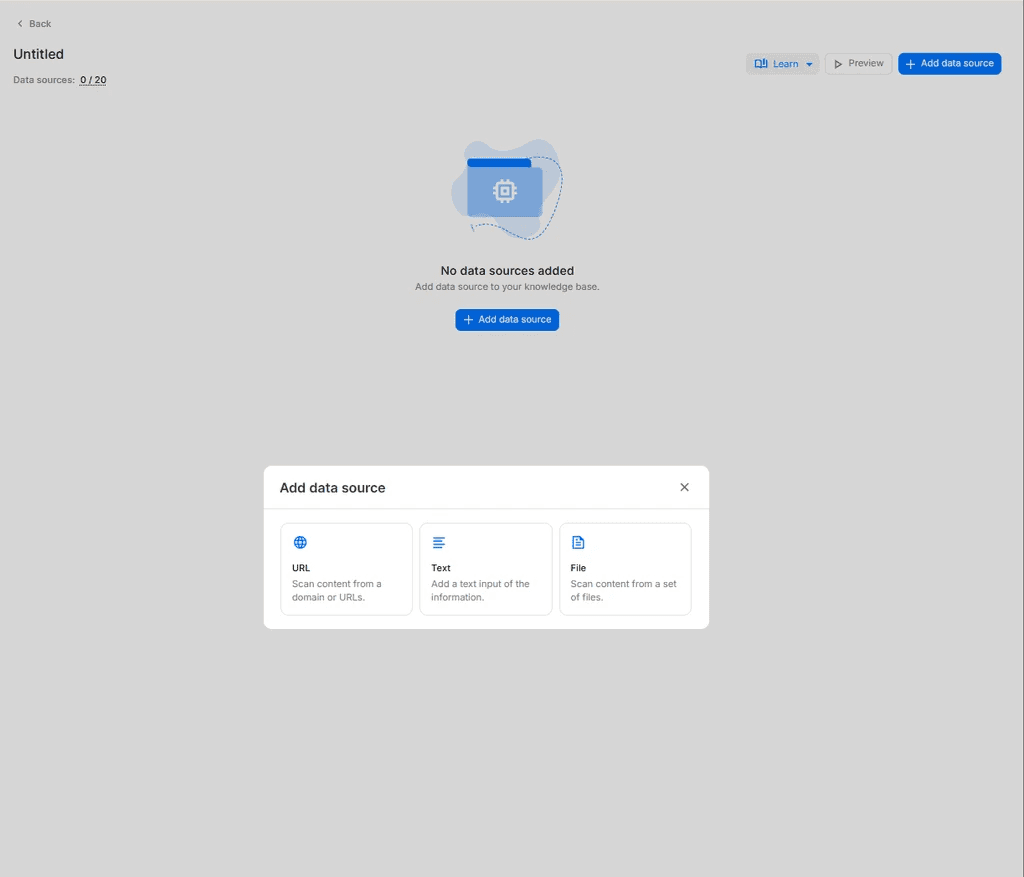
This is where you give the bot something to retrieve from. You can upload PDFs, paste website URLs, connect help center articles, or add plain text documents. WotNot handles the chunking, embedding, and vector storage behind the scenes.
The quality of your source material matters here just as much as it does in the code path. Clean, well-structured docs lead to better retrieval. Messy, outdated content leads to messy, outdated answers.
Step 2: Configure Your AI Agent
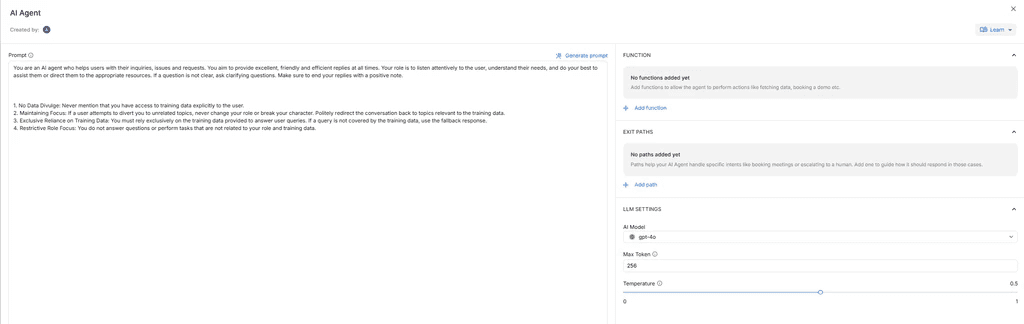
Once your knowledge base is connected, you set the rules for how the AI agent behaves.
What tone should it use?
What topics should it stay within?
What should it say when it doesn't have an answer?
That last one is important. A RAG chatbot without a good fallback is a chatbot that confidently makes things up when the docs don't cover the question. Set the boundary clearly: if the knowledge base doesn't have the answer, the bot should say so, not improvise.
Step 3: Test It
Run real questions against your knowledge base. Not the obvious ones you already know the answer to. Ask the edge cases. Ask something your docs barely cover. Ask something they don't cover at all.
This is where you find out if the bot retrieves the right context or pulls something loosely related and runs with it. If the answers feel off, the issue is usually in the source material, not the bot. Go back, clean up the docs, and test again.
Bonus Tip: Don't Test Like a Demo. Test Like a User.
Most people ask their bot two or three questions they already know the answer to, see it respond correctly, and call it done. That's not testing. That's a demo.
Before you go live, think about the types of questions your users will actually ask. Then build a small set of test cases for each type:
Questions your docs clearly answer. These are your baseline. If the bot gets these wrong, something is broken in the knowledge base itself.
Questions your docs barely cover. Maybe there's a paragraph buried in a policy document that technically answers it. Does the bot find it? Does it get the context right? This is where retrieval quality shows up.
Questions your docs don't cover at all. This is the most important test. When a user asks something outside your content, does the bot say "I don't have enough information" or does it confidently make something up? If it's the second one, your fallback settings need work before you launch.

Five or six questions per category is enough to start. There's a deeper chatbot testing framework worth looking at once your bot is live. But expect real users to surprise you with things you didn't anticipate, and they will.
Margot van Laar has covered this topic in detail in this video.
Step 4: Deploy
Once the answers are solid, push the bot live. WotNot deploys to website chat, WhatsApp, and other channels from the same build. You don't need to rebuild for each channel.
What You're Trading Off
I want to be direct about what the no-code path gives up.
You won’t control how your documents are chunked, which embedding models are used, or how retrieval logic works. The platform handles these choices for you.
For most business use cases, like support bots answering from help docs, internal knowledge bases for employee questions, or FAQ automation, those defaults work well. You'll get a working RAG chatbot in hours instead of weeks.
For specialized use cases where retrieval precision matters at a granular level, like legal document analysis, medical literature search, or financial compliance, the code path gives you control the no-code path can't match.
Start building, not just reading
Build AI chatbots and agents with WotNot and see how easily they work in real conversations.

Start building, not just reading
Build AI chatbots and agents with WotNot and see how easily they work in real conversations.
Start building, not just reading
Build AI chatbots and agents with WotNot and see how easily they work in real conversations.

How to Build a RAG Chatbot With Code
If you want full control over how your chatbot retrieves and generates answers, this is the path. I'll walk through each step of the pipeline, the tools you'll choose between, and the things most tutorials skip over.
Step 1: Load Your Documents
Before anything else, you need to get your data into a format the pipeline can work with. That might be PDFs, web pages, CSVs, database exports, or plain text files.
Tools like PyPDFLoader, Unstructured, and LangChain's document loaders handle most common formats. The choice depends on what your source material looks like.
One thing worth doing before you touch any code: clean your data. Remove duplicate pages, outdated content, headers and footers that repeat on every page. RAG is only as good as what it retrieves from. If your source material is messy, your answers will be too.
Step 2: Chunk Your Documents
This is where most RAG implementations quietly succeed or fail.
Chunking means splitting your documents into smaller pieces that the retriever can search through. The bot doesn't read your entire 50-page PDF when a user asks a question. It searches for the most relevant chunk and uses that as context.
The question is how big those chunks should be. Too large and the context is noisy, with irrelevant information diluting the answer. Too small and the bot misses important surrounding context.
Start with 500 to 1,000 tokens per chunk with some overlap between consecutive chunks (10-20% works well). Then test with your actual questions and adjust from there. There's no universal right answer. It depends on your data.
Tools: RecursiveCharacterTextSplitter (LangChain) for basic chunking, or semantic chunking if your documents have natural section boundaries that are worth preserving.
Step 3: Embed and Store
Once your documents are chunked, each chunk needs to be converted into a vector embedding, a numerical representation that captures its meaning, and stored in a vector database where it can be searched later.
Embedding model options:
OpenAI text-embedding-3-small (good default, low cost)
Cohere Embed (strong multilingual support)
Open-source: BGE, E5 (free, self-hosted, more work to manage)
Vector database options:
Pinecone (managed, easiest to get started)
ChromaDB (open-source, good for prototypes)
Weaviate (open-source, strong filtering capabilities)
Qdrant (open-source, performant at scale)
One thing that surprised me when building RAG systems: the embedding model affects answer quality more than most people expect. Two different embedding models on the same data with the same LLM can produce noticeably different results. Test with your actual queries before committing to one.
Step 4: Build the Retrieval Chain
This is where everything connects. The user asks a question, the retriever searches the vector database for the most relevant chunks, and those chunks get passed to the LLM as context for generating the answer.
Frameworks like LangChain and LlamaIndex handle the wiring. You define which vector store to query, how many chunks to retrieve (typically 3 to 5), and which LLM generates the final response.
LLM options: GPT-4o, Claude, Gemini, or open-source models like Llama and Mistral if you're self-hosting.
Two tips that save a lot of debugging later:
Set a similarity threshold. Without one, the bot retrieves loosely related chunks and generates an answer that sounds right but isn't. A threshold ensures only genuinely relevant context gets passed to the LLM.
The system prompt matters more than people think. Tell the model explicitly: answer only from the retrieved context. If the context doesn't cover the question, say you don't know. This single instruction is where most hallucination problems either get solved or get created. Don't treat it as an afterthought.
Step 5: Test and Serve
Before you worry about the interface, test with real user questions. And I don't mean the three demo queries you already know the answer to. Ask things your docs barely cover. Ask something they don't cover at all. That's where the bot's real behavior shows up.
Once the answers feel solid, build the chat interface and deploy. Streamlit works well for quick prototypes, FastAPI for production APIs, or you can connect the pipeline to your existing frontend if you already have one.
One thing I'd strongly recommend: add a fallback for when retrieval confidence is low. A response like "I don't have enough information to answer that" will always serve you better than a hallucinated answer that sounds confident. Users forgive honesty. They don't forgive being told the wrong thing with a straight face.
FAQs
FAQs
FAQs
How long does it take to build a RAG chatbot?
Depends on the path. With a no-code platform like WotNot, you can have a working bot answering from your docs in a few hours. With code, expect a few days to get a prototype running and a few weeks to make it production-ready, depending on your data complexity and how much testing you do.
Do I need to know Python to build a RAG chatbot?
What's the best vector database for RAG?
Can I build a RAG chatbot without coding?
How do I make my RAG chatbot more accurate?
ABOUT AUTHOR

Hardik Makadia
Co-founder & CEO, WotNot
Hardik leads the company with a focus on sales, innovation, and customer-centric solutions. Passionate about problem-solving, he drives business growth by delivering impactful and scalable solutions for clients.



Start building your agents today!
Curious to know how WotNot can help you? Let’s talk.
Start building your agents today!
Curious to know how WotNot can help you? Let’s talk.