
Let’s build your chatbot today!
Launch a no-code WotNot agent and reclaim your hours.
*Takes you to quick 2-step signup.
Chatbots can handle up to 70% of routine customer queries. But only when the conversation is scripted correctly.
I’ve seen teams spend weeks picking platforms, obsessing over integrations, and getting design approvals.
Then someone opens the script editor and types "Hi there! How can I help you today?" — and calls it a day.
That single opener is responsible for more failed chatbot deployments than any technical issue ever was.
The gap between a chatbot that converts and one that just sits there is almost entirely in the script!
In this blog, I will share 9 high-conversion chatbot templates built from patterns I have seen work across real industries and deployments.
Each one chatbot template will include a full conversation script, a clear use case, and a note on how to make it yours.
Steal them, tweak the details, and go live!
1. Customer Support Chatbot Template That Actually Deflects Tickets
This customer support chatbot template is built for teams fielding the same ten questions every single day.
It deflects repetitive tickets and collects the context agents need before they ever enter a conversation.
On top of that, it routes complex issues to the right person automatically, without making the customer feel passed around.
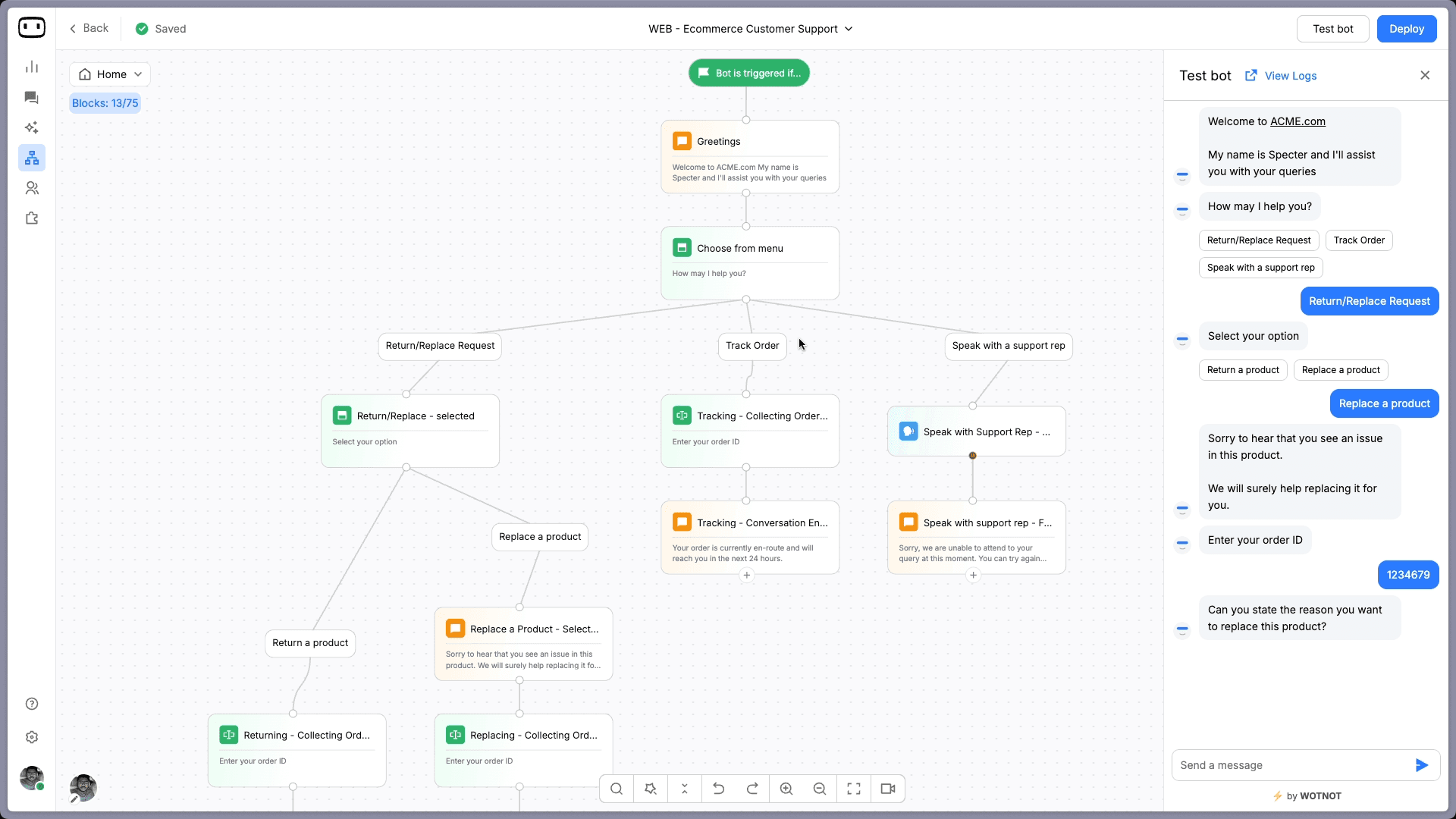
What this chatbot template helps you do:
Resolve FAQs instantly without agent involvement
Collect issue context upfront before escalating tickets
Route queries by type (billing, technical, orders, returns)
Reduce support workload without compromising customer experience
Chatbot Template Script:

Bot: Hi there! 👋 What can I help you with today?
→ Track my order
→ Billing question
→ Technical issue
→ Something else

[If "Track my order"]
Bot: Sure! Drop your order ID and registered email. I'll pull up the details right away.

[If "Technical issue"]
Bot: Got it. Describe the issue briefly, and I'll connect you with the right person.

[If "Something else"]
Bot: A support agent will follow up within [X hours]. Is there anything else I can help with in the meantime
2. B2B Lead Generation Chatbot Template That Qualifies Before It Captures
A static contact form asks for a name and email and calls it lead generation.
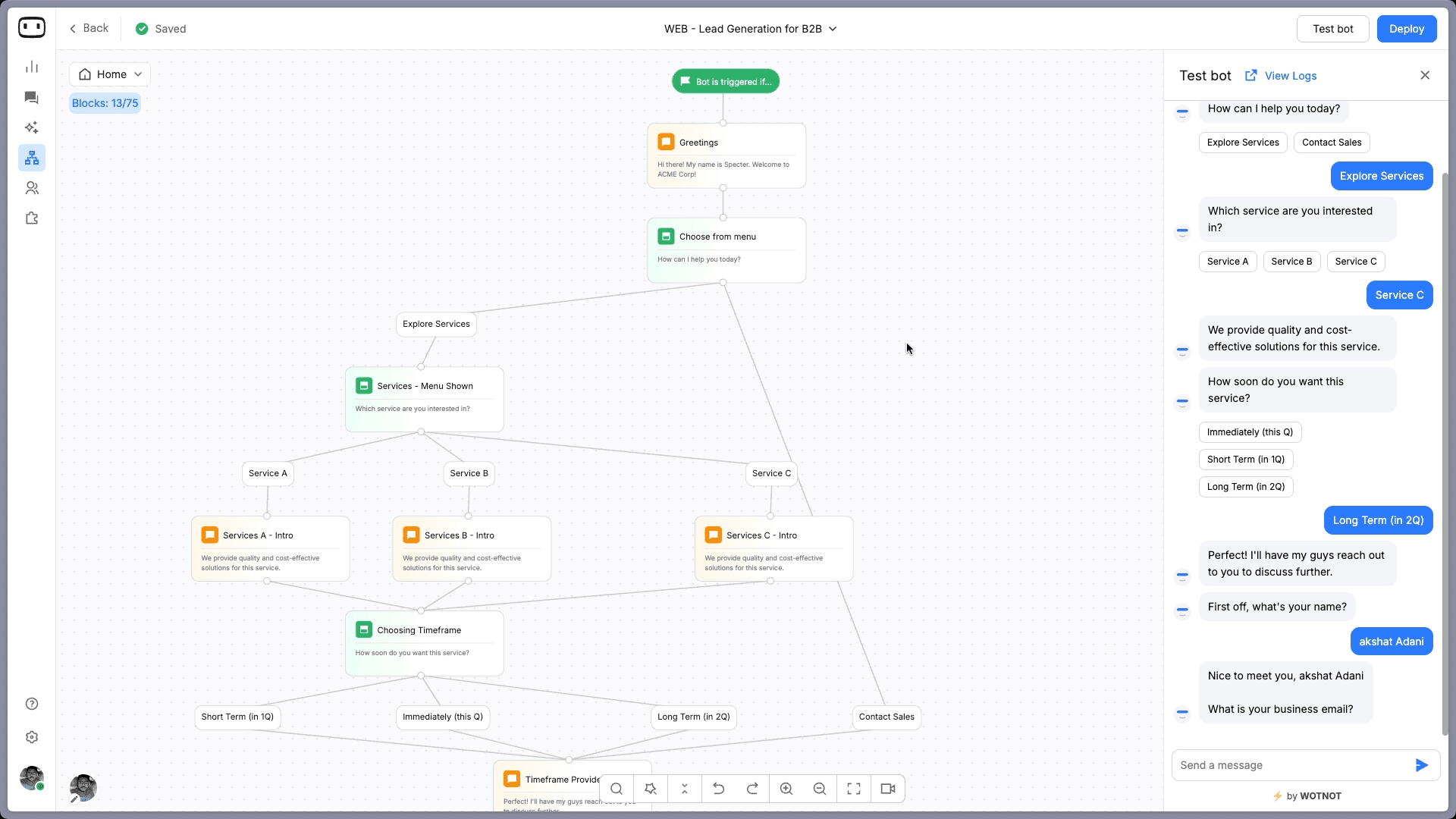
This B2B chatbot template does the actual qualifying work instead.
It asks the right questions, segmenting by intent and company size, and routing high-value prospects to sales before they lose interest and close the tab.
What this chatbot template helps you do:
Qualify leads based on role, company size, and buying intent
Segment visitors by product interest or use case
Route decision-ready leads directly to your sales team
Capture contact details for automated follow-up sequences
Chatbot Template Script:

Bot: Hey! 👋 What brings you here today?
→ Exploring the product
→ Looking for pricing
→ Comparing options

[If "Looking for pricing"] Bot: Happy to help. How large is your team?
→ 1 to 10 people
→ 11 to 50 people
→ 50 or more

Bot: What's the best email to send pricing details to? [Collect: Name, Email, Company Name]
Bot: You're all set! Someone from our team will reach out within 24 hours.
3. E-commerce Chatbot Template for Browsers Who Never Quite Pulled the Trigger
This chatbot website template is built for online stores that need to move visitors from browsing to buying.
It handles product discovery, order tracking, and cart recovery inside one conversation flow.
Better yet, it never feels like a pop-up ad chasing someone around the page.
What this chatbot template helps you do:
Guide visitors to the right product based on their preferences
Recover abandoned carts with well-timed, contextual nudges
Handle order tracking and return requests without agent involvement
Cross-sell and upsell based on what the visitor is already viewing
Chatbot Template Script:

Bot: Welcome! 😊 What can I help you with today?
→ Find a product
→ Track my order
→ Return or exchange

[If "Find a product"] Bot: Let's find the right fit. What are you shopping for?
[Free text input or category buttons]

Bot: Here are a few options based on what you're looking for. [Product cards displayed]
Bot: Want me to add one of these to your cart
4. Healthcare Appointment Booking Chatbot Template for Clinics That Value Their Staff's Time
Front desks at hospitals and clinics spend a disproportionate amount of their day on calls that simply did not need to be calls.
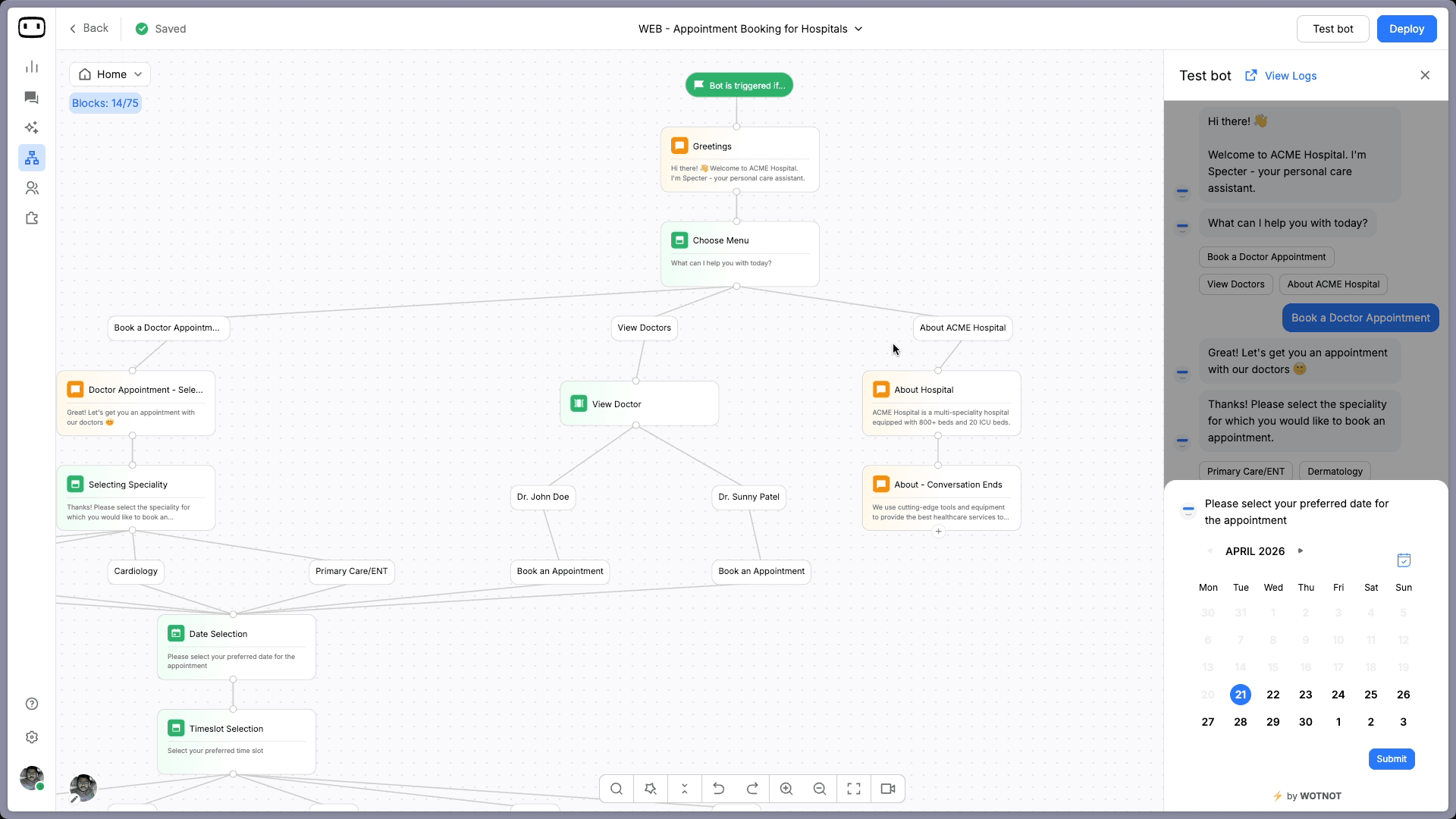
This chatbot template handles booking, rescheduling, and cancellations end-to-end.
As a result, your staff can focus on patients already in the building rather than those still trying to get there.
What this chatbot template helps you do:
Let patients book or reschedule appointments independently, at any hour
Collect health and contact information upfront before the visit
Send automated reminders that meaningfully reduce no-shows
Route urgent cases to on-call staff immediately
Chatbot Template Script:

Bot: Hello! 👋 How can I assist you today?
→ Book an appointment
→ Reschedule an appointment
→ Find a doctor

[If "Book an appointment"] Bot: Which department are you looking for? [General, Dermatology,
Orthopedics, etc.]

Bot: What date and time works best for you?
Bot: Done! Your appointment is confirmed for [Date] at [Time]. You'll get a reminder 24 hours
before
Start building, not just reading
Build AI chatbots and agents with WotNot and see how easily they work in real conversations.

Start building, not just reading
Build AI chatbots and agents with WotNot and see how easily they work in real conversations.
Start building, not just reading
Build AI chatbots and agents with WotNot and see how easily they work in real conversations.

5. Feedback and Survey Chatbot Template That People Actually Complete
Most feedback forms get abandoned because they feel like homework assigned after a transaction.
A conversational survey, on the other hand, feels like a quick 60-second chat… Plus, completion rates reflect that difference significantly.
This template is built for NPS, CSAT, and post-interaction feedback loops that people actually finish.
What this chatbot template helps you do:
Collect NPS and CSAT scores automatically after every interaction
Trigger surveys based on specific user actions or time on page
Segment responses by customer type or product area
Flag and follow up with unhappy customers in real time before they churn
Chatbot Template Script:

Bot: Hey! Got 60 seconds? We'd love your honest feedback. 🙏
Bot: On a scale of 1 to 10, how would you rate your experience today? [Number selector]

[If score is 1 to 6] Bot: We're sorry to hear that. What went wrong? We genuinely want to make it
right.

[If score is 9 or 10] Bot: That's great to hear! Would you mind leaving a quick review?
[Link to Google / G2 / Trustpilot]
6. Real Estate Chatbot Template for Leads That Go Cold Within the Hour
In real estate, a lead not contacted within the first hour is often a lead that never converts.
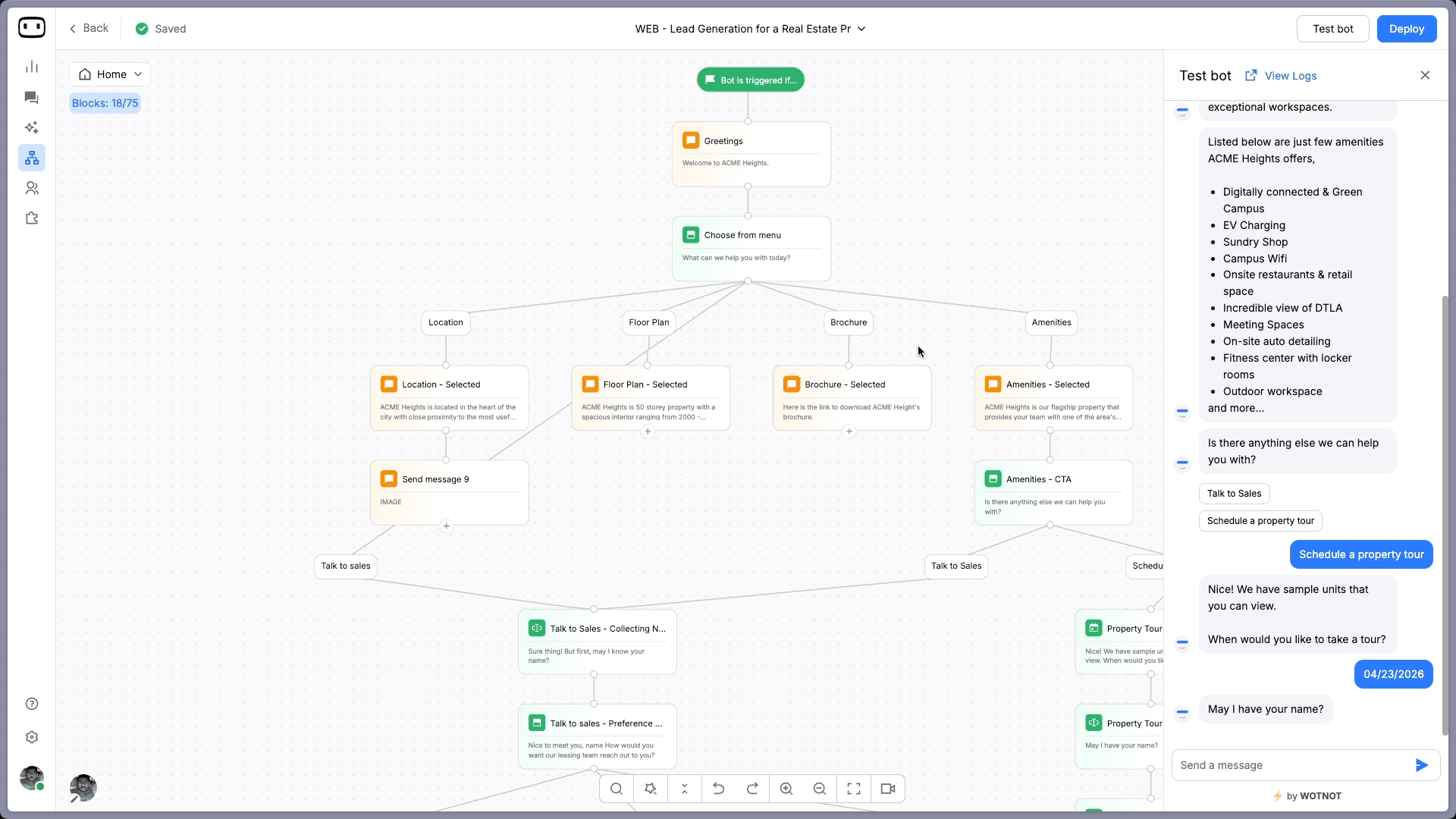
This chatbot template qualifies buyer intent, captures property preferences, and books site visits automatically.
That means your agents spend their time with people who are genuinely ready to move, not chasing inquiries from three days ago.
What this chatbot template helps you do:
Qualify buyers and renters based on budget and location preferences upfront
Showcase tailored property listings inside the conversation itself
Book site visits without back-and-forth calendar coordination
Nurture research-phase leads with relevant follow-ups over time
Chatbot Template Script:

Bot: Hi! Are you looking to buy, rent, or just exploring for now? 🏡
→ Buy
→ Rent
→ Still exploring

[If "Buy"] Bot: What is your budget range for purchasing? [Budget options as buttons]
Bot: Which area or neighborhood interests you most?
Bot: Here are a few properties that match what you're looking for. [Property listings displayed]
Bot: Want to schedule a site visit this week?

[If "Rent"] Bot: What is your monthly rental budget? [Budget options as buttons]
Bot: Which area are you looking in?
Bot: Here are some available rentals that fit your criteria. [Listings displayed]
Bot: Would you like to book a viewing this week?

[If "Still exploring"] Bot: No problem! What type of property are you interested in?
[Residential / Commercial / Plots]
Bot: Drop your email and we will send you curated listings as they come in.
Bot: Our team will also reach out when something matches your preferences. 😊
7. Restaurant Reservation Chatbot Template That Fills Tables Without Phone Calls
Phone reservations frustrate customers who would rather book in 30 seconds.
They also tie up your staff during the exact hours they are busiest.
This template handles the full booking conversation on its own, collects everything your team needs to prepare, and confirms the reservation without a single call being made.
What this chatbot template helps you do:
Accept table reservations 24 hours a day, including after closing time
Collect party size, date, time, and dietary preferences in one clean flow
Send automated booking confirmations and day-before reminders
Handle cancellations and rescheduling without staff involvement
Chatbot Template Script:

Bot: Welcome to [Restaurant Name]! 🍽️ Ready to reserve a table?

→ Book a table
→ View the menu
→ Ask a question

[If "Book a table"] Bot: How many guests will be joining? Bot: What date and time works best? Bot: Any dietary preferences or special requests we should know about?
Bot: Perfect! Your table is reserved for [Date] at [Time] for [X] guests. See you then! 🎉
8. Banking and Account Opening Chatbot Template for Fintechs Done With the Paper Trail
Banks and fintech companies that still rely on branch visits or PDF forms for account opening are actively losing customers to competitors with a faster path.
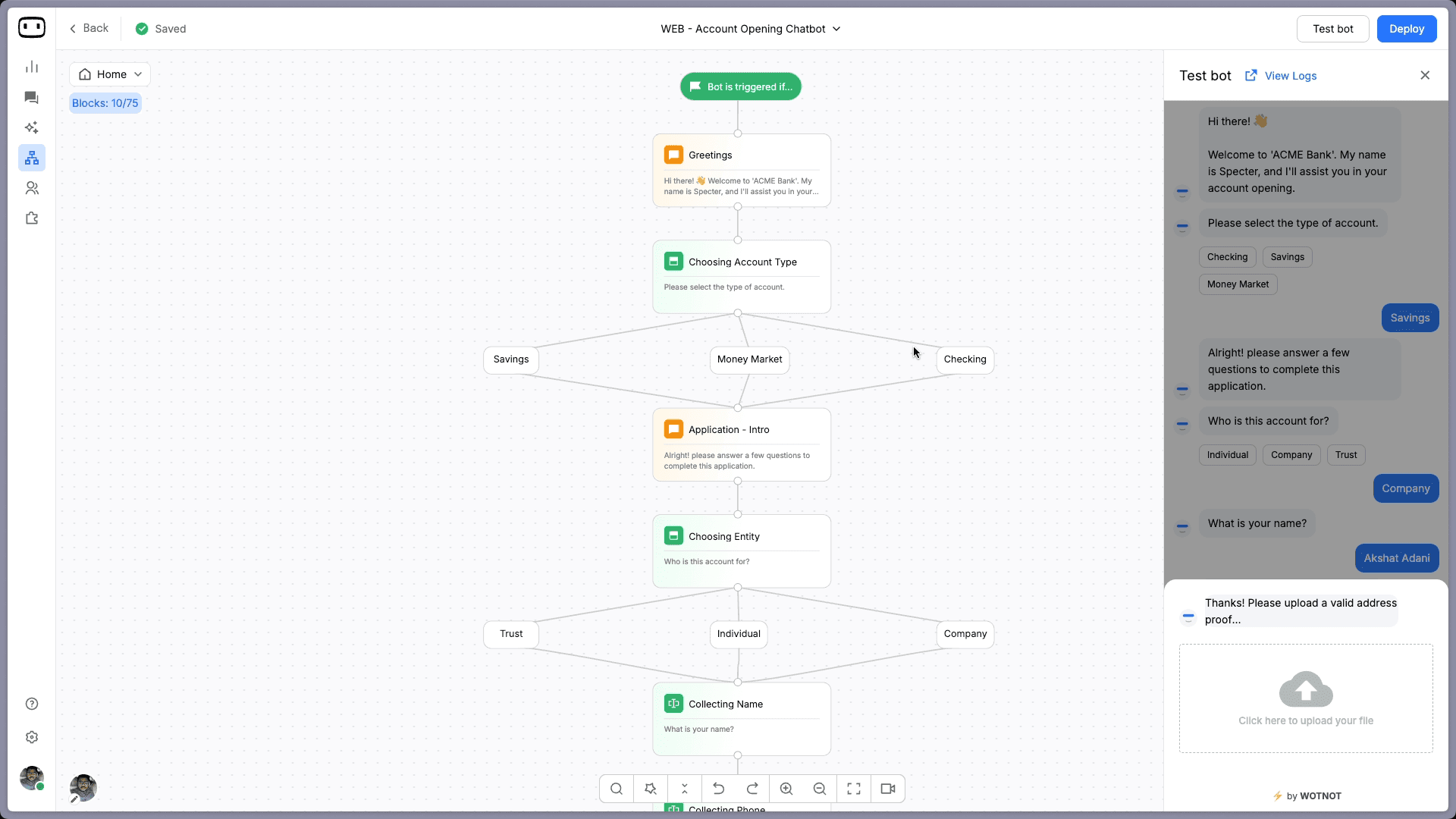
This template guides users through onboarding in a clear, structured conversation.
It stays compliant and easy to follow without making the process feel like a government application.
What this chatbot template helps you do:
Walk users through account opening step by step in a guided flow
Collect KYC details conversationally without overwhelming the user
Answer eligibility, product, and interest rate questions instantly
Route complex queries to a relationship manager without friction
Chatbot Template Script:

Bot: Hi! Want to open an account with us today? It takes less than 5 minutes. 🏦
→ Yes, let's get started
→ Tell me more first

[If "Tell me more first"]

Bot: Of course! We offer savings accounts, current accounts, and fixed deposits. All can be
opened fully online in under 5 minutes.
Bot: No branch visit, no paperwork. Ready to get started?

→ Yes, let's go
→ I'll come back later

[If "Yes, let's get started" or "Yes, let's go"]

Bot: What's your full name? Bot: Date of birth? Bot: Do you have a government-issued ID handy?
→ Yes, I do
→ I'll grab it and come back

[If "Yes, I do"] Bot: A representative will contact you within 24 hours to complete verification
and get you set up.

[If "I'll grab it and come back"] Bot: No problem! Drop your email and we will send you a reminder
to complete the process when you are ready
9. Insurance Lead Generation Chatbot Template for High-Intent Visitors Who Just Need Clarity
Insurance visitors are not browsing out of curiosity — they have already decided to buy and just need clarity on their options. This AI chatbot template qualifies prospects, walks them through available plans in plain language, and connects them with an advisor the moment they are ready to commit.
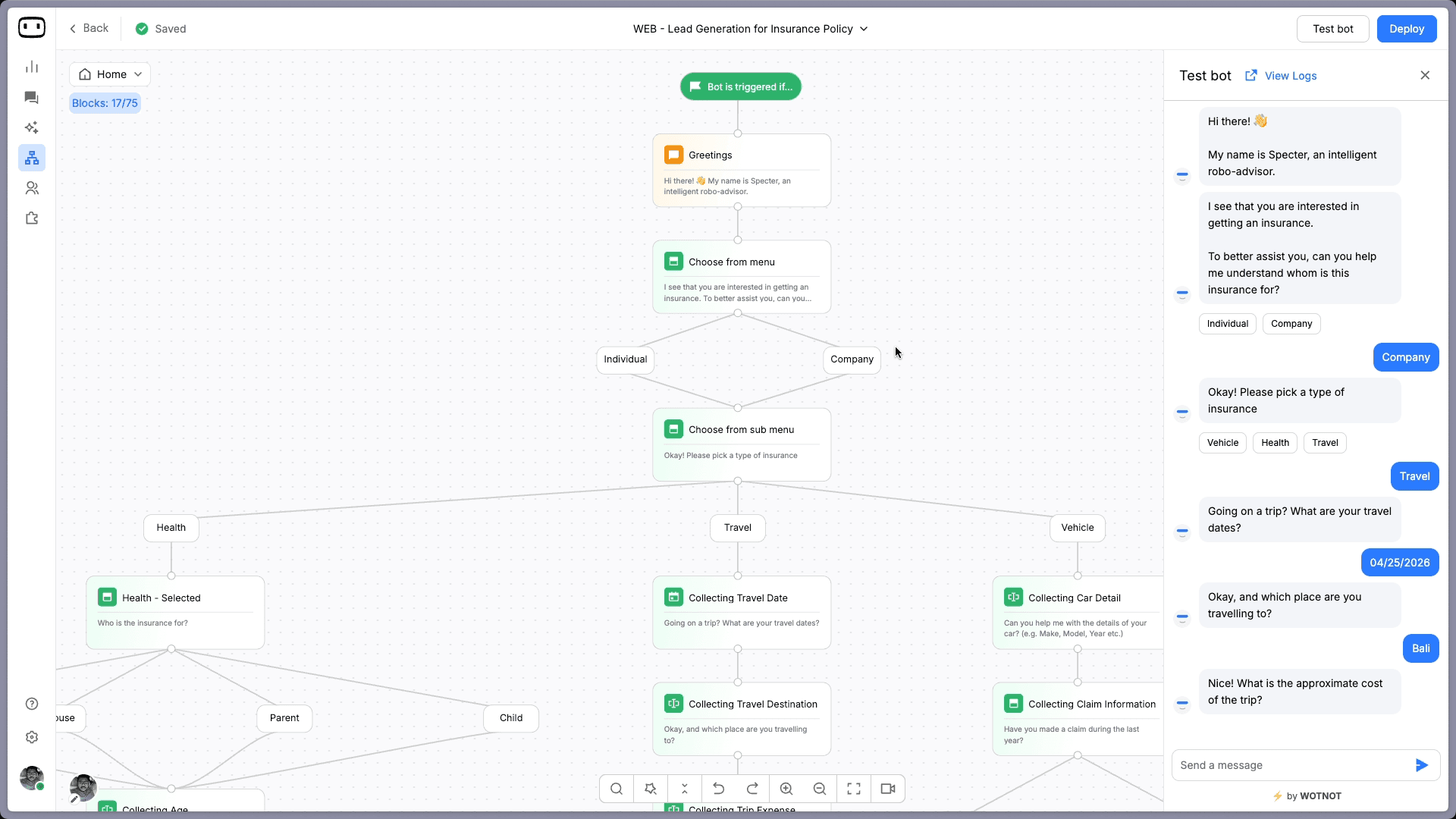
What this chatbot template helps you do:
Capture lead details and coverage requirements right at the start of the conversation
Qualify prospects by policy type, coverage scope, and monthly budget
Book advisor callbacks from genuinely warm, interested leads
Walk visitors through plan options in clear, jargon-free language
Chatbot Template Script:

Bot: Hi! Looking for the right insurance coverage? Let's help you find a plan that fits. 🛡️
→ Health Insurance
→ Vehicle Insurance
→ Travel Insurance

[If "Health Insurance"]

Bot: How many people will be covered under this plan?
Bot: What is the age of the oldest member to be covered?
Bot: What is your comfortable monthly premium budget?
Bot: Here are the best health plans based on your inputs. [Plan options displayed]
Bot: Would you like a callback from one of our health insurance advisors
How to Customize These Chatbot Templates for Your Business
A chatbot template is a starting point, not a finished product.
The businesses that consistently get the best results are the ones that spend 20 focused minutes personalizing before going live.
Here is what actually makes the difference.
1. Match the Tone to Your Brand Voice Before You Change Anything Else
Before adjusting a single question or button label, get the tone right first.
A legal services firm and a direct-to-consumer skincare brand should not sound the same.
Visitors pick up on a mismatch faster than you expect.
If your brand is formal and precise, clean up the casual language and pull out the emojis. If it is warm and conversational, keep the personality dialed up.
The script is the first impression your brand makes on every new visitor, so it should feel consistent with everything else they have already seen from you.
Not sure what your brand voice sounds like yet? Generate a starting personality for your chatbot here before you touch these templates.
2. Replace Every Placeholder with Language Your Customers Actually Use
Generic tags like "[problem]" or "[department]" show you where to fill in real details — they are not meant to survive into the final version.
The more specific and grounded your language is, the more credible your bot feels in that first exchange.
A SaaS company asking about "team size" lands very differently than one asking about "number of active users."
These small word choices determine whether someone keeps engaging or closes the widget within the first message.
For a deeper look at how to get chatbot language right across different scenarios, the chatbot scripts guide is worth reading alongside these templates.
3. Know Exactly When the Bot Should Hand Off to a Human
Every chatbot template needs a defined escalation point — not a vague fallback, but a deliberate moment where the conversation transitions to a live agent.
This matters most for high-value leads who need a real conversation, frustrated customers already on edge, and anything that genuinely requires human judgment.
A bot that tries to handle everything and stumbles at one critical moment will lose the user entirely.
If you are building on an LLM-powered platform, intelligent escalation can be dynamic rather than rule-based.
That shift meaningfully changes the experience for edge cases your template flow did not anticipate.
4. Use Personalization Tokens to Make Responses Feel Less Robotic
Most chatbot platforms support personalization tokens — variables that pull in the user's name, location, last action, or referral source.
Greeting a visitor by name, or referencing the product page they came from, creates a noticeably different experience.
And it does all of that without adding meaningful complexity to your flow.
Start with name personalization, run it for a week, and layer in additional tokens based on what the conversation data shows.
If you are still evaluating which platform to build these templates on, this breakdown of top AI agent builders covers what the market looks like right now.
The Best Chatbot Template Is the One You Actually Ship
The hardest part of deploying a chatbot has never been choosing a platform.
It is the blank screen moment — figuring out what the bot should say first, what comes next, and what happens when the conversation goes somewhere you did not plan for.
These 9 templates remove that problem by giving you a proven structure to build from rather than an empty editor to stare at.
Start with the template that fits your most pressing use case. Adjust the language for your brand and your audience.
If you want to deploy any of these templates without writing a single line of code, start building on WotNot and have your first bot live today.
Or book a demo if you want to see how it works with your specific use case first.
FAQs
FAQs
FAQs
What is a chatbot template?
Can I use these templates on any chatbot platform?
How long does it take to customize a chatbot template?
Do these templates work for AI chatbots?
What is the difference between a chatbot template and a chatbot script?
ABOUT AUTHOR

Hardik Makadia
Co-founder & CEO, WotNot
Hardik leads the company with a focus on sales, innovation, and customer-centric solutions. Passionate about problem-solving, he drives business growth by delivering impactful and scalable solutions for clients.

Start building your chatbots today!
Curious to know how WotNot can help you? Let’s talk.
Start building your chatbots today!
Curious to know how WotNot can help you? Let’s talk.