Let’s build your chatbot today!
Launch a no-code WotNot agent and reclaim your hours.
*Takes you to quick 2-step signup.
Your customers don't ask generic questions. So why give them a generic chatbot?
They ask questions specific to your products, your pricing, your policies, and the problems they're actually trying to solve. A generic chatbot can answer questions, but it doesn't understand your business well enough to give useful answers.
That's where a custom chatbot comes in. It's built around your data, your brand voice, your business rules, and the AI and tools your team already uses. The model matters, but so do the information, instructions, and systems behind it; that's what turns a chatbot that knows a lot into one that actually knows your business.
But a custom chatbot sounds like a big project for a team of developers, right? Not anymore. No-code platforms can now build a chatbot tailored to your business without starting a developer project from scratch.
This guide explains what makes a chatbot custom, when you need one, and how to build one without writing code.
What Is a Custom Chatbot?
A custom chatbot is built around your business rather than relying on generic knowledge. Instead of pulling from what an AI model happens to know, it works from your actual information: your products, your policies, your way of doing things. It can also act inside the systems your team already runs on.
The simplest way to think about it is: every custom chatbot is a chatbot, but not every chatbot is custom.
Because a basic chatbot can answer general questions and guide someone to a "Contact us" page. But a custom chatbot can answer questions about your products, pricing, policies, and processes because it is configured for your business.
Let’s build your chatbot today!
Launch a no-code WotNot agent and reclaim your hours.
Let’s build your chatbot today!
Launch a no-code WotNot agent and reclaim your hours.
Custom Chatbot vs Generic Chatbot: What's the Difference?
The gap between the two comes down to how much they know about your business. A generic chatbot runs on general knowledge or basic templates. A custom one runs on your specific information, and that changes everything about how useful it is.
Here's how the two compare side by side:
Generic Chatbot | Custom Chatbot | |
|---|---|---|
Knowledge | General facts or basic templates | Your products, policies, and data |
Brand voice | Generic tone | Matches how your business speaks |
Integrations | Basic or none | Connects to your CRM, calendar, helpdesk |
Conversation logic | Pre-built or generic flows | Your qualification, routing, and rules |
Accuracy | Can give vague or wrong answers | Grounded in your real information |
Setup | Quick to launch | Needs configuration |
Best for | Simple FAQs, basic capture | Accurate, branded, action-driven conversations |
The pattern is clear enough. A generic bot is faster to switch on but limited in what it can do well. A custom bot takes some setup, but it's the one that can actually represent your business in a conversation, which is the whole reason you'd add a bot in the first place.
Do You Actually Need a Custom Chatbot?
Not every business needs a custom chatbot, and it's worth being honest about that before you invest the time. A generic chatbot is perfectly fine for some situations. A custom one should be a necessity.
Take a small local bakery with a simple website. Most of what people ask is easy: what are your hours, do you take custom cake orders, where are you located. A basic bot answers all of that in an afternoon, and custom would be overkill here.
Now take a SaaS company with three pricing tiers, a dozen integrations, and customers asking whether the tool fits their specific setup. A generic bot fumbles those questions instantly because the answers live in that company's own documentation and product knowledge. This is the business that needs a custom AI chatbot.
That's the line. If your customers ask simple, general questions, generic is fine. If they ask questions only your business could answer, you need custom. Here's how to tell which side you're on:
You need a custom chatbot when any of these are true:
Accuracy about your business matters. If a wrong answer about your product, pricing, or policy would cost you a customer or create a support headache, the bot needs to be grounded in your real information.
You want the bot to do things, not just talk. Booking a meeting, checking an order, qualifying a lead, updating your CRM. Actions require a bot connected to your systems.
Brand consistency matters to you. If how your business sounds is part of how it's perceived, a generic tone works against you.
You're in a specialized industry. Healthcare, real estate, hospitality, SaaS, each has its own terminology, rules, and workflows a generic bot won't understand.
Generic bots have already let you down. If you've tried an off-the-shelf tool and kept getting vague or wrong answers, that's the clearest signal you've outgrown generic.
One thing worth adding, because it's the difference between a custom bot that helps and one that hurts: guardrails. A good custom bot answers only from your approved information and hands a conversation to a human the moment it's out of its depth. That's what stops it from confidently giving a wrong answer, which is the fastest way to lose a customer's trust.
The simple test: if your customers ask questions only your business can answer, or you want the bot to take real action, you need custom. If they don't, you probably don't.
How to Build a Custom Chatbot
The good news is that building a custom chatbot no longer requires a developer. Modern no-code platforms let you create one trained on your own business, set its voice, and connect it to your tools, all without touching code. I'll walk through it using WotNot, since it's built for exactly this, though the general steps apply to most no-code platforms.
A quick note on the wording: WotNot lets you either start from a ready-made template or build from a blank canvas. Building from a blank canvas still means no code; it just gives you full control over the flow instead of a preset. That's the route we'll use here, since a custom chatbot is defined by your data and rules rather than a template.
Step 1: Pick Where It Will Live
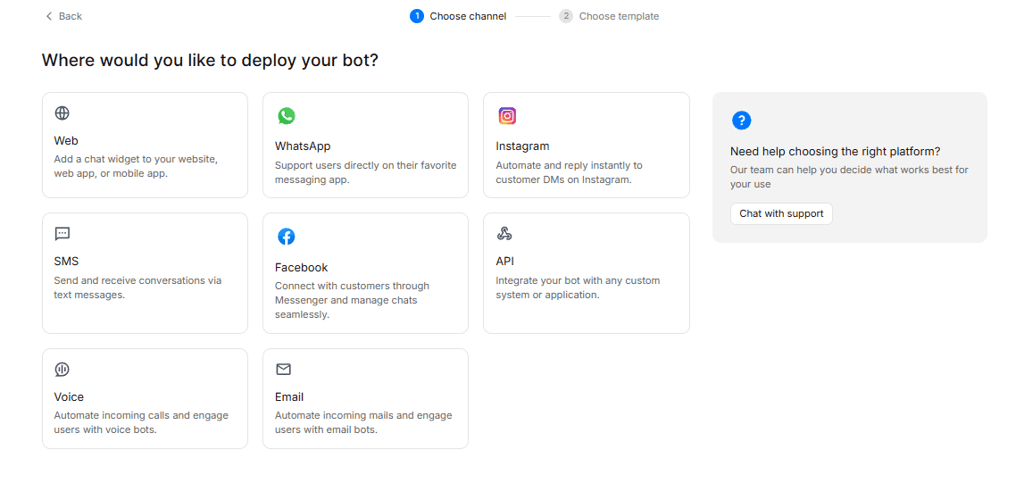
Log in to WotNot, click Bot Builder, then “Build a Bot,” and select Inbound Bot, since a custom chatbot's job here is to respond to customers who reach out to you. Then choose where it will live. For most businesses, the website is the primary touchpoint or channel, so a chat widget on your key pages is the natural starting point. If your customers reach you more on WhatsApp or Instagram, you can deploy there instead, or across several channels from the same build.
Step 2: Start From a Template or Build From Scratch
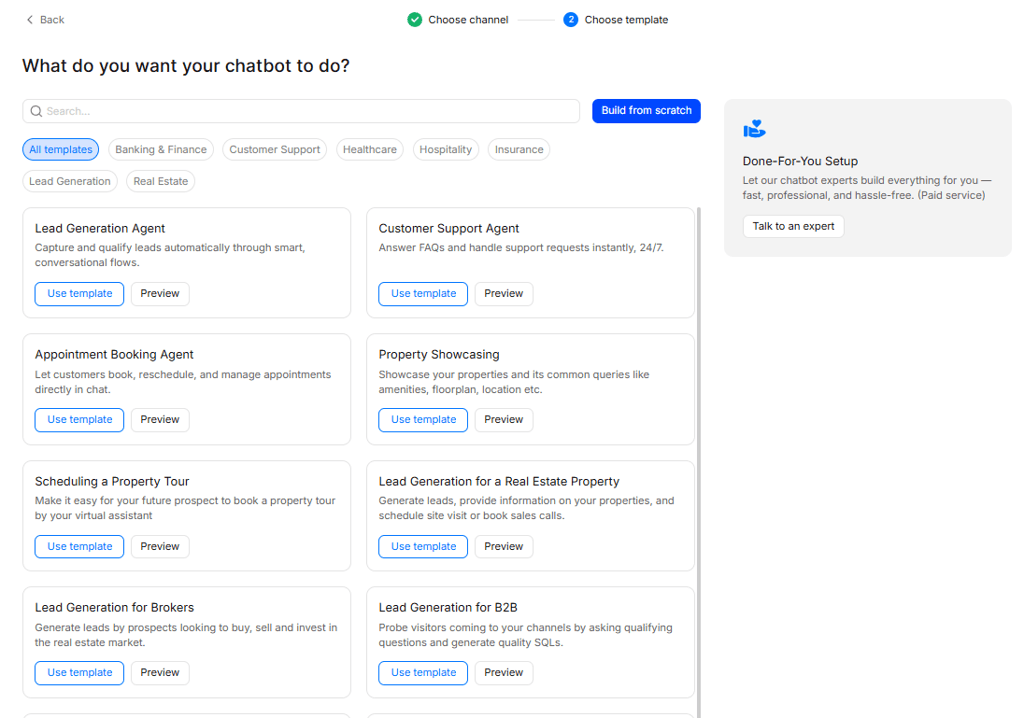
After picking your channel, you'll land on the template panel. You'll see ready-made templates for common jobs, lead generation, customer support, appointment booking, and more. If one matches your use case closely, select it and customize from there.
For a fully custom chatbot shaped entirely around your business, choose Build from Scratch. It gives you a blank canvas to define your own flow, data, and rules rather than starting from a preset.
Step 3: Train It on Your Business
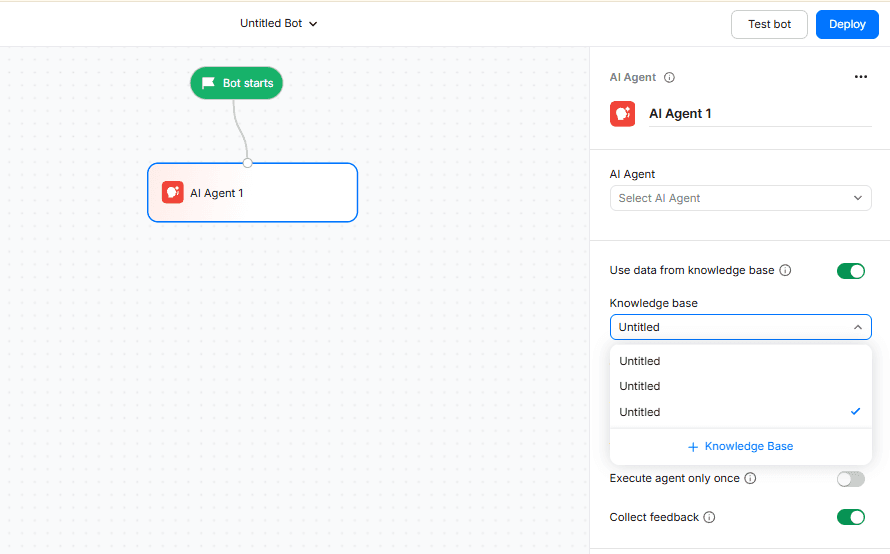
This is the step that makes the bot custom. Add an AI Agent to your flow, then connect its knowledge base. You can feed it your content three ways: add a URL to scan your website, upload a file, or paste text directly, your product information, FAQs, and policies. Once it's trained, the bot answers from your real information instead of generic knowledge. This approach is called retrieval-augmented generation, and it's what keeps the answers grounded.
Step 4: Set Its Voice and Instructions
Write the agent's prompt to define how it behaves. Set the tone so it sounds like your brand, and give it clear instructions on what it should and shouldn't do, which topics to stick to and when to say it doesn't know rather than guess. This is where you set the guardrails that keep it accurate and on-brand.
Step 5: Add Logic and Connect Your Tools
A custom bot follows your rules and takes action. Use paths to define how it should handle specific intents, qualifying a lead, routing to sales, and booking a meeting. Then connect your systems through native integrations, your CRM, calendar, or helpdesk, so the bot can do those things instead of just talking about them.
Step 6: Test, Then Deploy
Before going live, test it the way a real customer would. Ask the tricky questions and the edge cases your content only partly covers to check whether it answers accurately or guesses. Once it holds up, deploy it. For a website, that's a snippet you paste into your site, and you can style the widget to match your brand first.
Start building, not just reading
Build AI chatbots and agents with WotNot and see how easily they work in real conversations.

Start building, not just reading
Build AI chatbots and agents with WotNot and see how easily they work in real conversations.
Start building, not just reading
Build AI chatbots and agents with WotNot and see how easily they work in real conversations.

Start With What Your Customers Actually Ask
A custom chatbot isn't about having the fanciest AI. It's about giving your customers answers that are actually right, in a voice that actually sounds like you.
The best way to start isn't to map out every possible conversation. It's to look at the questions your customers already ask most, the ones your team answers over and over, and build a bot that handles those accurately from your own content. Get that working, see where it stumbles, and expand from there. A custom bot grounded in your real information and improved over time will always beat a generic one that launched faster.
And the barrier to getting there has dropped. What used to take a developer and months of work now takes an afternoon on one of the easiest AI agent platforms. So the real question isn't whether you can build a custom chatbot. It's whether you're ready to stop handing your customers generic answers.
If you want to build one trained on your own business, you can try WotNot free and have it answering from your content today.
FAQs
FAQs
FAQs
What is a custom chatbot?
How is a custom chatbot different from a regular chatbot?
Can I build a custom chatbot without coding?
How much does a custom chatbot cost?
Do I need a custom AI chatbot for my company?
ABOUT AUTHOR

Hardik Makadia
Co-founder & CEO, WotNot
Hardik leads the company with a focus on sales, innovation, and customer-centric solutions. Passionate about problem-solving, he drives business growth by delivering impactful and scalable solutions for clients.

Start building your chatbots today!
Curious to know how WotNot can help you? Let’s talk.
Start building your chatbots today!
Curious to know how WotNot can help you? Let’s talk.