
23 min read
AI Help Desk Software: 7 Platforms That Resolve vs Just Manage

Hardik Makadia

Let’s build your chatbot today!
Launch a no-code WotNot agent and reclaim your hours.
*Takes you to quick 2-step signup.
I think I've cracked the problem that every support team runs into: your business is growing, but not at the pace your support workload is growing.
And it's not because customer problems are becoming more complex. NO.
It's because the same 5 questions start consuming more of your support team's time than the issues they were actually hired to solve.
By handling the same pile every day, your agents are not solving difficult problems. They are repeating information that already exists somewhere in your systems.
The frustrating part? These answers already exist. Someone from your team just ends up typing them out over and over again.
And that's the exact problem AI help desk software is built to solve.
Mark this: AI help desk software doesn't promise faster replies. It breaks the link between business growth and support headcount.
I've researched and selected 7 AI help desk software platforms based on one simple question: Can the AI actually resolve customer issues, or does it simply help your agents manage them? That distinction is what separates software that genuinely reduces your workload from software that just reorganizes it.
What's covered in this guide:
7 AI Help Desk Platforms at a Glance
Platform | Best For | AI Pricing Model | Starting Price | Free Trial / Plan | G2 |
Autonomous AI resolution | Per AI outcome + seat | $39/seat + $0.99/outcome | 14-day free trial | ⭐4.5 | |
AI-first customer support | Flat-rate | $29/month | 14-day free trial | ⭐4.6 | |
Enterprise support teams | Per seat + AI add-ons | $19/agent | Trial available | ⭐4.3 | |
Mid-sized support teams | AI bundled in paid plans | ~$19/agent | Trial available | ⭐4.4 | |
Small teams | Per seat + AI Answers | $30/user | Free plan + trial | ⭐4.4 | |
Budget-conscious teams | AI bundled in Enterprise | ~$20/user | Free plan + trial | ⭐4.4 | |
Ecommerce support | Per ticket + AI usage | $10/month | Trial available | ⭐4.6 |
Let’s build your chatbot today!
Launch a no-code WotNot agent and reclaim your hours.
Let’s build your chatbot today!
Launch a no-code WotNot agent and reclaim your hours.
Five Things Your AI Help Desk Demo Won't Show You
Demos are designed to show you what's possible. Production tells you what's practical.
Before choosing a platform, here are five things you should evaluate beyond the demo.
Does the AI resolve tickets, or does it help your agents resolve them?
These are two different products sold under the same name.
Some platforms deploy AI agents that handle the full conversation autonomously, and can understand the issue, pull the data, take action, and confirm resolution.
Others use AI to suggest replies, summarize threads, and detect sentiment while a human still does the actual work.
Both have value.
But if you're buying AI to reduce headcount dependency and the AI still needs a human on every ticket, you haven't changed the equation. You've just made the equation slightly faster. Know which one you're buying before you sign.
How does it handle questions it wasn't trained on?
This situation will arise, and that’s for sure, and most AI help desks do fall apart at this stage.
Any AI can answer the questions in your knowledge base. The real test is what happens when a customer asks something that isn't there.
Does the AI confidently make something up?
Does it say "I don't know" and dead-end the conversation?
Or does it gracefully hand off to a human with full context?
The answer to this question tells you more about the platform's reliability than any resolution rate on a case study.
Which channels does the AI actually work on?
Email and chat are the demo. WhatsApp, voice, and social are the reality.
Most help desks show AI working on email and website chat. But your customers are also on WhatsApp, Instagram, SMS, and phone. Ask whether the AI resolves across all of those, or only on the channels the vendor is most comfortable showing you.
If the AI only works on two channels and your customers use five, you're still staffing humans for the other three. That gap matters more to your budget than any feature on the pricing page.
What happens when the AI hands off to a human?
This is where demos lie, and production tells the truth.
In the demo, the handoff looks seamless. In production, the agent receives a ticket with half the context missing, no conversation history, and a customer already frustrated by having to re-explain their issue.
Ask to see the handoff in detail. What exactly does the human agent see when they receive an escalated ticket? If the answer is anything less than the full conversation with all collected data, the AI isn't saving your agents' time. It's creating a different kind of frustration.
What does the pricing actually look like at your volume?
The starting price on the pricing page is almost never the real price.
Per-seat, per-resolution, per-ticket, interaction-based, with AI add-ons on top.
The pricing models in this space are designed to look affordable at low volume and scale unpredictably at real volume.
Before you commit, model your actual monthly ticket count against the pricing structure. Include AI resolution fees, overage charges, and any add-ons for features like Copilot or analytics. The number you land on is your real price, not the one on the landing page.
|
7 AI Help Desk Platforms: Capabilities, Limitations, and Pricing Breakdown
I've assessed each tool below against the five questions above. So let's see what each platform offers, where it genuinely delivers, and where you can walk past it.
1. Intercom Fin
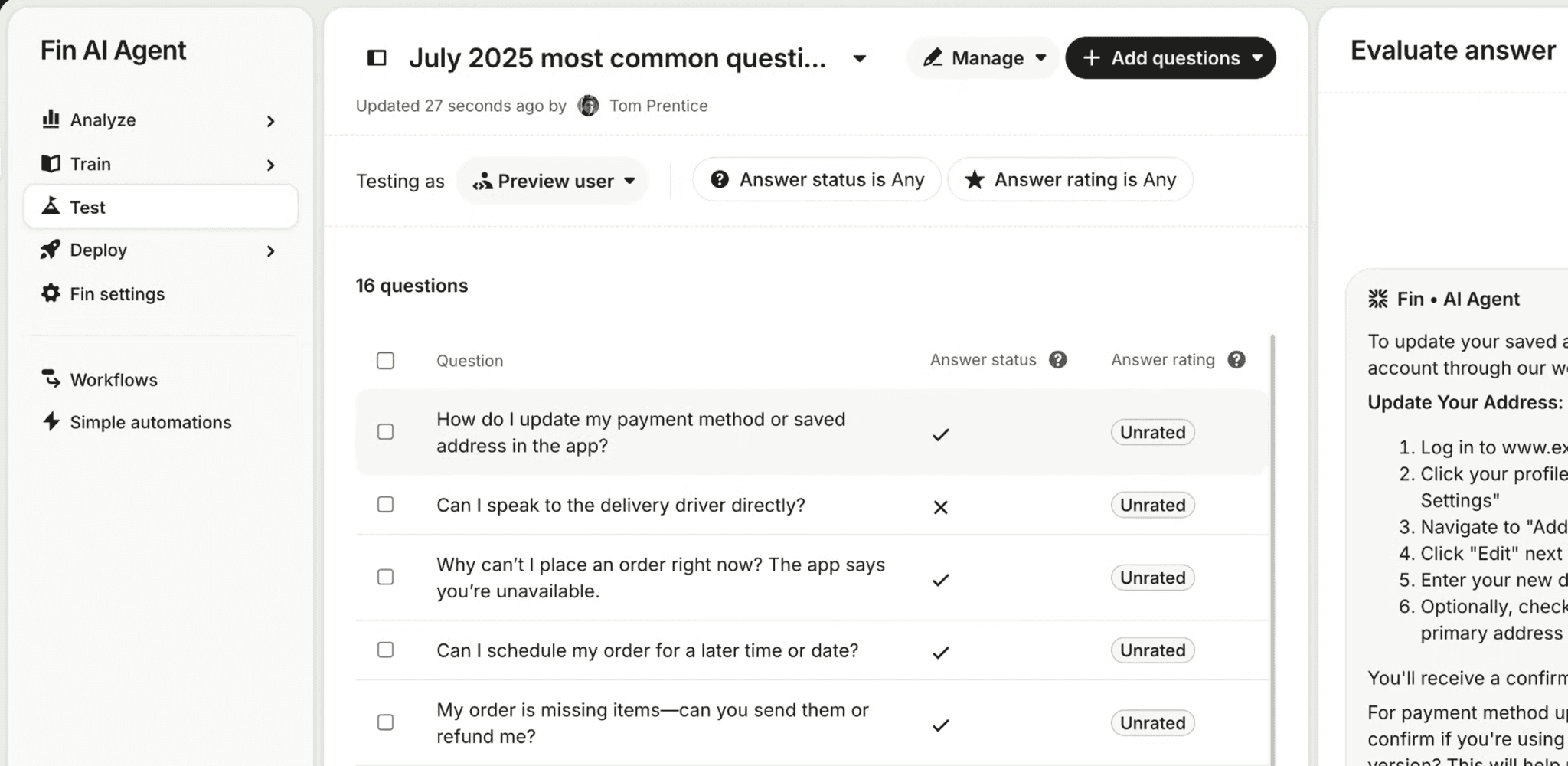
Intercom is the platform most teams think of first when they hear "AI help desk." And for good reason.
Fin AI Agent (Intercom) is one of the most capable autonomous resolution engines on the market right now. It works as a standalone AI agent on top of your existing help desk (Zendesk, Salesforce, Freshdesk, HubSpot) or as part of Intercom's own help desk. It has resolved over 40 million conversations and is deployed across 10,000+ business accounts.
G2 rating: 4.5/5.
How Intercom Fin handles help desk support
What separates Fin from most AI help desks is that you don't need to switch your help desk to use it. It works as a standalone AI agent on top of Zendesk, Salesforce, Freshdesk, HubSpot, or Gorgias.
No migration. No rip-and-replace.
You plug Fin into your existing setup, and it starts resolving tickets from day one. Most platforms on this list require you to adopt their entire help desk. Fin just asks for your knowledge base and a channel to work on.
The outcome-based model means you pay $0.99 only when Fin actually resolves. If it can't, and hands off to a human, no charge. That changes the risk equation. You're not paying for AI that tries. You're paying for AI that succeeds.
Copilot handles the other side. You can find it inside the agent's inbox, where it suggests replies, finds relevant articles, and summarizes threads. Ten free conversations per agent per month. Unlimited usage is a paid add-on.
And Procedures push Fin beyond Q&A into agentic territory. You configure multi-step sequences: verify the customer, check the order, trigger a refund, and confirm the resolution. That's not answering a question but completing a task.
Where it lacks
The pricing sounds simple. $0.99 per resolution. Until you start adding layers.
At $0.99 per outcome, a team handling 3,000 conversations at 50% resolution pays $1,485 in Fin fees alone. Add the base plan (Essential at $39/seat, Advanced at $99/seat). Add Copilot at $35/agent/month. Add Pro at $99/month for analytics. A five-agent team on Advanced with both add-ons crosses $2,250/month before volume fluctuations. That's not $0.99 anymore. That's layers.
Your busiest month is your most expensive month. No volume cap. No ceiling. Resolution fees scale with traffic, and the bill arrives after the fact.
Some knowledge sources only work in Copilot mode. Notion, Confluence, and other internal docs can help agents draft replies, but cannot power autonomous customer-facing responses. If your richest content is internal, Fin can see it but can't use it where it matters most.
Pricing
Essential: $39/seat/month + $0.99 per Fin AI outcome
Advanced: $99/seat/month + $0.99 per Fin AI outcome
Expert: $139/seat/month + $0.99 per Fin AI outcome
Standalone Fin AI Agent: From $0.99 per outcome (no seats required)
Copilot add-on: $35/agent/month
Pro add-on: $99/month
Proactive Support Plus add-on: $99/month
Free trial available on all plans
Choose it when
Your support volume exceeds 300 conversations per month, and your knowledge base is well-maintained. Fin is the strongest autonomous resolution engine on this list. It's also one of the best options if you already run Zendesk, Salesforce, or Freshdesk and want to add AI resolution without migrating your entire help desk.
Skip it when
Pricing predictability matters more to you than per-resolution efficiency.
Or if your knowledge base is sparse, because Fin's resolution rate mirrors your content quality, and paying $0.99 for weak resolutions is expensive underperformance.
If you want flat-rate AI resolution across multiple channels without layered add-on costs, WotNot offers a different pricing model worth comparing.
If Intercom's pricing layers or knowledge base limitations are a concern for your team, I've done a more detailed breakdown of Intercom alternatives that covers more options beyond this list.
2. WotNot
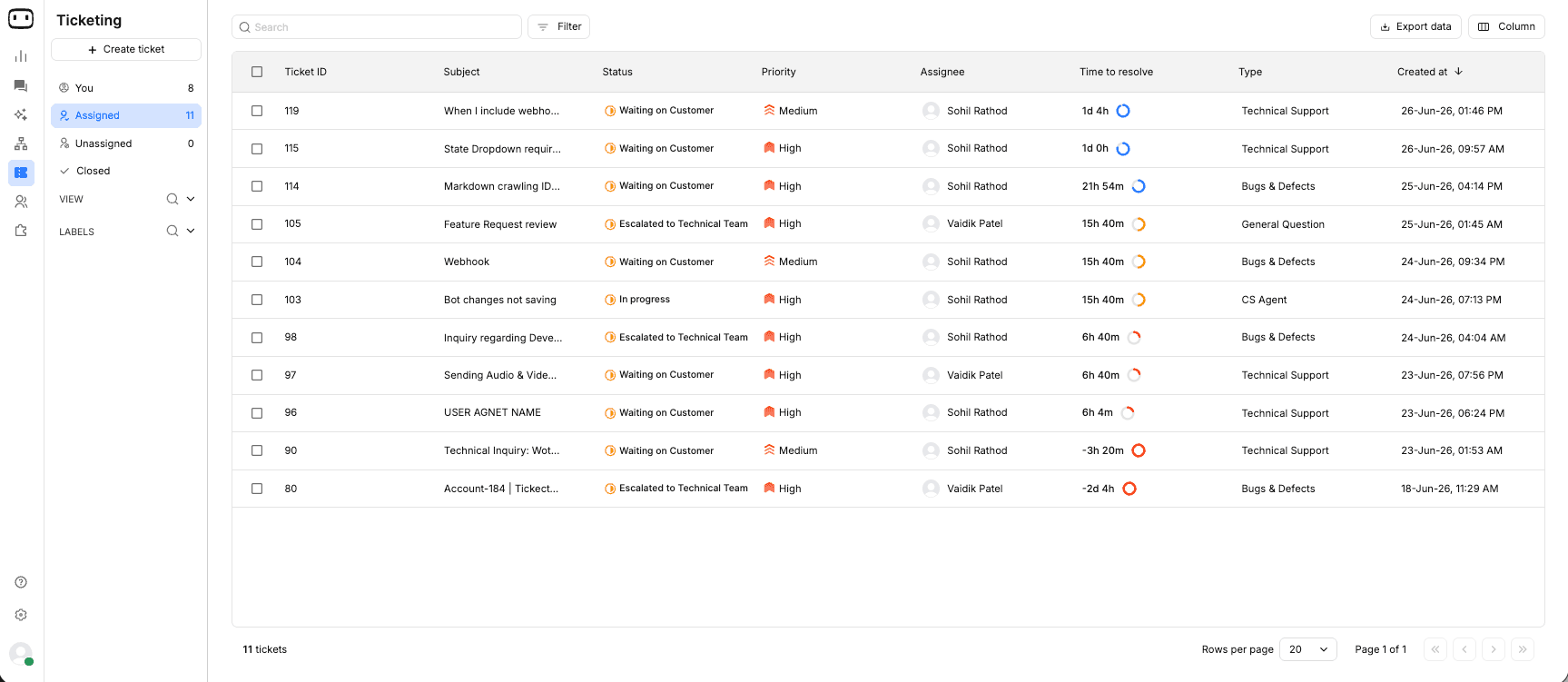
WotNot is an AI agent platform that lets businesses build, deploy, and manage AI agents across every customer channel without writing code. And it is the easiest AI agent platform to get started with on this list. I'm saying that because:
You don't need engineering to build or deploy AI agents.
You don't need to configure separate tools for each channel.
You don't need to pay extra for live chat or human handoff.
And if you don't want to build anything at all, WotNot's team builds it for you.
While most platforms on this list are help desks with AI added on top, WotNot is an AI resolution platform with help desk integrations built in. It sits in front of your existing support stack and resolves the repetitive volume before it reaches your agents.
G2 rating: 4.6/5.
How WotNot handles help desk support
AI Studio is the core. Pick from multiple LLMs, ground them in your support content through RAG, and build resolution flows visually. No code. When a customer asks about password resets or refund policies, the AI resolves it from your actual documentation, not canned responses.
One build deploys across web, WhatsApp, Instagram, Messenger, SMS, and phone. WotNot covers the channels your customers are already on without building separate flows for each. The platform also supports multilingual AI agents, so if your customers write in Spanish, Arabic, or Japanese, the bot responds in their language without you building separate flows for each one.
Live chat with unlimited agent seats is included. When the AI can't resolve, it hands off to a human with full context. No per-seat fees or cold restarts. The platform integrates with Zendesk, Freshdesk, Salesforce, and HubSpot, so unresolved tickets land in your existing help desk with complete conversation history.
For teams that don't want to configure any of this, managed services handle it. You tell them what needs to be resolved, and they build it.
Where it lacks
WotNot resolves conversations. It is not a full ticketing system.
There is no native ticket management with SLA tracking, priority queues, or advanced reporting dashboards. If your operation needs ITIL workflows, compliance-level audit trails, or detailed agent performance analytics, those live in your connected help desk, not in WotNot.
WotNot also does not have a per-resolution pricing model. That sounds like a benefit, and for most teams it is. But if you specifically want to pay only when the AI resolves, Intercom's outcome-based model ties cost directly to value in a way flat-rate pricing doesn't.
Pricing
Do It Yourself: (20% discount applied)
Lite: $23/month (billed annually)
Starter: $79/month (billed annually)
Premium: $239/month (billed annually)
Enterprise: Custom pricing
14-day free trial on Lite, Starter, and Premium. No credit card required.
Done For You:
Subscription + Managed Setup: Starts at $12,000/year
Includes managed implementation, dedicated account manager, 60 hours of managed services, quarterly performance reviews, and 20K chats and AI credits.
Choose it when
Your support team handles high volumes of repetitive queries across multiple channels, and you want AI to resolve them before they become tickets.
Strong fit if you already run a help desk like Zendesk or Freshdesk and want to add an AI resolution layer without migrating.
And the right pick if your team doesn't have the technical bandwidth to build AI workflows from scratch, because managed services handle that for you.
Skip it when
You need a standalone help desk with native ticketing, SLA management, and advanced reporting. WotNot is the AI layer that sits in front of your help desk, not a replacement for one. If you don't have a help desk yet and need everything in one platform, Intercom or Zendesk can be a better choice.
Start building, not just reading
Build AI chatbots and agents with WotNot and see how easily they work in real conversations.

Start building, not just reading
Build AI chatbots and agents with WotNot and see how easily they work in real conversations.
Start building, not just reading
Build AI chatbots and agents with WotNot and see how easily they work in real conversations.

3. Zendesk
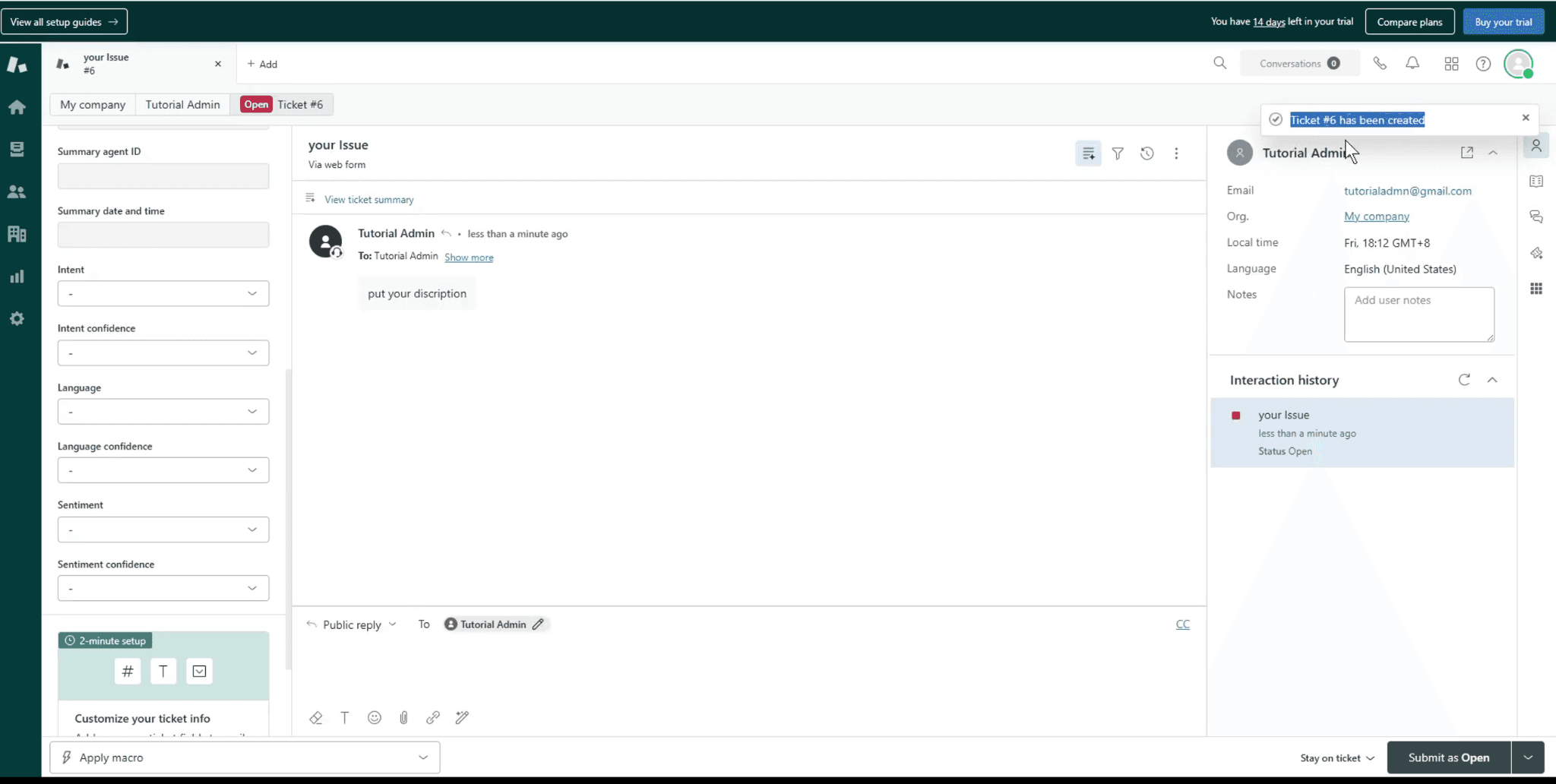
Zendesk is the most widely adopted help desk platform in the world, but also the most complex.
For enterprise support operations with large teams, advanced routing requirements, SLA enforcement, and compliance needs, Zendesk is often the default choice because no other platform matches its depth of configuration.
The AI capabilities have improved significantly since the May 2026 restructuring, but this is still a platform built for teams that need enterprise infrastructure rather than simplicity.
G2 rating: 4.3/5
How Zendesk handles help desk support
Zendesk runs two AI layers.
AI Agents handle autonomous resolution: they read your help center, understand customer intent, and resolve common queries without a human. Since the May 2026 update, only verified resolutions count toward your AI usage. Assisted escalations and contained resolutions are free. That's a fairer model than charging for every AI interaction regardless of outcome.
AI Copilot is the agent-assist layer. It suggests replies, summarizes tickets, detects sentiment, and surfaces relevant articles inside the agent's workspace. Useful for the tickets AI can't resolve alone. It's a paid add-on at $50/agent/month, which is worth noting because most teams won't realize they need it until after they've committed to the base plan.
The platform covers every channel: email, live chat, social, WhatsApp, phone, and SMS. Reporting and analytics go deep. If your operation runs on data-driven decisions, Zendesk gives you more visibility into your support performance than any other platform here.
Where it lacks
Zendesk is powerful. But I can't deny that it's too complex for most teams to set up without dedicated admin time.
The add-on pricing stacks quietly. Suite Team at $55/agent. AI Copilot at $50/agent. Workforce Engagement at $50/agent. A 10-agent team on Suite Team with both add-ons pays $1,550/month before AI resolution fees. Each layer sounds reasonable alone. Together, they built a bill that surprises teams who only looked at the base price.
Configuration requires real investment. This is not a platform you sign up for and go live the same afternoon. Routing rules, automation workflows, knowledge base setup, and channel configuration. Small teams often find themselves spending more time setting up Zendesk than the platform saves them in the first quarter. That's a headache you want to think through before committing. If that complexity is already a concern, I've compared several Zendesk alternatives that prioritize faster deployment.
And while the AI has improved, autonomous resolution rates trail behind AI-first platforms like Intercom Fin. Zendesk's AI was layered onto an existing help desk. Fin was built as an AI from the ground up. That architectural difference shows in resolution quality, especially on complex multi-turn conversations.
Pricing
Support Team: $19/agent/month (billed annually)
Suite Team: $55/agent/month (billed annually)
Suite Professional: $115/agent/month (billed annually)
Suite Enterprise + Copilot: Contact sales
AI Copilot add-on: $50/agent/month
Workforce Engagement Bundle: $50/agent/month
Contact Center add-on: $50/agent/month
Free trial available on Support Team, Suite Team, and Suite Professional
Choose it when
Your support operation has 10+ agents, needs enterprise-grade SLA management and reporting, and runs complex multi-team workflows across multiple channels.
Also, the right fit if compliance, audit trails, and workforce analytics are non-negotiable requirements for your business.
Skip it when
Your team is under 10 agents, and you don't need enterprise infrastructure.
The setup time and add-on costs are hard to justify when simpler platforms solve the same problems faster.
If what you actually need is AI resolving tickets before they reach agents, not a bigger system to manage them after they arrive, WotNot does that with less overhead and a faster path to live.
4. Freshdesk (Freddy AI)
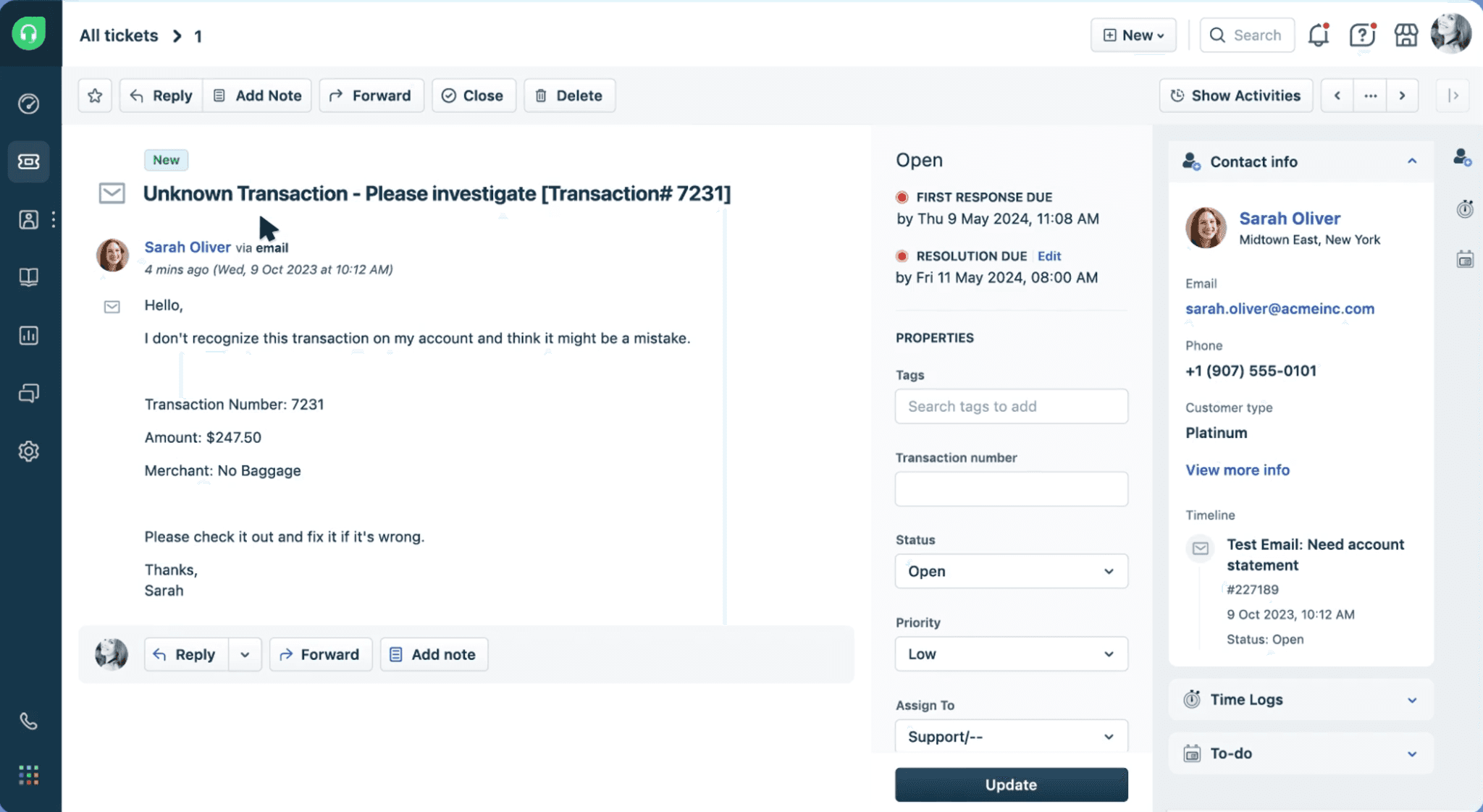
Freshdesk is the mid-market help desk that most growing teams evaluate alongside Zendesk. It covers the same territory — ticketing, automation, omnichannel inbox, knowledge base — but at a lower price point and with less configuration complexity.
The AI layer, Freddy AI, splits into three parts: AI Agent for autonomous customer resolution, AI Copilot for agent assistance, and AI Insights for analytics.
What makes Freshdesk interesting for this list is the pre-built Vertical AI Agents for Shopify, Stripe, and PayPal that let you launch industry-specific AI workflows without building from scratch.
G2 rating: 4.4/5
How Freshdesk handles help desk support
Freddy AI Agent reads your Freshdesk knowledge base, understands customer intent, and resolves queries autonomously. When a customer asks about a refund or order status, the AI doesn't just surface an article. It can execute the action: process the refund through Stripe, check the shipment through Shopify, and update the subscription. That's the advantage of pre-built Vertical AI Agents that come wired to platforms like Shopify, Stripe, and PayPal. Most help desks require you to build these connections. Freshdesk ships them ready to go.
For anything beyond the pre-built options, the AI Agent Studio lets you design custom resolution flows visually and deploy them across email, chat, WhatsApp, Instagram, and web. The AI works across these channels, though email and chat get the deepest AI support today.
Freddy AI Copilot handles the tickets AI can't close alone. It suggests replies, summarizes long threads, translates messages in real time, and detects sentiment so agents spend less time reading and more time resolving. Every Pro and Enterprise account gets 500 free AI sessions to test before committing further.
Where it lacks
Freshdesk charges per session. Not per resolution.
A session is any AI interaction, whether it resolves the issue or not. If the AI gives an unhelpful answer and the customer escalates to a human, you've paid for the AI session and the human's time. The included sessions are a one-time account allocation, not a monthly refresh. A team handling 2,000 tickets with 50% AI involvement burns through those fast. After that, additional sessions are billed in blocks, and email sessions cost significantly more than chat sessions. That pricing gap catches teams off guard.
Freddy AI can also only train on Freshdesk's native knowledge base. If your best documentation lives in Notion, Confluence, or Google Drive, the AI cannot access it for customer-facing replies. That limits resolution quality for teams whose knowledge lives outside Freshdesk.
Pricing
Growth: ~$17.50/agent/month (billed annually)
Pro: ~$52.50/agent/month (billed annually)
Enterprise: ~$82.50/agent/month (billed annually)
Freddy AI Agent: Available on Pro and Enterprise plans. Session-based billing.
Freddy AI Copilot: Paid add-on per agent.
Free trial available on all paid plans
Choose it when
You need a mid-market help desk with solid AI capabilities and don't want Zendesk's complexity or price tag.
Especially strong if you run Shopify or use Stripe, because the pre-built vertical agents save weeks of setup time.
Also, a natural fit if you're already in the Freshworks ecosystem with Freshservice or Freshsales.
Skip it when
Your AI volume is high enough that per-session billing becomes unpredictable.
Or if your knowledge base lives outside Freshdesk in tools like Notion or Google Drive.
If you want AI that resolves across channels like WhatsApp and Instagram without session-based billing, WotNot's flat-rate model handles that differently.
5. HelpScout
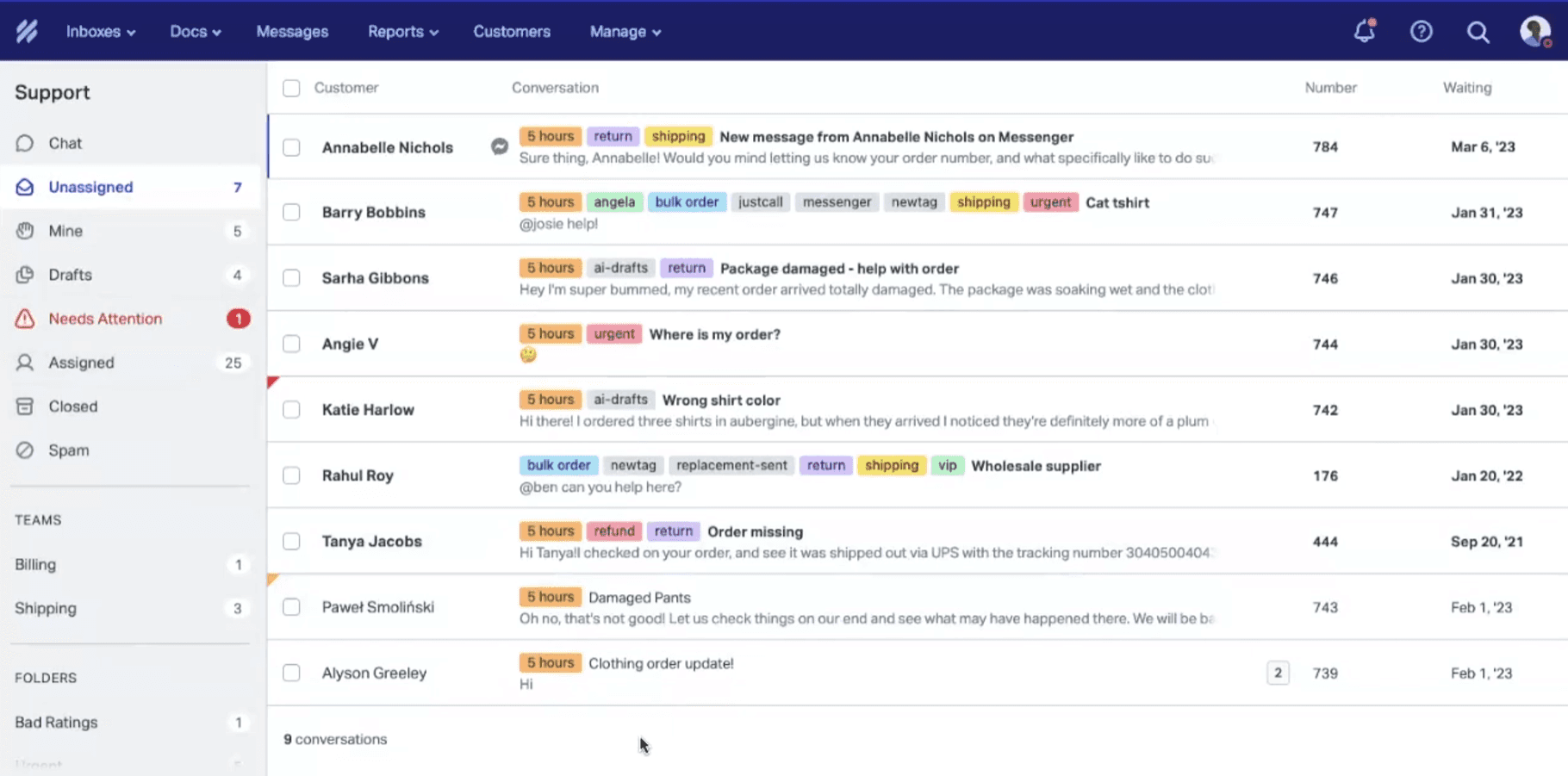
HelpScout is a customer support platform built for teams that want to deliver personal, email-first support without the complexity of a traditional help desk.
It combines a shared inbox, live chat, knowledge base, and AI assistance in a clean, easy-to-adopt interface. Rather than trying to replace human agents, its AI helps teams respond faster and more consistently. A free plan for up to five users also makes Help Scout one of the most accessible options on this list.
G2 rating: 4.4/5
How HelpScout handles help desk support
AI Drafts is where most teams get immediate value. When an agent opens a ticket, AI drafts a reply based on your knowledge base and past conversation patterns. The agent reviews, adjusts tone, and sends. It doesn't replace the human. It gives them a head start on every ticket. For teams handling 200+ tickets a day, that head start adds up to hours saved by the end of the week.
AI Answers is the autonomous layer. It powers a chatbot through the Beacon widget on your site that resolves common questions directly from your Docs knowledge base. Customer asks "what's your return policy?" and the AI answers it without creating a ticket. This is Help Scout's version of ticket deflection, and it comes with a 3-month free trial so you can test resolution quality before paying.
AI Summarize condenses long email threads into a quick brief. When a ticket has been bounced between three agents over a week, the new agent reads a five-line summary instead of scrolling through 40 messages. Small feature. Saves real time.
What I appreciate about Help Scout's approach to AI: it's not trying to automate everything. It's trying to make humans faster on the conversations that matter and deflect the ones that don't. That philosophy won't suit every team. But for the ones it does, the experience is noticeably cleaner than most alternatives in this category.
Where it lacks
Help Scout's AI is thoughtful. But it's not built to resolve at scale.
AI Answers costs $0.75 per resolution. At 500 resolutions a month, that's $375 on top of your plan. At 1,000, it's $750. For teams with high deflection volume, that pricing model gets expensive compared to platforms where AI is included in the base price or billed at lower rates.
The autonomous AI is limited to the Beacon chatbot. It doesn't resolve tickets in your email inbox autonomously, the way Intercom Fin or Freshdesk Freddy do. Your agents still handle every email. AI just helps them draft faster.
Channel coverage is email, chat, and social. No WhatsApp. No SMS. No phone. For teams whose customers reach out across more than email and web, that's a gap that won't close by adding another plan.
Pricing
Free: Available (up to 5 users, 1 inbox, 1 Docs site)
Standard: $25/user/month
Plus: $45/user/month
Pro: $75/user/month
AI Answers add-on: $0.75 per resolution
AI Answers: 3-month free trial available
Free trial available on Standard and Plus plans
(Pricing to be verified from live screenshots before publishing)
Choose it when
Your team values simplicity over automation depth.
You handle most support through email, your team is under 20 agents, and you want AI that makes humans faster rather than replacing them. The free plan and 3-month AI Answers trial make it the lowest-risk starting point on this list.
Skip it when
You need high-volume autonomous resolution. AI Answers at $0.75/resolution doesn't scale well past a few hundred deflections monthly.
Or if your customers reach out on WhatsApp, SMS, or phone, Help Scout doesn't cover those channels.
6. Zoho Desk
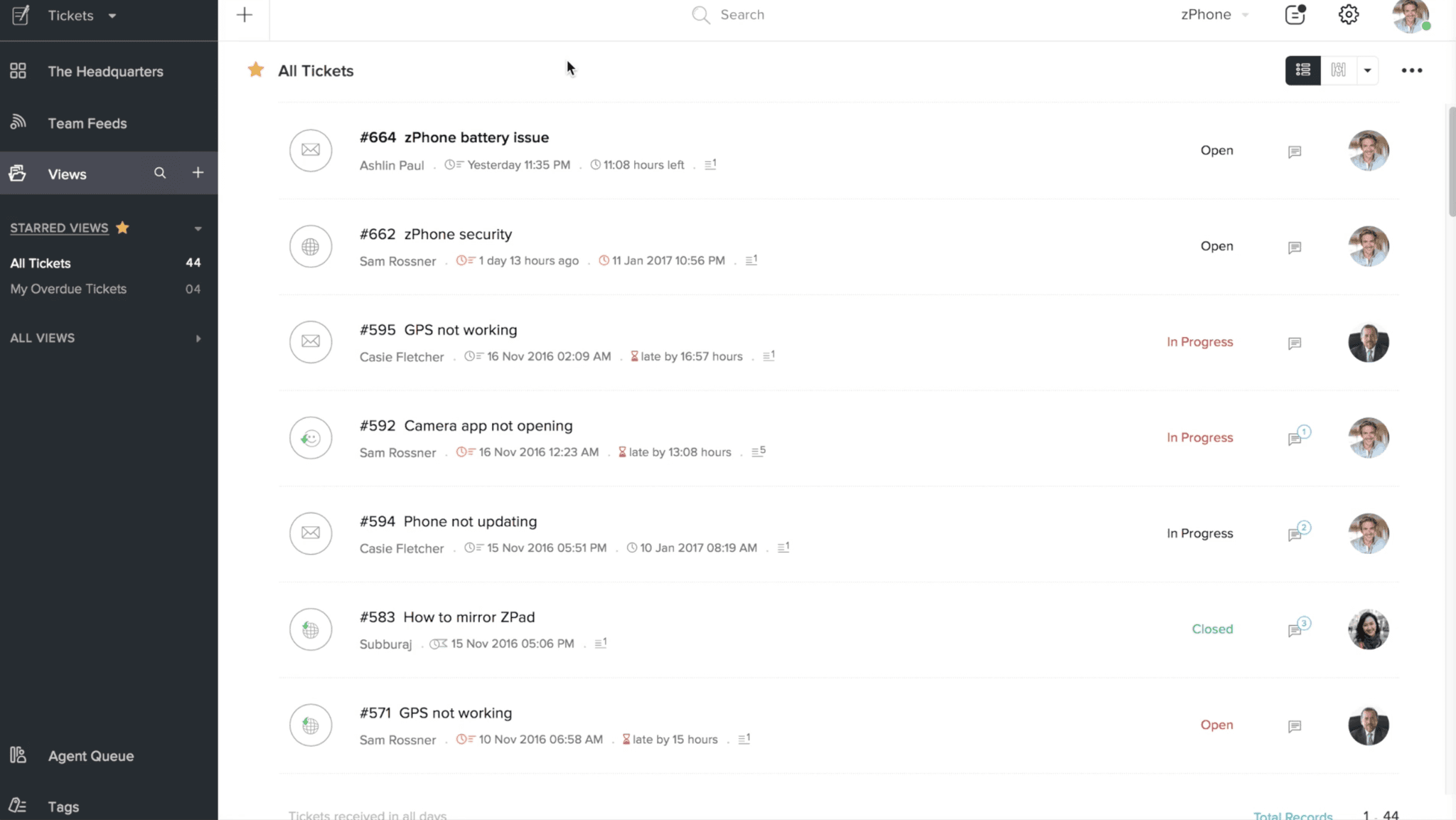
Zoho Desk is the most affordable help desk on this list, with AI included in the price.
No per-resolution fees or per-session billing and AI add-ons. Zia, the AI assistant, comes bundled with your plan. For teams already inside the Zoho ecosystem using Zoho CRM, Zoho Analytics, or Zoho One, Desk plugs in natively and shares data across every app. That integration depth at this price point is something no other platform here can match.
G2 rating: 4.4/5.
How Zoho Desk handles help desk support
Zia works as an embedded assistant across your support workflow. It auto-tags incoming tickets so agents don't spend time classifying manually. It analyzes sentiment to flag frustrated customers and route them to senior agents automatically. When an agent opens a ticket, Zia suggests replies based on your knowledge base and past conversations.
The Answer Bot handles the customer-facing side. It lives on your website and messaging channels, pulls answers from your knowledge base, and resolves common queries without creating a ticket.
For teams that want to go further, Zia Agent Studio lets you build custom AI agents with a no-code builder and access to over 700 pre-built actions across the Zoho ecosystem. Describe what you want the agent to do in plain language, and Zia generates the agent structure for you.
One thing to appreciate about Zoho's approach: AI is part of the seat price, not metered on top. While other platforms on this list charge per resolution, per session, or per agent add-on, Zoho bundles everything into the subscription. At $27.90/agent/month for Enterprise, you get the full AI suite without watching a usage meter climb.
Where it lacks
Zoho's AI is bundled. But bundled doesn't mean best-in-class.
Zia is primarily assistive, not autonomous. It suggests replies and tags tickets, but it doesn't resolve conversations end-to-end the way Intercom Fin or Freshdesk Freddy do. For teams expecting AI to close tickets without human involvement, Zia's resolution capabilities will feel limited.
The full Zia suite is locked behind Enterprise. Sentiment analysis, Answer Bot, anomaly detection, and Zia Agents are all Enterprise-only features. On Standard or Professional, you get generative reply assistance with a BYO OpenAI key, but not the autonomous AI that makes this list relevant.
Zia can also only access knowledge within the Zoho ecosystem. If your documentation lives in Notion, Confluence, or Google Drive, the AI can't reach it. For teams with distributed knowledge across multiple tools, this creates accuracy gaps that the AI can't close on its own.
Pricing
Free Edition: $0
Express: ~$4.90/user/month (billed annually)
Standard: ~$9.30/user/month (billed annually)
Professional: ~$16.30/user/month (billed annually)
Enterprise: ~$27.90/user/month (billed annually)
AI (Zia) is included in plan pricing. No per-resolution or per-session fees.
Free trial available on all paid plans
Choose it when
Budget is a real constraint, and you want AI bundled into the price without usage-based surprises.
Especially strong if you're already on the Zoho ecosystem, where CRM, analytics, and help desk share data natively. Also, a solid starting point for small teams that want to grow into AI without committing to expensive per-resolution models.
Skip it when
You need AI that resolves tickets autonomously at scale. Zia assists agents well, but doesn't close tickets on its own the way AI-first platforms do. Or if your knowledge base lives outside Zoho in tools like Notion or Google Drive.
7. Gorgias
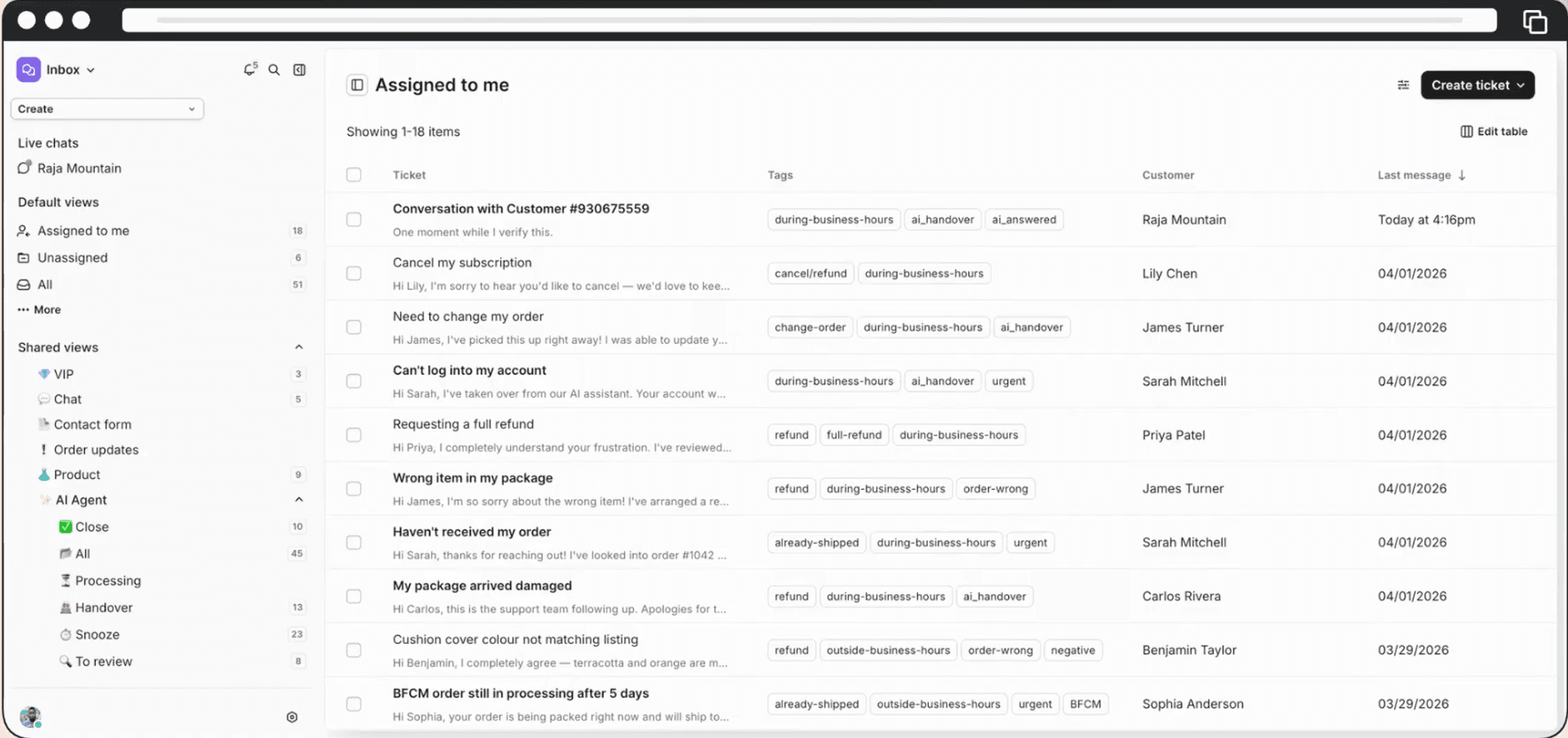
Gorgias is the only platform on this list built exclusively for ecommerce.
While every other tool here serves multiple industries, Gorgias made a deliberate choice to go deep on one: online stores.
If your support operation revolves around orders, shipments, refunds, and returns, Gorgias understands that context natively because that's all it was designed to do. Over 15,000 brands run their support on it, most of them on Shopify.
G2 rating: 4.6/5.
How Gorgias handles help desk support
The reason ecommerce teams gravitate toward Gorgias is the Shopify integration. When a customer reaches out, the agent sees their complete order history, shipping status, payment details, and lifetime value right inside the ticket. They can refund, cancel, duplicate, or edit orders without opening a single extra tab. That might sound like a small thing until you realize most help desks require your agents to keep Shopify open in another window and copy-paste information back and forth hundreds of times a day.
The AI Agent takes this further by resolving common queries autonomously. Order tracking, return requests, refund status, cancellations, and FAQ responses. Gorgias claims up to 60% auto-resolution, though real-world numbers sit closer to 26-56% depending on how well your knowledge base is maintained. The AI also reads customer intent, so it knows whether someone is asking for a refund or just checking on a delivery before routing the conversation.
What most help desks don't offer is revenue attribution. Gorgias tracks which support conversations that actually led to a sale. When an agent recommends a product during a chat, and the customer buys it, that shows up in your dashboard. Support stops being just a cost line and starts contributing to revenue in a way you can actually measure.
Where it lacks
Gorgias is laser-focused on ecommerce. That focus is both its greatest strength and its clearest boundary.
If your business is not an online store, Gorgias doesn't make sense. It has no relevance for SaaS, IT, healthcare, or general customer support. The entire platform assumes every ticket is connected to an order, a shipment, or a transaction.
The per-ticket pricing model means your cost grows with your volume. Plans range from $40/month for 50 tickets to $1,227/month for 5,000 tickets. On top of that, the AI Agent bills $1.50 per additional automated interaction beyond your included allowance. During a holiday rush or a flash sale, both your ticket count and your AI usage spike at the same time, and so does your bill.
And while Gorgias covers email, chat, social, WhatsApp, and voice, the AI Agent works best on Shopify. If your store runs on WooCommerce or BigCommerce, you get the help desk but the AI capabilities are thinner. That's a meaningful gap if you chose Gorgias specifically for the automation.
Pricing
Starter: $40/month (50 tickets)
Basic: $77/month (300 tickets)
Pro: $471/month (2,000 tickets)
Advanced: $1,227/month (5,000 tickets)
Enterprise: Custom
AI Agent: Included allowance per plan. Additional interactions at $1.50 each.
Overages: $0.40/ticket (Starter & Basic), $0.36/ticket (Pro & Advanced)
Unlimited agent seats on all plans
Free trial on Basic and Pro plans, no credit card required
Choose it when
Your business is an ecommerce store, especially on Shopify, and your support team spends most of their day on order-related queries.
If you want the deepest native store integration available with AI that can process refunds and check shipments from inside the ticket, Gorgias was built for exactly that.
Skip it when
Your support operation goes beyond ecommerce.
Gorgias has no use case for SaaS support, IT help desks, or general customer service. Or if your ticket volume is unpredictable and per-ticket pricing makes budgeting difficult during peak months.
Pricing Traps to Watch Before You Pick an AI Help Desk
The pricing page will tell you one number. Your invoice will tell you a different one. Here's what the same 2,000 tickets per month actually costs across three models:
Per-seat pricing (Zendesk): Five agents on Suite Team at $55/agent = $275/month. Add AI Copilot at $50/agent, and you're at $525. Hire a sixth agent during a busy quarter, and that cost is permanent. The base is predictable. Everything around it isn't.
Per-resolution pricing (Intercom Fin): At a 60% resolution rate, Fin resolves 1,200 conversations at $0.99 each = $1,188 in AI fees. Add two Essential seats at $19 each = $1,226/month. Your best-performing month is also your most expensive month. The better the AI works, the more you pay.
Flat-rate with AI built in (WotNot): Starter at $79/month. AI Studio handles the repetitive volume. Live chat with unlimited seats covers your human team. Volume spikes during a product launch or a holiday campaign. Your bill stays $79.
Same 2,000 tickets. Three very different invoices.
The cheapest plan on the pricing page is rarely the cheapest plan in production. Always model your actual volume before you commit. Ask the vendor what your bill looks like at 2x your current tickets. If they can't answer clearly, that tells you something.
Choosing the Right AI Help Desk
If you've read this far, you already know what your support team is dealing with.
And the right AI help desk won't fix all of that overnight. But it will start taking the repetitive weight off your team's shoulders so they can spend their energy where it actually matters.
Every platform on this list does something well. Intercom Fin is the strongest autonomous resolver. Zendesk is the enterprise backbone. Freshdesk gives you vertical AI agents ready to deploy. Help Scout keeps things human. Zoho Desk gives you AI without the meter running. Gorgias owns ecommerce support.
WotNot is what we built for the teams that needed AI resolving across every channel their customers use, without layered pricing that punishes growth. If that sounds like what you're looking for, I'd genuinely suggest trying it with your own tickets for a couple of weeks and seeing what the AI actually resolves versus what still needs your team. That's the only honest test.
FAQs
FAQs
FAQs
What is AI help desk software?
AI help desk software uses artificial intelligence to handle customer support queries, either by resolving them autonomously or by helping agents work faster. The difference from a traditional help desk is that AI can deflect repetitive tickets before they reach your team, reducing workload without adding headcount.
Can AI help desk software replace human agents?
ABOUT AUTHOR
Hardik Makadia
Co-founder & CEO, WotNot
Hardik leads the company with a focus on sales, innovation, and customer-centric solutions. Passionate about problem-solving, he drives business growth by delivering impactful and scalable solutions for clients.
You may also like…
You may also like…



Start building your chatbots today!
Curious to know how WotNot can help you? Let’s talk.
Start building your chatbots today!
Curious to know how WotNot can help you? Let’s talk.